

Python CSV: Read and Write CSV Files with csv and DictReader
Learn to read and write CSV files in Python: csv.reader and writer, DictReader and DictWriter, quoted commas, newline='', Excel's utf-8-sig and pandas read_csv.
Suppose a wholesale stationery distributor in Siyaganj emails you last month's billing export. You open it in Notepad and see lines like 1042,"Sharma Traders, Indore",3,1450. Each line is one bill. Commas separate the bill number, the customer, the number of cartons and the amount.
But look at the customer: "Sharma Traders, Indore" contains a comma of its own. The quotation marks around it are the export's way of saying "this comma is part of the name, not a column break". If you split each line on commas yourself, that row breaks into five pieces instead of four and every number shifts one column.
That export is a CSV file, and the quoting rule is exactly why Python ships a dedicated csv module. It knows the rules, so you never have to count commas.
Python's csv module is a standard-library module for reading and writing comma-separated values files, turning each line into a list or dictionary of fields while correctly handling quoting, embedded commas and line breaks.
This lesson builds directly on Python file handling, since a CSV file is opened like any other text file. The examples use in-memory files and a temporary folder, so they run anywhere. They target Python 3.12+.
What is a CSV file?
A CSV file is a table saved as text. The first line usually holds the column names, called the header. Each following line is a row, with fields separated by a delimiter, normally a comma. Fields that contain the delimiter, a quote or a line break are wrapped in double quotes.
Because it is plain text, every tool can read it: Excel, Google Sheets, Power BI, databases and Python. That is why CSV is still the most common format analysts receive. The format is described in RFC 4180, and Python's module follows it by default.
Why not just split lines on commas?
Here is the problem from the opening, in code.
import csv, io

line = '1042,"Sharma Traders, Indore",3,1450'

print("split(','):", line.split(","))
print("csv.reader:", next(csv.reader(io.StringIO(line))))
split produces five broken pieces, with stray quote marks. The csv reader produces the four correct fields and removes the quotes. Real exports also contain doubled quotes ("5"" pipe" means 5" pipe) and line breaks inside addresses, which only a proper parser handles.
How do you read a CSV file in Python?
csv.reader wraps a file object and yields each row as a list of strings. The example uses io.StringIO as the file; with a real file you would write open("bills.csv", newline="", encoding="utf-8") instead.
import csv, io

data = io.StringIO(
    "bill_no,customer,cartons,amount\n"
    '1042,"Sharma Traders, Indore",3,1450\n'
    "1043,Mehta Stationers,5,2380\n"
    "1044,Gupta Books,2,980\n"
)

reader = csv.reader(data)
header = next(reader)                 # first row is the header
print(header)
total = 0
for row in reader:
    bill_no, customer, cartons, amount = row
    total += int(amount)              # every field arrives as a string
    print(bill_no, customer, sep=" | ")
print("Total billed: Rs", total)
Every value from the csv module is a str. Forgetting this is the classic bug: "1450" + "980" gives "1450980". Convert with int() or float() as you read, as covered in type conversion.
Quick check
What type is row["amount"] when you read a CSV with csv.DictReader?
The csv module never converts types. Wrap values in int() or float() yourself.
Reading rows as dictionaries with DictReader
Positional unpacking breaks as soon as someone adds a column to the export. csv.DictReader reads the header for you and returns each row as a dictionary, so you refer to fields by name.
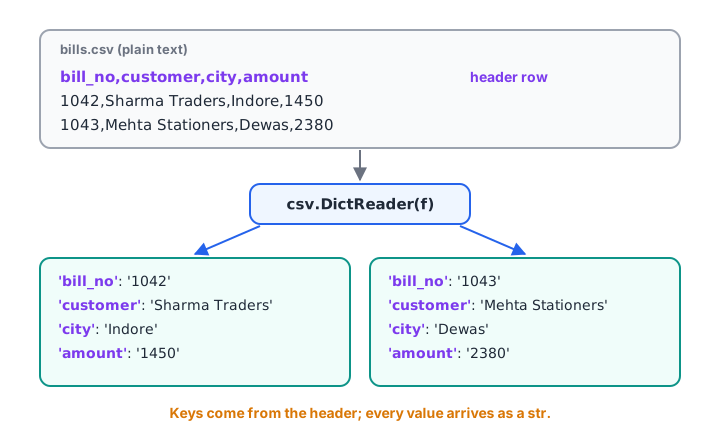
DictReader uses the header line as keys, so each data row becomes a dictionary you can read by column name.
import csv, io
from collections import defaultdict

data = io.StringIO(
    "bill_no,customer,city,amount\n"
    "1042,Sharma Traders,Indore,1450\n"
    "1043,Mehta Stationers,Dewas,2380\n"
    "1044,Gupta Books,Indore,980\n"
    "1045,Jain Paper Mart,Ujjain,3120\n"
)

by_city = defaultdict(int)
for row in csv.DictReader(data):
    by_city[row["city"]] += int(row["amount"])

print(row)                                   # the last row, as a dict
for city, amt in sorted(by_city.items(), key=lambda kv: -kv[1]):
    print(f"{city:<7} Rs {amt:>6,}")
DictReader exposes the header as reader.fieldnames. If a file has no header row, pass fieldnames=["bill_no", ...] yourself. The grouping pattern with defaultdict comes from the collections module lesson.
How do you write a CSV file in Python?
csv.writer turns lists into correctly quoted lines. writerow() writes one row and writerows() writes many. Values that are not strings are converted with str() automatically.
import csv, tempfile
from pathlib import Path

path = Path(tempfile.mkdtemp()) / "top_customers.csv"
rows = [
    ["customer", "city", "orders", "revenue"],
    ["Sharma Traders, Indore", "Indore", 14, 52300.5],
    ["Mehta Stationers", "Dewas", 9, 31840.0],
]

with open(path, "w", newline="", encoding="utf-8") as f:
    writer = csv.writer(f)
    writer.writerows(rows)

print(path.read_text(encoding="utf-8"))
The writer added quotes around the customer whose name contains a comma, and left the others alone. That is the default QUOTE_MINIMAL behaviour.
Writing dictionaries with DictWriter
When your data is already a list of dictionaries, perhaps from an API or a DictReader, use csv.DictWriter. You list the columns once with fieldnames, call writeheader(), then write rows.
import csv, io

summary = [
    {"city": "Indore", "bills": 2, "amount": 2430},
    {"city": "Dewas", "bills": 1, "amount": 2380},
    {"city": "Ujjain", "bills": 1, "amount": 3120, "note": "new"},
]

out = io.StringIO()
writer = csv.DictWriter(out, fieldnames=["city", "bills", "amount"],
                        extrasaction="ignore")       # skip unexpected keys
writer.writeheader()
writer.writerows(summary)
print(out.getvalue())
By default DictWriter raises ValueError when a dictionary has a key not listed in fieldnames. extrasaction="ignore" drops such keys instead. Missing keys are written as empty fields.
Delimiters, quoting and Excel files
Not every "CSV" uses commas. Exports from software set to European regional settings use semicolons, and tab-separated files (.tsv) use tabs. Pass the delimiter argument to handle them.
import csv, io

semicolon = io.StringIO("item;qty;price\nA4 paper;10;245,50\nStapler;2;180,00\n")
for row in csv.DictReader(semicolon, delimiter=";"):
    price = float(row["price"].replace(",", "."))   # decimal comma
    print(row["item"], int(row["qty"]) * price)

excel_export = "customer,amount\nRavi,1450\n".encode("utf-8")   # BOM at start
text = excel_export.decode("utf-8-sig")              # strips the BOM
print(next(csv.DictReader(io.StringIO(text))).keys())
Excel often saves "CSV UTF-8" files with an invisible byte order mark (BOM) at the start. Read with encoding="utf-8" and your first column is named "customer", so row["customer"] fails with a KeyError. Opening with encoding="utf-8-sig" removes the mark, and writing with it makes Excel display Hindi text correctly.
| Option | Example | What it controls |
|---|---|---|
delimiter |
";", "\t" |
The column separator |
quotechar |
'"' |
The character that wraps special fields |
quoting |
csv.QUOTE_ALL |
When fields are quoted on writing |
skipinitialspace |
True |
Ignores spaces after each delimiter |
csv module vs pandas read_csv
Both are good tools. The question is what you do next with the data.
csv module |
pandas.read_csv |
|
|---|---|---|
| Install | Built in | Needs pandas |
| Row type | List or dict of strings | A DataFrame with typed columns |
| Memory | Streams one row at a time | Loads the table (or chunks) |
| Best for | Scripts, streaming huge files, writing simple exports | Analysis: filtering, grouping, joins |
import io
import pandas as pd

data = io.StringIO("bill_no,city,amount\n1042,Indore,1450\n1043,Dewas,2380\n1044,Indore,980\n")
df = pd.read_csv(data)
print("amount column type:", df["amount"].dtype)
print(df.groupby("city")["amount"].sum())
pandas detected amount as an integer column automatically. From here, cleaning and grouping continue in data cleaning with pandas and pandas groupby and pivot tables.
Common mistakes with Python CSV files
- Splitting on commas manually. Quoted fields break it. Use
csv.reader. - Forgetting
newline="". It causes blank lines on Windows and misread multi-line fields. - Treating values as numbers. Everything is a string until you convert it.
- Ignoring the BOM. A
KeyErroron the first column usually means you needutf-8-sig. - Hard-coding column positions. Use
DictReaderso new columns don't break the script. - Writing a header twice when appending. Only call
writeheader()when the file is new.
Key takeaways
- Use the
csvmodule, notsplit(","), for any real CSV file. DictReaderandDictWriterwork with rows as dictionaries keyed by the header.- Open files with
newline=""and an explicit encoding; useutf-8-sigwith Excel. - Every field is a string until you convert it.
- Use
delimiterfor semicolon or tab files. - Reach for
pandas.read_csvwhen the next step is analysis.
Next, learn the other format every analyst receives from APIs in working with JSON in Python. Cleaning messy CSV exports is a regular exercise in Debugshala's practical data analytics training in Indore.
FAQ
How do I read a CSV file in Python without pandas?
Use the built-in csv module. Open the file with open("data.csv", newline="", encoding="utf-8"), then loop over csv.reader(f) for lists or csv.DictReader(f) for dictionaries keyed by the header. Convert numeric fields with int() or float(), because the module returns every value as a string.
What is the difference between csv.reader and csv.DictReader?
csv.reader returns each row as a list, so you access fields by position, such as row[2]. csv.DictReader uses the header row as keys and returns each row as a dictionary, so you write row["amount"]. DictReader is safer when columns may be added or reordered.
Why does my CSV file have blank lines between rows?
On Windows, opening the output file without newline="" makes Python translate the csv writer's line endings again, producing an extra blank line after every row. Open the file with open(path, "w", newline="", encoding="utf-8") and the blank lines disappear.
How do I open a CSV file from Excel with Hindi text in Python?
Open it with encoding="utf-8-sig". Excel's "CSV UTF-8" option adds a byte order mark at the start of the file, which otherwise sticks to the first column name. Using utf-8-sig for writing also helps Excel display Hindi and other non-English text correctly.
Where can I practise reading CSV data in Python?
Start with small exports of your own, then practise timed questions. You can take CSV and Python file quizzes on Debugshala Test. In Indore, Debugshala's Old Palasia campus runs data analytics classes with real dataset exercises, and offers a free demo class.
From the team behind this site
Go further with the Data Analytics Course at Debugshala
These tutorials are written by Debugshala, a training and placement institute at Old Palasia, Indore. The classroom course adds live mentoring, real projects and interview preparation.
- Offline classes at Old Palasia, Indore
- Free demo class before you pay
- Non-IT, fresher and year-gap friendly
- Placement assistance
700+ students placed · 200+ hiring partners · 4.9★ Google rating
