

Python *args and **kwargs: Packing, Unpacking and Forwarding
Learn Python *args and **kwargs: collect any number of arguments, unpack lists and dicts into calls, forward options to other functions, and order parameters.
Picture a sweet shop in Chappan Dukan taking a mixed-box order on the phone. One customer wants three items, the next wants nine. On top of the items, some customers add instructions: "less sugar", "gift wrap", "deliver after 6".
The order-taker does not have a form with nine item boxes and a box for every possible instruction. She has a single "items" line where she writes however many sweets are named, and a "notes" section where she writes any instruction with its value.
That "items" line is *args: it gathers however many positional values arrive. The "notes" section is **kwargs: it gathers any number of named options, each with its value.
In Python, *args is a parameter that packs any number of extra positional arguments into a tuple, and **kwargs is a parameter that packs any number of extra keyword arguments into a dictionary, so one function can accept a variable number of inputs.
This lesson builds on Python function arguments, where you met positional, keyword and default parameters. If those are fresh in your mind, the stars will make sense quickly.
What is *args in Python?
Put a star before a parameter name and Python collects every leftover positional argument into a tuple under that name. If there are none, the tuple is empty.
def total_bill(*amounts):
    print("Received:", amounts, type(amounts).__name__)
    return sum(amounts)

print(total_bill(120, 80))
print(total_bill(450, 90, 60, 210, 35))
print(total_bill())                       # empty tuple, sum is 0

def bill_with_name(customer, *items):
    return f"{customer}: {len(items)} items, Rs {sum(items)}"

print(bill_with_name("Ravi", 120, 80, 45))
In bill_with_name, the first argument fills customer as usual. Only the leftovers go into items. That is why *args usually comes after the required parameters.
Built-ins work like this too. print() accepts any number of values because its signature begins with *objects, and max(3, 9, 4) accepts loose values the same way.
Quick check
def f(a, *args, **kwargs): return args. What does f(1, 2, 3, x=4) return?
a takes 1, x=4 goes to kwargs, and only the leftover positional values 2 and 3 are packed into args.
What is **kwargs in Python?
Two stars collect every keyword argument that does not match a named parameter. They arrive as a dictionary, with parameter names as string keys.
def place_order(item, qty, **notes):
    line = f"{qty} x {item}"
    for key, value in notes.items():
        line += f" | {key.replace('_', ' ')}: {value}"
    return line

print(place_order("kaju katli", 2))
print(place_order("rasgulla", 12, less_sugar=True, gift_wrap="red"))
print(place_order("namkeen", 1, deliver_after="6 pm", note="call first"))

def show(**kw):
    return kw
print(show(city="Indore", pin=452001))
The function never declared gift_wrap or deliver_after, yet it handles them. That flexibility is the whole point, and also the main risk, which we come back to below.
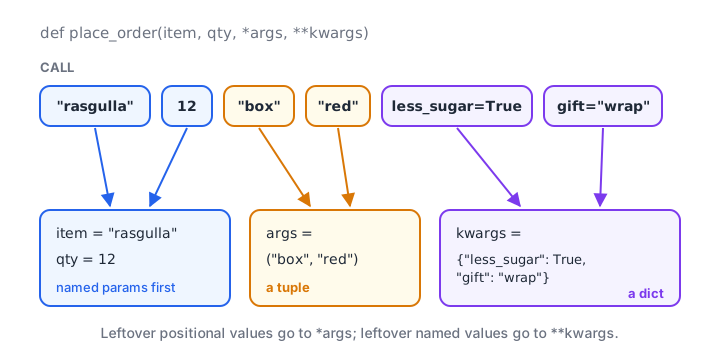
Positional leftovers are packed into a tuple, named leftovers into a dictionary; named parameters are filled first.
How do you use *args and **kwargs together?
A function can have both, along with ordinary parameters. Python insists on a fixed order in the definition.
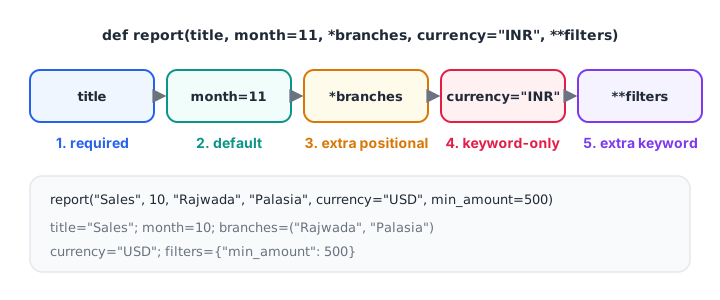
Left to right: required, defaults, the *args catch-all, keyword-only parameters, then the **kwargs catch-all last.
| Position | Kind | Example | Notes |
|---|---|---|---|
| 1 | Required positional | report |
Must be supplied |
| 2 | With default | month=11 |
Optional |
| 3 | *args |
*branches |
Extra positional values, as a tuple |
| 4 | Keyword-only | currency="INR" |
Can only be set by name |
| 5 | **kwargs |
**filters |
Extra keyword values, as a dict |
def report(title, month=11, *branches, currency="INR", **filters):
    print("title   :", title)
    print("month   :", month)
    print("branches:", branches)
    print("currency:", currency)
    print("filters :", filters)

report("Sales", 10, "Rajwada", "Palasia", currency="USD", min_amount=500, channel="online")
Any parameter placed after *args is automatically keyword-only, because *args would swallow every positional value. That is the same rule you saw with the bare * marker in the previous article.
Unpacking with * and ** in a function call
The stars also work on the calling side, where they do the opposite job. *sequence spreads a list or tuple into separate positional arguments. **mapping spreads a dictionary into separate keyword arguments.
def final_price(amount, gst, discount):
    return round(amount * (1 + gst) - discount)

row = [2400, 0.18, 100]
print(final_price(*row))                      # same as final_price(2400, 0.18, 100)

options = {"gst": 0.05, "discount": 40}
print(final_price(1200, **options))           # same as gst=0.05, discount=40

monthly = [182000, 205500, 241300]
print(max(*monthly), min(*monthly))

base = {"currency": "INR", "decimals": 2}
custom = {**base, "decimals": 0, "city": "Indore"}   # merge dicts
print(custom)
print([*monthly, 198750])                     # build a new list
Unpacking shines when your data already sits in a list or dictionary, such as a row read from a file or a settings dictionary loaded from JSON. The same star syntax appears in assignment, as in first, *rest = items, which the tuples article covers.
The number of items must match. final_price(*[2400, 0.18]) raises TypeError: final_price() missing 1 required positional argument: 'discount'.
Quick check
nums = [5, 9, 2]. Which call is the same as max(5, 9, 2)?
A single star in a call spreads a sequence into separate positional arguments.
Forwarding arguments to another function
The most common real use of *args, **kwargs is a wrapper: a function that adds a bit of behaviour and passes everything else straight through to another function, without needing to know its parameters.
def final_price(amount, gst=0.18, discount=0):
    return round(amount * (1 + gst) - discount)

def logged(func, *args, **kwargs):
    print(f"calling {func.__name__} with args={args} kwargs={kwargs}")
    result = func(*args, **kwargs)
    print("  ->", result)
    return result

logged(final_price, 1000)
logged(final_price, 1000, discount=50)
logged(sorted, [3, 1, 2], reverse=True)
logged works with any function, even sorted, because it collects whatever arrives and spreads it back out unchanged. This pattern is the foundation of Python decorators, which you will meet in the advanced section.
A flexible filter for rows
Here is an analyst-style use: a filter that accepts any column conditions by keyword.
sales = [
    {"branch": "Rajwada", "channel": "store", "amount": 1200},
    {"branch": "Palasia", "channel": "online", "amount": 800},
    {"branch": "Rajwada", "channel": "online", "amount": 450},
    {"branch": "Rajwada", "channel": "online", "amount": 2300},
]

def filter_rows(rows, **conditions):
    return [r for r in rows if all(r.get(col) == val for col, val in conditions.items())]

print(len(filter_rows(sales)))                                   # no conditions: all rows
print(filter_rows(sales, branch="Rajwada", channel="online"))
print(sum(r["amount"] for r in filter_rows(sales, channel="online")))
The comprehension and all() come from list comprehension. pandas offers a similar convenience with df.query() and df.assign(**new_columns), which accepts columns as keyword arguments.
Common mistakes with *args and **kwargs
- Wrong order in the definition.
def f(**kw, *args)is aSyntaxError.**kwargsalways comes last. - Forgetting to unpack when forwarding.
func(args, kwargs)passes one tuple and one dict. Writefunc(*args, **kwargs). - Treating
argsas a list. It is a tuple, soargs.append()fails. Convert withlist(args)if needed. - Using
**kwargsfor everything. It hides what a function accepts and lets typos through. Prefer explicit parameters. - Duplicate keys when unpacking.
f(a=1, **{"a": 2})raisesTypeError: got multiple values for keyword argument 'a'. - Thinking the names matter.
*itemsand**optionswork exactly like*argsand**kwargs; pick names that describe the data.
Key takeaways
*argspacks extra positional arguments into a tuple.**kwargspacks extra keyword arguments into a dictionary.- Definition order: required, defaults,
*args, keyword-only,**kwargs. - In a call,
*listand**dictunpack values into arguments. func(*args, **kwargs)forwards everything unchanged, which is how wrappers and decorators work.- Prefer explicit parameters when the options are known, so typos raise errors.
Next, learn to write small throwaway functions in a single line with Python lambda functions.
FAQ
What is the difference between *args and **kwargs in Python?
*args collects extra positional arguments into a tuple, while **kwargs collects extra keyword arguments into a dictionary of name-value pairs. Use *args when callers pass a varying number of plain values, and **kwargs when they pass a varying set of named options. A function can use both.
Do I have to name them args and kwargs?
No. Only the star syntax matters. *args and **kwargs are a widely followed convention, but *amounts or **options work exactly the same and often read better. Keep the conventional names for generic wrappers that just pass everything through, and descriptive names elsewhere.
What does the star do in a Python function call?
In a call, a single star unpacks a list, tuple or other iterable into separate positional arguments, and a double star unpacks a dictionary into keyword arguments. For example, f(*[1, 2]) equals f(1, 2) and f(**{"x": 1}) equals f(x=1). This is the reverse of packing in a definition.
Can a function have both *args and keyword arguments?
Yes. Any parameter after *args in the definition becomes keyword-only, as in def report(*branches, currency="INR"). Callers then must write currency="USD" by name. You can add **kwargs after those to catch any further named options, and it must always be the last parameter.
Where can I learn advanced Python functions with mentors in Indore?
Debugshala teaches Python functions as part of its classroom analytics training at Old Palasia, Indore, with free demo classes and placement assistance. Debugshala's bilingual analytics classes are taught in English and Hindi, and you can try variable-argument MCQs on Debugshala Test.
From the team behind this site
Go further with the Data Analytics Course at Debugshala
These tutorials are written by Debugshala, a training and placement institute at Old Palasia, Indore. The classroom course adds live mentoring, real projects and interview preparation.
- Offline classes at Old Palasia, Indore
- Free demo class before you pay
- Non-IT, fresher and year-gap friendly
- Placement assistance
700+ students placed · 200+ hiring partners · 4.9★ Google rating
