

Python for Loop: range(), enumerate(), zip() with Examples
Learn the Python for loop step by step: looping over lists and strings, range(), running totals, enumerate(), zip(), nested loops and the mistakes to avoid.
At the end of the day, the manager of a medical store on MG Road has a stack of 30 bills. To find the day's total, she picks up the first bill, adds its amount to a running total, puts it aside, and picks up the next one. She repeats the same small action until the stack is empty.
She does not write 30 separate instructions. She learns one routine, "take a bill, add it, move on", and applies it to however many bills there are.
That routine is a loop. The stack is the sequence, each bill is one item, and the running total is a variable that grows as the loop goes along.
A for loop in Python is a control-flow statement that iterates over the items of a sequence (or any iterable) and runs its indented block once for each item, with a loop variable holding the current item.
This lesson assumes you are comfortable with indentation and blocks from the Python if...else statement.
How does a for loop work in Python?
The syntax is for name in sequence: followed by an indented block. Python takes the first item, gives it to name, runs the block, then moves to the next item until none are left.
bills = [1200, 950, 1430, 780]

for amount in bills:
    print("Processing bill of Rs", amount)

print("All bills processed")
The loop variable, amount here, is an ordinary variable that Python updates on every pass. Choose a name that describes one item: for bill in bills, for city in cities, for row in rows.
The accumulator pattern: running totals
The most common use of a loop in data work is building a result as you go. Create a variable before the loop, update it inside, and use it after.
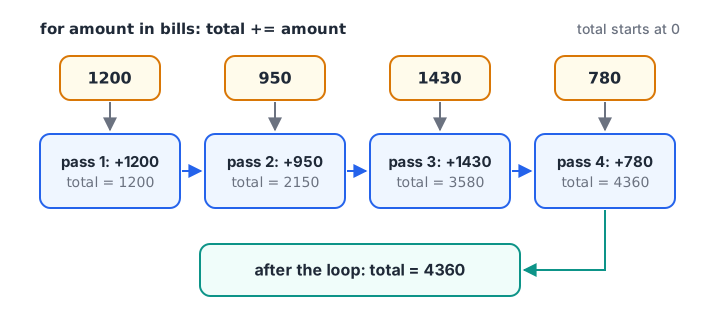
Each pass gives the loop variable the next item; the running total carries over between passes.
bills = [1200, 950, 1430, 780]

total = 0                 # 1. start before the loop
for amount in bills:
    total += amount       # 2. update inside the loop
    print(f"Added {amount:>5}, running total {total:>5}")

print("Day total:", total)  # 3. use after the loop
print("Average bill:", total / len(bills))
The print inside the loop shows the state after each pass, a useful habit while you are learning. Python's built-in sum(bills) does the same job in one call, but the pattern matters because you will often need more than a plain sum.
Looping over lists and strings
Anything you can step through item by item is called an iterable. Lists and strings are the first ones you meet. A string gives you one character at a time.
cities = ["Indore", "Bhopal", "Ujjain", "Gwalior"]
for city in cities:
    print(city, "has", len(city), "letters")

code = "MP09"
for ch in code:
    print(ch, "is a digit" if ch.isdigit() else "is a letter")
Lists get a full lesson in Python lists, and dictionaries, which you also loop over constantly, in Python dictionaries.
Using range() in a for loop
range() produces a sequence of whole numbers without you typing them out. It has three forms:
range(stop)gives 0, 1, ... up tostop - 1.range(start, stop)starts atstartinstead of 0.range(start, stop, step)jumps bystep, which can be negative to count down.
The stop value is never included. range(5) gives five numbers, 0 to 4.
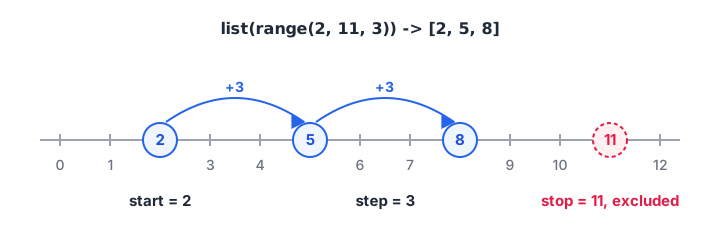
range(2, 11, 3) starts at 2, jumps by 3, and stops before reaching 11.
print(list(range(5)))
print(list(range(1, 6)))
print(list(range(2, 11, 3)))
print(list(range(10, 0, -2)))

for month in range(1, 13, 3):
    print("Quarter starts in month", month)
list() turns a range into a visible list so you can check what it contains. In a loop you don't need it, because range hands the numbers over one at a time without storing them all.
A classic use is a simple table, such as projected growth over the next five years:
revenue = 50.0   # lakh rupees this year
growth = 0.12

for year in range(1, 6):
    revenue = revenue * (1 + growth)
    print(f"Year {year}: Rs {revenue:.2f} lakh")
Quick check
What does list(range(3, 12, 4)) produce?
It starts at 3 and adds 4 each time: 3, 7, 11. The next value, 15, is past the stop of 12.
Filtering inside a loop with if
Combine a loop with an if to act only on some items. This is how you count, filter and find extremes by hand.
orders = [450, 2300, 180, 5200, 999, 3100]

big = []
small_count = 0
largest = orders[0]
for value in orders:
    if value >= 2000:
        big.append(value)
    else:
        small_count += 1
    if value > largest:
        largest = value

print("Big orders:", big)
print("Small orders:", small_count)
print("Largest order:", largest)
big.append(value) adds an item to the end of the list. Starting largest with the first order, not zero, keeps the logic correct even if all values were negative.
enumerate() and zip(): positions and pairs
When you need the position of each item as well as the item, use enumerate(). It gives you pairs of (position, item), and start=1 makes the numbering human-friendly.
top_products = ["Atta 10kg", "Mustard oil 1L", "Basmati 5kg"]
for rank, product in enumerate(top_products, start=1):
    print(f"#{rank} {product}")

stores = ["Palasia", "Vijay Nagar", "Rajwada"]
sales = [48000, 61500, 39200]
for store, amount in zip(stores, sales):
    print(f"{store:<12} Rs {amount:,}")
zip() walks through two (or more) lists side by side and stops at the shortest one. Prefer both of these to writing for i in range(len(stores)), which is harder to read and easier to get wrong.
Nested for loops
A loop inside another loop runs the inner loop completely for every pass of the outer one. It is the natural way to work with grid-shaped data, like stores by months.
stores = ["Palasia", "Rajwada"]
months = ["Sep", "Oct", "Nov"]

for store in stores:
    for month in months:
        print(f"{store}-{month}", end="  ")
    print()   # new line after each store
Two stores and three months give six combinations. Nested loops multiply quickly: 1,000 rows by 1,000 rows is a million passes. For large data, pandas does this kind of work far faster, which is one reason analysts learn it next.
break, continue and for...else
break stops a loop early, continue skips to the next item, and an else after a for runs only if the loop finished without a break. They are covered with diagrams in break, continue and pass.
Quick check
How many times does print run in: for a in range(3): for b in range(4): print(a, b)?
The inner loop runs 4 times for each of the 3 outer passes, so 3 x 4 = 12.
Common mistakes with Python for loops
- Off-by-one with range.
range(1, 10)stops at 9. Writerange(1, 11)to include 10. - Resetting the total inside the loop.
total = 0must come before theforline, or it is wiped on every pass. - Wrong indentation of the final print. An indented
print(total)prints on every pass instead of once at the end. - Changing a list while looping over it. Removing items from the list you are looping over skips elements. Build a new list instead.
- Using
range(len(...))by habit. Loop over the items directly, or useenumerate()when you need positions.
Key takeaways
- A
forloop runs its block once per item, with the loop variable holding the current item. - Use the accumulator pattern: start before the loop, update inside, use after.
range(start, stop, step)never includesstop.- Add
ifinside the loop to filter, count or track a maximum. enumerate()gives positions,zip()pairs items from two lists.- Nested loops multiply passes, so keep them small.
Next, see how to repeat until a condition changes, rather than over a fixed set of items, with the Python while loop.
FAQ
What is the difference between a for loop and a while loop in Python?
A for loop goes through a known collection of items, such as a list or a range, and stops when the items run out. A while loop repeats as long as a condition stays true, so it suits cases where you don't know in advance how many passes are needed.
Why does range() not include the last number?
Excluding stop makes counting simple: range(5) gives exactly five numbers, and range(0, len(items)) matches every list position. It also lets ranges join cleanly, since range(0, 5) and range(5, 10) cover 0 to 9 with no overlap and no gap.
How do I loop with an index in Python?
Use enumerate(), as in for i, item in enumerate(items):. It gives you the position and the item together. Add start=1 to count from one. This is clearer and less error-prone than for i in range(len(items)) followed by items[i].
Can a for loop iterate over a dictionary?
Yes. Looping over a dictionary gives its keys. Use for key, value in d.items(): to get keys and values together, or d.values() for values only. Dictionaries keep insertion order, so the loop follows the order in which keys were added.
How do I get better at writing loops for analytics work?
Practise small, real tasks: totals by store, counts above a target, top-N lists. You can work through loop-heavy Python exercises on Debugshala Test. In Indore, the hands-on data analytics batch at Debugshala moves from loops like these to pandas, with a free demo class first.
From the team behind this site
Go further with the Data Analytics Course at Debugshala
These tutorials are written by Debugshala, a training and placement institute at Old Palasia, Indore. The classroom course adds live mentoring, real projects and interview preparation.
- Offline classes at Old Palasia, Indore
- Free demo class before you pay
- Non-IT, fresher and year-gap friendly
- Placement assistance
700+ students placed · 200+ hiring partners · 4.9★ Google rating
