

Python Input and Output: input(), print() and f-strings
Learn Python input and output: read user input with input(), convert it to numbers safely, and format clean reports with print() and f-strings, with examples.
Think of the billing counter at a medical store in Vijay Nagar. The pharmacist asks, "Name?" and then "How many strips?" You answer, they type it in, and a printed bill comes out with your name, the quantity and the total.
That counter has an input step, where the customer gives information, and an output step, where the bill is printed. Between the two, the software does some sums.
Most useful programs follow this shape: take something in, work on it, and show a result. In Python the two ends are handled by two built-in functions.
Input and output (I/O) in Python means reading data into a program and showing results from it; for the keyboard and screen, the built-in input() function reads a line typed by the user as a string, and print() displays values.
You already know the basics of print() from your first Python program. This lesson adds formatted output and keyboard input.
How does print() work in Python?
print() takes any number of values, converts each to text, joins them with a space and adds a new line at the end. You can change the joiner with sep and the ending with end.
item = "Paracetamol 500mg"
strips = 3
price = 32.5

print(item, strips, price)
print(item, strips, price, sep=" | ")
print("Total:", strips * price, end=" rupees\n")
print("Items:", ["Crocin", "ORS", "Vicks"])
Lists, numbers and booleans all print without any conversion from you. That is fine for a quick check, but reports need more control over decimals and spacing.
By default, print() writes to the standard output: the terminal in VS Code, or the output panel under a Run Code button. It can also write somewhere else through its file argument, which you will use when saving reports in Python file handling. For now, the screen is all you need.
Formatting output with f-strings
An f-string is a string with an f before the opening quote. Anything inside curly braces { } is worked out and inserted into the text. It is the modern, recommended way to build output in Python 3.
customer = "Meera"
strips = 3
price = 32.5
total = strips * price

print(f"Customer: {customer}")
print(f"{strips} strips x Rs {price} = Rs {total}")
print(f"Total with 2 decimals: Rs {total:.2f}")
print(f"Big number with commas: {1250000:,}")
print(f"Share of budget: {total / 500:.1%}")
The part after the colon is a format spec. .2f means two decimal places, , adds thousands separators, and .1% multiplies by 100 and adds a percent sign.
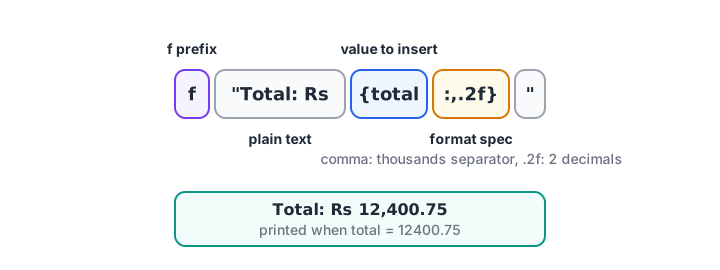
Inside the braces: the value first, then a colon, then how it should look.
Printing a neat table
Width and alignment let you line up columns. < aligns left, > aligns right, and the number is the column width.
rows = [("Crocin", 2, 30.0), ("ORS pack", 5, 21.0), ("Vicks", 1, 145.0)]

print(f"{'Item':<10}{'Qty':>5}{'Amount':>10}")
print("-" * 25)
grand = 0
for name, qty, rate in rows:
    amount = qty * rate
    grand += amount
    print(f"{name:<10}{qty:>5}{amount:>10.2f}")
print("-" * 25)
print(f"{'Total':<15}{grand:>10.2f}")
The full format mini-language, including Indian-style lakh separators, is covered in Python string formatting.
Quick check
What does print(f"{1234.5:,.2f}") show?
The comma adds a thousands separator and .2f keeps exactly two decimal places.
How to take input in Python with input()
input() shows an optional prompt, pauses the program and waits. When the user types a line and presses Enter, input() returns that line as a string, without the Enter key.
The examples in this section need a person typing at the keyboard, so they are shown with their output from a sample run. Copy them into VS Code or the online compiler to try them. (This site's Run Code runner can also answer input() through a pop-up box.)
name = input("Customer name: ")
city = input("City: ")
print(f"Thank you, {name} from {city}!")Customer name: Meera
City: Indore
Thank you, Meera from Indore!Leave a space at the end of the prompt, as in "Customer name: ". Otherwise the user's typing sticks to the colon.
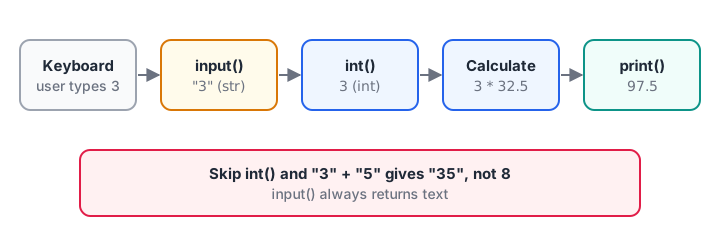
input() always hands you text. Convert it before doing any maths.
Converting input to int or float
Because input() returns text, adding two answers joins them instead of adding them. This is the most common beginner bug with input.
a = input("Strips on Monday: ")
b = input("Strips on Tuesday: ")
print("Without conversion:", a + b)
print("With conversion:", int(a) + int(b))

price = float(input("Price per strip: "))
print(f"Two days cost Rs {(int(a) + int(b)) * price:.2f}")Strips on Monday: 3
Strips on Tuesday: 5
Without conversion: 35
With conversion: 8
Price per strip: 32.5
Two days cost Rs 260.00"3" + "5" is "35", two pieces of text glued together. int("3") + int("5") is 8. Use float() for amounts with decimals. The rules for these functions are in Python type conversion.
Quick check
The user types 4 and then 6. What does print(input() + input()) show?
input() returns strings, so + joins "4" and "6" into "46".
Reading several values from one line
Sometimes the user types several numbers on one line, separated by spaces. split() breaks the string into a list of pieces, and you convert each one.
line = input("Sales for 3 days: ")
sales = [int(x) for x in line.split()]
print("Days:", len(sales), "Total:", sum(sales))Sales for 3 days: 1200 950 1430
Days: 3 Total: 3580You can test the same logic without typing anything by putting the text in a variable. This version runs right here:
line = "1200 950 1430"          # what the user would type
parts = line.split()
print("Pieces:", parts)

sales = [int(x) for x in parts]
print("As numbers:", sales)
print(f"Total: {sum(sales)}, average: {sum(sales) / len(sales):.1f}")
The line [int(x) for x in parts] is a list comprehension: it builds a new list by applying int() to every piece. The lesson on list comprehensions explains it in detail.
Handling invalid input safely
Users make typos. If someone types "three" where you expect a number, int() raises a ValueError and the program stops. A while loop with try and except keeps asking until the answer is valid.
while True:
    answer = input("Quantity: ")
    try:
        qty = int(answer)
        break
    except ValueError:
        print("Please type a whole number, like 4.")
print("Quantity accepted:", qty)Quantity: three
Please type a whole number, like 4.
Quantity: 4
Quantity accepted: 4To see the same checking logic run in the browser, feed it a list of pretend answers instead of the keyboard:
typed_answers = ["three", "4.5", " 4 "]

for answer in typed_answers:
    try:
        qty = int(answer)
        print(f"{answer!r} -> accepted {qty}")
        break
    except ValueError:
        print(f"{answer!r} -> not a whole number, asking again")
int() ignores spaces around the digits, so " 4 " is accepted. while loops get their own lesson in the Python while loop.
Common input and output mistakes
- Doing maths on raw input.
input()returns a string. Convert withint()orfloat()first. - Using
int()on decimal answers.int("32.5")fails. Usefloat()for prices and weights. - Building output with
+."Total: " + totalfails whentotalis a number. Use an f-string. - Forgetting the
f."Total: {total}"prints the braces literally. It must bef"Total: {total}". - Expecting
input()in data work. Real analysis reads files and databases, not the keyboard.input()is mainly for small tools and practice.
Key takeaways
print()shows values;sepandendcontrol spacing and line endings.- f-strings insert values into text, and format specs like
.2f,,and>10control how they look. input()pauses, reads one line and always returns a string.- Convert input with
int()orfloat()before calculating. split()reads several values from one line;try/excepthandles bad answers.
Next, put numbers to work with Python operators, from basic arithmetic to comparisons.
FAQ
What does input() return in Python?
input() always returns a string, even if the user types digits. Typing 25 gives you the text "25". To use it as a number, convert it with int(input()) for whole numbers or float(input()) for decimals. If the user just presses Enter, you get an empty string.
How do I take integer input in Python?
Wrap the call in int(), as in age = int(input("Age: ")). If the user might type something that is not a whole number, put the conversion inside try and except ValueError and ask again. For decimal values such as prices, use float() instead of int().
How do I take multiple inputs in one line in Python?
Read the line once and split it: values = input().split() gives a list of strings. Convert them with [int(v) for v in values] or list(map(int, values)). For exactly two numbers, a, b = map(int, input().split()) unpacks them into two variables.
What is the difference between print and return?
print() displays a value on the screen and gives nothing back to the program. return sends a value out of a function so other code can use it. A function that only prints its result cannot be used in further calculations.
How can I practise Python input and output problems?
Coding tests usually read input and print output in a fixed format, so practise both. You can solve input-output coding questions on Debugshala Test. In Indore, Debugshala's analytics course with Python from scratch builds the same skills in class, with a free demo first.
From the team behind this site
Go further with the Data Analytics Course at Debugshala
These tutorials are written by Debugshala, a training and placement institute at Old Palasia, Indore. The classroom course adds live mentoring, real projects and interview preparation.
- Offline classes at Old Palasia, Indore
- Free demo class before you pay
- Non-IT, fresher and year-gap friendly
- Placement assistance
700+ students placed · 200+ hiring partners · 4.9★ Google rating
