

Python while Loop: Syntax, break, else and Infinite Loops
Learn the Python while loop with flowcharts and runnable examples: counters, break and while-else, avoiding infinite loops, and when to use for instead.
You want to buy a laptop that costs Rs 60,000. You can save Rs 7,500 a month, and your bank adds 1 percent interest on the balance each month. How many months until you can buy it?
You could sit with a calculator: add the savings, add the interest, check the balance, and repeat until it crosses 60,000. You don't know in advance how many rounds it will take. You only know when to stop.
That is exactly the job of a while loop. Unlike a for loop, which walks through a fixed list of items, a while loop keeps going until a condition tells it to stop.
A while loop in Python is a control-flow statement that repeatedly runs an indented block of code for as long as its condition evaluates to True, checking the condition before each repetition.
This lesson follows the Python for loop, and the conditions use the comparison operators from Python operators.
How does a while loop work in Python?
The syntax is while condition: followed by an indented block. Python checks the condition. If it is true, the block runs once, and Python goes back to check the condition again. The first time the condition is false, Python skips the block and carries on after the loop.
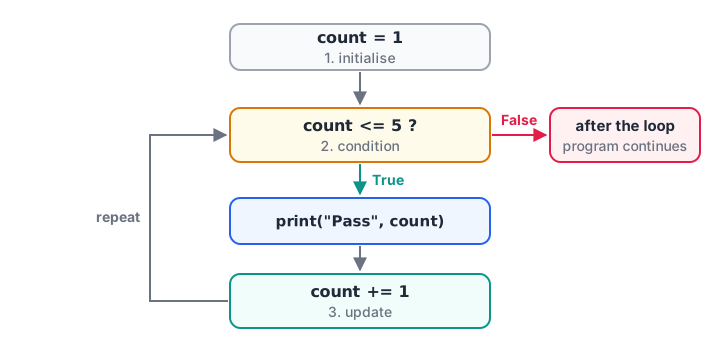
The condition is checked before every pass. The update step inside the body is what eventually makes it False.
count = 1                 # 1. starting value

while count <= 5:         # 2. condition
    print("Pass number", count)
    count += 1            # 3. update

print("Loop ended, count is now", count)
Note that count ends at 6, not 5. The loop stops only when the check fails, and that happens when count has already moved past the limit.
The three parts of every while loop
- Initialise a variable before the loop, so the condition has something to test.
- Test it in the condition on the
whileline. - Update it inside the loop, moving it towards making the condition false.
Forget step 3 and the condition never changes, so the loop runs forever. That is the single most common while bug.
Quick check
What is printed? n = 10, then while n > 3: n -= 4, then print(n)
n goes 10, 6, 2. After reaching 2 the condition 2 > 3 is false, so the loop stops and prints 2.
Quick check
When does the else block of a while loop run?
The else block runs once after the loop ends normally. A break skips it.
Example: how many months to reach a savings target?
Here is the laptop problem as code. The number of months is unknown, which makes it a natural fit for while.
target = 60000
monthly_saving = 7500
interest = 0.01          # 1 percent per month

balance = 0
months = 0
while balance < target:
    balance += monthly_saving
    balance += balance * interest
    months += 1
    print(f"Month {months}: Rs {balance:,.0f}")

print(f"You can buy the laptop after {months} months.")
Change monthly_saving to 5000 or the target to 80000 and run it again. The loop adjusts itself, because it only cares about the condition, not a fixed count.
Example: sum of the digits of a number
Some problems naturally shrink a value until nothing is left. Taking digits off a number with % and // is a classic one, and it appears often in coding tests.
number = 4072
original = number
total = 0

while number > 0:
    digit = number % 10      # last digit
    total += digit
    number //= 10            # drop the last digit
    print(f"took {digit}, total {total}, left {number}")

print(f"Sum of digits of {original} is {total}")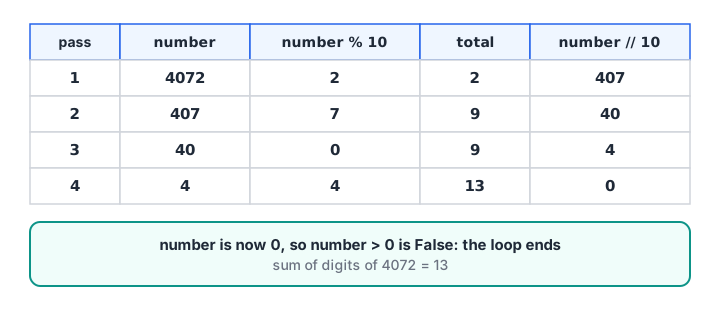
Each pass removes one digit. When number reaches 0, the condition number > 0 fails and the loop ends.
Infinite loops and how to avoid them
An infinite loop is a loop whose condition never becomes false. The program appears to freeze. In a terminal, press Ctrl + C to stop it.
Here is a bug that causes one, shown without a Run button for obvious reasons:
stock = 10
while stock > 0:
    print("Selling one unit")
    # forgot: stock -= 1
Two habits keep you safe. First, check that something inside the loop changes the variable in the condition. Second, when the input is unpredictable, add a safety limit so the loop must stop after a reasonable number of passes:
balance = 1000
max_months = 120
months = 0

while balance < 1_00_000 and months < max_months:
    balance += balance * 0.02
    months += 1

if balance >= 1_00_000:
    print("Target reached in", months, "months")
else:
    print("Stopped after", months, "months; balance is", round(balance))
At 2 percent a month with no new deposits, Rs 1,000 takes about 233 months to reach Rs 1 lakh, so the safety limit stops the loop at 120 and the program reports that honestly instead of running for a long time.
while True with break
Sometimes the stopping point is easiest to describe in the middle of the loop. Then write while True:, which on its own never ends, and use break to leave the loop when the job is done.
pending_orders = ["ORD-101", "ORD-102", "CANCELLED", "ORD-104"]

while True:
    if not pending_orders:
        print("No more orders")
        break
    order = pending_orders.pop(0)    # take the first order
    if order == "CANCELLED":
        print("Found a cancelled marker, stopping")
        break
    print("Packing", order)

print("Left in queue:", pending_orders)
pop(0) removes and returns the first item, so the list gets shorter on every pass. break jumps straight out of the loop. Its partner, continue, skips to the next check. Both are covered in break, continue and pass.
The same shape is used to keep asking for keyboard input until it is valid. It needs a person typing, so here it is with a sample run:
while True:
    pin = input("Enter a 6-digit PIN code: ")
    if len(pin) == 6 and pin.isdigit():
        break
    print("That doesn't look right, try again.")
print("Delivering to", pin)Enter a 6-digit PIN code: 45201
That doesn't look right, try again.
Enter a 6-digit PIN code: 452001
Delivering to 452001The while...else clause
A while loop can have an else block. It runs when the condition becomes false normally, but not when the loop is left with break. It is handy for "search, and report if nothing was found".
readings = [31, 33, 36, 34]   # temperatures in Celsius
i = 0
while i < len(readings):
    if readings[i] > 40:
        print("Heat alert at reading", i)
        break
    i += 1
else:
    print("All", len(readings), "readings were safe")
for loop vs while loop: which should you use?
| Question | for loop |
while loop |
|---|---|---|
| Do you know the items or the number of passes? | Yes: a list, a string, a range |
No: stop when something becomes true |
| What controls it? | The sequence runs out | A condition becomes False |
| Risk of running forever? | Very low | Yes, if the update is missing |
| Typical analyst use | Totals over rows, lists of files | Retries, targets, processing a queue |
A good rule: if you can say "for each ...", use for. If you would say "keep going until ...", use while. The digit-sum problem could be written with a for loop over str(number), but the savings problem genuinely needs while.
Common mistakes with while loops
- Missing the update. Without
count += 1or similar, the condition never changes. - Updating in the wrong direction.
count -= 1withwhile count <= 5counts away from the limit forever. - Off-by-one conditions.
<and<=differ by one pass. Trace the first and last pass on paper. - Using
whilefor a fixed list.while i < len(items)with manuali += 1is longer and riskier thanfor item in items. - Forgetting that
elseis skipped afterbreak. Use it only for the "finished without breaking" case.
Key takeaways
- A
whileloop repeats while its condition is true, checking it before each pass. - Initialise, test and update: every loop needs all three.
- An update that never makes the condition false causes an infinite loop; stop it with Ctrl + C.
while Truewithbreakis fine when the exit point is in the middle of the loop.while...elseruns theelseonly when the loop ends withoutbreak.- Choose
forfor known sequences andwhilefor "until" problems.
Next, learn the full set of loop controls in Python break, continue and pass.
FAQ
What is a while loop in Python with an example?
A while loop repeats code as long as a condition is true. For example, count = 1, then while count <= 3: with print(count) and count += 1 inside, prints 1, 2 and 3. The loop checks count <= 3 before each pass and stops when count reaches 4.
How do I stop an infinite while loop in Python?
Press Ctrl + C in the terminal to interrupt the running program. To fix the code, make sure something inside the loop changes the variable in the condition, or add a break that is guaranteed to run. A maximum-iterations counter is a good safety net when the input is unpredictable.
Is there a do-while loop in Python?
No. Python has no do...while statement. To run the body at least once and check afterwards, write while True:, put the body first, and finish with if not condition: break. This gives the same behaviour and is the standard Python pattern.
Which is faster, for or while in Python?
For walking through a list or a range, a for loop is usually a little faster and clearly safer, because Python handles the counting internally. The difference rarely matters in small scripts. Choose the loop that matches the problem; for large data, pandas and NumPy are far faster than either.
Are while loop questions asked in data analyst interviews?
Yes, mostly in written coding rounds: digit sums, reversing a number, or finding how many periods until a target. Practising them builds the logic you later use in pandas. Debugshala's data analytics course with placement support in Indore includes this practice, and you can try timed loop questions on Debugshala Test.
From the team behind this site
Go further with the Data Analytics Course at Debugshala
These tutorials are written by Debugshala, a training and placement institute at Old Palasia, Indore. The classroom course adds live mentoring, real projects and interview preparation.
- Offline classes at Old Palasia, Indore
- Free demo class before you pay
- Non-IT, fresher and year-gap friendly
- Placement assistance
700+ students placed · 200+ hiring partners · 4.9★ Google rating
