

Python Tuples: Immutable Sequences, Unpacking and Use Cases
Learn Python tuples: creating them, immutability, unpacking and star unpacking, tuple keys for grouped totals, and when to pick a tuple over a list.
Imagine the GST registration certificate of a shop in Rajwada. It lists the trade name, the GSTIN, the state code and the date of registration. Those four details belong together, they always appear in the same order, and nobody is allowed to edit the printed certificate with a pen.
Compare that with the shop's daily sales notebook, which grows every evening and gets corrected when someone makes a mistake. The notebook needs to change. The certificate must not.
In Python, the notebook is a list. The certificate is a tuple: a fixed, ordered group of values. Reading the four details into four separate variables in one step is tuple unpacking.
A Python tuple is a built-in, ordered and immutable sequence type that groups a fixed number of values, often of different types, into one object.
How do you create a tuple in Python?
The comma is what makes a tuple. Parentheses are optional in most places, but they make the code easier to read, so most people write them. An empty tuple is (), and tuple() converts any other sequence.
store = ("Rajwada Branch", "23ABCDE1234F1Z5", 23, "2024-04-01")
point = 22.7196, 75.8577          # parentheses are optional
empty = ()
single = ("Indore",)              # the trailing comma matters
not_a_tuple = ("Indore")          # just a string in brackets
from_list = tuple([120, 98, 143])

print(store)
print(type(point).__name__, point)
print(len(empty), type(single).__name__, type(not_a_tuple).__name__)
print(from_list)
The single-item case catches everyone once. ("Indore") is just a string with brackets around it, because brackets also group expressions such as (2 + 3) * 4. Add a trailing comma to tell Python you mean a tuple.
Reading items: indexing, slicing and searching
Tuples support the same read operations as lists and strings: indexes from 0, negative indexes from the end, slices, in, len(), and two methods, count() and index().
week = (120, 98, 143, 110, 143, 210, 188)

print("Monday:", week[0], "Sunday:", week[-1])
print("Weekend:", week[5:])
print("Best day:", max(week), "Total:", sum(week))
print("Times 143 appeared:", week.count(143))
print("First 143 on day index:", week.index(143))
print("Any day above 200?", any(x > 200 for x in week))
Those two methods are all a tuple has. Everything that would change it, such as append, remove or sort, simply does not exist on a tuple.
Quick check
Which of these creates a tuple with one item?
The trailing comma makes the tuple. ("Indore") is just a string, and tuple("Indore") splits the string into six single-letter items.
Why are tuples immutable?
Immutable means the tuple object cannot change after it is created. You can't assign to an index, delete an item or add one. To "change" a tuple you build a new one, often by slicing and joining.
gst_slab = ("Packaged food", 0.12)

try:
    gst_slab[1] = 0.05
except TypeError as err:
    print("Error:", err)

new_slab = gst_slab[:1] + (0.05,)     # build a new tuple instead
print("Old:", gst_slab)
print("New:", new_slab)

as_list = list(gst_slab)              # or convert, edit, convert back
as_list[1] = 0.18
print("Via list:", tuple(as_list))
Immutability buys you three things. Data that should never change is protected from accidental edits. Python can use tuples as dictionary keys and set members, because their value cannot shift. And tuples are slightly smaller and faster to create than lists of the same items.
What is tuple unpacking in Python?
Unpacking assigns the items of a tuple (or any sequence) to several names at once. The number of names must match the number of items, unless you use a starred name to collect the extras.
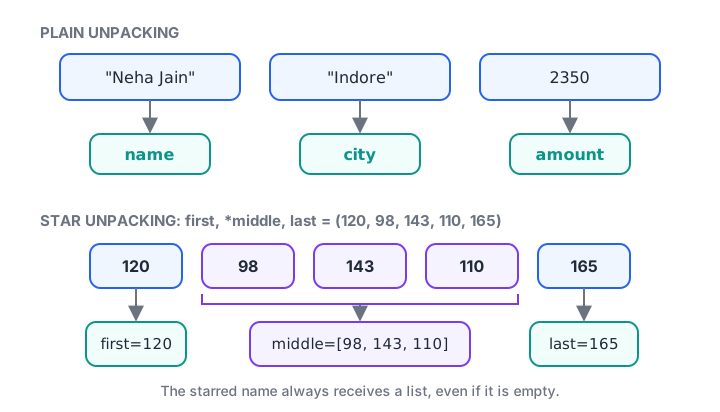
Plain unpacking matches item to name one by one; a starred name collects everything left over into a list.
record = ("Neha Jain", "Indore", 2350)
name, city, amount = record
print(f"{name} from {city} spent {amount}")

# Star unpacking: first, last and everything in between
first, *middle, last = (120, 98, 143, 110, 165)
print("first:", first, "middle:", middle, "last:", last)

# Swap two values without a temporary variable
a, b = "Bhopal", "Indore"
a, b = b, a
print("a:", a, "b:", b)

# _ for values you don't need
_, pin_city, _ = ("ignored", "Ujjain", "ignored")
print(pin_city)
You have already used unpacking without naming it. A for loop such as for name, score in zip(names, scores) unpacks a tuple on every iteration, and so does for i, item in enumerate(items).
Returning several values from a function
A function returns one object, but that object can be a tuple. This is the standard way to return several results together, and unpacking reads them back into separate names.
def summarise(values):
    total = sum(values)
    average = total / len(values)
    return min(values), max(values), round(average, 1)   # a tuple

low, high, avg = summarise([120, 98, 143, 110, 165])
print(f"Low {low}, high {high}, average {avg}")

result = summarise([500, 700])
print("Raw return value:", result, type(result).__name__)
You will see this pattern constantly in libraries. divmod() returns a tuple, df.shape in pandas is a tuple of (rows, columns), and scikit-learn's train_test_split returns several arrays that you unpack in one line.
Quick check
What is middle after first, *middle, last = (10, 20, 30, 40)?
A starred name in unpacking always collects the extra items into a list, even when the source is a tuple.
Tuples as dictionary keys for grouped totals
Because tuples are immutable and hashable, they can be dictionary keys. A pair like ("Indore", "Oct") becomes a single key, which is a neat way to total sales by two columns at once in plain Python. Dictionaries get their own tutorial in Python dictionaries.
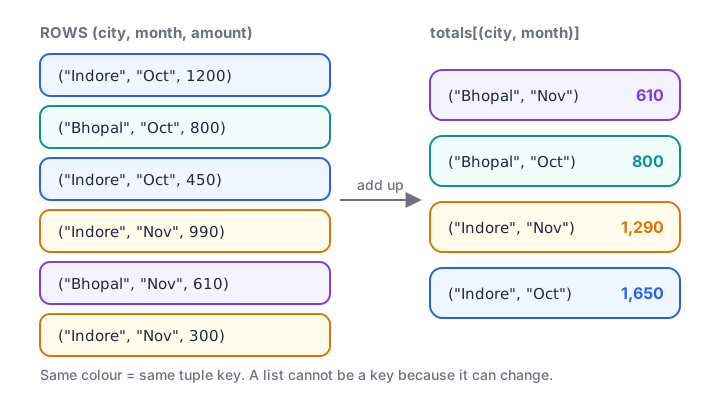
Each (city, month) tuple is one key, so rows from the same city and month add up in the same place.
sales = [
    ("Indore", "Oct", 1200), ("Bhopal", "Oct", 800),
    ("Indore", "Oct", 450), ("Indore", "Nov", 990),
    ("Bhopal", "Nov", 610), ("Indore", "Nov", 300),
]

totals = {}
for city, month, amount in sales:
    key = (city, month)
    totals[key] = totals.get(key, 0) + amount

for (city, month), amount in sorted(totals.items()):
    print(f"{city:7} {month}: {amount:>5,}")

try:
    {["Indore", "Oct"]: 1}
except TypeError as err:
    print("List as key fails:", err)
This is exactly what pandas does behind df.groupby(["city", "month"]), which returns results labelled by tuple keys. Writing it once by hand makes that output much easier to understand.
List vs tuple: which should you use?
Both are ordered sequences that allow duplicates and mixed types. The deciding question is whether the collection should change after you create it.
| Feature | List | Tuple |
|---|---|---|
| Syntax | [120, 98] |
(120, 98) or 120, 98 |
| Can change after creation | Yes | No |
| Methods | Many (append, sort, pop, ...) |
Only count, index |
| Usable as dict key or in a set | No | Yes, if its items are hashable |
| Typical use | Growing collection of similar items | Fixed record of related values |
| Memory and creation speed | Slightly more | Slightly less |
import sys

as_list = [120, 98, 143, 110, 165]
as_tuple = (120, 98, 143, 110, 165)

print("List bytes :", sys.getsizeof(as_list))
print("Tuple bytes:", sys.getsizeof(as_tuple))
print("Equal values?", list(as_tuple) == as_list)
print("Works as a dict key:", {as_tuple: "week 45"}[as_tuple])
The size difference is small for one object, and on its own it is not a reason to choose. Choose by meaning: a list says "more of these may come", a tuple says "these values belong together as one thing". When each position deserves a name, such as record.city, look at namedtuple in the collections module or at dataclasses.
Common mistakes with Python tuples
- Forgetting the comma in a one-item tuple.
("Indore")is a string. Write("Indore",). - Trying to modify a tuple.
t[0] = 5raisesTypeError. Build a new tuple, or use a list if the data really must change. - Mismatched unpacking.
a, b = (1, 2, 3)raisesValueError: too many values to unpack. Match the count or use*rest. - Assuming a tuple is fully frozen. A list inside a tuple can still change, and it makes the tuple unhashable.
- Using a tuple for a growing collection. Adding to a tuple means creating a new one each time. If items keep arriving, use a list.
Key takeaways
- Tuples are ordered and immutable; the comma, not the parentheses, creates them.
- A one-item tuple needs a trailing comma:
("Indore",). - Reading works like lists, but only
count()andindex()are available as methods. - Unpacking assigns items to names in one line;
*restcollects extras into a list. - Functions return several values as a tuple.
- Tuples of hashable items work as dictionary keys, which makes two-column grouping easy.
- Pick lists for changing collections and tuples for fixed records.
Next in the data structures section are Python sets, which drop duplicates automatically and make membership checks very fast.
FAQ
What is the difference between a list and a tuple in Python?
A list is mutable, so you can add, remove and replace items, while a tuple is immutable and fixed once created. Lists use square brackets and have many methods; tuples use commas or parentheses and have only count() and index(). Tuples can be dictionary keys; lists cannot.
Can we change a tuple in Python?
No, a tuple's items cannot be reassigned, added or removed after creation. You can create a new tuple from parts of the old one, such as t[:1] + (5,), or convert it to a list, change it and convert back. If a tuple holds a list, that inner list can still change.
Why use a tuple instead of a list in Python?
Use a tuple when the values form one fixed record, such as a coordinate, a date or a row of results, and should not change by accident. Tuples are also required for dictionary keys and set items, and they signal intent clearly to anyone reading your code.
How do you convert a list to a tuple in Python?
Pass the list to the built-in tuple() function: tuple([120, 98, 143]) returns (120, 98, 143). The reverse, list(my_tuple), gives you an editable list. Both create a new object, so changing the result never affects the original sequence.
Where can I learn Python data structures for analytics in Indore?
Debugshala teaches classroom batches at its Old Palasia campus, with sessions in English and Hindi, and accepts fresh graduates and non-IT learners. You can attend a free demo of Debugshala's job-focused analytics course, and attempt data structure MCQs on Debugshala Test.
From the team behind this site
Go further with the Data Analytics Course at Debugshala
These tutorials are written by Debugshala, a training and placement institute at Old Palasia, Indore. The classroom course adds live mentoring, real projects and interview preparation.
- Offline classes at Old Palasia, Indore
- Free demo class before you pay
- Non-IT, fresher and year-gap friendly
- Placement assistance
700+ students placed · 200+ hiring partners · 4.9★ Google rating
