

Python Type Hints: Annotations, list[int], Optional and mypy
Learn Python type hints for 3.12+: annotate variables and functions, list[str] and dict[str, float], X | None, TypedDict, type aliases and checking with mypy.
Think about the printed GST invoice pad used by a hardware shop on MG Road. Each box is labelled: "Invoice date (DD/MM/YYYY)", "GSTIN (15 characters)", "Amount (Rs)".
Nothing physically stops a tired clerk from writing a phone number in the amount box. But the labels make mistakes obvious, and the accountant who checks the pad at the end of the day spots them quickly.
Python code can carry the same kind of labels. A hint such as amount: float is the printed label on the box. Python, like the pad, accepts whatever you write. The accountant is a type checker, a tool that reads your labels and flags values that do not fit, before the invoice reaches a customer.
Python type hints are optional annotations, defined in PEP 484 and later proposals, that declare the expected types of variables, function parameters and return values so that editors and static type checkers can detect errors; the interpreter does not enforce them.
This lesson follows Python packages. Hints are especially useful once your helpers live in modules that other people import. Everything here targets Python 3.12+.
What are type hints in Python?
A hint goes after a colon for a variable or parameter, and after an arrow -> for a function's return value. Default values come after the hint.
city: str = "Indore"
target: int = 50_000

def with_gst(amount: float, rate: float = 0.18) -> float:
    return round(amount * (1 + rate), 2)

def describe(name: str, orders: int) -> str:
    return f"{name} placed {orders} orders"

print(with_gst(1200))
print(describe("Neha", 7))
print(with_gst.__annotations__)
The hints are stored on the function in __annotations__, but they change nothing about how it runs. That is what the next example shows.
Does Python enforce type hints?
No. Python ignores hints while running. A call with the wrong type runs anyway, and either crashes later or, worse, quietly produces a wrong answer.
def total_units(a: int, b: int) -> int:
    return a + b

print(total_units(120, 80))        # 200, as intended
print(total_units("120", "80"))    # "12080": wrong, but no error
print(total_units([1], [2]))       # a list: also no error
This is where a type checker helps. Save the function and a bad call as stock.py, then run mypy on it. It reports the problem without running the file.
def total_units(a: int, b: int) -> int:
    return a + b

print(total_units("120", "80"))pip install mypy
mypy stock.pystock.py:4: error: Argument 1 to "total_units" has incompatible type "str"; expected "int" [arg-type]
stock.py:4: error: Argument 2 to "total_units" has incompatible type "str"; expected "int" [arg-type]
Found 2 errors in 1 file (checked 1 source file)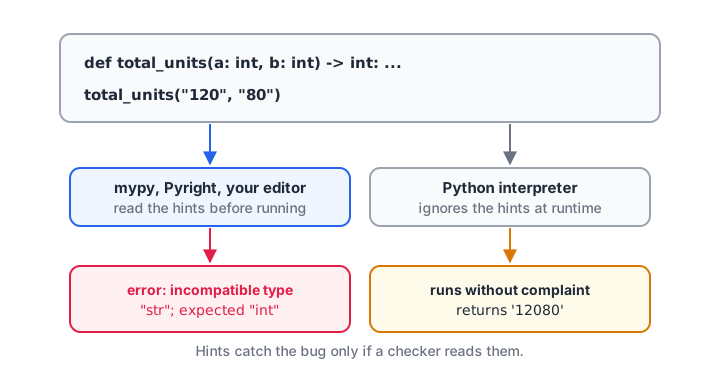
Type checkers and editors read the hints before the code runs; the interpreter just executes it.
Editors such as VS Code (with the Pylance extension) and PyCharm run similar checks as you type, underlining the bad argument and offering better autocomplete because they know each variable's type. See the mypy documentation for configuration.
Quick check
def add(a: int, b: int) -> int: return a + b. What does add("4", "5") do when run?
Hints are not checked by the interpreter. A static checker such as mypy would report the call, but Python just runs it.
Type hints for lists, dicts and other collections
Since Python 3.9 you can put the item types inside square brackets on the built-in collection names. No import is needed.
| Hint | Meaning | Example value |
|---|---|---|
list[float] |
A list of floats | [1450.0, 980.5] |
dict[str, int] |
Keys are str, values are int | {"Indore": 42} |
tuple[str, int] |
Exactly two items: a str then an int | ("Palasia", 12) |
tuple[int, ...] |
Any number of ints | (1, 2, 3) |
set[str] |
A set of strings | {"UPI", "Cash"} |
int | None |
An int or None | None |
def city_totals(rows: list[tuple[str, float]]) -> dict[str, float]:
    totals: dict[str, float] = {}
    for city, amount in rows:
        totals[city] = totals.get(city, 0.0) + amount
    return totals

def top_city(totals: dict[str, float]) -> tuple[str, float]:
    best = max(totals, key=totals.get)
    return best, totals[best]

rows = [("Indore", 1450.0), ("Dewas", 640.0), ("Indore", 2300.0)]
t = city_totals(rows)
print(t)
print(top_city(t))
For parameters, prefer the general abstract types from collections.abc when you only loop over an argument. Iterable[float] accepts a list, a tuple, a set or a generator, so the function is more reusable.
How do you write Optional types in Python?
A function that may return nothing should say so. In modern Python write X | None. The older spelling Optional[X] from the typing module means exactly the same thing and is still common in existing code.
from collections.abc import Iterable

def find_customer(phone: str, book: dict[str, str]) -> str | None:
    return book.get(phone)

def average(values: Iterable[float]) -> float | None:
    values = list(values)
    return sum(values) / len(values) if values else None

book = {"9826012345": "Ravi Jain"}
name = find_customer("9000000000", book)
print(name.upper() if name is not None else "not found")
print(average([1200, 950, 1800]), average([]))
The checker now forces you to handle the None case before calling .upper(). That single habit prevents a very common runtime error: AttributeError: 'NoneType' object has no attribute ....
Quick check
Which hint means "a string or nothing" in Python 3.12?
The | operator creates a union type. Optional[str] from typing is the older equivalent.
Type aliases, TypedDict and Literal
Long hints become hard to read. The type statement, new in Python 3.12, gives a hint a name. TypedDict describes dictionaries with fixed keys, which is exactly what a row from an API or a JSON file looks like. Literal restricts a value to a few allowed strings.
from typing import TypedDict, Literal

type CityTotals = dict[str, float]          # Python 3.12+ alias

class Order(TypedDict):
    order_id: int
    city: str
    amount: float
    mode: Literal["UPI", "Cash", "Card"]

def summarise(orders: list[Order]) -> CityTotals:
    out: CityTotals = {}
    for o in orders:
        out[o["city"]] = out.get(o["city"], 0.0) + o["amount"]
    return out

orders: list[Order] = [
    {"order_id": 1, "city": "Indore", "amount": 1450.0, "mode": "UPI"},
    {"order_id": 2, "city": "Ujjain", "amount": 980.0, "mode": "Cash"},
]
print(summarise(orders))
print(Order.__required_keys__ == {"order_id", "city", "amount", "mode"})
At runtime an Order is a plain dict. The checker, however, will flag a typo such as o["amout"] or a mode of "Paytm". For records with behaviour, dataclasses are often a better fit, covered in Python dataclasses.
Generic functions in Python 3.12
Some functions work on any type but keep it consistent: give them a list of strings and they return a string. Python 3.12 added a short syntax for this, with the type parameter in square brackets after the name.
def first_or_default[T](items: list[T], default: T) -> T:
    return items[0] if items else default

print(first_or_default(["Indore", "Bhopal"], "none"))
print(first_or_default([], 0))
print(first_or_default.__type_params__)
Where should you add type hints?
You do not need to annotate everything. Hints pay off most where code is shared or easy to misuse.
- Function parameters and return types, especially in modules and packages.
- Empty collections, such as
totals: dict[str, float] = {}, where the checker cannot guess the contents. - Public data structures: TypedDicts and dataclasses for records.
- Skip obvious locals.
count = 0is clearly an int; a hint adds noise.
For pandas code, pd.DataFrame and pd.Series work as hints, as in def clean(df: pd.DataFrame) -> pd.DataFrame:. Column-level types are not checked, so keep validating data with assertions as shown in data cleaning with pandas.
Common mistakes with Python type hints
- Expecting hints to stop bad input. They do not run. Validate user and file data yourself, and raise errors as shown in Python exception handling.
- Using
listfromtypingin new code.typing.Listandtyping.Dictare old spellings; uselistanddict. - Forgetting
| None. If a function can returnNone, say so, or the checker cannot warn callers. - Hinting a parameter too narrowly.
list[float]rejects tuples;Iterable[float]accepts both. - Mutable defaults with hints.
def f(x: list[int] = [])is still the shared-list trap.
Key takeaways
- Annotate parameters with
name: typeand returns with-> type. - The interpreter ignores hints; mypy, Pyright and editors check them.
- Use
list[str],dict[str, float],tuple[str, int]directly. - Write
X | Nonefor values that may be missing. - Use
typealiases,TypedDictandLiteralfor readable, precise hints. - Focus hints on function signatures and shared code.
The next section moves from organising code to working with data on disk, starting with Python file handling.
FAQ
What are type hints in Python?
Type hints are annotations that state the expected type of a variable, parameter or return value, written as amount: float or -> str. They document intent and let editors and type checkers such as mypy catch mistakes before running. Python does not enforce them, so code with wrong types still runs.
Do type hints make Python faster?
No. The standard CPython interpreter ignores hints when executing, so they neither speed up nor slow down your code in any meaningful way. Their benefit is fewer bugs and better editor support. Some separate compilers can use hints for speed, but ordinary Python does not.
What is the difference between Optional and None in type hints?
Optional[str] and str | None mean the same thing: the value is either a string or None. None alone means the value is always None, typically for functions that return nothing. In Python 3.10 and later, the str | None form is preferred because it needs no import.
Is mypy required to use type hints?
No. Hints are valid Python without any tool, and editors such as VS Code and PyCharm already use them for autocomplete and warnings. Running mypy or Pyright adds a full project-wide check, which is useful in larger codebases and in automated tests before code is merged.
Is writing typed Python taught in Debugshala's Indore analytics course?
Debugshala's Old Palasia campus teaches Python for data analysis as part of its job-focused data analytics programme in Indore, alongside pandas and SQL, in English and Hindi. A free demo class is available. To revise, try typing and functions questions on Debugshala Test.
From the team behind this site
Go further with the Data Analytics Course at Debugshala
These tutorials are written by Debugshala, a training and placement institute at Old Palasia, Indore. The classroom course adds live mentoring, real projects and interview preparation.
- Offline classes at Old Palasia, Indore
- Free demo class before you pay
- Non-IT, fresher and year-gap friendly
- Placement assistance
700+ students placed · 200+ hiring partners · 4.9★ Google rating
