

Python Numbers and the math Module: int, float and Rounding
Understand Python int, float and complex numbers, why 0.1 + 0.2 is not 0.3, how round() really works, and the math functions analysts use daily.
Imagine you run the books for a namkeen wholesaler in Malharganj. A shop orders 1,250 packets, and each carton holds 12. How many full cartons do you ship, and how many loose packets are left? Then you add 18% GST, round to the paisa and work out how fast sales grew since last year.
That one order needs whole numbers (cartons), decimals (rupees and paise), a remainder (loose packets), rounding rules and a growth formula. Get any of them slightly wrong and the invoice is off by a few rupees, which is exactly the kind of error an auditor notices.
The cartons are an int. The price with paise is a float. Rounding, square roots and logarithms come from the math module. Each has small rules that trip up beginners, and this tutorial walks through them with analyst-style numbers.
Python numbers are values of the built-in types int, float and complex, and the math module is a standard library module that provides mathematical functions and constants for them.
What number types does Python have?
Python decides the type from how you write the literal. A number without a decimal point is an int, a number with a point or exponent is a float, and a number ending in j is complex. The tutorial on variables and literals shows more literal forms.
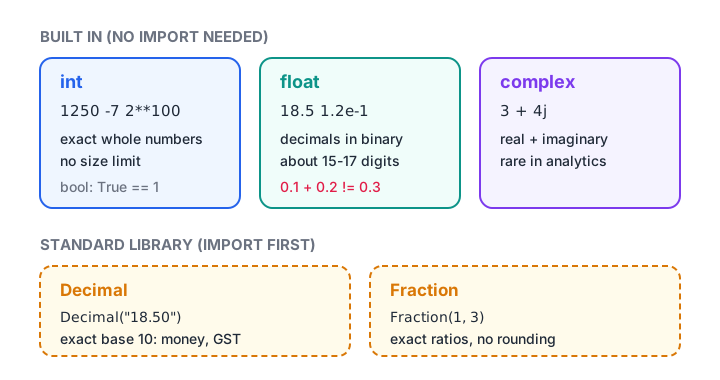
The three built-in Python number types, plus the two standard library types analysts reach for.
packets = 1_250          # underscores are just for readability
price = 18.50
growth = 1.2e-1          # scientific notation: 0.12
signal = 3 + 4j

for value in [packets, price, growth, signal]:
    print(value, type(value).__name__)

print("Huge ints are fine:", 2 ** 100)
print("True counts as 1:", True + True)
Two details stand out. Python integers have no fixed size limit, so 2 ** 100 prints all 31 digits instead of overflowing. And bool is a subtype of int, which is why True + True is 2 and why sum() on a list of True/False values counts the trues.
Mixing types and converting
When you combine an int and a float, Python converts the result to float. int() converts back by cutting off the decimals, not by rounding. The type conversion tutorial covers this in more depth.
print(10 + 2.5)            # int + float -> float
print(int(7.99))           # cuts towards zero: 7
print(int(-7.99))          # -7, not -8
print(float("1250"))       # text to float
print(int("1,250".replace(",", "")))  # remove commas first
How does division work in Python?
Python has three division operators, and the operators tutorial lists them alongside the others. For an analyst they answer three different questions.
| Operator | Question it answers | 1250 ? 12 |
|---|---|---|
/ |
What is the exact ratio? | 104.1666... |
// |
How many full groups fit? | 104 |
% |
What is left over? | 2 |
The built-in divmod() returns the last two together, which is handy for cartons, pages of results or converting minutes into hours.
packets, per_carton = 1250, 12
cartons, loose = divmod(packets, per_carton)
print(f"Ship {cartons} cartons and {loose} loose packets")

minutes = 437
hours, mins = divmod(minutes, 60)
print(f"Delivery run took {hours} h {mins} min")

print("Floor division rounds down:", -7 // 2)
print("Remainder takes the divisor's sign:", -7 % 2)
Notice that -7 // 2 is -4, not -3. Floor division always rounds towards negative infinity. This matters when you work with refunds or other negative amounts.
Quick check
What does round(4.5) return in Python 3?
Python rounds exact halves to the nearest even integer (banker's rounding), so 4.5 becomes 4 and 5.5 becomes 6.
Why is 0.1 + 0.2 not equal to 0.3 in Python?
Computers store floats in binary. Just as 1/3 cannot be written exactly in decimal (0.3333...), 0.1 cannot be written exactly in binary. Python stores the nearest possible value, and tiny errors show up when you add such values together.
import math

total = 0.1 + 0.2
print(total)
print(total == 0.3)
print(math.isclose(total, 0.3))

price = 2.675
print(round(price, 2))      # 2.67, because 2.675 is stored as 2.67499...
print(f"{price:.20f}")
This is not a Python bug. The same thing happens in Excel, JavaScript and most databases, because they use the same IEEE 754 standard. The fix is to never compare floats with ==. Use math.isclose(), or compare rounded values.
Use Decimal when every paisa matters
For invoices, ledgers and GST calculations, use the decimal module. It stores numbers in base 10, so 0.1 really is 0.1. Create Decimals from strings, not from floats, or the float error comes along with them.
from decimal import Decimal, ROUND_HALF_UP

price = Decimal("18.50")
qty = 1250
gst_rate = Decimal("0.18")

subtotal = price * qty
gst = (subtotal * gst_rate).quantize(Decimal("0.01"), rounding=ROUND_HALF_UP)
print("Subtotal:", subtotal)
print("GST     :", gst)
print("Total   :", subtotal + gst)

print(Decimal("0.1") + Decimal("0.2") == Decimal("0.3"))
Decimal is slower than float, so keep floats for statistics and big datasets and use Decimal where exact rupee values are a legal or business requirement.
Rounding numbers: round(), floor, ceil and trunc
round() surprises nearly everyone the first time. When a value is exactly halfway, it rounds to the nearest even number. This is called banker's rounding, and it avoids pushing totals upward when you round thousands of values.
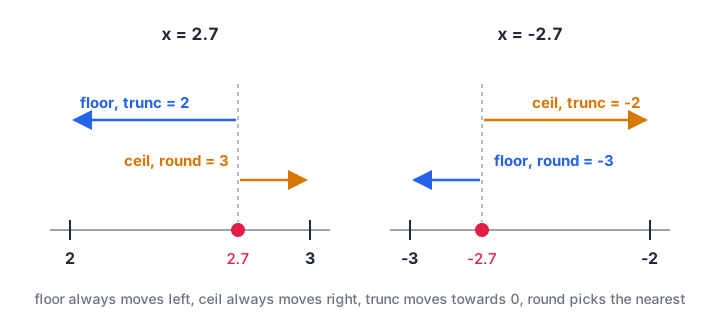
floor goes left, ceil goes right, trunc goes towards zero, and round goes to the nearest whole number.
import math

for x in [2.5, 3.5, 2.7, -2.7]:
    print(f"{x:>5}: round={round(x):>3}  floor={math.floor(x):>3}  "
          f"ceil={math.ceil(x):>3}  trunc={math.trunc(x):>3}")

# How many vans for 1,250 packets if one van carries 400?
print("Vans needed:", math.ceil(1250 / 400))
Pick the function by the business rule, not by habit. Vans and cartons need ceil, because you can't send three-quarters of a van. Age in completed years needs floor. Report totals usually need round() or Decimal's ROUND_HALF_UP, whichever your finance team expects.
Quick check
You need to pack 1,000 items into boxes of 24. Which expression gives the number of boxes required?
1000 / 24 is about 41.67, so you need 42 boxes. Floor division gives 41 and round gives 42 here only by luck.
Useful functions in the math module
The math module is part of the standard library, so you only need import math. The official math documentation lists everything; these are the ones an analyst uses most.
| Function | What it does | Example |
|---|---|---|
math.sqrt(x) |
Square root | standard deviation by hand |
math.log(x), math.log10(x) |
Natural and base-10 log | growth rates, skewed data |
math.exp(x) |
e to the power x | undoing a log |
math.prod(items) |
Multiply everything | compounding monthly growth |
math.isclose(a, b) |
Safe float comparison | checking totals |
math.pi, math.e |
Constants | geometry, growth |
math.inf, math.nan |
Infinity and not-a-number | placeholders, missing values |
Here is a small, realistic example: the compound annual growth rate (CAGR) of a shop's sales from ₹52,000 to ₹84,000 over three years, and a check of the monthly growth factors.
import math

start, end, years = 52_000, 84_000, 3
cagr = (end / start) ** (1 / years) - 1
print(f"CAGR: {cagr:.2%}")

monthly_growth = [1.04, 0.98, 1.06, 1.02]
print("Combined factor:", round(math.prod(monthly_growth), 4))

values = [12, 15, 11, 18, 14]
mean = sum(values) / len(values)
std = math.sqrt(sum((v - mean) ** 2 for v in values) / len(values))
print(f"Mean {mean}, std dev {std:.3f}")

print("Is nan missing?", math.isnan(float("nan")))
In real projects, NumPy and pandas do these calculations on whole columns at once. Knowing the plain-Python version helps you check their results and read their documentation.
Common mistakes with Python numbers
- Comparing floats with
==.0.1 + 0.2 == 0.3isFalse. Usemath.isclose(). - Expecting
round(2.5)to be 3. It is 2. Use Decimal withROUND_HALF_UPif your rule says halves go up. - Using
int()to round.int(7.99)is 7. It truncates. - Creating Decimal from a float.
Decimal(0.1)carries the binary error. WriteDecimal("0.1"). - Forgetting that
/always returns a float.10 / 2is5.0, which can look odd in a report. Use//when you want a whole number. - Storing numbers as text. Values read from files are strings until you convert them, and
"100" + "50"gives"10050".
Key takeaways
inthas unlimited size,floatis approximate binary,complexholds real and imaginary parts./gives a float ratio,//gives full groups,%gives the remainder, anddivmod()gives both.- Never compare floats with
==; usemath.isclose(). - Use
Decimalbuilt from strings for money and GST. round()uses banker's rounding; choosefloor,ceilortruncbased on the business rule.
Numbers are only half of a typical dataset. Next, learn to clean names, cities and product codes with Python strings and string methods, and later generate test data with the random module.
FAQ
What is the difference between int and float in Python?
An int is a whole number such as 1250 and is always exact, with no size limit. A float is a number with a decimal part such as 18.5, stored in binary with about 15–17 significant digits, so it can carry tiny rounding errors. Mixing the two gives a float.
Why does Python round 2.5 to 2?
Python's round() follows the IEEE 754 "round half to even" rule. Exact halves go to the nearest even number, so 2.5 becomes 2 and 3.5 becomes 4. Over many values this keeps totals unbiased. For "halves always go up", use Decimal with ROUND_HALF_UP.
Do I need to import math to use round() and abs()?
No. round(), abs(), min(), max(), sum() and pow() are built-in functions available everywhere. You need import math only for functions like sqrt(), floor(), ceil(), log() and isclose(), and for constants such as math.pi and math.inf.
Should I use float or Decimal for money in Python?
Use Decimal when exact rupee and paisa values matter, such as invoices, ledgers and tax. Use float for analysis, averages and large datasets, where speed matters and tiny errors are harmless. Always build Decimals from strings like Decimal("18.50"), never from floats.
Where can I practise Python for data analytics in Indore?
Debugshala offers classroom training at Old Palasia in English and Hindi, open to fresh graduates and learners from non-IT backgrounds. You can try a free demo of a guided analytics course in Indore before you commit, and solve number-based coding questions on Debugshala Test.
From the team behind this site
Go further with the Data Analytics Course at Debugshala
These tutorials are written by Debugshala, a training and placement institute at Old Palasia, Indore. The classroom course adds live mentoring, real projects and interview preparation.
- Offline classes at Old Palasia, Indore
- Free demo class before you pay
- Non-IT, fresher and year-gap friendly
- Placement assistance
700+ students placed · 200+ hiring partners · 4.9★ Google rating
