

Python Generators: yield, Generator Expressions and Pipelines
Learn Python generators: how yield pauses a function, generator expressions, memory savings, lazy data pipelines, yield from and infinite sequences.
Picture the roti counter at a wedding in Indore. The cook could make 500 rotis before the guests arrive and stack them up. They would go cold, take a whole table, and many would be wasted if fewer people turned up.
Instead, she rolls and cooks one roti whenever a guest holds out a plate. Between guests she simply waits, dough ready, tawa hot, remembering exactly where she was. When the dough runs out, the counter closes.
That is a generator. The cook is the generator function. Handing over one hot roti is yield. Waiting at the tawa with everything in place is the paused state. The guest holding out a plate is a call to next(), and the dough running out is StopIteration.
A Python generator is a function containing yield that, when called, returns a generator object: an iterator that runs the function's body only until the next yield, hands back that value, and pauses with all its local variables intact until the next value is requested.
This lesson builds on Python iterators, where you wrote __iter__ and __next__ by hand. A generator gives you the same protocol in a fraction of the code. Examples target Python 3.12+.
How does yield work in Python?
Calling a generator function does not run its body. It returns a generator object straight away. The body starts running only when you call next(), and it pauses at each yield.
def token_counter(start, stop):
    print("  [generator starts]")
    n = start
    while n <= stop:
        print(f"  [about to yield {n}]")
        yield n
        print(f"  [resumed after {n}]")
        n += 1
    print("  [generator finished]")

gen = token_counter(41, 43)
print("Created:", type(gen).__name__)
print("Got", next(gen))
print("Got", next(gen))
for value in gen:                 # takes the rest
    print("Loop got", value)
Read the output carefully. Nothing prints when gen is created. Each next() runs the body only up to the following yield. The local variable n survives between calls, which is what a normal function cannot do, because its locals vanish when it returns.
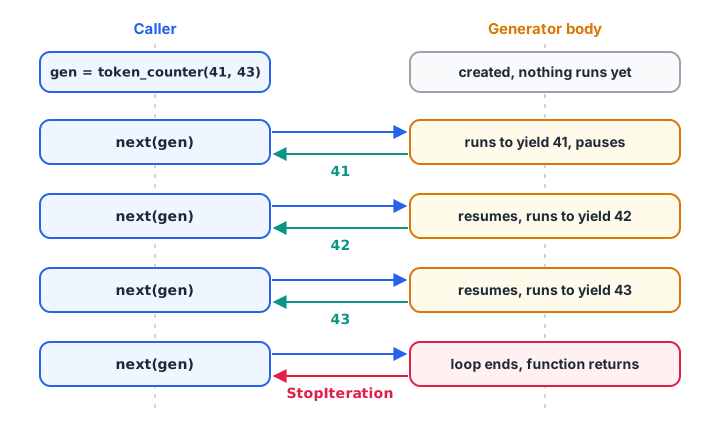
Control passes back and forth: each next() resumes the generator exactly where it paused.
yield vs return
return ends a function and hands back one value. yield hands back a value and keeps the function alive for more. A generator may also use a bare return to stop early, which raises StopIteration for the caller.
Quick check
What happens when you call a function that contains yield?
The body starts only when next() is called on the generator, directly or through a loop.
Why are generators memory efficient?
A function that builds a list must hold every item at once. A generator holds only its current state. For a million values the difference is dramatic.
import sys

def squares_list(n):
    return [i * i for i in range(n)]

def squares_gen(n):
    for i in range(n):
        yield i * i

lst = squares_list(1_000_000)
gen = squares_gen(1_000_000)

print("list object over 1 MB:", sys.getsizeof(lst) > 1_000_000)
print("generator object under 1 KB:", sys.getsizeof(gen) < 1_000)
print("same total:", sum(lst) == sum(gen))
The list's size grows with the data; the generator's size is fixed, a few hundred bytes. That is why generators are the right tool for large log files, database cursors and API pages. pandas uses the same idea when you read a CSV with chunksize, as shown in data cleaning with pandas.
Generator expressions
For simple cases you do not need a function. Swap the square brackets of a list comprehension for round brackets and you get a generator expression. When it is the only argument to a function, you can drop the extra brackets.
amounts = [1450, 980, 12300, 2300, 15400, 640]

as_list = [a * 1.18 for a in amounts]          # all values, now
as_gen = (a * 1.18 for a in amounts)           # values on demand

print(type(as_list).__name__, type(as_gen).__name__)
print(round(sum(a * 1.18 for a in amounts), 2))
print(max(a for a in amounts if a < 10000))
print(any(a > 15000 for a in amounts))         # stops at the first match
List comprehension [...] |
Generator expression (...) |
|
|---|---|---|
| Computes | All items immediately | One item per request |
| Memory | Grows with the data | Constant |
| Reusable | Yes | No, single pass |
Indexing, len() |
Yes | No |
| Best for | Results you reuse or inspect | Feeding sum, max, any, loops |
Quick check
Which is a generator expression?
Round brackets create a generator expression. Square brackets build a list, curly brackets a set.
Building a data pipeline with generators
The real power shows when you connect generators. Each stage takes an iterator in and yields items out. A row travels through every stage before the next row is even read, so memory stays flat no matter how large the input is.
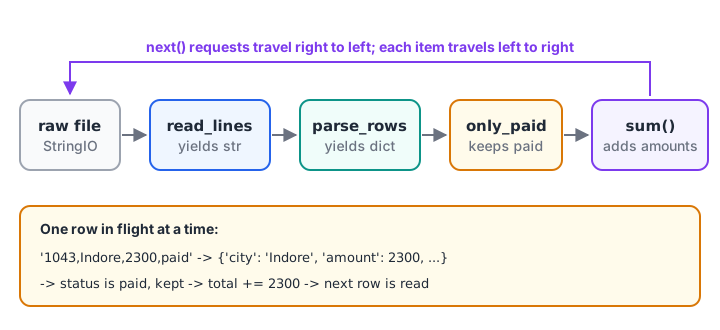
Each stage pulls one item from the stage before it, so only one row is in flight at a time.
import io

raw = io.StringIO("order_id,city,amount,status\n1041,Indore,1450,paid\n"
                  "1042,Bhopal,980,failed\n1043,Indore,2300,paid\n"
                  "1044,Ujjain,,paid\n1045,Indore,640,paid\n")

def read_lines(f):
    next(f)                                   # skip header
    for line in f:
        yield line.strip()

def parse_rows(lines):
    for line in lines:
        order_id, city, amount, status = line.split(",")
        if amount:                            # drop rows with no amount
            yield {"city": city, "amount": int(amount), "status": status}

def only_paid(rows):
    return (r for r in rows if r["status"] == "paid")

rows = only_paid(parse_rows(read_lines(raw)))
print("Paid Indore total:", sum(r["amount"] for r in rows if r["city"] == "Indore"))
Every function is short and testable on its own. You could swap io.StringIO for a real file from Python CSV files and the pipeline would handle a 5 GB export with the same few kilobytes of memory.
Delegating with yield from
yield from other_iterable yields every item from another iterable or generator, one by one. It is the clean way to flatten nested data or to split a generator into helpers.
monthly_files = {
    "2026-09": [412, 298],
    "2026-10": [431, 305, 77],
    "2026-11": [450],
}

def all_orders(files):
    for month in sorted(files):
        yield from files[month]               # same as: for x in ...: yield x

print(list(all_orders(monthly_files)))
print(sum(all_orders(monthly_files)))
Infinite generators
Because a generator computes values only on demand, it can describe an endless sequence. You take as many items as you need with next() or itertools.islice().
from itertools import islice

def invoice_numbers(prefix, start=1):
    n = start
    while True:                               # never ends on its own
        yield f"{prefix}/{n:05d}"
        n += 1

numbers = invoice_numbers("IDR-2026")
print(next(numbers), next(numbers))
print(list(islice(numbers, 3)))               # the next three
Never call list() on an infinite generator: it will run until memory is exhausted. Generators also support send() and close() for two-way communication, but most data work never needs them. The Python generator documentation covers them.
Common mistakes with Python generators
- Expecting a result from the call.
squares_gen(5)returns a generator object, not numbers. Loop over it or wrap it inlist(). - Reusing an exhausted generator. The second pass is empty. Call the generator function again for a fresh one.
- Using
len()or indexing. Generators support neither. Convert to a list if you need them. - Late errors. Because work is lazy, a bad row raises its error when it is reached, not when the pipeline is built.
- Mixing
return valueandyieldexpecting the value back. A loop never sees a generator's return value. - Generators for tiny data. For ten items a list is simpler and easier to debug.
Key takeaways
yieldhands back a value and pauses the function with its state intact.- Calling a generator function returns a lazy iterator; nothing runs until
next(). - Generators use constant memory, regardless of how many values they produce.
- Generator expressions are the round-bracket cousin of list comprehensions.
- Chained generators form pipelines that process large files row by row.
yield fromdelegates to another iterable; infinite generators needisliceornext.
Next, Python closures show another way functions keep state between calls. Processing large exports with lazy pipelines is part of the Python foundation in the Debugshala analytics course that ends with real business datasets.
FAQ
What is a generator in Python?
A generator is a special iterator created by a function that contains yield. Each time you ask for a value with next() or a loop, the function runs until its next yield, returns that value and pauses. Generators produce values lazily, one at a time, so they use very little memory.
What is the difference between yield and return in Python?
return sends back a single value and ends the function; its local variables are gone. yield sends back a value but only pauses the function, keeping its local state so it can continue from the same line next time. A function with yield becomes a generator that can produce many values.
When should I use a generator instead of a list?
Use a generator when the data is large, possibly endless, or needed only once, such as summing a column in a huge file. Use a list when you need indexing, len(), several passes or random access. Generators save memory; lists offer flexibility and easier debugging.
Can a generator be reused in Python?
No. Once a generator has produced all its values, it is exhausted and further loops get nothing. To iterate again, call the generator function again to create a new generator object, or store the values in a list first if you need them several times.
Where can I practise Python generator questions?
Generators are a favourite topic in Python screening rounds, often as "what does this print?" questions about yield order. Run the token_counter example and predict each line first, then practise generator and yield MCQs on Debugshala Test. Debugshala in Indore offers a free demo class for its analytics course.
From the team behind this site
Go further with the Data Analytics Course at Debugshala
These tutorials are written by Debugshala, a training and placement institute at Old Palasia, Indore. The classroom course adds live mentoring, real projects and interview preparation.
- Offline classes at Old Palasia, Indore
- Free demo class before you pay
- Non-IT, fresher and year-gap friendly
- Placement assistance
700+ students placed · 200+ hiring partners · 4.9★ Google rating
