

Sorting in Python: sorted() vs sort(), key Functions and Ranks
Learn sorting in Python with sales data: sorted() vs list.sort(), reverse, key functions, sorting dicts by value, multi-column sorts and stable sorting.
Imagine the owner of a mobile accessories shop in Chhoti Gwaltoli asks you for "the salespeople, best first". Simple enough. Then she adds, "and if two people sold the same amount, put the one with fewer returns first". Then, "actually, group them by branch, and inside each branch, best first".
Each request is the same list of salespeople, put in a different order. What changes is the rule you use to compare two people: their sales, then their returns, then their branch and sales together.
In Python, that comparison rule is the key. You do not write the sorting algorithm yourself. You tell Python what value to look at for each item, and it does the rest.
Sorting in Python means arranging the items of an iterable in order using the built-in sorted() function or the list.sort() method, optionally guided by a key function that computes the value each item is compared by.
This lesson builds on list and dict comprehension and on the lists article. All examples target Python 3.12+, but sorting has worked this way for many years.
sorted() vs list.sort(): what is the difference?
Both use the same algorithm and accept the same key and reverse arguments. The difference is what they change and what they return.
sorted(iterable) |
my_list.sort() |
|
|---|---|---|
| Works on | Any iterable: list, tuple, set, dict, string | Lists only |
| Original data | Left unchanged | Reordered in place |
| Returns | A new sorted list | None |
| Use when | You need to keep the original order too | You no longer need the old order |
sales = [48000, 125000, 76500, 125000, 39900]

ranked = sorted(sales, reverse=True)
print("New list:", ranked)
print("Original:", sales)

sales.sort()
print("Sorted in place:", sales)

result = sales.sort()
print("sort() returns:", result)          # None, a classic trap

print(sorted("indore"))                   # a string becomes a sorted list of characters
print(sorted({"Ujjain", "Bhopal", "Indore"}))
The line result = sales.sort() is worth staring at. Writing sales = sales.sort() throws away your list and leaves you holding None. If you want the sorted list as a value, use sorted().
Quick check
What is the value of x after x = [3, 1, 2]; x = x.sort()?
list.sort() sorts in place and returns None, and that None was assigned back to x.
How does the key argument work?
The key argument takes a function. Python calls it once for each item, gets back a sort key, and orders the items by those keys. The original items are what end up in the result; the keys are only used for comparing.
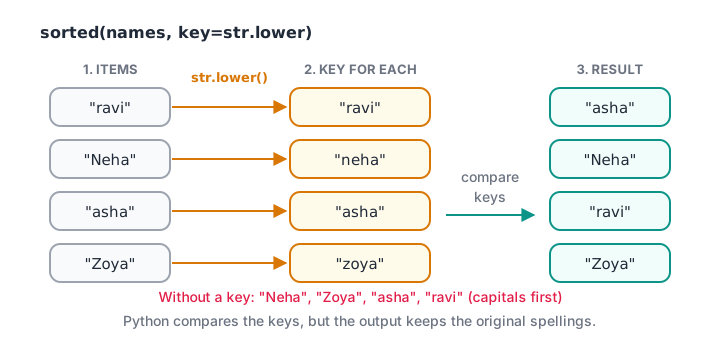
The key function turns each item into the value Python compares; the result still contains the original items.
names = ["ravi", "Neha", "asha", "Zoya", "mohit"]

print(sorted(names))                   # uppercase sorts before lowercase
print(sorted(names, key=str.lower))    # case-insensitive
print(sorted(names, key=len))          # shortest first

def last_digit(code):
    return int(code[-1])

codes = ["INV-27", "INV-31", "INV-19", "INV-42"]
print(sorted(codes, key=last_digit))
Notice that you pass the function itself, key=str.lower, without brackets. Writing key=str.lower() would call it immediately and fail.
Plain sorted(names) puts "Neha" and "Zoya" before "asha" because uppercase letters have smaller character codes than lowercase ones. key=str.lower compares lowercase copies while keeping the original spellings in the output.
Small one-off key functions are often written inline as lambda expressions, such as key=lambda row: row[1]. The lambda tutorial covers that syntax properly; in this article we use it only in its simplest form.
Quick check
Which call sorts the words by length, shortest first?
key expects a function object, so pass len without brackets and as a keyword argument.
Sorting lists of tuples and records
Real data usually comes as rows. Tuples compare item by item: first elements first, and only if those are equal, the second elements. So sorting rows without a key sorts by the first column, with later columns breaking ties.
from operator import itemgetter

team = [
    ("Ravi", "Rajwada", 125000, 3),
    ("Neha", "Palasia", 98000, 1),
    ("Asha", "Rajwada", 125000, 1),
    ("Mohit", "Palasia", 143000, 4),
]

print([r[0] for r in sorted(team)])                          # by name
by_sales = sorted(team, key=itemgetter(2), reverse=True)
for name, branch, amount, returns in by_sales:
    print(f"{name:<6} {branch:<8} {amount:>7,}  returns={returns}")
operator.itemgetter(2) builds a small function that returns item 2 of whatever it is given. It does the same job as lambda r: r[2], reads clearly and is slightly faster. For dictionaries, itemgetter("sales") works the same way.
How do you sort by multiple keys in Python?
Back to the shop owner's second request: sales high to low, and for equal sales, fewer returns first. One direction is descending and the other ascending. There are two clean ways to handle that.
Option 1: a tuple key with a negated number
Return a tuple from the key. Python compares the first part, then the second. To flip one numeric column, negate it.
team = [
    ("Ravi", "Rajwada", 125000, 3),
    ("Neha", "Palasia", 98000, 1),
    ("Asha", "Rajwada", 125000, 1),
    ("Mohit", "Palasia", 143000, 4),
]

def rank_key(row):
    name, branch, amount, returns = row
    return (-amount, returns)          # amount descending, returns ascending

for row in sorted(team, key=rank_key):
    print(row[0], row[2], row[3])
Asha and Ravi both sold Rs 1,25,000, so the second part of the key, returns, decides: Asha's 1 beats Ravi's 3.
Option 2: two stable passes
Negation only works for numbers. For text columns in mixed directions, rely on stability: Python's sort never reorders items whose keys are equal. Sort by the least important column first, then by the most important.
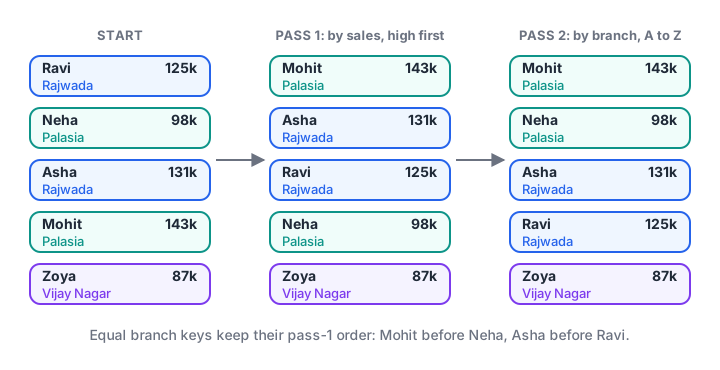
The second pass groups by branch; because the sort is stable, each branch keeps the sales order from the first pass.
team = [
    ("Ravi", "Rajwada", 125000), ("Neha", "Palasia", 98000),
    ("Asha", "Rajwada", 131000), ("Mohit", "Palasia", 143000),
    ("Zoya", "Vijay Nagar", 87000),
]

step1 = sorted(team, key=lambda r: r[2], reverse=True)   # secondary: sales, high first
step2 = sorted(step1, key=lambda r: r[1])                # primary: branch A to Z
for name, branch, amount in step2:
    print(f"{branch:<12} {name:<6} {amount:>7,}")
This two-pass trick is exactly what the official Sorting HOWTO recommends for complex orderings. It also matches how you would sort a spreadsheet by hand: last criterion first.
How do you sort a dictionary by value?
A dictionary has no sort() method, but sorted() accepts its items(), which are (key, value) pairs. Sort the pairs by their second element, and rebuild a dictionary if you need one. Since dictionaries keep insertion order, the new dictionary stays sorted.
branch_sales = {"Rajwada": 256000, "Palasia": 241000, "Vijay Nagar": 87000, "Sarafa": 312000}

ranked = sorted(branch_sales.items(), key=lambda kv: kv[1], reverse=True)
print(ranked)

top = dict(ranked[:2])
print("Top 2:", top)

print(sorted(branch_sales))                                  # keys only, A to Z
print(sorted(branch_sales, key=branch_sales.get))           # keys, by value
for rank, (branch, amount) in enumerate(ranked, start=1):
    print(f"#{rank} {branch:<12} Rs {amount:,}")
The dictionaries tutorial explains items() and get if either is unfamiliar. For "the top 3 out of a million", heapq.nlargest(3, data, key=...) avoids sorting everything.
Sorting text that contains numbers
Strings sort character by character, so "INV-10" comes before "INV-9": the character "1" is smaller than "9". Spreadsheet users meet this all the time. The fix is a key that pulls out the number.
invoices = ["INV-9", "INV-10", "INV-2", "INV-101", "INV-33"]
print(sorted(invoices))                                   # text order

print(sorted(invoices, key=lambda s: int(s.split("-")[1])))   # numeric order

amounts = ["1,250", "980", "12,400", "3,005"]
print(sorted(amounts, key=lambda s: int(s.replace(",", ""))))Common mistakes when sorting in Python
- Assigning the result of
sort().data = data.sort()setsdatatoNone. Usedata.sort()alone, ordata = sorted(data). - Calling the key function.
key=len()is wrong; passkey=len. - Mixing types.
sorted([3, "10", 7])raisesTypeErrorbecause Python 3 will not compare numbers with strings. Convert first. Nonein the data.Nonecannot be compared with numbers either. Use a key such aslambda x: (x is None, x or 0)to push missing values to the end.- Case surprises. Capitalised words sort first unless you use
key=str.lower. - Number-like text. "INV-10" sorts before "INV-9" until you extract the number in the key.
Key takeaways
sorted()returns a new list from any iterable;list.sort()reorders a list and returnsNone.reverse=Truegives descending order.key=takes a function that computes the comparison value for each item.- A tuple key sorts by several columns; negate a number to flip its direction.
- Sorting is stable, so two passes, least important first, handle any mix of directions.
- Sort a dict by value with
sorted(d.items(), key=lambda kv: kv[1]).
The next lesson tours the collections module, whose Counter.most_common() sorts counts for you.
FAQ
What is the difference between sort() and sorted() in Python?
sorted() is a built-in function that accepts any iterable and returns a new sorted list, leaving the original untouched. sort() is a list method that reorders the list in place and returns None. Both accept key and reverse. Use sorted() when you must keep the original order.
How do I sort a list in descending order in Python?
Pass reverse=True, as in sorted(sales, reverse=True) or sales.sort(reverse=True). This reverses the comparison while keeping the sort stable. For a single numeric column inside a tuple key, you can also negate the value, such as key=lambda r: -r[2].
Is Python's sort stable?
Yes. Python guarantees that sorted() and list.sort() are stable, meaning items with equal keys keep their original relative order. This makes multi-pass sorting reliable: sort by the secondary column first, then by the primary column, and the secondary order survives inside each group.
Which sorting algorithm does Python use?
CPython uses Timsort, a hybrid of merge sort and insertion sort that is fast on real data containing partly ordered runs. Since Python 3.11 it decides the order of merges with a refined policy known as Powersort. The worst case is O(n log n), and the sort is stable.
Where can I learn sorting and data handling in Python in Indore?
Debugshala teaches Python for analytics in classrooms at Old Palasia, Indore, in English and Hindi, and welcomes non-IT graduates and people with a year gap. Start with a free demo of Debugshala's analyst course in Old Palasia, and practise sorting questions on Debugshala Test.
From the team behind this site
Go further with the Data Analytics Course at Debugshala
These tutorials are written by Debugshala, a training and placement institute at Old Palasia, Indore. The classroom course adds live mentoring, real projects and interview preparation.
- Offline classes at Old Palasia, Indore
- Free demo class before you pay
- Non-IT, fresher and year-gap friendly
- Placement assistance
700+ students placed · 200+ hiring partners · 4.9★ Google rating
