

Python Custom Exceptions: Create Your Own Exception Classes
Learn Python custom exceptions: define your own error classes, build a hierarchy, add fields like row and column, chain errors and report bad data rows.
Think about a cheque that bounces at a bank branch in Indore. The bank does not hand it back with a note saying only "error". It attaches a return memo with a specific reason: "insufficient funds", "signature differs", "cheque older than three months".
Each reason leads to a different next step. Insufficient funds means you call the customer. A signature mismatch goes to the fraud desk. A stale cheque simply needs a fresh one. The memo also carries details: the cheque number, the amount and the date.
Custom exceptions work the same way. Python's built-in errors are the general word "error". Your own exception classes are the specific reasons on the memo, and the attributes you attach to them are the cheque number and amount.
A custom exception in Python is a user-defined class that inherits from Exception (or one of its subclasses), raised with raise to signal a specific, named problem that callers can catch separately from other errors.
This lesson follows Python exception handling, which covered try, except, raise and the built-in hierarchy. Examples target Python 3.12+.
Why create custom exceptions in Python?
Built-in exceptions are broad. When a data-loading function raises ValueError, the caller cannot tell whether a number was malformed, a date was in the future, or a GST rate was outside the allowed range. All three look identical.
def check_row(row):
    if "amount" not in row:
        raise ValueError("amount column missing")
    if float(row["amount"]) < 0:
        raise ValueError("amount is negative")

for row in [{"city": "Indore"}, {"amount": "-450"}, {"amount": "12,300"}]:
    try:
        check_row(row)
    except ValueError as err:
        print("ValueError:", err)
The third row fails inside float(), a plain parsing error, but the caller sees the same type for all three. The only way to tell them apart is to compare message strings, which breaks the moment someone rewords a message.
A custom exception gives each problem its own type. The type is something except can match on, and it documents your function: anyone reading the code sees the exact failures it can produce.
How do you create a custom exception class?
You define a class that inherits from Exception. The body can be just a docstring. Inheriting is what makes it raisable and catchable. Classes in general are covered in Python classes and objects, but you need only this one pattern here.
class NegativeAmountError(Exception):
    """Raised when a sales amount is below zero."""

def check_amount(amount):
    if amount < 0:
        raise NegativeAmountError(f"amount cannot be negative: {amount}")
    return amount

try:
    check_amount(-450)
except NegativeAmountError as err:
    print(type(err).__name__, "->", err)

print(issubclass(NegativeAmountError, Exception))
Three conventions are worth keeping. End the name with Error, as the built-ins do. Use a docstring rather than pass, because it tells readers when the error is raised. And put the message in the constructor call, so the traceback explains itself.
Should you inherit from Exception or ValueError?
Inherit from the built-in that matches the meaning. A negative amount is a bad value, so class NegativeAmountError(ValueError) lets existing except ValueError code keep catching it. If no built-in fits, inherit from Exception. Never inherit from BaseException, which is reserved for exits and Ctrl+C.
Quick check
Which class should a custom exception normally inherit from?
Inheriting from Exception keeps the error catchable by normal handlers. BaseException is reserved for exits and keyboard interrupts.
Build an exception hierarchy for your project
Real projects define a family. One base class represents "anything wrong with this package". Specific subclasses sit beneath it. The Python inheritance lesson explains the mechanics. Here you only need the effect: an except clause also catches every subclass of the class it names.
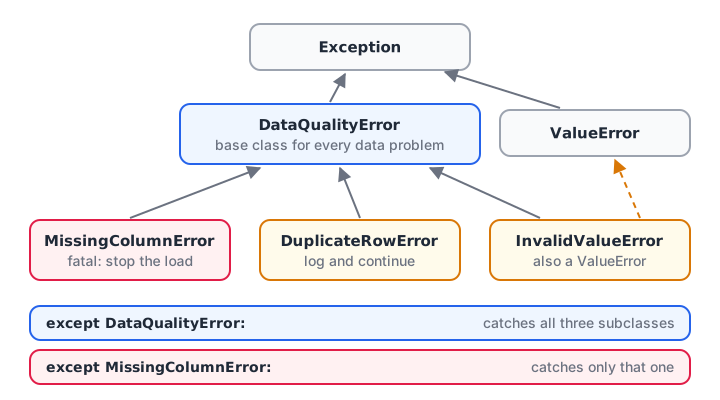
Catch DataQualityError for any data problem, or a subclass for one specific problem.
class DataQualityError(Exception):
    """Base class for every data problem in this project."""

class MissingColumnError(DataQualityError):
    """A required column is absent."""

class InvalidValueError(DataQualityError, ValueError):
    """A value cannot be used, such as a negative amount."""

class DuplicateRowError(DataQualityError):
    """The same order ID appears twice."""

problems = [MissingColumnError("no 'city'"), InvalidValueError("amount -450"),
            DuplicateRowError("order 1042 twice")]
for exc in problems:
    try:
        raise exc
    except MissingColumnError:
        print("Stop the load:", exc)
    except DataQualityError:
        print("Log and continue:", exc)
The caller chose two levels of detail. Missing columns are fatal, so they are caught first and stop the load. Every other data problem is caught by the base class and logged. Notice that InvalidValueError also inherits from ValueError, so older code that catches ValueError still works.
Quick check
MissingColumnError inherits from DataQualityError. Which clause catches a raised MissingColumnError?
An except clause catches the class it names and all of its subclasses.
How do you add extra data to a custom exception?
A message string is fine for people, but code often needs details: which row, which column, which value. Give the class an __init__ method that stores them as attributes and passes a readable message up to Exception with super().__init__().
class InvalidValueError(ValueError):
    def __init__(self, row, column, value, reason):
        self.row, self.column, self.value = row, column, value
        super().__init__(f"row {row}, column '{column}': {value!r} ({reason})")

try:
    raise InvalidValueError(17, "gst_rate", 0.45, "must be one of 0, 0.05, 0.12, 0.18, 0.28")
except InvalidValueError as err:
    print("Message:", err)
    print("Row to fix:", err.row)
    print("Column:", err.column, "| bad value:", err.value)
Calling super().__init__(message) matters. It stores the message in err.args, which is what str(err) prints and what logging tools record. Forget it, and the error prints as an empty string.
Adding notes to an exception
Since Python 3.11, any exception has an add_note() method. It attaches extra lines of context without changing the type or message, which helps when you re-raise an error from deep inside a loop.
class MissingColumnError(Exception):
    pass

def load(columns, file_name):
    try:
        if "amount" not in columns:
            raise MissingColumnError("required column 'amount' not found")
    except MissingColumnError as err:
        err.add_note(f"while loading {file_name}")
        raise

try:
    load(["order_id", "city"], "nov_sales.csv")
except MissingColumnError as err:
    print(err)
    print(err.__notes__)
Using custom exceptions in a data pipeline
The best place for custom exceptions is a validation step. Low-level code raises precise errors. A loader catches them row by row, collects them, and carries on. At the end you get clean rows plus a report of what was rejected and why.
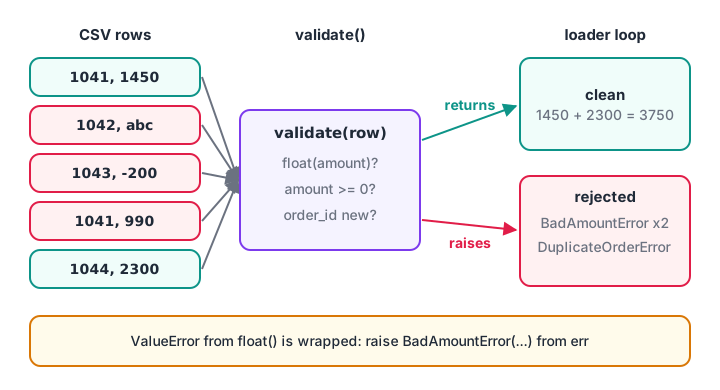
Raise precisely where the problem is found; handle it where you know what to do next.
import csv, io
from collections import Counter
class DataQualityError(Exception): pass
class BadAmountError(DataQualityError): pass
class DuplicateOrderError(DataQualityError): pass
raw = io.StringIO("order_id,amount\n1041,1450\n1042,abc\n1043,-200\n1041,990\n1044,2300\n")

def validate(row, seen):
    try:
        amount = float(row["amount"])
    except ValueError as err:
        raise BadAmountError(f"order {row['order_id']}: not a number") from err
    if amount < 0:
        raise BadAmountError(f"order {row['order_id']}: negative amount")
    if row["order_id"] in seen:
        raise DuplicateOrderError(f"order {row['order_id']}: duplicate")
    seen.add(row["order_id"])
    return amount

clean, rejected, seen = [], [], set()
for row in csv.DictReader(raw):
    try:
        clean.append(validate(row, seen))
    except DataQualityError as err:
        rejected.append(err)

print("Clean total:", sum(clean))
print("Rejected by type:", dict(Counter(type(e).__name__ for e in rejected)))
for e in rejected:
    print(" -", e)
Look at the raise ... from err line. The low-level ValueError from float() is wrapped in your own BadAmountError, and the original stays attached as __cause__. The loader deals with one family of errors, but nothing is lost for debugging. Reading CSV text this way was covered in Python CSV files.
Custom exception or built-in exception?
Do not create a class for every possible problem. A built-in is often the clearest choice, and readers already know what it means.
| Situation | Use | Why |
|---|---|---|
| Wrong argument value, used once | ValueError |
Everyone understands it |
| Wrong argument type | TypeError |
Standard meaning |
| A problem callers must handle differently | Custom subclass | except can target it |
| A library or package with several failure modes | Base class plus subclasses | One catch-all, many specific cases |
| You need row, column or ID on the error | Custom class with attributes | Code can read the details |
A good test: will any caller ever write except ThisError? If no caller will catch it by name, a built-in with a clear message is enough.
Common mistakes with custom exceptions
- Inheriting from
BaseException. It escapesexcept Exceptionhandlers. Inherit fromException. - Skipping
super().__init__(). The error then prints an empty message anderr.argsis empty. - Too many classes. Ten error types that nobody catches separately just add noise.
- Vague names.
MyErrororCustomExceptionsays nothing. Name the problem:DuplicateOrderError. - Losing the original error. When wrapping, use
raise NewError(...) from errso the cause survives. - Catching your base class too early. Catch it where you can actually decide what to do, usually in the loader or at the top of the script.
Key takeaways
- A custom exception is a class that inherits from
Exceptionor a fitting built-in. - Name it after the problem and end the name with
Error. - Give a project one base error and specific subclasses beneath it.
- Store details like row and column as attributes, and call
super().__init__(message). - Wrap low-level errors with
raise ... from errto keep the cause. - Create a custom class only when some caller will catch it by name.
Next, learn how classes themselves work in Python classes and objects. Writing validation layers like this for messy sales exports is regular project work in Debugshala's data analytics course, where validation scripts are built in class.
FAQ
How do you create a custom exception in Python?
Define a class that inherits from Exception, for example class InvalidRateError(Exception): pass. Then raise it with raise InvalidRateError("rate must be under 0.28") and catch it with except InvalidRateError. Add an __init__ method if you want to store extra details such as a row number.
Why use custom exceptions instead of ValueError?
Custom exceptions let callers handle different problems differently without parsing message text. A loader can stop on MissingColumnError but only log InvalidValueError. They also document which failures a function can produce. Inheriting from ValueError keeps backward compatibility with code that already catches it.
What is the difference between Exception and BaseException in Python?
BaseException is the root of all exceptions, including SystemExit and KeyboardInterrupt, which should normally end a program. Exception is the subclass for ordinary errors. Custom exceptions should inherit from Exception so that except Exception handlers catch them while Ctrl+C still stops the script.
Do custom exceptions need an __init__ method?
__init__ method?No. A class with only a docstring works, and the message you pass is stored automatically. Add __init__ only when you want named attributes such as row or column. If you do, call super().__init__(message) so the error still prints its message and logging tools can record it.
Where can I practise Python exception questions in Indore?
Debugshala, at Old Palasia in Indore, teaches error handling inside its data analytics course, in English and Hindi, with a free demo class before you pay. To test yourself first, practise custom exception MCQs on Debugshala Test, which has free coding and aptitude quizzes.
From the team behind this site
Go further with the Data Analytics Course at Debugshala
These tutorials are written by Debugshala, a training and placement institute at Old Palasia, Indore. The classroom course adds live mentoring, real projects and interview preparation.
- Offline classes at Old Palasia, Indore
- Free demo class before you pay
- Non-IT, fresher and year-gap friendly
- Placement assistance
700+ students placed · 200+ hiring partners · 4.9★ Google rating
