

Python break, continue and pass Statements with Examples
Learn when to use break, continue and pass in Python loops, with flow diagrams, for-else searches, nested loops and data-cleaning examples you can run.
Imagine you are checking a day's UPI transactions for a pharmacy in Palasia, one row at a time. Some rows are refunds you don't care about today, so you skip them. If you spot a payment over ₹50,000, policy says stop checking and call the owner at once.
Now imagine one step of your checklist isn't written yet. Your manager says, "We will add GST checks there later." You still need a line in the checklist so it doesn't look broken.
Skipping a refund and moving to the next row is continue. Stopping the whole check at the large payment is break. The empty "add later" line is pass. Three tiny keywords, three very different jobs.
In Python, break exits the nearest enclosing loop, continue jumps to the next iteration of that loop, and pass is a null statement that does nothing and exists only to fill a place where a statement is required.
How break, continue and pass change loop flow
A normal loop runs its body once per item, top to bottom. break and continue are the two ways to leave the body early, and they go to different places. pass does not change the flow at all.
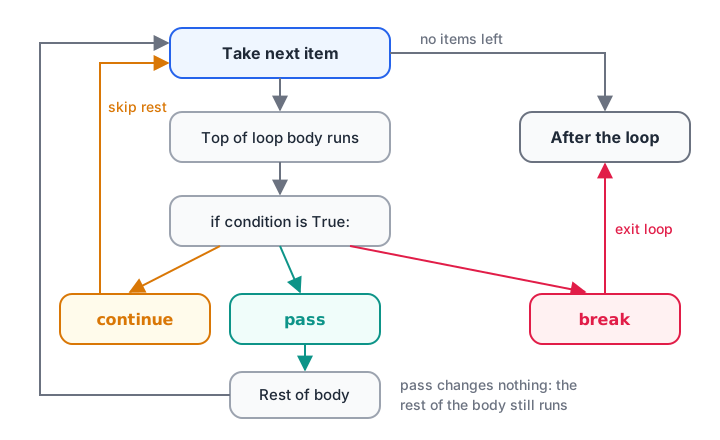
break leaves the loop, continue goes back for the next item, pass simply falls through to the next line.
| Statement | What happens next | Typical analyst use |
|---|---|---|
break |
Loop ends; code after the loop runs | Stop at the first match or the first fatal error |
continue |
Rest of this iteration is skipped; next item starts | Skip blanks, refunds, test records |
pass |
Nothing; the next line runs as usual | Placeholder for code you will write later |
All three need a loop or a block around them. If you are not yet comfortable with loops, read the for loop and while loop tutorials first.
Quick check
A loop runs over [1, 2, 3, 4]. Its body is "if n == 3: continue", then "print(n)". What gets printed?
continue skips the print only for n == 3, then the loop carries on with 4.
Quick check
When does the else block of a for loop run?
break skips the else block. If the loop runs through every item, else runs once at the end.
What does break do in Python?
break ends the loop the moment it runs. Python skips any remaining items and continues with the first line after the loop. It almost always sits inside an if, because an unconditional break would end the loop on the first pass.
transactions = [1200, 450, -300, 8000, 62000, 900, 1500]
LIMIT = 50000

checked = 0
for amount in transactions:
    checked += 1
    if amount > LIMIT:
        print(f"Alert: Rs {amount:,} needs approval. Stopping.")
        break
    print(f"Row {checked}: Rs {amount:,} ok")

print(f"Checked {checked} of {len(transactions)} rows")
The last two transactions are never looked at. That is the point: once a stop condition is met, more work is wasted, or even risky.
break with while True
A common pattern is an "endless" loop that stops only when a condition inside it is met. It reads naturally when you can't know the number of steps in advance, such as reading pages of results until one comes back empty.
pages = [[101, 102, 103], [104, 105], [106], []]   # simulated API pages

page_no = 0
all_ids = []
while True:
    batch = pages[page_no]
    if not batch:
        print(f"Page {page_no} is empty, done.")
        break
    all_ids.extend(batch)
    page_no += 1

print("Collected IDs:", all_ids)
What does continue do in Python?
continue stops the current iteration only. The loop itself keeps going with the next item. Use it to filter out rows early so the main logic below it stays flat and readable.
rows = ["  Indore ", "", "Bhopal", "TEST", None, "ujjain", "Dewas"]

clean = []
for city in rows:
    if not city:            # catches "" and None
        continue
    city = city.strip()
    if city.upper() == "TEST":
        continue
    clean.append(city.title())

print("Kept:", clean)
print("Skipped:", len(rows) - len(clean))
Without continue, you would wrap the useful code in nested if blocks. The guard clause style above, "skip what you don't want, then handle the rest", is easier to read and to extend with more rules. The if...else tutorial explains the conditions themselves.
i = 0
odd_total = 0
while i < 10:
    i += 1                  # update first
    if i % 2 == 0:
        continue            # skip even numbers
    odd_total += i

print("Sum of odd numbers 1-9:", odd_total)
Using else with break: the search pattern
Python loops can have an else block. It runs only if the loop completes without a break. This sounds odd at first, but it solves a very common task: search for something, and do one thing if it is found and another if it is not.
invoices = ["INV-1001", "INV-1002", "INV-1007", "INV-1010"]
wanted = "INV-1005"

for inv in invoices:
    if inv == wanted:
        print(f"Found {wanted}")
        break
else:
    print(f"{wanted} is missing: raise it with accounts")

# Without for-else you need an extra flag variable
found = False
for inv in invoices:
    if inv == wanted:
        found = True
        break
print("Flag version, found =", found)
Read the else as "no break". If that wording helps, add a short comment like # no break next to it, as the comments tutorial suggests for anything a reader might misread.
break and continue in nested loops
In nested loops, break and continue only affect the loop they are written in, the innermost one. The outer loop carries on as if nothing happened.
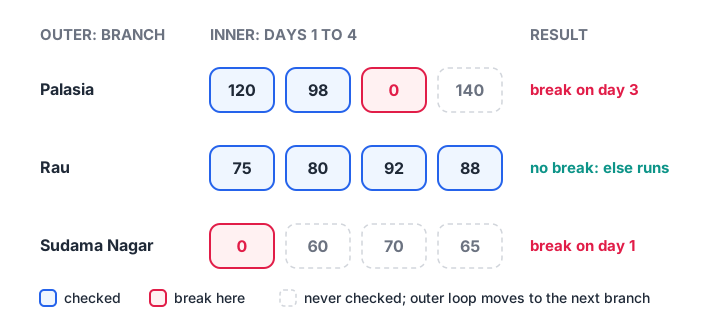
A break in the inner loop returns control to the outer loop, which moves on to the next branch.
Here each branch's daily sales are scanned until the first zero-sales day, which usually means the data feed stopped. Each branch gets its own scan.
branches = {
    "Palasia": [120, 98, 0, 140],
    "Rau": [75, 80, 92, 88],
    "Sudama Nagar": [0, 60, 70, 65],
}

for branch, sales in branches.items():
    for day, units in enumerate(sales, start=1):
        if units == 0:
            print(f"{branch}: feed stopped on day {day}")
            break
    else:
        print(f"{branch}: all {len(sales)} days present")
To stop both loops at once, the cleanest way is to put them inside a function and use return, which you will meet in Python functions. Avoid clever flag variables spread across both loops; they are easy to get wrong.
What does pass do in Python?
Python uses indentation to define blocks, and a block cannot be empty. pass fills the gap. It is common while you sketch the structure of a script before writing the details.
def check_gst(row):
    pass            # TODO: add GST validation next sprint

class SalesReport:
    pass            # fields will be added later

for month in ["Jan", "Feb", "Mar"]:
    if month == "Feb":
        pass        # February rules not decided yet
    else:
        print("Processing", month)

print(check_gst({"amount": 500}))   # a function with only pass returns None
pass and continue look similar inside a loop, but they are not the same. pass does nothing and lets the rest of the body run. continue skips the rest of the body. If the if block is the last thing in the loop body, you won't see a difference, which is why beginners mix them up.
Common mistakes with break, continue and pass
- Expecting break to exit all loops. It exits only the innermost loop. Use a function with
returnto leave several levels. - Using pass where you meant continue.
passwon't skip the code below it in the loop body. - Silencing errors with pass.
except: passhides every error, including real bugs. Catch a specific exception and at least log it, as shown in Python exception handling. - Infinite while loops. A
continueplaced before the counter update means the counter never changes. - Misreading for-else. The else runs when the loop was not broken, not when the loop was empty or failed.
- Overusing break. If a loop has three different breaks, a clear
whilecondition or a small function is usually easier to follow.
Key takeaways
breakends the nearest loop; code after the loop runs next.continueskips to the next item; use it as a guard clause to filter rows.passis a do-nothing placeholder for blocks you will fill in later.for ... elseruns the else only when no break happened, ideal for searches.- In nested loops, both
breakandcontinueaffect only the inner loop. - Never use
except: passto hide errors.
When a loop needs to choose between many cases, a long if/elif chain can get messy. The next tutorial, Python match-case, offers a cleaner way to branch on the shape of your data.
FAQ
What is the difference between break and continue in Python?
break stops the loop entirely and moves to the code after it, while continue stops only the current iteration and starts the next one. Use break when you have found what you need or hit a fatal problem. Use continue to skip an item and keep processing the rest.
What is the difference between pass and continue in Python?
pass does nothing, so the remaining lines in the loop body still run. continue skips those remaining lines and moves to the next iteration. pass also works outside loops, for empty functions or classes, whereas continue is valid only inside a loop.
Can I use break outside a loop in Python?
No. break and continue are valid only inside a for or while loop. Using them elsewhere raises SyntaxError: 'break' outside loop. To leave a function early, use return. To stop a whole script, call sys.exit(), usually only in command-line tools.
How do I break out of two nested loops in Python?
Put the nested loops in a function and use return when the condition is met; this exits every level at once. Alternatives include a flag variable checked by the outer loop, or the for-else pattern with continue and break, but the function approach is the most readable.
Where can I practise Python loops for analytics in Indore?
Debugshala holds classroom sessions at its Old Palasia campus in Indore, in English and Hindi, and its courses accept fresh graduates and non-IT learners. You can book a free demo of the analytics course run by Debugshala in Indore, and work through loop MCQs on Debugshala Test at your own pace.
From the team behind this site
Go further with the Data Analytics Course at Debugshala
These tutorials are written by Debugshala, a training and placement institute at Old Palasia, Indore. The classroom course adds live mentoring, real projects and interview preparation.
- Offline classes at Old Palasia, Indore
- Free demo class before you pay
- Non-IT, fresher and year-gap friendly
- Placement assistance
700+ students placed · 200+ hiring partners · 4.9★ Google rating
