

Python Modules and Imports: import, from, as and __name__
Learn Python modules and imports: import, from-import and aliases, writing your own module, how sys.path finds files, the __name__ guard and stdlib modules.
Think of a sweet shop in Sarafa that makes fifty items. The owner does not grind cardamom, roast besan and boil sugar syrup separately for every order. The basics are prepared once, kept in labelled containers on a shelf, and any cook can take what they need.
Over time the shop also buys some ready-made supplies, like packaged saffron, from trusted suppliers. The cooks never think about how the saffron was made. They just pick up the right packet.
Your Python code works the same way. Each labelled container is a module: a file of ready-made functions. Taking one off the shelf is an import. The packets bought from suppliers are the standard library and third-party libraries such as pandas.
A Python module is a file containing Python definitions and statements, such as functions, classes and variables, that other code can load and reuse with the import statement.
This lesson follows Python variable scope, because every module has its own global scope. Examples target Python 3.12+.
What is a module in Python?
Every .py file is a module. The file sales_utils.py becomes a module named sales_utils. Python also ships with hundreds of modules in its standard library, such as math, statistics, datetime, csv and json, documented at docs.python.org.
A module gives its contents a namespace. Writing statistics.mean means "the mean that lives inside statistics". Two modules can each define a function called load, and they never clash.
import math
import statistics

daily_sales = [12400, 9800, 15100, 11250, 13900]

print("Mean:", statistics.mean(daily_sales))
print("Median:", statistics.median(daily_sales))
print("Std dev:", round(statistics.stdev(daily_sales), 1))
print("Boxes of 12 needed for 130 units:", math.ceil(130 / 12))
print(type(math), math.__name__)
The ways to import in Python
There are four common forms. They differ in which names they create in your file.
| Statement | Name you use afterwards | When to use it |
|---|---|---|
import statistics |
statistics.mean(...) |
Default. Always clear where a name came from |
import pandas as pd |
pd.DataFrame(...) |
Long names with a community-standard alias |
from statistics import mean, median |
mean(...) |
A few names used very often |
from statistics import * |
Every public name, unqualified | Almost never: it hides origins and can overwrite your names |
import datetime as dt
from statistics import mean, median
from collections import Counter

orders = [("Vijay Nagar", 1450), ("Palasia", 980), ("Vijay Nagar", 2300)]
amounts = [a for _, a in orders]

print(mean(amounts), median(amounts))
print(Counter(area for area, _ in orders).most_common(1))
print(dt.date(2026, 11, 12).strftime("%d %b %Y"))
Aliases like pd for pandas, np for NumPy and dt for datetime are conventions. Using the standard alias makes your notebook easy for any analyst to read.
Where should imports go?
Put imports at the very top of the file, one per line, in three groups separated by a blank line: standard library first, then third-party libraries such as pandas, then your own modules. This layout comes from the PEP 8 style guide, and it lets a reader see every dependency of a script in a single glance.
How do you create your own module?
Save functions in a .py file and import it by its file name, without the .py. In a real project you would create sales_utils.py next to your script. The example below writes the file into a temporary folder so it runs anywhere, including in the browser.
import sys, tempfile, textwrap, importlib
from pathlib import Path

folder = Path(tempfile.mkdtemp())
(folder / "sales_utils.py").write_text(textwrap.dedent('''
    GST_RATE = 0.18

    def with_gst(amount):
        return round(amount * (1 + GST_RATE))

    def growth(old, new):
        return round((new - old) / old * 100, 1)
'''))

sys.path.insert(0, str(folder))     # let Python find the folder
importlib.invalidate_caches()

import sales_utils
print(sales_utils.with_gst(1000))
print(sales_utils.growth(42000, 48300), "%")
print(sales_utils.GST_RATE)
Your module is now as usable as any built-in one. Keeping helpers in a module means every notebook in a project can share one tested copy of with_gst, instead of each having its own slightly different version.
How does Python find a module?
When Python meets import sales_utils, it follows a fixed sequence.
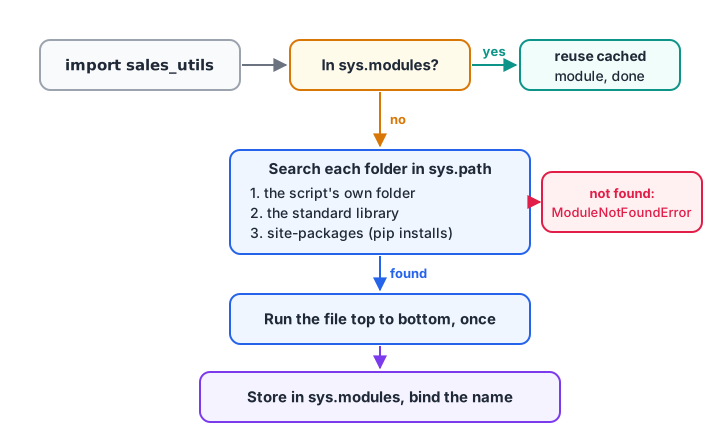
Python checks its cache first, then searches the folders in sys.path in order, and runs a module's code only the first time.
- Look in
sys.modules, a dictionary of modules already imported. If found, reuse it. - Otherwise search each folder in
sys.pathin order: the script's own folder first, then the standard library, thensite-packageswhere pip installs packages. - Run the module file top to bottom, once, to create a module object.
- Store it in
sys.modulesand bind the name in your file.
Step 3 means top-level code in a module runs only on the first import. The demo proves it with a print inside the module.
import sys, tempfile, importlib
from pathlib import Path

folder = Path(tempfile.mkdtemp())
(folder / "branch_config.py").write_text('print("loading branch_config...")\nBRANCHES = ["Indore", "Dewas"]\n')
sys.path.insert(0, str(folder))
importlib.invalidate_caches()

sys.modules.pop("branch_config", None)   # start fresh if re-run
import branch_config            # prints once
import branch_config            # cached: prints nothing
print("cached:", "branch_config" in sys.modules)
print(branch_config.BRANCHES)

importlib.reload(branch_config) # forces the file to run again
print("our folder is searched first:", sys.path[0] == str(folder))
importlib.reload() is handy in Jupyter when you edit a module and want the changes without restarting the kernel.
Quick check
You import the same module twice in one program. How many times does its top-level code run?
The first import runs the file and caches the module; the second import reuses the cached object.
What does if __name__ == "__main__" mean?
Every module has a built-in variable called __name__. When the file is imported, __name__ is the module's name. When the file is run directly, as in python report.py, Python sets __name__ to the string "__main__".
The guard below uses that to run demo or command-line code only when the file is executed, not when another file imports it. The example uses runpy to simulate both situations.
import runpy, tempfile
from pathlib import Path

code = '''
def monthly_report(total):
    return f"November total: Rs {total:,}"

print("__name__ is", __name__)
if __name__ == "__main__":
    print(monthly_report(486200))
'''
path = Path(tempfile.mkdtemp()) / "report.py"
path.write_text(code)

runpy.run_path(str(path), run_name="report")     # like: import report
print("---")
runpy.run_path(str(path), run_name="__main__")   # like: python report.py
When imported, only the function is defined and the report is not printed. When run as a script, the guarded block executes. Most scripts you write for scheduled reports should end with this guard.
Quick check
What is __name__ set to when you run python report.py directly?
The file being executed directly always gets __name__ == "__main__"; imported modules get their own name.
Standard library modules every analyst uses
Before installing anything, check whether the standard library already covers it.
| Module | What it does for an analyst |
|---|---|
statistics |
Mean, median, mode, standard deviation on plain lists |
math |
Rounding helpers, logs, square roots |
datetime |
Dates, times and differences between them |
collections |
Counter, defaultdict, namedtuple (lesson) |
csv, json |
Reading and writing data files |
pathlib |
Working with file paths |
random |
Sampling and shuffling |
itertools |
Grouping, combining and chaining iterables |
Use dir(module) to list a module's contents and help(module.function) to read its documentation without leaving Python.
import statistics
public = [n for n in dir(statistics) if not n.startswith("_")]
print(len(public), "public names, e.g.", public[:6])
print(statistics.mode.__doc__.splitlines()[0])
print("Has fmean?", hasattr(statistics, "fmean"))
Common mistakes with Python imports
- Naming your file after a module. A file called
pandas.py,csv.pyorrandom.pyin your project folder is found first and hides the real one. Rename it and delete any__pycache__folder. - Using
from module import *. It can overwrite your own names silently and makes code hard to trace. - Expecting edits to apply after re-importing. The cached module is reused; use
importlib.reload()or restart. - Circular imports. If
a.pyimportsb.pyandb.pyimportsa.py, one sees a half-loaded module. Move shared code into a third module. - Putting slow work at module top level. It runs on import. Wrap it in a function or the
__main__guard.
Key takeaways
- A module is a
.pyfile; importing runs it once and exposes its names. - Prefer
import moduleor a standard alias; usefrom ... importfor a few names. - Python searches
sys.modules, then the folders insys.path. - Use the
__name__ == "__main__"guard for script-only code. - Never name your files after standard or installed modules.
When one module is not enough, group several into a folder. That is the subject of the next lesson, Python packages. If you want hands-on help organising analysis code into reusable modules, Debugshala's Indore data analytics training covers it in class projects.
FAQ
What is a module in Python with an example?
A module is a .py file whose functions, classes and variables can be reused through import. For example, import statistics loads the standard library's statistics module, and statistics.mean([10, 20, 30]) returns 20. Any file you write, such as sales_utils.py, can be imported the same way as import sales_utils.
What is the difference between import and from import in Python?
import statistics binds the module name, so you write statistics.mean(). from statistics import mean binds only the function, so you write mean(). Both load the whole module once. The first keeps origins clear; the second is shorter when you use a few names often.
Why is if __name__ == "__main__" used in Python?
if __name__ == "__main__" used in Python?It lets a file act as both a reusable module and a runnable script. Code under the guard runs only when the file is executed directly, because Python then sets __name__ to "__main__". When another file imports it, __name__ is the module name and the guarded code is skipped.
Why does Python say ModuleNotFoundError?
ModuleNotFoundError means Python searched every folder in sys.path and did not find the module. Common causes are a typo in the name, a package not installed in the active environment, or running the script from a different folder. Check with pip list inside the right virtual environment.
Where can I practise Python import and module questions?
Module and import questions appear often in Python interviews and online tests. You can attempt Python module MCQs on Debugshala Test for free. For classroom practice in Indore, Debugshala's Old Palasia campus offers a free demo of its data analytics programme.
From the team behind this site
Go further with the Data Analytics Course at Debugshala
These tutorials are written by Debugshala, a training and placement institute at Old Palasia, Indore. The classroom course adds live mentoring, real projects and interview preparation.
- Offline classes at Old Palasia, Indore
- Free demo class before you pay
- Non-IT, fresher and year-gap friendly
- Placement assistance
700+ students placed · 200+ hiring partners · 4.9★ Google rating
