

Python Closures: Nested Functions, nonlocal and Factories
Learn Python closures: nested functions that remember outer variables, __closure__ cells, nonlocal state, function factories and the late-binding loop trap.
Walk into a clothing store in Indore on the first day of the Diwali sale. The staff use price-tagging guns. Before opening, the manager sets one gun to "10% off" and another to "25% off". After that, nobody touches the settings.
A staff member picks up the 25% gun and tags sarees all day. The gun does not need to be told the discount each time; it remembers what the manager set. The manager may have left for a meeting, but the setting stays inside the gun.
That is a closure. The manager setting up the gun is the outer function. The gun is the inner function that gets returned. The remembered "25%" is a captured variable, kept alive even though the outer function has finished.
A closure in Python is a nested function object that retains access to variables from its enclosing function's scope after that enclosing function has returned, so the inner function carries its own remembered data.
The Python variable scope lesson introduced the enclosing scope and nonlocal; this lesson shows what closures are good for. It follows Python generators, another way functions keep state. Examples target Python 3.12+.
What is a closure in Python?
Three conditions make a closure. There is a nested function. The nested function uses a variable from the outer function. And the outer function returns the nested function, so it outlives the outer call.
def make_discount(percent):
    def apply(price):
        return round(price * (1 - percent / 100), 2)
    return apply

sale_10 = make_discount(10)
sale_25 = make_discount(25)

print(sale_10(2400), sale_25(2400))
prices = [999, 1450, 3200]
print([sale_25(p) for p in prices])
print(sale_25.__name__, "remembers percent =", sale_25.__closure__[0].cell_contents)
When make_discount(25) returns, its local variable percent would normally disappear. But apply still needs it, so Python keeps it alive and attaches it to the returned function. Each call to make_discount creates a fresh variable, so sale_10 and sale_25 never interfere.
How do closures remember values?
Python stores each captured variable in a small container called a cell. The outer function and the inner function both point to the same cell. When the outer function finishes, the cell stays, because the inner function still refers to it.
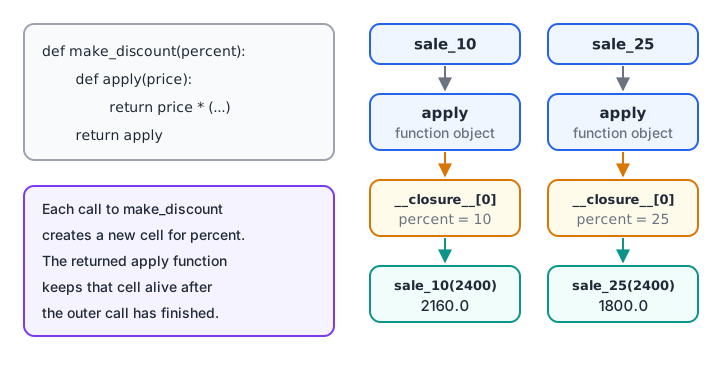
Every call to the outer function creates a new cell, so each closure carries its own value.
def make_gst_calculator(rate, label):
    def calc(amount):
        return f"{label}: {amount} + {round(amount * rate, 2)} GST"
    return calc

gst18 = make_gst_calculator(0.18, "Standard")
print(gst18(1450))
print("Free variables:", gst18.__code__.co_freevars)
print("Cell values:", [c.cell_contents for c in gst18.__closure__])

def plain(amount):
    return amount
print("A normal function has no closure:", plain.__closure__)
__code__.co_freevars lists the names the function borrows from outside, and __closure__ holds a cell for each one. A normal top-level function has __closure__ set to None. You rarely inspect these in real code, but they prove the remembered values are genuinely attached to the function.
Quick check
Which keyword lets an inner function reassign a variable of its enclosing function?
nonlocal makes the assignment update the enclosing variable's cell instead of creating a new local.
Changing captured state with nonlocal
Reading a captured variable needs nothing special. Assigning to it does: without nonlocal, Python would treat the name as a new local variable of the inner function. With nonlocal, the closure can update its own private state between calls.
def make_running_total():
    total = 0
    count = 0
    def add(amount):
        nonlocal total, count
        total += amount
        count += 1
        return f"{count} bills, total {total}, average {total / count:.1f}"
    return add

counter_a = make_running_total()
counter_b = make_running_total()
for bill in [1450, 980, 2300]:
    print("A:", counter_a(bill))
print("B:", counter_b(640))
Each counter keeps its own total, hidden from the rest of the program. Nothing outside can accidentally reset it, which is the main attraction compared with a global variable.
Function factories for data work
Closures shine as function factories: functions that build configured functions. In analysis you often need many similar rules (band this column, validate that range), and a factory lets you write the logic once and create each variant in one line.
import pandas as pd

def make_band(edges, labels):
    def band(value):
        for edge, label in zip(edges, labels):
            if value < edge:
                return label
        return labels[-1]
    return band

def make_range_check(low, high):
    return lambda v: low <= v <= high

order_band = make_band([1000, 5000], ["small", "medium", "large"])
valid_qty = make_range_check(1, 50)

df = pd.DataFrame({"amount": [640, 1450, 12300, 2300], "qty": [1, 3, 80, 2]})
df["band"] = df["amount"].map(order_band)
df["qty_ok"] = df["qty"].map(valid_qty)
print(df.to_string(index=False))
The lambda inside make_range_check is a closure too: it captures low and high. Short lambda functions are a natural fit for small factories like this.
The late-binding trap in loops
Closures look up a captured variable's value when they are called, not when they are created. If you build functions inside a loop, they all share the loop variable's single cell and see its final value.
rates = [0.05, 0.12, 0.18]

buggy = [lambda amt: round(amt * r, 2) for r in rates]
print("Buggy:", [f(1000) for f in buggy])          # all use 0.18

fixed = [lambda amt, r=r: round(amt * r, 2) for r in rates]
print("Default arg:", [f(1000) for f in fixed])

def make_tax(r):
    return lambda amt: round(amt * r, 2)
factory = [make_tax(r) for r in rates]
print("Factory:", [f(1000) for f in factory])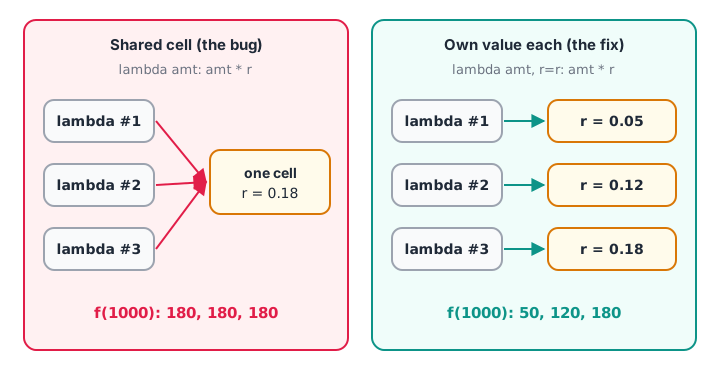
Shared cell: every lambda reads r at call time. Default argument or factory: each function gets its own value.
The default-argument fix works because default values are evaluated once, at definition time. The factory fix works because each make_tax(r) call creates a new cell. The factory is usually clearer to read.
Quick check
What does this print? fs = [lambda: i for i in range(3)]; print([f() for f in fs])
Every lambda shares the same i and reads it when called, after the loop has finished with i = 2.
Closures vs classes vs functools.partial
A closure and a small class can do the same job. The functools.partial helper is a third option when you only need to fix some arguments.
from functools import partial

def apply_discount(price, percent):
    return round(price * (1 - percent / 100), 2)

class Discount:
    def __init__(self, percent):
        self.percent = percent
    def __call__(self, price):
        return apply_discount(price, self.percent)

festive = partial(apply_discount, percent=25)
print(festive(2400), Discount(25)(2400), apply_discount(2400, 25))| Option | Best when | Downside |
|---|---|---|
| Closure | One behaviour, a little hidden state | State is hard to inspect or change later |
Class with __call__ |
Several methods or visible, changeable state | More code |
functools.partial |
You only need to pre-fill arguments | No custom logic of its own |
Closures are the basis of decorators
A decorator is a closure that receives a function and returns a wrapped version of it. The wrapper remembers the original function in a cell, exactly like apply remembered percent.
def count_calls(func):
    calls = 0
    def wrapper(*args):
        nonlocal calls
        calls += 1
        print(f"{func.__name__} call #{calls}")
        return func(*args)
    return wrapper

def monthly_total(values):
    return sum(values)

monthly_total = count_calls(monthly_total)
print(monthly_total([412, 298]))
print(monthly_total([431]))
The @decorator syntax and functools.wraps are the subject of the next lesson, Python decorators.
Common mistakes with Python closures
- Forgetting
nonlocalwhen assigning.total += amountwithout it raisesUnboundLocalError. - Creating closures in a loop without binding the value. All of them see the last value. Use a default argument or a factory.
- Calling the inner function inside the outer one.
return apply()returns a value;return applyreturns the function. - Hiding too much state. If you keep adding captured variables, a small class is easier to debug.
- Capturing a large object by accident. A closure keeps its captured DataFrame alive in memory as long as the function exists.
Key takeaways
- A closure is an inner function that remembers outer variables after the outer call returns.
- Captured variables live in cells, visible through
__closure__. - Each call of the outer function creates fresh cells, so closures do not interfere.
- Use
nonlocalto update captured state. - Function factories create configured functions such as discounters and validators.
- Late binding affects loops; fix it with a default argument or a factory.
Continue with Python decorators, which are built entirely on closures. Writing reusable cleaning rules with factories like make_band is the sort of practical Python taught in Debugshala's Old Palasia data analytics sessions.
FAQ
What is a closure in Python with an example?
A closure is a nested function that keeps access to variables from the function that created it. In make_discount(25), the returned apply function remembers percent = 25 and uses it on every call, long after make_discount has finished. Each call to the outer function creates an independent closure.
What is the difference between a nested function and a closure?
Every closure is a nested function, but not every nested function is a closure. A nested function becomes a closure when it uses variables from the enclosing function and survives beyond that function's call, usually by being returned. A helper that is only called inside its parent and uses no outer variables is just a nested function.
Why use closures instead of global variables?
Closures keep state private to one function, so other code cannot read or change it by accident. Each closure also has its own copy of the state, so you can create many independent counters or calculators. Global variables are shared by everything, which makes bugs harder to trace.
What is the late binding problem in Python closures?
Closures read captured variables when called, not when created. Functions created in a loop therefore all see the loop variable's last value. Fix it by binding the current value as a default argument, lambda amt, r=r: ..., or by creating each function through a factory call.
How can I practise closures for Python interviews in Indore?
Closure questions usually test late binding, nonlocal and how decorators work. Predict the output of each example above before running it, then try closure and nested-function questions on Debugshala Test. Debugshala's data analytics course at Old Palasia, Indore, begins with a free demo class, in English and Hindi.
From the team behind this site
Go further with the Data Analytics Course at Debugshala
These tutorials are written by Debugshala, a training and placement institute at Old Palasia, Indore. The classroom course adds live mentoring, real projects and interview preparation.
- Offline classes at Old Palasia, Indore
- Free demo class before you pay
- Non-IT, fresher and year-gap friendly
- Placement assistance
700+ students placed · 200+ hiring partners · 4.9★ Google rating
