

Python Operators: Arithmetic, Comparison, Logical and More
Learn every Python operator family with runnable examples: arithmetic, comparison, logical, assignment, membership and identity, plus the precedence rules.
Picture the billing desk at a wholesale grocery in Siyaganj. The clerk multiplies the rate by the quantity, subtracts a discount, checks whether the bill crosses the customer's credit limit, and asks one more question: is this a regular customer and have they paid last month's dues?
Every one of those small decisions is an operation. Multiply, subtract, compare, combine two yes/no answers. The clerk does them in a fixed order without thinking: the discount comes off the bill, not off the rate.
Python's operators are the same set of moves written as symbols, and Python also follows a fixed order when a line contains several of them.
An operator in Python is a symbol or keyword, such as +, ==, and or in, that performs an operation on one or more values (called operands) and produces a new value.
You will use the variables from Python variables and literals as operands, and the f-strings from Python input and output to show results.
Arithmetic operators in Python
Arithmetic operators do the maths. Most behave as on a calculator, but three deserve special attention: /, // and %.
| Operator | Meaning | Example | Result |
|---|---|---|---|
+ |
addition | 17 + 5 |
22 |
- |
subtraction | 17 - 5 |
12 |
* |
multiplication | 17 * 5 |
85 |
/ |
true division, always a float | 17 / 5 |
3.4 |
// |
floor division | 17 // 5 |
3 |
% |
modulus (remainder) | 17 % 5 |
2 |
** |
power | 17 ** 2 |
289 |
rate, qty = 42.5, 12
print("Bill:", rate * qty)
print("After Rs 50 off:", rate * qty - 50)
print("Split between 4 shops:", rate * qty / 4)
print("Square of qty:", qty ** 2)
print("10 / 2 is", 10 / 2)    # still a float
Floor division and modulus: packing problems
// answers "how many full groups?" and % answers "how many are left over?". Together they solve the packing and scheduling questions analysts meet all the time.
units = 1000
per_carton = 12

full_cartons = units // per_carton
loose_units = units % per_carton
print("Full cartons:", full_cartons)
print("Loose units:", loose_units)
print("Check:", full_cartons * per_carton + loose_units)

minutes = 135
print(f"{minutes} minutes = {minutes // 60} h {minutes % 60} min")
print("Is 2026 even?", 2026 % 2 == 0)
n % 2 == 0 is the classic test for an even number. With negative numbers, // rounds down, so -7 // 2 is -4, not -3. That rarely matters in sales data, but it surprises people in interviews.
Comparison operators
Comparison operators compare two values and give back a boolean: True or False. They are the questions behind every decision your program makes.
| Operator | Meaning | Example | Result |
|---|---|---|---|
== |
equal to | 5 == 5.0 |
True |
!= |
not equal to | 5 != 3 |
True |
>, < |
greater, less than | 90 > 75 |
True |
>=, <= |
greater or equal, less or equal | 75 >= 75 |
True |
target = 50000
sales = 53200
print("Hit target?", sales >= target)
print("Exactly on target?", sales == target)

# Chained comparison: is the score in the B band?
score = 82
print("B band:", 75 <= score < 90)

print("Same city?", "indore" == "Indore")
print("Alphabetical:", "Bhopal" < "Indore")
Chained comparisons like 75 <= score < 90 read just like maths and mean "75 is at most score, and score is below 90". String comparison is case-sensitive and works letter by letter, which is why "indore" == "Indore" is False.
Logical operators: and, or, not
Logical operators combine yes/no answers. They are written as plain English words in Python.
a and bis true only if both are true.a or bis true if at least one is true.not aflips true to false and false to true.
is_regular = True
dues_paid = False
bill = 18500
credit_limit = 20000

print("Give credit?", is_regular and dues_paid)
print("Allow order?", bill <= credit_limit or is_regular)
print("Dues pending?", not dues_paid)
print("Big regular order?", is_regular and bill > 15000)
Python stops evaluating as soon as it knows the answer. In False and anything, the second part is never checked. This is called short-circuit evaluation, and it lets you write safe checks like count > 0 and total / count > 100 without dividing by zero.
or also returns the first truthy value itself, not just True. That makes city = raw_city or "Unknown" a neat way to fill blanks:
raw_city = ""
city = raw_city or "Unknown"
print("City:", city)

count = 0
safe = count > 0 and 500 / count > 100
print("Average above 100?", safe)   # no ZeroDivisionError
Quick check
What does "" or "Unknown" return?
or returns the first truthy value. The empty string is falsy, so the result is "Unknown".
Assignment operators
The plain = assigns. The combined versions update a variable using its current value, which saves typing in running totals.
| Operator | Same as |
|---|---|
x += 5 |
x = x + 5 |
x -= 5 |
x = x - 5 |
x *= 2 |
x = x * 2 |
x /= 2 |
x = x / 2 |
x //= 2, x %= 2, x **= 2 |
the same pattern |
cash = 10000
cash += 2500      # sale
cash -= 800       # supplier payment
cash *= 1.02      # 2 percent interest
print("Cash:", round(cash, 2))
Membership and identity operators
in and not in check whether a value appears inside a collection or a string. They read naturally and are used constantly when filtering data.
metro_cities = ["Mumbai", "Delhi", "Bengaluru", "Chennai"]
print("Indore" in metro_cities)
print("Indore" not in metro_cities)
print("ORD" in "ORD-2026-0147")

discount = None
print("No discount set?", discount is None)

a = [1, 2]
b = [1, 2]
print("Equal values?", a == b, "| Same object?", a is b)
is checks whether two names point to the same object in memory, while == checks whether the values are equal. Use is almost only with None: write x is None, not x == None.
A note on bitwise operators
Python also has bitwise operators (&, |, ^, ~, <<, >>) that work on the binary digits of integers. You rarely need them in basic Python, but you will meet & and | again in pandas, where they combine filter conditions such as (df["city"] == "Indore") & (df["sales"] > 5000).
What is operator precedence in Python?
When a line has several operators, Python does not simply go left to right. It follows precedence rules, like the BODMAS rule from school maths.
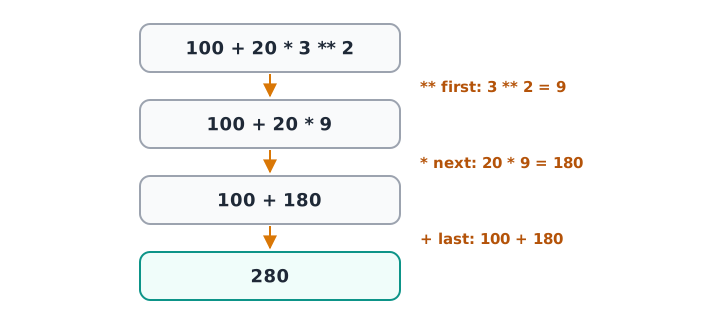
Python works through 100 + 20 * 3 ** 2 in three steps, highest precedence first.
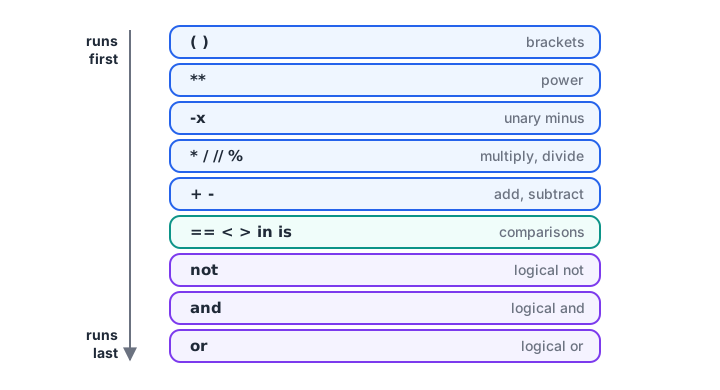
Higher rungs run first. When in doubt, add brackets.
print(100 + 20 * 3 ** 2)       # 3**2, then *20, then +100
print((100 + 20) * 3)          # brackets first
print(-2 ** 2, (-2) ** 2)      # ** beats the minus sign
print(2 ** 3 ** 2)             # ** groups right to left: 2 ** 9

cost, price = 75, 120
print("Margin %:", (price - cost) / price * 100)
print("Wrong margin:", price - cost / price * 100)
The last two lines are a real bug pattern. The correct margin is 37.5 percent. Without brackets, cost / price * 100 runs first, giving 62.5, and the "margin" becomes 57.5. Add brackets whenever a formula has more than one step; they cost nothing and make intent obvious.
Putting operators together: a store performance check
Real analysis mixes several operator families in a few lines. Here a regional manager compares two months for one store and flags it for review.
oct_sales, nov_sales = 4_20_000, 3_78_000
oct_orders, nov_orders = 1400, 1350
city = "Indore"
review_cities = ["Indore", "Bhopal", "Ujjain"]

change_pct = (nov_sales - oct_sales) / oct_sales * 100
avg_order = nov_sales / nov_orders
fell_sharply = change_pct <= -5
needs_review = fell_sharply and city in review_cities

print(f"Sales change: {change_pct:.1f}%")
print(f"Average order: Rs {avg_order:.2f}")
print("Fell by 5% or more?", fell_sharply)
print("Send for review?", needs_review)
print("Orders lost:", oct_orders - nov_orders, "| per day:", (oct_orders - nov_orders) // 30)
Arithmetic builds the measures, comparison turns a measure into a yes/no flag, and and with in combines two flags into one decision. Brackets around nov_sales - oct_sales make sure the subtraction happens before the division.
Notice how readable this is compared with a spreadsheet formula like =AND((C2-B2)/B2*100<=-5, ...). Each step has a name, so a colleague can check every number on its own. That habit, one clear operation per line, will serve you well when the same logic moves into pandas columns.
Common mistakes with Python operators
- Using
=in a comparison.if sales = 100is aSyntaxError. Comparisons need==. - Expecting
/to give an integer.10 / 2is5.0. Use//when you need a whole number. - Writing
x == None. It works, butx is Noneis the correct and safer check. - Forgetting precedence.
not a == bmeansnot (a == b). Brackets prevent surprises. - Using
and/orin pandas filters. pandas needs&and|, with each condition in brackets.
Quick check
Quick check
What does 17 // 5 + 17 % 5 evaluate to?
17 // 5 is 3 and 17 % 5 is 2, so the total is 5.
Quick check
What is the value of 2 + 3 * 2 ** 2?
The power runs first (2 ** 2 = 4), then 3 * 4 = 12, then 2 + 12 = 14.
Key takeaways
/returns a float,//the floor and%the remainder;//and%solve grouping problems.- Comparisons return
TrueorFalse, and can be chained like0 <= x < 10. and,orandnotcombine conditions and short-circuit.inchecks membership;ischecks identity and is mainly used asis None.- Precedence follows a fixed ladder, so use brackets in any multi-step formula.
Next, use comparisons and logical operators to make decisions with the Python if...else statement.
FAQ
What are the 7 types of operators in Python?
Python's operator families are arithmetic (+, -, *, /, //, %, **), comparison (==, !=, <, >, <=, >=), logical (and, or, not), assignment (=, += and similar), membership (in, not in), identity (is, is not) and bitwise (&, |, ^, ~, <<, >>).
What is the difference between / and // in Python?
/ is true division and always returns a float, so 7 / 2 is 3.5. // is floor division, which divides and rounds down to the nearest whole number, so 7 // 2 is 3. With a float operand, // returns a whole-valued float, such as 7.0 // 2 giving 3.0.
What is the difference between == and is in Python?
== checks whether two values are equal. is checks whether two names refer to the exact same object in memory. Two separate lists with the same contents are == but not is. Use == for comparing data, and keep is for checks like x is None.
What does the % operator do in Python?
% is the modulus operator. It returns the remainder after division, so 17 % 5 is 2. It is commonly used to test even numbers (n % 2 == 0), to wrap values around a cycle such as weekdays, and with // to split totals into groups and leftovers.
How can I practise Python operator questions for placements?
Operator precedence and // versus % are favourite questions in written coding rounds. You can crack operator and expression MCQs on Debugshala Test. Debugshala's Old Palasia data analytics programme covers Python fundamentals like these alongside placement preparation.
From the team behind this site
Go further with the Data Analytics Course at Debugshala
These tutorials are written by Debugshala, a training and placement institute at Old Palasia, Indore. The classroom course adds live mentoring, real projects and interview preparation.
- Offline classes at Old Palasia, Indore
- Free demo class before you pay
- Non-IT, fresher and year-gap friendly
- Placement assistance
700+ students placed · 200+ hiring partners · 4.9★ Google rating
