

Python Exception Handling: try, except, else, finally and raise
Learn Python exception handling: try and except, catching specific errors, else and finally, raising errors, the exception hierarchy and messy data rows.
Picture the billing counter of a busy mall in Indore on a Saturday evening. A customer taps a card and the machine says "declined". The cashier does not shut the counter and send everyone home. She says, "Would you like to pay by UPI or cash instead?" The problem is handled, and the queue keeps moving.
Some problems she cannot fix at the counter, like a suspected fake note. Those she passes up to the manager. And whatever happens, at the end of each bill she closes the cash drawer and hands over a receipt.
That routine is exception handling. The declined card is an exception: something going wrong while the work is in progress. The cashier's fallback is an except block. Passing the fake note upwards is raising the exception to a higher level. Closing the drawer no matter what is a finally block.
Exception handling in Python is the mechanism for detecting and responding to runtime errors, using try to run code that might fail, except to handle specific exception types, else for code that runs only on success, and finally for clean-up that always runs.
This lesson follows working with JSON in Python, where invalid input raised a JSONDecodeError. Examples target Python 3.12+.
What is an exception in Python?
There are two kinds of errors. A syntax error means Python cannot even read the code, such as a missing colon, and nothing runs. An exception happens while a valid program is running, when an operation cannot be completed.
def demo(step):
    try:
        step()
    except Exception as err:
        print(f"{type(err).__name__:<18} {err}")

demo(lambda: int("12,300"))                    # text is not a valid int
demo(lambda: {"Indore": 10}["Bhopal"])         # missing dict key
demo(lambda: [1450, 980][5])                   # index out of range
demo(lambda: 48200 / 0)                        # division by zero
demo(lambda: "Total: " + 5000)                 # str + int
demo(lambda: open("no_such_file.csv"))         # missing file
Each exception has a type, which names the category of problem, and a message with the details. Without a handler, Python prints a traceback: the chain of calls that led to the error, with the failing line at the bottom. Read tracebacks from the bottom up.
How does try and except work in Python?
Code inside try runs normally. If a line raises an exception, Python skips the rest of the try block and looks for an except clause whose type matches. If one matches, its code runs and the program continues after the whole statement.
raw_amounts = ["1450", "980", "12,300", "", "2300"]

clean, rejected = [], []
for value in raw_amounts:
    try:
        clean.append(int(value))
    except ValueError:
        rejected.append(value)

print("Clean:", clean)
print("Rejected:", rejected)
print("Total of clean rows:", sum(clean))
This is how analysts load messy exports: valid rows go through, bad rows are collected for review instead of crashing a script on row 4 of 40,000. Your report can then say exactly how many rows were rejected and why.
Catching several exceptions
A try can have several except clauses, checked from top to bottom. To handle different types the same way, list them in a tuple. Use as err to get the exception object and its message.
records = [{"amount": "1450", "qty": "2"}, {"amount": "980", "qty": "0"},
           {"amount": "abc", "qty": "1"}, {"qty": "3"}]

for r in records:
    try:
        unit_price = int(r["amount"]) / int(r["qty"])
        print("Unit price:", unit_price)
    except ZeroDivisionError:
        print("Skipped: quantity is zero")
    except (ValueError, KeyError) as err:
        print(f"Skipped: bad record ({type(err).__name__}: {err})")
What do else and finally do in try except?
The full statement has four parts. else runs only if the try block finished without an exception. finally runs every time: after success, after a handled exception, and even when an unhandled exception is on its way out.
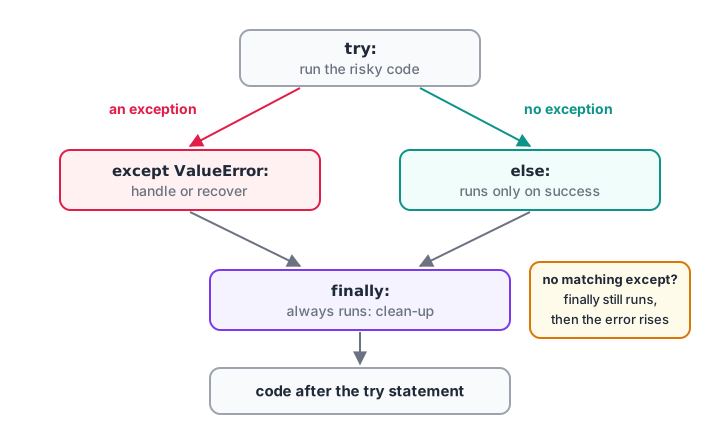
Exactly one of except or else runs after try; finally runs on every path.
def load_rate(text):
    print(f"-- load_rate({text!r})")
    try:
        rate = float(text)
    except ValueError:
        print("   except: not a number, using 0.18")
        rate = 0.18
    else:
        print("   else: parsed fine")
    finally:
        print("   finally: always runs")
    return rate

print(load_rate("0.12"))
print(load_rate("eighteen"))
Put only the risky line in try, and the code that depends on its success in else. That way an unrelated bug in the follow-up code is not accidentally caught by your except. Use finally for clean-up such as closing connections or removing temporary files. For files, a with block from Python file handling already does that clean-up for you.
Quick check
In a try statement with except, else and finally, when does the else block run?
else runs on success only. finally runs on every path.
How do you raise an exception in Python?
You can raise exceptions yourself with raise. Do it when a function receives input it cannot work with. Failing loudly and early is far better than returning a wrong number that ends up in a dashboard.
def discount_price(price, percent):
    if price < 0:
        raise ValueError(f"price cannot be negative, got {price}")
    if not 0 <= percent <= 100:
        raise ValueError(f"percent must be 0-100, got {percent}")
    return round(price * (1 - percent / 100), 2)

print(discount_price(1450, 10))
for args in [(-50, 10), (999, 150)]:
    try:
        discount_price(*args)
    except ValueError as err:
        print("Rejected:", err)
Choose the built-in type that fits: ValueError for a bad value, TypeError for a wrong type, KeyError or LookupError for something not found. When none fits, define your own exception class, which is the topic of Python custom exceptions.
Re-raising and chaining exceptions
Sometimes you want to record an error and still let it propagate. A bare raise inside except re-raises the same exception. raise NewError(...) from err replaces it with a clearer one while keeping the original attached as the cause.
import json

def parse_order(text):
    try:
        return json.loads(text)
    except json.JSONDecodeError as err:
        raise ValueError("order message is not valid JSON") from err

try:
    parse_order("{'id': 101}")                 # single quotes: invalid JSON
except ValueError as err:
    print("Error:", err)
    print("Caused by:", type(err.__cause__).__name__)
The Python exception hierarchy
Exceptions are classes arranged in a family tree. An except clause catches the named class and all of its subclasses. That is why except LookupError catches both KeyError and IndexError, and why except Exception catches nearly everything.
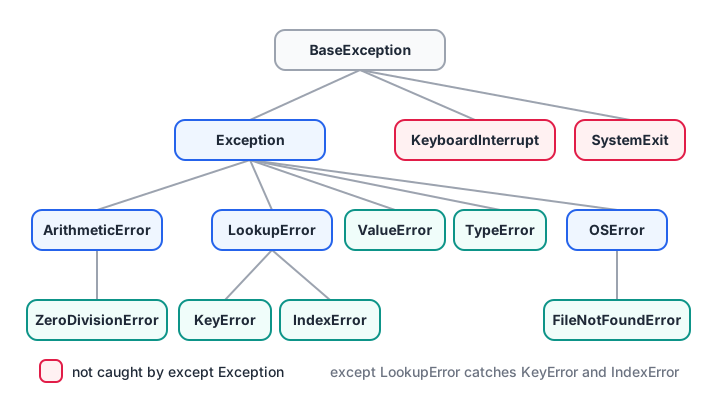
An except clause also catches every subclass beneath the class it names.
for exc in (KeyError, IndexError, ZeroDivisionError, FileNotFoundError,
            KeyboardInterrupt):
    chain = [c.__name__ for c in exc.__mro__ if c is not object]
    print(" -> ".join(chain))

try:
    {"Indore": 1}["Dewas"]
except LookupError as err:
    print("Caught by LookupError:", type(err).__name__)
KeyboardInterrupt (pressing Ctrl+C) and SystemExit sit outside Exception, directly under BaseException. A bare except: catches them too, which can make a script impossible to stop. The full tree is in the Python documentation.
| Clause | Catches | Verdict |
|---|---|---|
except ValueError: |
Only that type and its subclasses | Best: precise |
except (ValueError, KeyError): |
Either type | Good |
except Exception as err: |
Almost all errors | Only at the top of a program, and log err |
except: |
Everything, including Ctrl+C | Avoid |
Quick check
Which clause catches both KeyError and IndexError?
KeyError and IndexError are both subclasses of LookupError.
Ask forgiveness or look before you leap?
Python programmers often prefer trying an operation and handling the exception, nicknamed EAFP ("easier to ask forgiveness than permission"). The alternative, LBYL ("look before you leap"), checks conditions first. Both appear in good code.
stock = {"A4 paper": 120, "Stapler": 0}

def units_lbyl(item):
    if item in stock:              # look before you leap
        return stock[item]
    return 0

def units_eafp(item):
    try:                           # ask forgiveness
        return stock[item]
    except KeyError:
        return 0

print(units_lbyl("Stapler"), units_lbyl("Marker"))
print(units_eafp("A4 paper"), units_eafp("Marker"))
print(stock.get("Marker", 0))     # often simplest of all
Use EAFP when the check would duplicate the operation, or when the situation can change between checking and acting, such as a file being deleted. Use a simple check when it reads more clearly. And remember helpers like dict.get() that avoid the question entirely.
Common mistakes in Python exception handling
- Bare
except:. It catches Ctrl+C and hides real bugs. Name the exception. except Exception: pass. Errors disappear silently. At minimum, record what failed.- A huge
tryblock. Wrap only the line that can fail, so you know what you caught. - Catching an exception you cannot handle. If there is no sensible fallback, let it propagate.
- Returning a fake default. Returning
0for a failed sales figure can corrupt a report. Raise or record instead. - Ordering parent before child.
except Exceptionbeforeexcept ValueErrormakes the second clause unreachable.
Key takeaways
- Exceptions are runtime errors; unhandled ones stop the program with a traceback.
- Wrap only risky code in
try; catch specific types inexcept. elseruns on success;finallyalways runs.- Use
raisefor invalid input, andraise ... from errto add context. exceptalso catches subclasses; avoid bareexcept:.- In data work, collect bad rows instead of crashing or silently skipping them.
Next, design your own error types in Python custom exceptions. Robust data-loading scripts are part of the project work in the Indore data analytics course run by Debugshala.
FAQ
What is exception handling in Python?
Exception handling is how a Python program responds to errors that occur while it runs. You place code that might fail in a try block and handle specific errors in except blocks, so the program can recover, retry or report the problem instead of stopping with a traceback.
What is the difference between except and finally in Python?
An except block runs only when a matching exception is raised in the try block. A finally block runs every time, whether the try succeeded, an exception was handled, or an unhandled exception is propagating. Use except for recovery and finally for clean-up that must always happen.
Can you use try without except in Python?
Yes, try can be paired with only finally. The finally code runs, and any exception still propagates to the caller afterwards. This is useful for guaranteed clean-up when the current function cannot handle the error. A try with neither except nor finally is a syntax error.
When should I raise an exception in Python?
Raise an exception when a function cannot do its job correctly with the input it received, for example a negative price or a missing required column. Raising early with a clear message, such as ValueError("price cannot be negative"), is better than returning a misleading value that spreads through later calculations.
Where can I practise Python exception handling MCQs?
Questions on try, except, else and finally ordering are common in Python screening tests. You can work through Python error-handling quizzes on Debugshala Test. Debugshala in Old Palasia, Indore, also offers a free demo class for its classroom data analytics course.
From the team behind this site
Go further with the Data Analytics Course at Debugshala
These tutorials are written by Debugshala, a training and placement institute at Old Palasia, Indore. The classroom course adds live mentoring, real projects and interview preparation.
- Offline classes at Old Palasia, Indore
- Free demo class before you pay
- Non-IT, fresher and year-gap friendly
- Placement assistance
700+ students placed · 200+ hiring partners · 4.9★ Google rating
