

Python Functions: def, return, Docstrings and Reusable Code
Learn Python functions from scratch: define with def, call them, return values instead of printing, return several results, write docstrings and test helpers.
Imagine the accounts clerk at a hardware wholesaler in Loha Mandi. Every invoice needs the same three steps: add 18% GST, round to the nearest rupee, and apply a Rs 50 discount if the total crosses Rs 5,000. On a busy day she does those steps 300 times, and once in a while she forgets the discount.
So she writes the steps on a card and pins it above her desk: "Invoice rule. Give me the amount, I give you the final bill." Now anyone in the office can follow the card and get the same answer.
That card is a function. Its name is "invoice rule", the amount you hand over is the argument, the steps on the card are the body, and the final bill is the return value. Writing the card once is defining the function; following it for a particular invoice is calling it.
A Python function is a named block of reusable code, created with the def keyword, that accepts input values through parameters, runs its statements, and optionally sends a result back to the caller with return.
This article opens the functions section of the series. It follows the collections module and uses ideas from if-else and for loops.
How do you define and call a function in Python?
A definition starts with def, then the function name, round brackets holding the parameters, and a colon. The indented lines below form the body. Nothing in the body runs until you call the function by writing its name followed by brackets.
def final_bill(amount):
    with_gst = amount * 1.18
    total = round(with_gst)
    if total > 5000:
        total -= 50
    return total

print(final_bill(1200))
print(final_bill(4500))
print(final_bill(10000))

bills = [1200, 4500, 10000, 760]
print([final_bill(b) for b in bills])
The rule is now written exactly once. If GST changes next year, you edit one line and every bill in your script follows. Copy-pasted logic, by contrast, has to be found and fixed in every place it was pasted.
What happens when you call a function?
When Python reaches final_bill(4500), it pauses the current line, jumps into the function, and binds the parameter amount to the value 4500. It then runs the body top to bottom. At return total, it jumps back and the whole call expression is replaced by that value.
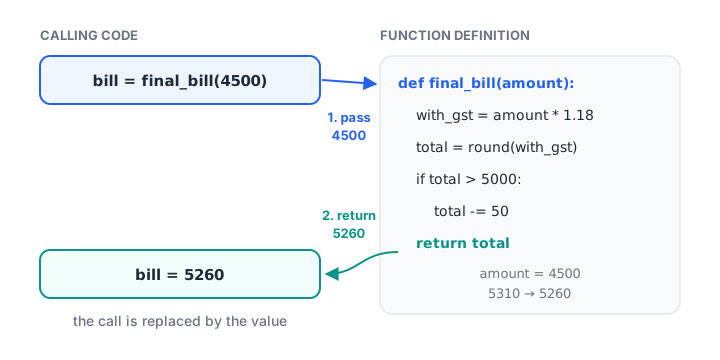
A call hands the argument to the parameter, runs the body, and replaces the call with the returned value.
The names amount, with_gst and total exist only while the function runs. They do not clash with variables of the same name elsewhere in your script. The rules behind that are covered in Python variable scope.
Parameters vs arguments
A parameter is the name in the definition (amount). An argument is the actual value you pass when calling (4500). Functions can take several parameters, give them default values, and accept them by name. Those options have their own lesson, Python function arguments, so here we keep to simple positional ones.
What is the difference between return and print?
This is the most important habit to build with functions. print() shows text on the screen and then the value is gone. return hands a value back to the code that called the function, where it can be stored, compared, added up or passed to another function.
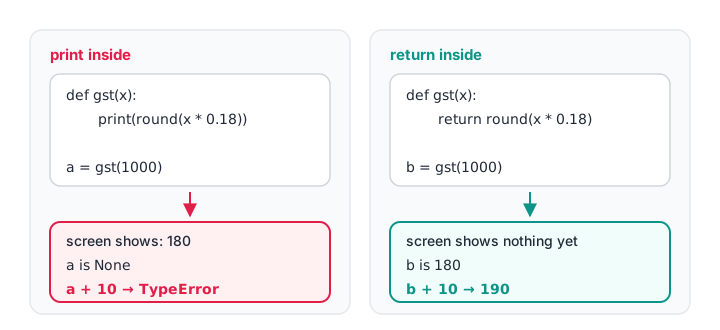
Only a returned value can be used by the next line of code; a print-only function hands back None.
def gst_print(amount):
    print(round(amount * 0.18))         # shows it, returns nothing

def gst_return(amount):
    return round(amount * 0.18)         # gives it back

a = gst_print(1000)
b = gst_return(1000)
print("a is", a, "| b is", b)

total_tax = sum(gst_return(x) for x in [1000, 2500, 400])
print("Total GST:", total_tax)
The first call prints 180, but a ends up as None. Trying sum(gst_print(x) ...) would fail with a TypeError, because you cannot add None values. Make your functions return results, and do the printing at the edges of your program.
A function whose body has no return, or a bare return with no value, returns None. That is fine for functions whose job is an action, such as writing a file or sending a report, rather than computing a value.
Quick check
What does x hold after def f(n): print(n * 2) and x = f(5)?
f prints 10 but has no return statement, so the call returns None and x is None.
Returning more than one value
Python lets you return several values separated by commas. They are packed into a tuple, and the caller can unpack them straight into separate variables.
def summarise(sales):
    total = sum(sales)
    average = total / len(sales)
    best = max(sales)
    return total, average, best

november = [18200, 22450, 15900, 27300, 20100]
total, avg, best = summarise(november)
print(f"Total Rs {total:,} | Avg Rs {avg:,.0f} | Best day Rs {best:,}")

result = summarise([500, 700])
print(type(result).__name__, result)
If a function returns four or more values, or the meaning of each position is unclear, return a dictionary or a namedtuple instead, so callers can write result["total"] rather than remembering that position 0 is the total.
Quick check
def stats(a, b): return a + b, a * b. What is stats(2, 3)?
Returning comma-separated values packs them into a tuple.
Early returns and guard clauses
A function stops the moment it hits return. You can use that to deal with bad or special inputs at the top, then write the main logic without deep nesting. These top checks are called guard clauses.
def clean_phone(raw):
    if raw is None:
        return None
    digits = "".join(ch for ch in str(raw) if ch.isdigit())
    if len(digits) < 10:
        return None                      # too short: give up early
    last10 = digits[-10:]
    if last10[0] not in "6789":
        return None                      # not a valid Indian mobile start
    return last10

for value in ["+91 98260-12345", "12345", None, 9826012345, "091-5555512345"]:
    print(repr(value), "->", clean_phone(value))
Every exit returns the same kind of thing: a 10-digit string, or None for "could not clean". Keeping return types consistent makes the function predictable for whoever calls it. For truly unexpected input, raising an error is often better than returning None, which you will learn in Python exceptions.
How do you write a docstring?
A docstring is a string literal placed as the first line of the function body. Python stores it on the function, and help() and code editors display it. Describe what the function does, what it expects and what it returns.
def conversion_rate(visitors, buyers):
    """Return the share of visitors who bought, as a percentage.

    visitors: total number of store visitors (must be above 0)
    buyers: number of visitors who made a purchase
    """
    return round(buyers / visitors * 100, 1)

print(conversion_rate(840, 63))
print(conversion_rate.__doc__.splitlines()[0])
Keep the first line a short summary ending in a full stop, as the docstring conventions in PEP 257 suggest. Many teams also add type hints, such as def conversion_rate(visitors: int, buyers: int) -> float:, which the later lesson on Python type hints explains.
Functions are values too
In Python a function is an object like any other. You can store it in a variable, put it in a list or dictionary, and pass it to another function. You already did this with sorted(names, key=str.lower) in the sorting article.
def to_lakh(x):
    return f"{x / 100000:.2f} L"

def to_thousand(x):
    return f"{x / 1000:.0f} K"

formats = {"lakh": to_lakh, "thousand": to_thousand}
amount = 2_45_000
for name, fn in formats.items():
    print(name, "->", fn(amount))
This idea, passing behaviour around as a value, is the basis of key functions, callbacks and the short anonymous functions covered in Python lambda.
Common mistakes with Python functions
- Forgetting the brackets when calling.
final_billrefers to the function itself;final_bill(1200)runs it. - Printing instead of returning. The caller receives
None. Return the value and print it outside. - Code after
return. Lines after areturnin the same block never run. - Calling before defining. In a script, the
defmust run before the first call, or you get aNameError. - Inconsistent return types. Returning a number in one branch and a message string in another makes callers fragile.
- Doing too much. A function that cleans, analyses and prints is hard to reuse. Give each function one job.
Key takeaways
- Define with
def name(params):and an indented body; call withname(args). returnsends a value back and ends the function; noreturnmeansNone.- Return results and print outside the function, so values stay reusable.
- Return several values as a tuple and unpack them at the call site.
- Guard clauses at the top handle bad input and keep the main logic flat.
- A docstring as the first line documents what the function does.
Next, learn every way to pass values in with Python function arguments.
FAQ
What is a function in Python with an example?
A function is a named, reusable block of code. For example, def add_gst(x): return round(x * 1.18) defines a function, and add_gst(1000) calls it and returns 1180. Functions avoid repeated code, make scripts easier to test, and let you change a rule in one place.
What is the difference between return and print in Python?
return sends a value back to the code that called the function, so it can be stored or used in further calculations. print() only displays text on the screen. A function that prints but never returns gives the caller None, which cannot be added, compared or saved.
Can a Python function return multiple values?
Yes. Write return a, b, c and Python packs the values into a tuple. The caller can unpack it with x, y, z = my_function(). For many values or values with unclear positions, return a dictionary or a namedtuple so each result has a readable name.
What does a Python function return if there is no return statement?
It returns None. The same happens with a bare return that has no value. This is normal for functions that perform an action, such as saving a file, but it causes bugs when the caller expects a number, so check your function returns what you need.
Where can I learn to write Python functions for data analysis in Indore?
Debugshala teaches Python and analytics in classrooms at Old Palasia, Indore, in English and Hindi, and takes graduates from any stream. A beginner-friendly data analytics course in Indore starts with a free demo class, and you can solve function-writing quizzes on Debugshala Test.
From the team behind this site
Go further with the Data Analytics Course at Debugshala
These tutorials are written by Debugshala, a training and placement institute at Old Palasia, Indore. The classroom course adds live mentoring, real projects and interview preparation.
- Offline classes at Old Palasia, Indore
- Free demo class before you pay
- Non-IT, fresher and year-gap friendly
- Placement assistance
700+ students placed · 200+ hiring partners · 4.9★ Google rating
