

Python Virtual Environments and pip: A Beginner's Setup Guide
Create a Python virtual environment with venv, install pandas with pip and share a requirements.txt, with steps for Windows, macOS and Linux.
Imagine two analysts sharing one office laptop at a Vijay Nagar startup. Riya is maintaining an old sales report that only works with an older pandas version. Arjun is starting a new dashboard project and needs the latest pandas.
If both install packages into the same Python, one of them will break the other's work. Arjun upgrades pandas on Monday, and on Tuesday Riya's report crashes with an error neither of them understands.
The fix is to give each project its own sealed lunchbox. Riya's box holds her old pandas, Arjun's box holds the new one, and the shared Python on the laptop stays clean. Each lunchbox is a virtual environment, the shared laptop Python is the system or base interpreter, and the person filling the boxes is pip.
A Python virtual environment is an isolated directory that holds its own Python interpreter link and its own set of installed packages, so each project can use different package versions without affecting the others.
What is a virtual environment in Python?
When you install Python from python.org, as shown in getting started with Python, you get one base interpreter. Every package you install with plain pip install lands in that single shared place by default.
A virtual environment is a small folder, usually called .venv, inside your project. It contains a pointer to the base Python, a private site-packages folder for libraries, and activation scripts. Once it is active, python and pip refer to that folder instead of the shared install.
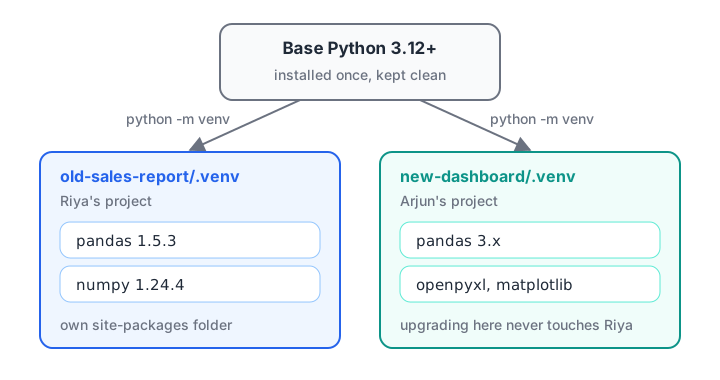
Each project's virtual environment has its own packages, while the base Python stays untouched.
The venv module that creates these folders is part of the standard library, so there is nothing extra to install. The official venv documentation describes every option.
Why analysts need virtual environments
- Reproducible reports. A report that ran in March should still run in November. Pinning versions inside an environment makes that possible.
- No version fights. One project can use an older library while another uses the newest.
- Safe experiments. Want to try a new library? Install it in a throwaway environment and delete the folder if you don't like it.
- Easy hand-over. A colleague or a server can rebuild your exact setup from one text file.
How to create and activate a virtual environment
Follow these steps once per project. The commands are typed in a terminal (Command Prompt or PowerShell on Windows, Terminal on macOS and Linux), not in the Python prompt.
- Make a project folder and move into it.
mkdir sales-report
cd sales-report- Create the environment. This makes a folder named
.venv. On macOS and Linux usepython3ifpythonis not found.
python -m venv .venv- Activate it. The command depends on your operating system and shell.
| System and shell | Activation command |
|---|---|
| Windows Command Prompt | .venv\Scripts\activate.bat |
| Windows PowerShell | .venv\Scripts\Activate.ps1 |
| macOS or Linux (bash, zsh) | source .venv/bin/activate |
- Check that it worked. Your prompt now starts with
(.venv), andpythonpoints inside the project.
(.venv) $ python -c "import sys; print(sys.prefix)"
/home/riya/sales-report/.venv- Deactivate when you are done. Type
deactivateand the prompt returns to normal. The environment still exists; it is simply not in use.
How to tell if you are inside a virtual environment
Inside an active environment, sys.prefix points to the environment folder, while sys.base_prefix still points to the base Python. Comparing the two is the standard check. You can run this block here in the browser or locally.
import sys

print("Python version :", sys.version.split()[0])
print("sys.prefix     :", sys.prefix)
print("sys.base_prefix:", sys.base_prefix)

in_venv = sys.prefix != sys.base_prefix
if in_venv:
    print("You are inside a virtual environment.")
else:
    print("You are using the base interpreter.")
The browser runner on this page has no virtual environment, so it normally reports the base interpreter. On your own computer, run it once before and once after activating .venv and watch the prefix change.
What is pip and how do you install packages?
pip is Python's standard package installer. It downloads libraries from the Python Package Index (PyPI) and installs them into the currently active environment. A good habit is to call it as python -m pip, which guarantees that pip belongs to the Python you think you are using.
(.venv) $ python -m pip install --upgrade pip
(.venv) $ python -m pip install pandas openpyxl
(.venv) $ python -m pip list
Here openpyxl lets pandas read .xlsx files, something you will need often as an analyst.
Common pip commands
| Task | Command |
|---|---|
| Install the latest version | python -m pip install pandas |
| Install an exact version | python -m pip install "pandas==2.2.3" |
| Upgrade a package | python -m pip install --upgrade pandas |
| Remove a package | python -m pip uninstall pandas |
| See what is installed | python -m pip list |
| Details of one package | python -m pip show pandas |
| Save the exact versions | python -m pip freeze > requirements.txt |
| Rebuild from the file | python -m pip install -r requirements.txt |
You can also check versions from inside Python. This is useful at the top of a notebook so that anyone reading it knows which versions produced the numbers.
from importlib.metadata import version, PackageNotFoundError

for pkg in ["pandas", "numpy", "openpyxl"]:
    try:
        print(f"{pkg:10} {version(pkg)}")
    except PackageNotFoundError:
        print(f"{pkg:10} not installed here")

import pandas as pd
print("pandas says:", pd.__version__)
Quick check
Which command saves the exact package versions of the active environment to a file?
pip freeze prints packages in name==version format, which pip install -r can read back.
Sharing your setup with requirements.txt
pip freeze prints every package in the environment with its exact version. Redirecting it into requirements.txt gives you a recipe that recreates the same environment on another laptop, a server or a colleague's machine.
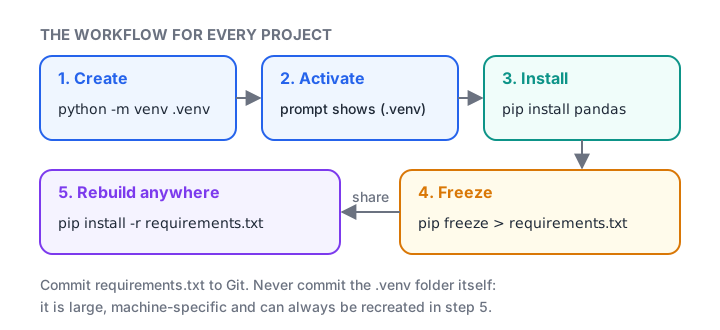
The five-step venv and pip workflow you repeat for every project.
A typical file looks like this (the version numbers are only examples from an older project):
numpy==2.1.3
openpyxl==3.1.5
pandas==2.2.3
python-dateutil==2.9.0.post0
Pinned lines (==) give exact repeatability. Unpinned lines (pandas alone) always install the newest release, which is convenient but can change your results without warning. The small script below audits a requirements file and flags anything that isn't pinned.
requirements = """
pandas==2.2.3
numpy>=1.26
openpyxl==3.1.5
matplotlib
# reporting helpers
python-dateutil==2.9.0.post0
"""

pinned, loose = [], []
for line in requirements.splitlines():
    line = line.strip()
    if not line or line.startswith("#"):
        continue
    (pinned if "==" in line else loose).append(line)

print("Pinned:", pinned)
print("Not pinned:", loose)
print(f"{len(pinned)} of {len(pinned) + len(loose)} packages are reproducible")
Rebuilding an environment from scratch
When a colleague clones your project, they follow three steps: create .venv, activate it, then run python -m pip install -r requirements.txt. Within a minute they have the same library versions you used.
This is also how you fix a broken environment. Delete the .venv folder, create a fresh one and reinstall from the file. Environments are cheap and disposable; the requirements file is what matters.
Common mistakes with venv and pip
- Installing before activating. If the prompt doesn't show
(.venv), pip installs into the base Python. Activate first, every time you open a new terminal. - Committing
.venvto Git. The folder is large and machine-specific. Add.venv/to.gitignoreand commit onlyrequirements.txt. - Moving or renaming the folder. Environments store absolute paths, so a moved
.venvoften stops working. Delete and recreate it instead. - Mixing
pipandpip3randomly. Different commands can point to different Pythons.python -m pipremoves the guesswork. - Using
sudo pip installon Linux. It can damage packages your operating system depends on. Use a virtual environment instead. - Picking the wrong interpreter in VS Code. Use Python: Select Interpreter and choose the one inside
.venv, or your editor will run a different Python than your terminal.
Quick check
You open a new terminal and run pip install pandas, but the prompt does not show (.venv). Where does pandas go?
Activation only lasts for that terminal session. Without it, pip installs into whichever Python is first on your PATH, usually the base install.
Key takeaways
- Create one virtual environment per project with
python -m venv .venv. - Activate it before installing anything, and check for
(.venv)in the prompt. - Use
python -m pipto install, upgrade and remove packages. - Save versions with
pip freeze > requirements.txtand rebuild withpip install -r. - Never commit
.venv; delete and recreate it whenever it breaks.
With a clean environment ready, you can move on to Python's building blocks, starting with variables and literals and then numbers and the math module. If any name in this guide looked strange, revisit Python keywords and identifiers.
FAQ
Do I need a virtual environment for every Python project?
Yes, it is the recommended habit for every project that installs packages. A separate environment costs a few megabytes and a few seconds, and it prevents version conflicts between projects. For quick experiments with only the standard library, the base interpreter is fine.
What is the difference between venv and virtualenv?
venv is built into Python 3 and needs no installation, so it is the usual choice for beginners. virtualenv is an older third-party tool with a few extra features and faster creation. Both produce similar isolated environments, and the pip commands inside them are identical.
What is the difference between pip and conda?
pip installs Python packages from PyPI into the active environment. Conda is a separate package and environment manager that can also install non-Python libraries. Many analysts use plain venv and pip, because pandas, NumPy and Jupyter all install cleanly with pip on modern Python versions.
How do I delete a Python virtual environment?
Deactivate it, then delete the .venv folder like any other folder. Nothing else on your system refers to it, so removal is clean. If you kept a requirements.txt, you can recreate the identical environment later with python -m venv .venv followed by pip install -r requirements.txt.
Can I learn Python setup and data analytics in a classroom in Indore?
Yes. Debugshala runs offline classes at its Old Palasia campus with teaching in English and Hindi, and it accepts fresh graduates and non-IT students. You can sit in a free demo class of the data analytics training at Debugshala, Indore before you decide, and try practice quizzes on Debugshala Test.
From the team behind this site
Go further with the Data Analytics Course at Debugshala
These tutorials are written by Debugshala, a training and placement institute at Old Palasia, Indore. The classroom course adds live mentoring, real projects and interview preparation.
- Offline classes at Old Palasia, Indore
- Free demo class before you pay
- Non-IT, fresher and year-gap friendly
- Placement assistance
700+ students placed · 200+ hiring partners · 4.9★ Google rating
