

Python Strings and String Methods: Slicing, split and strip
Learn Python strings with indexing, slicing and the string methods analysts use to clean names, cities, phone numbers and product codes in real data.
Imagine a mobile shop chain with branches in Rajwada, Bhawarkua and Vijay Nagar. Every branch sends a daily sheet of customer details. One counter types " RAHUL sharma ", another "rahul Sharma", and the phone numbers arrive as "+91 98260-12345", "9826012345" and "098260 12345".
Your manager wants one simple number: how many unique customers bought a phone this month. Before you can count, every name and every phone number must look the same.
Each cell in those sheets is a string. Picking out the last 10 digits of a phone number is slicing. Removing spaces and fixing capital letters uses string methods. These three skills cover a surprising share of real cleaning work.
A Python string is an ordered, immutable sequence of Unicode characters, and string methods are built-in functions attached to every string that return a transformed copy of it.
How do you create a string in Python?
Wrap text in single quotes, double quotes or triple quotes. Single and double quotes behave the same, so pick whichever avoids escaping. Triple quotes let a string span several lines, which is handy for SQL queries or long messages.
city = 'Indore'
shop = "Ravi's Mobiles"            # double quotes, so the apostrophe is fine
query = """SELECT name, phone
FROM customers
WHERE city = 'Indore'"""

print(city, "|", shop)
print(query)
print("Length of shop name:", len(shop))
print("Tab\tand newline\nescapes")
print(r"C:\data\new_sales.csv")    # raw string: backslashes kept as typed
The backslash starts an escape sequence: \n is a new line and \t is a tab. A raw string, written with an r in front, turns escapes off. That makes it useful for Windows paths and, later, for regular expressions.
If you are reading text typed by a user, remember that input() always returns a string, as the input and output tutorial explains.
How do indexing and slicing work on strings?
Every character has a position, starting at 0 from the left. Python also numbers positions from the right with negative indexes, so -1 is always the last character. This double numbering makes it easy to grab both prefixes and suffixes.
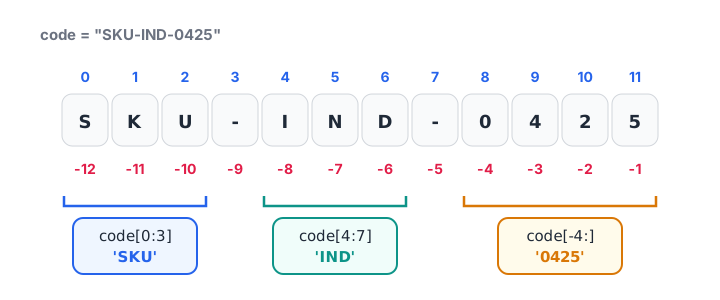
Positive indexes count from the left starting at 0; negative indexes count from the right starting at -1.
A slice s[start:stop] returns the characters from start up to, but not including, stop. Leave out start to begin at the front, leave out stop to go to the end. A third number, the step, skips characters.
code = "SKU-IND-0425"

print(code[0], code[-1])        # first and last character
print(code[0:3])                # 'SKU'
print(code[4:7])                # 'IND'
print(code[-4:])                # last four: '0425'
print(code[:3] + code[-4:])     # 'SKU0425'
print(code[::-1])               # reversed
print(repr(code[100:]))         # out-of-range slice: empty string, no error
Indexing past the end (code[100]) raises an IndexError, but slicing past the end quietly returns an empty string. That makes slices safer for messy data where some values are shorter than you expect.
Strings are immutable
You cannot change a character in place. code[0] = "X" raises a TypeError. Every method that seems to "change" a string actually builds a new one, so you must store the result.
name = "  rahul sharma "
name.strip()                    # result thrown away
print(repr(name))               # still has spaces

name = name.strip().title()     # store the new string
print(repr(name))

try:
    name[0] = "X"
except TypeError as err:
    print("Error:", err)
Quick check
What does "INDORE-452001"[-6:] return?
A negative start of -6 begins six characters from the end and runs to the end, which is the PIN code.
Which Python string methods should analysts know?
Python has more than 40 string methods, all listed in the official str documentation. In everyday cleaning you will use a dozen of them again and again.
| Method | What it does | Example result |
|---|---|---|
strip() |
Remove spaces at both ends | " Indore " → "Indore" |
lower(), upper() |
Change case | "INDORE" → "indore" |
title() |
Capitalise each word | "vijay nagar" → "Vijay Nagar" |
replace(a, b) |
Replace every a with b |
"98260-12345" → "9826012345" |
split(sep) |
Break into a list | "a,b,c" → ["a", "b", "c"] |
sep.join(list) |
Glue a list into one string | ["a", "b"] → "a-b" |
startswith(), endswith() |
Check prefix or suffix | "INV-101".startswith("INV") |
find(x) |
Position of x, or -1 |
"a@b.com".find("@") → 1 |
count(x) |
How many times x appears |
"banana".count("a") → 3 |
isdigit(), isalpha() |
Check content | "12345".isdigit() → True |
zfill(n) |
Pad with leading zeros | "42".zfill(5) → "00042" |
Chaining methods to clean text
Because each method returns a new string, you can chain several in one line. Read the chain from left to right: each step works on the result of the previous one.
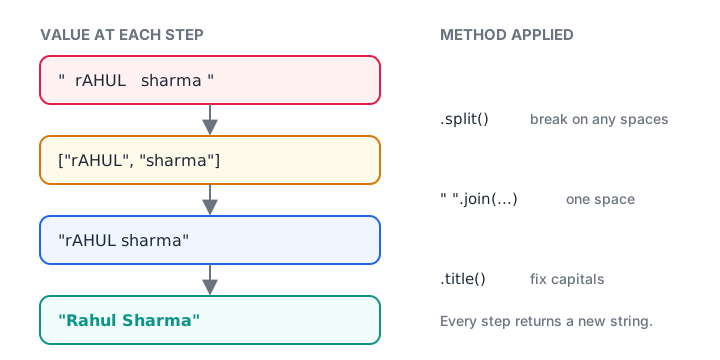
Method chaining: each string method returns a new string that the next one works on.
raw_names = ["  RAHUL sharma ", "rahul  Sharma", "Priya verma", "  priya VERMA"]

clean = []
for n in raw_names:
    n = " ".join(n.split())     # collapse repeated spaces
    clean.append(n.strip().title())

print(clean)
print("Raw unique:", len(set(raw_names)))
print("Clean unique:", len(set(clean)))
The " ".join(n.split()) trick is worth remembering. split() with no argument splits on any run of whitespace and drops empty pieces, so joining the pieces with a single space removes double spaces anywhere in the text.
Splitting and joining
split() is how you break one field into several. A full address, a "City, State" field or a comma-separated list of tags all come apart with one call. join() reverses it.
row = "Neha Jain, Indore, MP, 452001"
name, city, state, pin = [part.strip() for part in row.split(",")]
print(name, "|", city, "|", state, "|", pin)

email = "neha.jain@example.com"
user, domain = email.split("@")
print("User:", user, "Domain:", domain)

tags = ["premium", "repeat", "emi"]
print("Tags:", ", ".join(tags))
print("Path:", "/".join(["data", "2026", "nov", "sales.csv"]))
Quick check
After running name = " Asha "; name.strip(), what is the value of name?
Strings are immutable. strip() returns a new string, but the result was not assigned back to name.
Searching and checking text
The in operator is the simplest search: "Indore" in address returns True or False. For a position, use find(), which returns -1 when the text is missing. index() does the same but raises an error instead, which is useful when the text must be there.
Here is a real cleaning task: turning phone numbers typed in five different ways into one 10-digit format. It combines a loop, a check method and a slice.
phones = ["+91 98260-12345", "9826012345", "098260 12345",
          "91-98260 12345", "98260 1234"]

for raw in phones:
    digits = "".join(ch for ch in raw if ch.isdigit())
    last10 = digits[-10:]
    ok = len(last10) == 10 and last10[0] in "6789"
    status = "valid" if ok else "check manually"
    print(f"{raw!r:18} -> {last10:>10}  {status}")
The for loop tutorial explains the loop itself. The key idea here is that slicing with [-10:] drops the country code or leading zero no matter how it was typed. The last number has only nine digits, so it gets flagged instead of silently accepted.
Common mistakes with Python strings
- Forgetting to assign.
name.strip()on its own does nothing toname. Writename = name.strip(). - Off-by-one slices.
s[0:3]gives three characters, positions 0, 1 and 2. The stop index is never included. - Comparing without normalising case.
"Indore" == "indore"isFalse. Comparea.lower() == b.lower(), orcasefold()for non-English text. - Adding strings and numbers.
"Total: " + 500raises aTypeError. Convert withstr(500), or better, use an f-string. - Building long strings with
+in a loop. It works, but collecting pieces in a list and calling"".join(pieces)once is cleaner and faster. - Trusting
title()blindly. It capitalises every letter after a non-letter, so"it's ready".title()gives"It'S Ready", and"mcdonald"becomes"Mcdonald". Check a sample by eye.
Key takeaways
- Strings are immutable sequences; every method returns a new string you must store.
- Index from the left with 0, 1, 2 and from the right with -1, -2, -3.
s[start:stop]excludesstop, and slices never raise errors for out-of-range positions.strip(),lower(),title(),replace(),split()andjoin()handle most cleaning." ".join(s.split())collapses all extra whitespace in one step.
You now know how to clean text. Next, learn to present it neatly with Python string formatting and f-strings. If you skipped ahead, the previous article on numbers and the math module covers the numeric side of a dataset.
FAQ
What is the difference between a string and a list in Python?
Both are ordered sequences that support indexing and slicing, but a string holds only characters and is immutable, while a list can hold any objects and can be changed in place. To modify text character by character, convert it with list(s), edit it, then rebuild it with "".join().
How do I remove spaces from a string in Python?
Use strip() to remove spaces from both ends, lstrip() or rstrip() for one end, and replace(" ", "") to remove every space. To collapse repeated spaces inside the text into single spaces, use " ".join(s.split()), which also trims both ends.
How do I reverse a string in Python?
Use a slice with a step of -1: s[::-1]. It starts at the end and walks backwards one character at a time, returning a new reversed string. "".join(reversed(s)) also works and reads more clearly to some people, but the slice is shorter and is the common idiom.
Is there a difference between single and double quotes in Python?
No. 'Indore' and "Indore" create exactly the same string. Choose double quotes when the text contains an apostrophe and single quotes when it contains double quotes, so you avoid escaping. Many teams pick one style and let a formatter such as Black apply it consistently.
Where can I learn Python text cleaning for analytics in Indore?
Debugshala teaches in classrooms at its Old Palasia campus in Indore, in English and Hindi, and accepts graduates from IT and non-IT backgrounds. Book a free demo through Debugshala's analyst training programme, and practise string questions on Debugshala Test to check your progress.
From the team behind this site
Go further with the Data Analytics Course at Debugshala
These tutorials are written by Debugshala, a training and placement institute at Old Palasia, Indore. The classroom course adds live mentoring, real projects and interview preparation.
- Offline classes at Old Palasia, Indore
- Free demo class before you pay
- Non-IT, fresher and year-gap friendly
- Placement assistance
700+ students placed · 200+ hiring partners · 4.9★ Google rating
