

Python Lists: Create, Index, Slice and Modify (with Examples)
Learn Python lists step by step: indexing, slicing, append, extend, insert, pop and remove, copying without surprises, and nested lists for table-like data.
Imagine you manage a juice counter at Sarafa Bazaar's night market. Every evening you write the number of glasses sold on a single strip of paper, one number after another: 120, 98, 143, 110.
When a new day ends you add a number at the end. If you spot a mistake, you cross out one number and write the right one.
That strip has three useful properties. The numbers stay in order, so day 1 is always first. You can change it whenever you like. And it can grow as long as you need.
In Python that strip is a list. Each number is an element, its position on the strip is its index, and adding a day at the end is append(). Lists are the first data structure every analyst learns, and the one you will use most often before moving on to pandas.
A Python list is a built-in, ordered and mutable sequence type that stores a collection of items, of any type, in square brackets.
How do you create a list in Python?
Write items between square brackets, separated by commas. A list can hold numbers, strings, booleans, None, or a mix. An empty list is [], and list() turns other sequences, such as a string or a range, into a list.
daily_sales = [120, 98, 143, 110]
cities = ["Indore", "Bhopal", "Ujjain"]
mixed = ["Rahul", 24, True, None]
empty = []
from_range = list(range(1, 6))
letters = list("SALE")

print(daily_sales, len(daily_sales))
print(cities)
print(mixed)
print(empty, from_range, letters)
print("Total glasses:", sum(daily_sales))
print("Best day:", max(daily_sales), "Worst day:", min(daily_sales))len(), sum(), min() and max() work directly on lists of numbers. They are often all you need for a quick summary before reaching for a library.
Indexing and slicing lists
Lists use exactly the same indexing and slicing rules as Python strings: positions start at 0, negative indexes count from the end, and [start:stop] leaves out the stop position.
week = [120, 98, 143, 110, 165, 210, 188]   # Mon .. Sun

print("Monday:", week[0])
print("Sunday:", week[-1])
print("Weekdays:", week[:5])
print("Weekend:", week[5:])
print("Every other day:", week[::2])
print("Last three days:", week[-3:])
print("Is 143 in the list?", 143 in week)
print("Which day was 143?", week.index(143))
The in operator checks membership, and index() returns the first position of a value. index() raises a ValueError if the value is missing, so check with in first when you aren't sure.
How do you add and remove items from a list?
Unlike strings, lists are mutable: you can change them in place. The list methods below modify the original list and return None, which is the source of a classic beginner bug covered later.
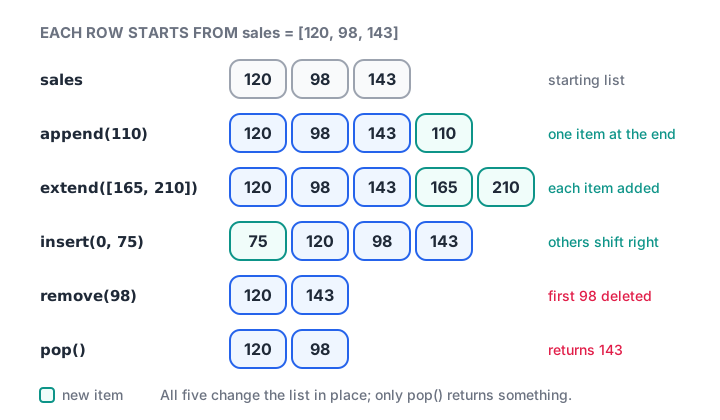
Five list methods and what each one does to the same starting list.
| Method | What it does | Returns |
|---|---|---|
append(x) |
Add one item at the end | None |
extend(items) |
Add every item from another sequence | None |
insert(i, x) |
Put x at position i, shifting the rest right |
None |
remove(x) |
Delete the first item equal to x |
None |
pop() / pop(i) |
Remove and return the last item, or item i |
the removed item |
clear() |
Remove everything | None |
list[i] = x |
Replace the item at position i |
— |
del list[i] |
Delete by position or slice | — |
sales = [120, 98, 143]

sales.append(110)            # one new day
sales.extend([165, 210])     # two more days at once
sales.insert(0, 75)          # a missed day at the start
print("After adding:", sales)

sales[2] = 101               # fix a typo (98 should be 101)
sales.remove(75)             # the missed day was a test entry
last = sales.pop()           # take off the last day
print("Popped:", last)
print("After changes:", sales)

del sales[1:3]
print("After del slice:", sales)
append vs extend
This pair confuses almost everyone once. append() adds its argument as a single item, even if that argument is a list. extend() unpacks the argument and adds each element.
a = [1, 2]
a.append([3, 4])
print("append:", a, "length", len(a))

b = [1, 2]
b.extend([3, 4])
print("extend:", b, "length", len(b))

c = [1, 2] + [3, 4]          # + makes a new list
print("plus  :", c)
When you combine this week's sales with last week's, you almost always want extend() or +, not append().
Quick check
After a = [1, 2]; a.append([3, 4]), what is len(a)?
append adds its argument as one item, so the list becomes [1, 2, [3, 4]], which has three elements.
Why does changing one list change another?
A variable does not hold the list itself. It holds a reference, an arrow pointing at the list in memory. Writing b = a copies the arrow, not the list, so both names point at the same object. This is called aliasing.
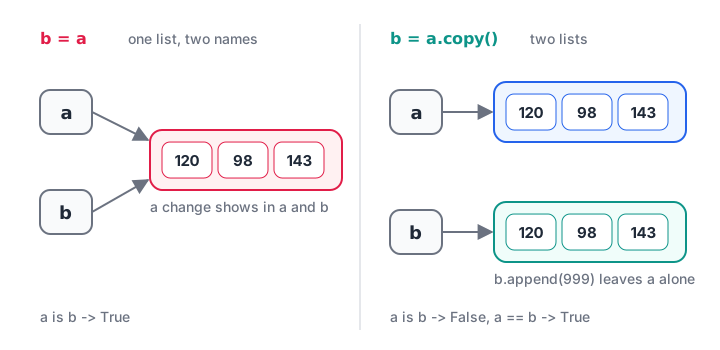
Assignment shares one list between two names; copy() gives the second name its own list.
original = [120, 98, 143]
alias = original              # same list, two names
alias.append(999)
print("original:", original)  # changed too

backup = original.copy()      # independent copy (same as original[:])
backup.append(0)
print("original:", original)
print("backup  :", backup)
print("same object?", alias is original, backup is original)
This matters when you keep a "raw" list and a "cleaned" list. If the cleaned list is only an alias, your raw data is quietly modified as well.
Shallow vs deep copy
copy() and [:] are shallow copies. They copy the outer list, but inner lists are still shared. For a list of lists, use copy.deepcopy().
import copy

rows = [["Indore", 120], ["Bhopal", 95]]
shallow = rows.copy()
deep = copy.deepcopy(rows)

shallow[0][1] = 0            # change an inner list
print("rows   :", rows)      # affected
print("deep   :", deep)      # safe
Quick check
Which line gives you an independent copy of the list raw?
copy() (or raw[:]) creates a new list. Plain assignment only creates a second name for the same list.
Nested lists: storing rows of a table
A list can contain other lists. A list of lists is the simplest way to hold a small table in plain Python, where each inner list is a row. A for loop walks through the rows, and unpacking gives each column a name.
orders = [
    ["Rahul", "Indore", 1499],
    ["Priya", "Bhopal", 899],
    ["Aman", "Indore", 2350],
    ["Sana", "Ujjain", 640],
]

print("Second row:", orders[1])
print("Amount in second row:", orders[1][2])

indore_total = 0
for name, city, amount in orders:
    if city == "Indore":
        indore_total += amount
print("Indore total:", indore_total)

amounts = [row[2] for row in orders]
print("All amounts:", amounts, "Average:", sum(amounts) / len(amounts))
The line [row[2] for row in orders] is a list comprehension, a compact way to build a list from a loop. It has its own article, Python list comprehension. For sorting rows by amount or name, see sorting in Python.
Common mistakes with Python lists
- Assigning the result of a method.
sales = sales.append(5)setssalestoNone, becauseappend()returnsNone. Call the method on its own line. - Copying by assignment.
clean = rawcreates an alias. Useraw.copy(). - Changing a list while looping over it. Removing items inside
for x in itemsskips elements. Loop over a copy, or build a new list instead. - Creating a grid with
*.[[0] * 3] * 2repeats the same inner list twice, so changing one row changes both. Use[[0] * 3 for _ in range(2)]. - Using
remove()for every match. It deletes only the first match. To drop all of them, build a new list that keeps the others. - Mixing types in one column. Python allows
[120, "98", None], butsum()on it fails. Keep one type per list where you can.
Key takeaways
- Lists are ordered and mutable, and can hold any mix of types.
- Indexing and slicing work just like strings.
append()adds one item,extend()adds many,insert()places an item,pop()andremove()take items out.- Most list methods change the list in place and return
None. b = ashares one list; usecopy()or[:], anddeepcopy()for nested lists.- A list of lists is a simple table that converts straight into a pandas DataFrame.
Lists can change; sometimes you want a collection that cannot. That is the job of Python tuples, the next tutorial. If you came here from match-case, you can now use sequence patterns on lists too.
FAQ
What is the difference between a list and an array in Python?
A Python list is built in and can hold items of different types. An array, usually a NumPy array, holds one type and supports fast maths on every element at once, like prices * 1.18. Use lists for general collections and NumPy arrays or pandas columns for numeric analysis on large data.
How do I remove duplicates from a list in Python?
Convert it to a set and back with list(set(items)), which is quick but loses the original order. To keep order, use list(dict.fromkeys(items)), which keeps the first occurrence of each value. For a pandas column, drop_duplicates() or unique() does the same job.
How do I find the length of a list in Python?
Use the built-in len() function: len([120, 98, 143]) returns 3. It counts top-level items only, so a nested list such as [[1, 2], [3]] has length 2. len() runs in constant time because lists keep track of their own size.
Can a Python list contain different data types?
Yes. A list can mix integers, strings, booleans, None and even other lists, such as ["Rahul", 24, True]. It is legal but often a sign that you are storing a record, where a tuple, dictionary or dataclass might describe the data more clearly. For analysis, keep one type per list.
Is there a Python and data analytics course with classroom teaching in Indore?
Yes. Debugshala runs classroom batches at its Old Palasia campus in Indore, teaching in English and Hindi, and accepts fresh graduates and people with a year gap. Start with a free demo of data analytics coaching at Debugshala, and sharpen list skills with coding questions on Debugshala Test.
From the team behind this site
Go further with the Data Analytics Course at Debugshala
These tutorials are written by Debugshala, a training and placement institute at Old Palasia, Indore. The classroom course adds live mentoring, real projects and interview preparation.
- Offline classes at Old Palasia, Indore
- Free demo class before you pay
- Non-IT, fresher and year-gap friendly
- Placement assistance
700+ students placed · 200+ hiring partners · 4.9★ Google rating
