

Python Comments: Single-line, Multi-line and Docstrings
How Python comments work: the # symbol, inline and multi-line comments, docstrings, commenting out code to debug, and habits that keep scripts clear.
Think of the ledger at a kirana shop in Malharganj. The owner writes every sale in ink. In the margin, in pencil, there are small notes: "Sharma ji pays on the 5th", "price raised after Diwali", "do not count returns here".
The pencil notes are not sales. If you added up the ledger, you would skip them. But when the owner's son takes over the shop, those notes are what help him understand the numbers.
Comments in Python are those pencil notes. Python skips them when it runs your file, and the next person to read your code (often you, three months later) depends on them.
A comment in Python is a line or part of a line that starts with the # symbol; the interpreter ignores everything from the # to the end of that line, so comments exist only for human readers.
This lesson follows your first Python program. The examples use print() and a few simple variables.
What is a comment in Python?
Type # anywhere outside a string and everything after it on that line becomes a comment. Python does not check it, run it or even care if it contains nonsense.
# Monthly sales check for the Palasia branch
print("Report started")

# The next line is ignored completely:
# print("This never shows up")

print("Report finished")
Only two lines of output appear. The four comment lines might as well not exist as far as the interpreter is concerned.
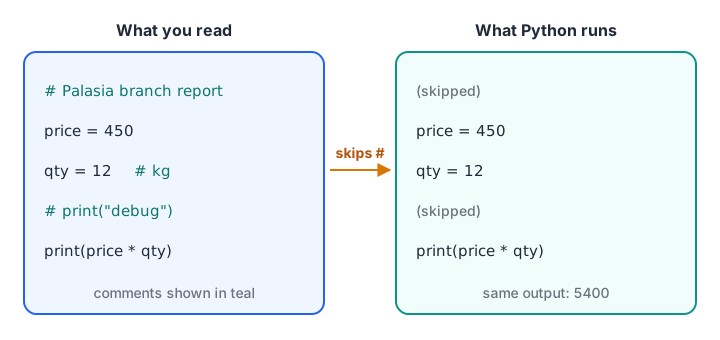
The person reading your file sees the notes. The interpreter sees only the code.
A # inside quotes is just a character, not the start of a comment. Python decides this from the quotes, so hashtags and order numbers are safe:
print("Campaign tag: #IndoreSale")   # this part is a comment
order_id = "ORD#4471"
print("Order:", order_id)
print("Characters in the tag:", len("#IndoreSale"))
Quick check
What does this line print? print("Total #1") # first total
The # inside the quotes is part of the string. Only the # after the closing bracket starts a comment.
Inline comments: notes on the same line as code
A comment can sit at the end of a line of code. Everything before the # runs as normal. These inline comments are perfect for units and short reminders.
price = 450          # rupees per kg, wholesale rate
qty = 12             # kg ordered
discount = 0.05      # 5 percent festival discount

bill = price * qty * (1 - discount)
print("Bill amount: Rs", bill)
Python's official style guide, PEP 8, suggests at least two spaces before the # and one space after it. Lining up the comments, as above, is optional but makes a block easier to scan.
Use inline comments sparingly. If every line has one, the important ones get lost.
How to write multi-line comments in Python
Python has no /* ... */ block like C or Java. The standard way is simply a # at the start of every line:
# Clean the raw branch names before grouping.
# The source sheet mixes "indore", "INDORE " and "Indore",
# so strip the spaces and use title case for all of them.
raw = "  INDORE "
clean = raw.strip().title()
print(repr(raw), "->", repr(clean))
You don't need to type each # by hand. In VS Code, select the lines and press Ctrl + / (Cmd + / on a Mac). Press it again to remove the comments.
Are triple-quoted strings comments?
You will see code that uses a triple-quoted string as a block comment:
"""
This block is a string, not a comment.
Python creates it and then throws it away.
"""
print("The program still runs normally")
It works because a string on its own line does nothing. But it is not a true comment: Python still reads it as a value, and if it sits in the wrong place it can become a docstring. Use # for comments and save triple quotes for docstrings.
What is a docstring in Python?
A docstring is a triple-quoted string placed as the very first line inside a function, class or module. Unlike a comment, Python keeps it and attaches it to the object, so tools can show it later.
Functions get their own lesson in Python functions. For now, read def as "define a reusable recipe called gst_amount".
def gst_amount(price, rate=0.18):
    """Return the GST on a price.

    price: amount before tax, in rupees
    rate:  GST rate as a decimal (0.18 means 18 percent)
    """
    return price * rate

print(gst_amount(1000))
print(gst_amount.__doc__.splitlines()[0])
The docstring is stored in the function's __doc__ attribute. help(gst_amount) prints it nicely, and VS Code shows it when you hover over the function name.
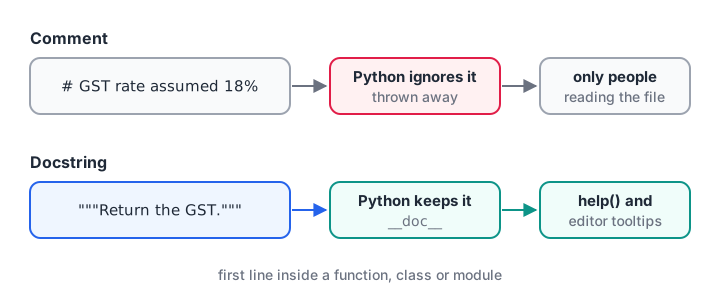
Comments are for people reading the code. Docstrings are for people using the code.
| Comment | Docstring | |
|---|---|---|
| Syntax | # text |
"""text""" as the first line of a function, class or module |
| Kept by Python? | No, thrown away | Yes, in the __doc__ attribute |
Shown by help() |
No | Yes |
| Best for | Why a line or block exists | What a function does and how to call it |
Quick check
Where does Python store a function's docstring?
A docstring is kept as the __doc__ attribute, which help() and code editors read.
Using comments to debug: commenting out code
Putting # in front of a line switches it off without deleting it. This is called commenting out, and analysts use it constantly to test a script step by step.
sales = [1200, 950, 1430, 0, 1100]
print("Days recorded:", len(sales))

# Step 2 is switched off while we check the raw numbers:
# sales = [s for s in sales if s > 0]

print("Average per day:", sum(sales) / len(sales))
Run it, then remove the # before sales = [...] and run again. The average changes from 936.0 to 1170.0, because the zero-sales holiday is now dropped. Commenting a step in and out shows you its exact effect.
Once you have decided, delete the dead code. A file full of commented-out experiments is confusing for the next reader.
What makes a good Python comment?
Good names already tell the reader what the code does. Comments earn their place by explaining why.
# Bad: repeats the code
count = count + 1  # add 1 to count

# Good: explains a decision the code cannot show
# Finance counts a return as a new row, so subtract
# returns before computing the net order count.
Comments that carry real value in data work usually explain:
- Business rules. "Orders after 11 pm count towards the next day."
- Assumptions. "Treating blank region as 'Unknown', not dropping the row."
- Units and sources. "Amounts in lakh rupees, from the finance export."
- Unfinished work.
# TODO: replace the hard-coded rate with the tax table.VS Code and most editors can list every TODO in a project.
Common mistakes with Python comments
- Letting comments go stale. You change
discount = 0.05to0.10but the comment still says 5 percent. A wrong comment is worse than no comment. - Commenting the obvious.
print(total) # print the totaladds noise and hides useful notes. - Using triple quotes as comments inside functions. The first one becomes a docstring, which may not be what you meant.
- Leaving secrets in comments. Passwords and API keys in comments are still in the file. Never write them there.
Key takeaways
#starts a comment that lasts until the end of the line, and Python ignores it.- A
#inside quotes is ordinary text, not a comment. - For several lines, put
#on each one; Ctrl + / in VS Code toggles them. - A triple-quoted string at the top of a function is a docstring, kept in
__doc__and shown byhelp(). - Comment out lines to test steps, then delete the dead code.
- Write comments about why: rules, assumptions, units and sources.
Next, start storing values with Python variables and literals. Comments will help you label what each variable means.
FAQ
How do you comment multiple lines in Python?
Put a # at the start of each line. Python has no separate block-comment symbol. In VS Code you can select the lines and press Ctrl + / (Cmd + / on a Mac) to add or remove the # on all of them at once, which is the quickest way.
What is the shortcut to comment in VS Code for Python?
Press Ctrl + / on Windows and Linux, or Cmd + / on macOS. It toggles a # at the start of the current line or every selected line. Press the same keys again to uncomment. The shortcut works the same way in Jupyter notebooks inside VS Code.
Do comments slow down a Python program?
No. Python discards comments while it reads the file, before any code runs, so they cost nothing at run time. A large file with many comments may take a fraction longer to read from disk, but you will never notice it in practice.
What is the difference between a comment and a docstring?
A comment starts with # and is thrown away by Python. A docstring is a triple-quoted string placed first in a function, class or module, and Python keeps it in the __doc__ attribute. Use comments to explain code and docstrings to describe how to use it.
Does Debugshala teach good coding habits like comments?
Yes. Readable, well-commented scripts are part of how Debugshala trains analysts, because teams review each other's code. Its Indore classroom course for aspiring data analysts runs at Old Palasia in English and Hindi, with a free demo class first.
From the team behind this site
Go further with the Data Analytics Course at Debugshala
These tutorials are written by Debugshala, a training and placement institute at Old Palasia, Indore. The classroom course adds live mentoring, real projects and interview preparation.
- Offline classes at Old Palasia, Indore
- Free demo class before you pay
- Non-IT, fresher and year-gap friendly
- Placement assistance
700+ students placed · 200+ hiring partners · 4.9★ Google rating
