

Python if...else Statement: if, elif, else with Examples
Learn Python if, if-else and if-elif-else with flowcharts and runnable examples: conditions, indentation, nested if, one-line if-else and beginner traps.
An online grocery app in Indore has a simple delivery rule. Orders of Rs 499 or more get free delivery. Orders below that pay Rs 40. And if the customer has a Gold membership, delivery is always free.
A human support agent applies that rule in a second. They look at the bill, check the membership, and decide. They never charge both Rs 40 and zero; exactly one outcome applies.
A program needs the same ability to look at a value and choose a path. In Python, that choice is written with if, elif and else.
The Python if...else statement is a decision-making statement that runs one block of code when a condition is True and, optionally, a different block when it is False; elif adds further conditions that are checked in order.
Conditions are built from the comparison and logical operators covered in Python operators, so keep that lesson handy.
How does the if statement work in Python?
An if statement has three parts: the keyword if, a condition that is either true or false, and a colon. The indented lines below it form the block that runs only when the condition is true.
bill = 620

if bill >= 499:
    print("Free delivery unlocked")
    print("You saved Rs 40")

print("Order placed")
Change bill to 300 and run it again. The two indented lines are skipped, but Order placed still prints, because it is not indented and therefore not part of the if.
Indentation is the syntax
Many languages use curly braces to group lines. Python uses indentation: the spaces at the start of a line. The standard is four spaces, and VS Code inserts them when you press Tab after a colon.
Every line in a block must be indented by the same amount. Mixing two and four spaces gives an error before anything runs:
bill = 620
if bill >= 499:
    print("Free delivery unlocked")
print("You saved Rs 40") File "order.py", line 4
print("You saved Rs 40")
IndentationError: unexpected indentif...else: choosing between two paths
Add else to give Python something to do when the condition is false. Exactly one of the two blocks runs, never both and never neither.
bill = 380
delivery_fee = 40

if bill >= 499:
    charge = 0
else:
    charge = delivery_fee

print("Bill:", bill)
print("Delivery charge:", charge)
print("Amount to pay:", bill + charge)
else has no condition of its own. It simply catches everything the if did not.
if...elif...else: several conditions in order
Real rules often have more than two outcomes. elif, short for "else if", adds more conditions. Python checks them from top to bottom and runs only the first block whose condition is true. The rest are skipped, even if they would also be true.
Suppose a sweet shop gives discounts by bill size: 15 percent on Rs 5,000 or more, 10 percent on Rs 2,000 or more, 5 percent on Rs 1,000 or more, and nothing below that.
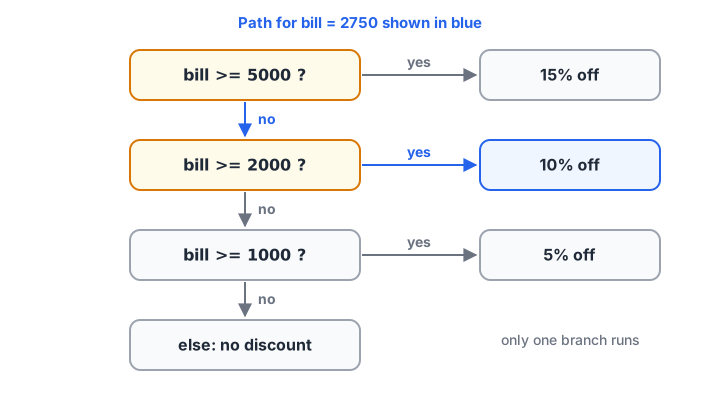
Python walks down the conditions and takes the first "yes". Every other branch is skipped.
bill = 2750

if bill >= 5000:
    discount = 0.15
elif bill >= 2000:
    discount = 0.10
elif bill >= 1000:
    discount = 0.05
else:
    discount = 0.0

print(f"Bill Rs {bill}: discount {discount:.0%}")
print(f"Pay Rs {bill * (1 - discount):.2f}")
A bill of 2,750 also satisfies bill >= 1000, but Python never reaches that line. It already found a match at bill >= 2000.
Why the order of elif conditions matters
Because only the first true branch runs, putting a broad condition first hides the specific ones below it. This is one of the most common logic bugs in grading and pricing code.
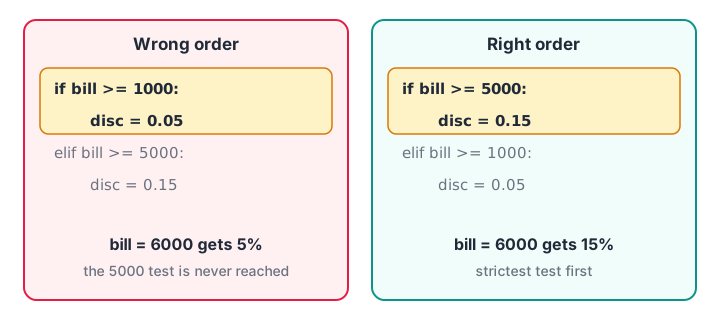
Put the strictest condition first. A broad test at the top swallows everything below it.
bill = 6000

# Wrong order: the broad test comes first
if bill >= 1000:
    wrong = 0.05
elif bill >= 5000:
    wrong = 0.15
else:
    wrong = 0.0

# Right order: strictest test first
if bill >= 5000:
    right = 0.15
elif bill >= 1000:
    right = 0.05
else:
    right = 0.0

print("Wrong order gives", wrong, "| right order gives", right)
Quick check
With marks = 85, which grade does this give? if marks >= 60: "C" elif marks >= 80: "A" else: "F"
85 >= 60 is true, so the first branch runs and the elif is never checked. The conditions are in the wrong order.
Quick check
What does "even" if 7 % 2 == 0 else "odd" give?
7 % 2 is 1, so the condition is false and the value after else, "odd", is returned.
Writing conditions: comparisons, and, or, not, in
Any expression that Python can treat as true or false works as a condition. Combine simple checks with and, or and not rather than stacking many if statements.
bill = 350
is_gold = True
city = "Indore"
cart = ["atta", "dal", "ghee"]

if bill >= 499 or is_gold:
    print("Free delivery")

if city in ["Indore", "Ujjain", "Dewas"] and bill > 0:
    print("Same-day delivery available")

if not cart:
    print("Cart is empty")
else:
    print("Items in cart:", len(cart))
if not cart uses truthiness: an empty list counts as false and a non-empty one as true. The same goes for empty strings, zero and None, as explained in Python type conversion.
Nested if statements
You can put an if inside another if. The inner one is only checked when the outer one is true.
bill = 820
is_gold = False
pincode = "452001"

if pincode.startswith("452"):
    print("Inside Indore delivery zone")
    if bill >= 499 or is_gold:
        print("Delivery is free")
    else:
        print("Delivery costs Rs 40")
else:
    print("Sorry, we do not deliver here yet")
Nesting is natural when the second question only makes sense after the first, as here. When both conditions are simply required together, one if with and is flatter and easier to read. As a rule, more than two or three levels of nesting is a sign the logic should be split up.
The one-line if...else (conditional expression)
When you only need to pick one of two values, Python has a compact form: value_if_true if condition else value_if_false. It is often called Python's ternary operator.
bill = 455
charge = 0 if bill >= 499 else 40
status = "free" if charge == 0 else "paid"
print("Delivery:", status, charge)

stock = 0
print("Label:", "In stock" if stock > 0 else "Out of stock")
Keep it for short choices. If you need elif or several statements, use the full form. For checking one value against many fixed options, Python 3.10+ also offers the match-case statement.
Common mistakes with if...else
- Forgetting the colon.
if bill >= 499without:is aSyntaxError. - Using
=instead of==.if city = "Indore":is aSyntaxError; comparisons need==. - Broad conditions first. Order
elifchecks from strictest to loosest. - Writing
orlike English.city == "Indore" or "Bhopal"is always true, because the non-empty string"Bhopal"is truthy on its own. Repeat the comparison or usein.
city = "Pune"
print("Buggy check:", bool(city == "Indore" or "Bhopal"))
print("Correct check:", city == "Indore" or city == "Bhopal")
print("Cleaner check:", city in ("Indore", "Bhopal"))
Key takeaways
ifruns its indented block only when the condition is true.elsecatches every case theifdid not; exactly one branch runs.elifchecks extra conditions in order and stops at the first true one.- Indentation (four spaces) defines the blocks, and every
if,elifandelseline ends with a colon. - Put the strictest condition first, and use
ininstead of chainedorcomparisons. a if condition else bpicks between two values in one line.
Next, repeat actions over many items with the Python for loop, where if statements become even more useful.
FAQ
What is the difference between if-elif-else and multiple if statements?
In an if-elif-else chain, Python stops at the first true condition, so at most one block runs. With separate if statements, every condition is checked and several blocks can run. Use a chain when the outcomes are mutually exclusive, like grades or price slabs.
Is else compulsory after if in Python?
No. else is optional. An if on its own simply does nothing when its condition is false. Add else only when there is a real alternative action, such as charging a delivery fee. An elif chain can also end without an else.
Does Python have a switch statement?
Python has no switch keyword, but Python 3.10 added match-case, which matches a value against several patterns and covers the same need. For simple cases, an if-elif-else chain or a dictionary lookup also works well. Most analyst code still uses if-elif-else.
How many elif can I use in Python?
There is no limit; you can write as many elif branches as you need. If a chain grows past five or six branches, consider a dictionary that maps values to results, or match-case, which are usually easier to read and update.
Where can I practise if-else problems for coding rounds?
Decision problems such as grading, tax slabs and leap years are common in placement tests. You can practise condition-based coding problems on Debugshala Test. Learners in Indore can also join Debugshala's analyst training at the Old Palasia campus for guided practice.
From the team behind this site
Go further with the Data Analytics Course at Debugshala
These tutorials are written by Debugshala, a training and placement institute at Old Palasia, Indore. The classroom course adds live mentoring, real projects and interview preparation.
- Offline classes at Old Palasia, Indore
- Free demo class before you pay
- Non-IT, fresher and year-gap friendly
- Placement assistance
700+ students placed · 200+ hiring partners · 4.9★ Google rating
