

Your First Python Program: print(), Order and Error Messages
Write your first Python program step by step: how print() works, why code runs top to bottom, sep and end, and how to read beginner error messages calmly.
Picture the order slip at a busy poha stall in Sarafa. The cook reads it from top to bottom: two plates of poha, one jalebi, then three cups of chai. Nobody skips to the chai first or reads the slip backwards. If a line is smudged, the cook stops and asks before guessing.
A Python program works the same way. The file is the slip, each line is one instruction, and the interpreter is the cook who follows them in order. When a line makes no sense, Python stops and tells you exactly which one.
Your first Python program is a short file of statements, usually calls to the built-in print() function, which the Python interpreter runs in order from the first line to the last.
If you have not run any Python yet, start with getting started with Python. Every block below also has a Run Code button, so you can follow along in the browser.
What does print("Hello, World!") actually do?
Almost every programmer's first line is print("Hello, World!"). It looks small, but it already contains three ideas you will use every day.
print("Hello, World!")
print("Welcome to Python")
print("Learning at my own pace")
print(2026)
print(7 * 24)
Each line calls the print() function once, and each call shows one line of output. The last call does not show "7 * 24". It shows 168, because Python works out the calculation before printing.
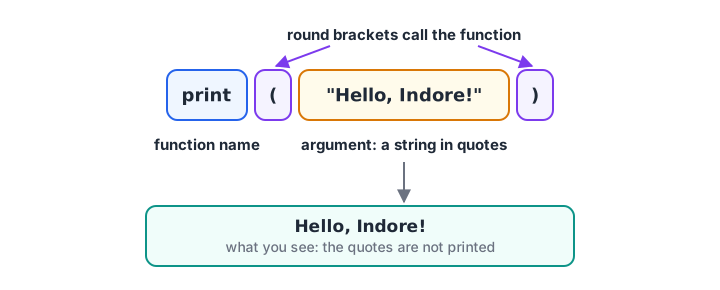
The parts of a print() call. The quotes mark where the text starts and ends; they are not printed.
Here is what each part means:
printis the function's name. Python has dozens of these built-in functions ready to use.- The round brackets
( )call the function. Without them, nothing happens. "Hello, World!"is the argument, the value you hand to the function. Text in quotes is called a string.
Strings vs numbers inside print()
Quotes change the meaning completely. Inside quotes, Python treats the characters as plain text. Without quotes, it treats them as code to be worked out.
print("12 + 8")
print(12 + 8)
print("12" + "8")
print("Rs", 1250 * 3)
The first line prints the text as typed. The second adds the numbers. The third joins two strings into "128", which is a classic beginner surprise. The last mixes a string and a number, separated by a comma.
Quick check
What does print("5" + "5") show?
Both values are strings, so + joins them into the text 55. Without quotes, 5 + 5 would give 10.
How does Python run a program, line by line?
Python reads your file from top to bottom and runs each statement before moving to the next one. The order you write lines in is the order things happen.
print("Step 1: Download yesterday's sales file")
print("Step 2: Remove blank rows")
print("Step 3: Total the sales by branch")
print("Step 4: Email the summary to the manager")
print("All steps finished")
Swap two lines and the output order swaps too. This matters more later, when one line creates a value that the next line needs. You must create something before you use it, just as the cook cannot pour chai before boiling the water.
You can use single quotes or double quotes for strings. 'Indore' and "Indore" are identical to Python. Pick one style and stay consistent. Double quotes are handy when the text itself contains an apostrophe, as in "Today's total".
How to print several values in one line
Give print() several values separated by commas. It prints them in order with a single space between each pair.
branch = "Vijay Nagar"
orders = 46
revenue = 18400
print("Branch:", branch)
print("Orders:", orders, "Revenue: Rs", revenue)
print("Average order value:", revenue / orders)
The words branch, orders and revenue are variables, names that hold values. You will learn them properly in variables and literals. For now, read orders = 46 as "let orders mean 46".
Changing the separator and line ending with sep and end
By default print() puts a space between values and finishes with a new line. Two optional settings, called keyword arguments, change that:
sep="..."sets what goes between the values.end="..."sets what goes after the last value. The default is"\n", the new-line character.
print("2026", "11", "12", sep="-")
print("Rajwada", "Palasia", "Vijay Nagar", sep=" | ")
print("Loading", end="")
print("...", end=" ")
print("done")
print()
print("A blank print() gives an empty line above")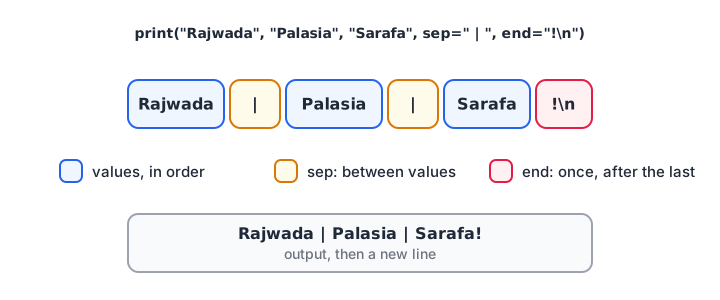
sep is placed between values; end is placed once, after the last one.
The sep="-" line is a quick way to build a date like 2026-11-12. The end="" trick keeps the next print() on the same line, which is useful for progress messages.
Quick check
What does print("a", "b", "c", sep="-") show?
sep replaces the default space between values, so the output is a-b-c.
Your first useful program: a daily sales summary
Put the pieces together. This program prints a small report that a store manager could read at the end of the day.
print("=" * 32)
print("DAILY SALES SUMMARY")
print("=" * 32)
print("Store:", "MG Road, Indore")
print("Date: 2026-11-12", end="\n\n")
print("Cash sales: Rs", 12500)
print("UPI sales:  Rs", 21750)
print("Card sales: Rs", 8300)
print("-" * 32)
print("Total:      Rs", 12500 + 21750 + 8300)
print("UPI share:", round(21750 / (12500 + 21750 + 8300) * 100, 1), "%")
"=" * 32 repeats the string 32 times to draw a line. round(value, 1) keeps one decimal place. With just print(), round() and a few maths operators, you have turned raw numbers into a readable report.
How to read Python error messages
Errors are normal, and every programmer sees dozens a day. The message tells you the file, the line number and the type of problem. Read it from the bottom line up.
Here is a file with a capital letter in the wrong place:
print("Report starts")
Print("Total: 500")
print("Report ends")Report starts
Traceback (most recent call last):
File "hello.py", line 2, in <module>
Print("Total: 500")
^^^^^
NameError: name 'Print' is not defined. Did you mean: 'print'?Notice that line 1 ran and printed, then Python stopped at line 2. Line 3 never ran. Python is case-sensitive, so Print and print are different names, and Python even suggests the fix.
A missing quote is different. It is a syntax error, a grammar mistake, so Python refuses to run any line at all:
print("Total:", 500)
print("Hi) File "hello.py", line 2
print("Hi)
^
SyntaxError: unterminated string literal (detected at line 2)| Mistake | Error you see | Fix |
|---|---|---|
print("Hi) |
SyntaxError: unterminated string literal |
Close the quote |
Print("Hi") |
NameError: name 'Print' is not defined |
Use lowercase print |
print "Hi" |
SyntaxError: Missing parentheses in call to 'print' |
Add brackets |
| Spaces before a line | IndentationError: unexpected indent |
Start the line at the left edge |
print("Total: " + 500) |
TypeError: can only concatenate str (not "int") to str |
Use a comma instead of + |
Common mistakes in a first Python program
- Copying curly quotes. Text pasted from Word or WhatsApp often has “smart quotes”. Python only accepts straight quotes
"or'. - Forgetting that order matters. Using a value on line 2 that you only create on line 5 gives a
NameError. - Indenting for neatness. In Python, spaces at the start of a line have meaning. Keep top-level lines flush left.
- Panicking at red text. Read the last line of the error, go to the line number it shows, and fix that one thing.
Key takeaways
- A Python program runs from top to bottom, one statement at a time.
print()shows values; quotes make text, and code without quotes is worked out first.- Commas print several values with spaces between them;
sepandendchange that. - A
SyntaxErrorstops the whole file. Other errors stop the program at the failing line. - Read errors from the bottom line, then go to the line number shown.
Next, learn to leave notes for yourself and your team with Python comments. When you are ready to format numbers neatly, the lesson on f-strings builds on everything here.
FAQ
How do I write my first Python program?
Create a file named hello.py, type print("Hello, World!") and run it with VS Code's Run button or python hello.py in a terminal. On this site, you can skip the setup and press Run Code on any example. Either way, the interpreter runs your file from top to bottom.
Why is Hello World the first program?
Hello World is the smallest program that proves your setup works. It checks that Python is installed, that you can save and run a file, and that output appears. The tradition comes from early programming books and is now used for almost every language.
Is Python case-sensitive?
Yes. Python treats uppercase and lowercase letters as different, so print, Print and PRINT are three different names. Only lowercase print is the built-in function. The same rule applies to your own variables: Sales and sales hold separate values.
What is the difference between single and double quotes in Python?
There is no difference in meaning. 'Indore' and "Indore" create the same string. Use double quotes when the text contains an apostrophe, like "Today's sales", and single quotes when it contains double quotes. Triple quotes let a string span several lines.
Where can I get help with Python as a beginner in Indore?
Debugshala's classroom Python and analytics training at Old Palasia starts from first programs like this one, in English and Hindi, and welcomes non-IT graduates. You can book a free demo class, and solve first-week Python quizzes on Debugshala Test in between.
From the team behind this site
Go further with the Data Analytics Course at Debugshala
These tutorials are written by Debugshala, a training and placement institute at Old Palasia, Indore. The classroom course adds live mentoring, real projects and interview preparation.
- Offline classes at Old Palasia, Indore
- Free demo class before you pay
- Non-IT, fresher and year-gap friendly
- Placement assistance
700+ students placed · 200+ hiring partners · 4.9★ Google rating
