

Python Decorators: @ Syntax, functools.wraps and Real Examples
Learn Python decorators step by step: functions that wrap functions, the @ syntax, functools.wraps, decorators with arguments, stacking, and lru_cache.
Picture the security desk at the entrance of a big mall on AB Road in Indore. Every visitor walks through it. The guard checks the bag, writes the time in a register and then lets the visitor in to shop exactly as they planned.
The shops inside never change. The jeweller does not need a guard of its own, and the food court does not keep its own register. One desk at the door adds the check for everybody.
Swap the mall for your code. The shops are your functions. The security desk is a decorator: a wrapper placed in front of a function that runs extra steps (logging, timing, checking inputs) every time the function is called, while the function's own code stays untouched.
A Python decorator is a callable that takes a function as input and returns a replacement function, usually a wrapper that runs extra code before and after calling the original, applied with the @name syntax placed above a function definition.
This lesson follows Python closures, because every decorator you write is a closure. If functions as values still feel odd, revise Python functions first. Examples target Python 3.12+.
What is a decorator in Python?
In Python, functions are objects. You can store them in variables, pass them to other functions and return them from functions. A decorator uses all three abilities at once.
def shout(func):
    def wrapper():
        result = func()
        return result.upper() + "!"
    return wrapper

def greet():
    return "namaste indore"

print(greet())
greet = shout(greet)   # decorate by hand
print(greet())
print("greet is now:", greet.__name__)
The line greet = shout(greet) passes the original function into shout, which builds wrapper and returns it. From then on, the name greet points to the wrapper. The wrapper still calls the original, because it remembers func in its closure.
The last line shows a side effect you will fix shortly: the function now calls itself wrapper.
How the @ syntax works
Writing greet = shout(greet) after every definition is clumsy. Python gives you a shortcut. Put @shout on the line directly above def, and Python applies the decorator as soon as the function is defined.
def shout(func):
    def wrapper():
        return func().upper() + "!"
    return wrapper

@shout
def greet():
    return "namaste indore"

@shout
def closing_note():
    return "store closes at 10 pm"

print(greet())
print(closing_note())
The two versions are identical in behaviour. The @ form simply keeps the decoration next to the definition, where a reader will see it.
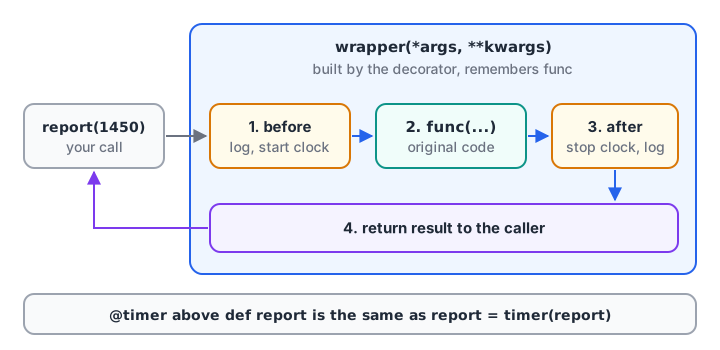
After decoration, the name points to the wrapper. The original function is still inside, reached only through the wrapper.
Writing a decorator that works on any function
The shout wrapper takes no arguments, so it breaks on any function that needs some. Real decorators accept anything with *args and **kwargs and pass it all through. They also return whatever the original returns. (The *args and **kwargs lesson covers how packing works.)
def log_call(func):
    def wrapper(*args, **kwargs):
        print(f"-> {func.__name__} args={args} kwargs={kwargs}")
        result = func(*args, **kwargs)
        print(f"<- {func.__name__} returned {result}")
        return result
    return wrapper

@log_call
def gst_amount(price, rate=0.18):
    return round(price * rate, 2)

@log_call
def total_bill(*items):
    return sum(items)

gst_amount(1450)
gst_amount(2400, rate=0.05)
total_bill(120, 80, 45)
Forgetting return result is the most common decorator bug. The wrapper then returns None, and every decorated function silently stops returning values.
Why you need functools.wraps
A wrapper replaces the original function, so it also replaces its name, its docstring and other metadata. That confuses logs, error messages, documentation tools and anyone debugging. The standard fix is the functools.wraps decorator, applied to the wrapper.
from functools import wraps

def plain(func):
    def wrapper(*args, **kwargs):
        return func(*args, **kwargs)
    return wrapper

def polite(func):
    @wraps(func)
    def wrapper(*args, **kwargs):
        return func(*args, **kwargs)
    return wrapper

@plain
def monthly_sales(region):
    """Return total sales for one region."""
    return 0

@polite
def monthly_profit(region):
    """Return total profit for one region."""
    return 0

print(monthly_sales.__name__, "|", monthly_sales.__doc__)
print(monthly_profit.__name__, "|", monthly_profit.__doc__)
print("original kept at:", monthly_profit.__wrapped__.__name__)
wraps copies __name__, __doc__, __module__ and a few other attributes onto the wrapper, and stores the original in __wrapped__. Make it a habit: every wrapper you write gets @wraps(func).
Quick check
What is @log_call above def report(): equivalent to?
The decorator receives the function and its return value replaces the name.
Decorators with arguments
Sometimes the decorator itself needs settings, such as how many times to retry or which values are allowed. Then you need three layers: an outer function that takes the settings, the decorator it returns, and the wrapper inside.
from functools import wraps

def retry(times):
    def decorator(func):
        @wraps(func)
        def wrapper(*args, **kwargs):
            for attempt in range(1, times + 1):
                try:
                    return func(*args, **kwargs)
                except ConnectionError as err:
                    print(f"attempt {attempt} failed: {err}")
            raise RuntimeError(f"{func.__name__} failed {times} times")
        return wrapper
    return decorator

responses = iter([ConnectionError("timeout"), ConnectionError("reset"), "rows=1240"])

@retry(times=3)
def fetch_sales():
    item = next(responses)
    if isinstance(item, Exception):
        raise item
    return item

print(fetch_sales())
Read @retry(times=3) in two steps. First Python calls retry(times=3), which returns decorator. Then it applies decorator to fetch_sales. The fake responses iterator stands in for an unreliable server, so you can watch two failures and a success.
A validation decorator for data functions
The same three-layer pattern makes a neat input guard for analysis code. Here the decorator checks that a DataFrame has the columns a function needs before the function runs.
from functools import wraps
import pandas as pd

def require_columns(*cols):
    def decorator(func):
        @wraps(func)
        def wrapper(df, *args, **kwargs):
            missing = [c for c in cols if c not in df.columns]
            if missing:
                raise KeyError(f"{func.__name__} needs columns {missing}")
            return func(df, *args, **kwargs)
        return wrapper
    return decorator

@require_columns("city", "amount")
def sales_by_city(df):
    return df.groupby("city")["amount"].sum()

orders = pd.DataFrame({"city": ["Indore", "Bhopal", "Indore"], "amount": [1450, 980, 2300]})
print(sales_by_city(orders).to_string())
try:
    sales_by_city(orders.rename(columns={"amount": "amt"}))
except KeyError as err:
    print("Blocked:", err)
The error message names the function and the missing column, which is far more useful than a pandas KeyError from deep inside a groupby.
Stacking decorators: which runs first?
You can put several decorators on one function. They are applied from the bottom up, closest to def first. When the function is called, the outermost wrapper runs first.
from functools import wraps

def tag(label):
    def decorator(func):
        @wraps(func)
        def wrapper(*args):
            print(f"enter {label}")
            result = func(*args)
            print(f"exit {label}")
            return result
        return wrapper
    return decorator

@tag("A")
@tag("B")
def daily_total(values):
    print("  computing")
    return sum(values)

print(daily_total([412, 298, 645]))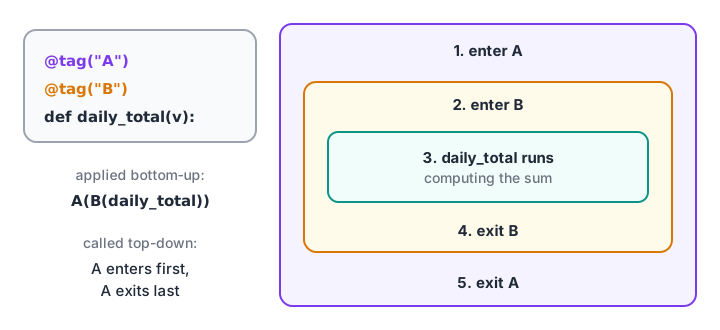
Stacked decorators work like nested boxes: applied inside-out, entered outside-in.
Order matters in practice. Put a logging decorator outside a caching decorator and you log every call. Put it inside and you log only the cache misses.
Quick check
With @A placed above @B on one function, which wrapper's code runs first when the function is called?
Decorators are applied bottom-up, so the result is A(B(func)) and A's wrapper is entered first.
Built-in decorators you already use
Python and its standard library ship many decorators. You will meet these constantly.
| Decorator | Where | What it does |
|---|---|---|
@property |
classes | Lets a method be read like an attribute |
@classmethod |
classes | Method receives the class, used for alternative constructors |
@staticmethod |
classes | Method receives neither instance nor class |
@dataclass |
dataclasses |
Writes __init__, __repr__ and __eq__ for you |
@functools.lru_cache |
functools |
Remembers results for repeated arguments |
@functools.wraps |
functools |
Copies metadata onto a wrapper |
The caching decorator is worth seeing in action, because it can turn a slow recursive function into a fast one with a single line.
from functools import lru_cache

calls = 0

@lru_cache(maxsize=None)
def ways_to_climb(steps):
    global calls
    calls += 1
    if steps <= 1:
        return 1
    return ways_to_climb(steps - 1) + ways_to_climb(steps - 2)

print(ways_to_climb(30), "computed with", calls, "real calls")
print(ways_to_climb.cache_info())
Without the cache, ways_to_climb(30) makes over two million calls. With it, each step count is computed once. The Python recursion lesson explains why the uncached version explodes. Decorated classes such as @dataclass are covered in Python dataclasses.
Common mistakes with Python decorators
- Writing
@timer()whentimertakes no settings, or@retrywhen it does. The parentheses must match how the decorator is defined. - Forgetting
return resultin the wrapper. The decorated function then always returnsNone. - Skipping
@wraps(func). Every function ends up namedwrapper, and logs become useless. - Doing slow work at decoration time. Code in the decorator body (outside the wrapper) runs once when the module loads, not on each call.
- Caching functions with side effects or unhashable arguments.
lru_cacheneeds hashable arguments, so it rejects a list or a DataFrame.
Key takeaways
- A decorator takes a function and returns a replacement, usually a wrapper.
@decoabovedef fmeansf = deco(f).- Write wrappers with
*argsand**kwargs, and return the original's result. - Add
functools.wrapsto keep the name and docstring. - Settings need a third layer:
@retry(times=3). - Stacked decorators apply bottom-up and run top-down.
- Prefer built-ins like
lru_cache,propertyanddataclasswhen they fit.
Next up is Python regular expressions, the tool for finding patterns such as phone numbers and PIN codes inside messy text. Guard decorators like require_columns are the kind of reusable habit practised in Debugshala's hands-on analytics programme in Indore.
FAQ
What is a decorator in Python in simple words?
A decorator is a function that wraps another function to add extra behaviour, such as logging, timing or input checks, without editing the original code. You apply it by writing @decorator_name above the function. Python then replaces the function with the wrapper, which calls the original inside.
Why is functools.wraps used in decorators?
functools.wraps copies the original function's name, docstring and module onto the wrapper and stores the original in __wrapped__. Without it, every decorated function reports its name as wrapper, which breaks logs, help text and debugging tools. Apply it to every wrapper you write.
How do you pass arguments to a Python decorator?
Add an outer layer. Write a function that accepts the settings and returns the actual decorator, which in turn returns the wrapper. @retry(times=3) first calls retry(times=3) to get a decorator, then applies that decorator to the function below it.
Are decorators asked in Python interviews?
Yes, often. Typical questions ask you to write a timing or logging decorator, explain what @ desugars to, explain functools.wraps or predict the order of stacked decorators. Write each example above from memory, then practise decorator and wrapper MCQs on Debugshala Test to check yourself.
Can I learn advanced Python like decorators at Debugshala in Indore?
Yes. Debugshala's data analytics course at its Old Palasia campus in Indore covers Python from basics through functions, closures and decorators, then pandas for analysis. Classes are taught in English and Hindi, fresh and non-IT graduates are welcome, and you can attend a free demo class before paying anything.
From the team behind this site
Go further with the Data Analytics Course at Debugshala
These tutorials are written by Debugshala, a training and placement institute at Old Palasia, Indore. The classroom course adds live mentoring, real projects and interview preparation.
- Offline classes at Old Palasia, Indore
- Free demo class before you pay
- Non-IT, fresher and year-gap friendly
- Placement assistance
700+ students placed · 200+ hiring partners · 4.9★ Google rating
