

Python match-case Statement: Structural Pattern Matching
Learn Python match-case (3.10+): literal, OR, capture, sequence and dictionary patterns, guards and the wildcard, with examples that route real data records.
Imagine the mailroom of a courier office in Indore's Lasudia industrial area. Parcels arrive all day, and a clerk sorts each one by looking at its label. Express parcels go to bay 1.
Parcels to Bhopal or Ujjain go to bay 2. A parcel with a COD tag and an amount over ₹5,000 goes to the supervisor. Anything unclear goes to the "check" shelf.
The clerk is not only reading one word. They look at the shape of the label: is there a COD tag, which city is written, is there an amount? Then they take the first rule that fits and stop.
The parcel is the subject of a match statement. Each sorting rule is a case with a pattern. The extra condition "amount over ₹5,000" is a guard, and the "check" shelf is the wildcard case _.
The Python match-case statement is a control-flow statement, available from Python 3.10, that checks a subject value against patterns from top to bottom and runs the block of the first pattern that matches, optionally binding parts of the value to names.
What is match-case in Python?
Many languages have a switch statement. Python's match started as that idea and grew into structural pattern matching: it can compare simple values, but it can also look inside lists, tuples and dictionaries and pull out the parts you need. The design is described in PEP 636, the official tutorial.
status = "shipped"

match status:
    case "pending":
        print("Order received, not packed yet")
    case "shipped":
        print("On the way")
    case "delivered":
        print("Completed")
    case _:
        print("Unknown status:", status)
Only one case runs. Once a pattern matches, Python skips the rest, so there is no "fall-through" and no need for a break as in C or Java. If no case matches and there is no case _, nothing happens at all.
How Python checks the cases
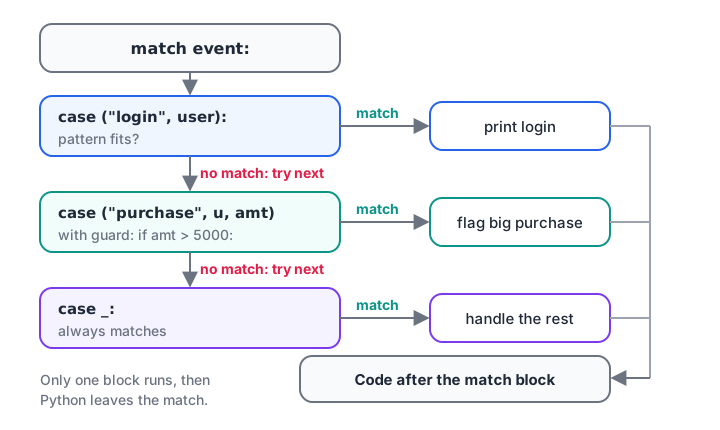
Cases are tried in order. The first pattern that matches, and whose guard is true, wins.
Because order matters, put specific patterns first and general ones last. A case _ placed at the top would swallow every value, and Python reports that as a SyntaxError because the cases below it could never run.
Quick check
What happens when no case matches and there is no case _?
A match statement with no matching case simply does nothing. Add case _ if you want a default action.
Literal and OR patterns
The simplest patterns are literal values: strings, numbers, True, False and None. Join alternatives with | to share one block across several values.
def payment_bucket(mode):
    match mode.lower():
        case "upi" | "gpay" | "phonepe":
            return "digital-upi"
        case "card" | "credit card" | "debit card":
            return "card"
        case "cash" | "cod":
            return "cash"
        case _:
            return "other"

for m in ["UPI", "PhonePe", "Debit Card", "COD", "cheque"]:
    print(f"{m:12} -> {payment_bucket(m)}")
This replaces a chain of if mode in (...) checks with something you can scan in a second. If you are new to conditions, the if...else tutorial covers the basics that match builds on.
Capture patterns, guards and the wildcard
A bare name in a pattern does not compare against a variable. It captures the value into that name. Combined with a guard, if after the pattern, it lets you match a whole range of values.
def classify_order(amount):
    match amount:
        case 0:
            return "free sample"
        case n if n < 0:
            return f"refund of {abs(n)}"
        case n if n >= 5000:
            return f"high value ({n}): needs approval"
        case n:
            return f"normal order ({n})"

for a in [0, -250, 7400, 899]:
    print(a, "->", classify_order(a))
The final case n: captures anything, so it acts as a default that also gives you the value. Use case _: when you don't need the value; the underscore is a wildcard that never binds a name.
Sequence patterns: matching lists and tuples
Patterns can look like lists or tuples. Python checks the length and each position, and captures the parts you name. *rest collects any number of remaining items, just like in unpacking.
events = [
    ("login", "riya"),
    ("purchase", "riya", 1499),
    ("purchase", "arjun", 6200),
    ("refund", "arjun", 6200, "damaged"),
    ("logout",),
]

for event in events:
    match event:
        case ("login", user):
            print(f"{user} logged in")
        case ("purchase", user, amount) if amount > 5000:
            print(f"Big purchase by {user}: {amount}")
        case ("purchase", user, amount):
            print(f"{user} bought for {amount}")
        case ("refund", user, amount, *reason):
            print(f"Refund {amount} to {user}, reason: {reason}")
        case _:
            print("Unrecognised event:", event)
This is where match pays off. The same logic with if needs length checks, index lookups and comparisons on every line. You will learn more about tuples in Python tuples, and the same patterns work with lists.
Quick check
Which pattern matches the tuple ("purchase", "riya", 1499) and captures the amount?
The sequence pattern must have the same length (three items). The first is the literal "purchase", and user and amount capture the rest.
Mapping patterns: matching dictionaries and JSON
Data from APIs, web forms and JSON files usually arrives as dictionaries. A mapping pattern checks that certain keys exist (and optionally what their values are) and captures them. Extra keys are ignored, which suits real-world records with many fields.
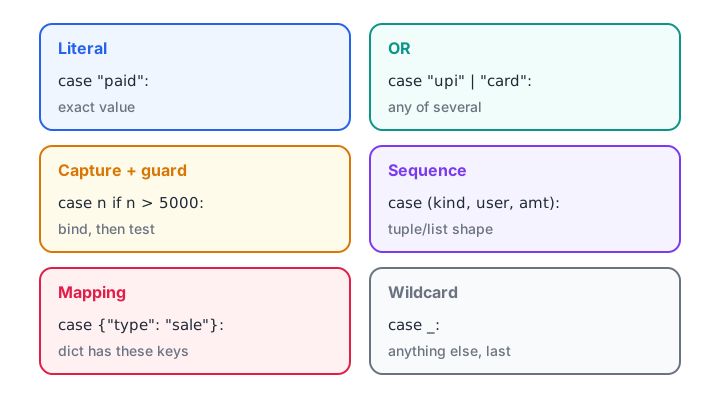
The six pattern types you will use most, from simple values to dictionary shapes.
records = [
    {"type": "sale", "city": "Indore", "amount": 1200},
    {"type": "sale", "city": "Bhopal", "amount": 860, "coupon": "DIWALI"},
    {"type": "return", "order_id": 5531},
    {"type": "sale", "city": "Indore"},
    {"msg": "heartbeat"},
]

for r in records:
    match r:
        case {"type": "sale", "amount": amt, "coupon": code}:
            print(f"Sale {amt} with coupon {code}")
        case {"type": "sale", "city": city, "amount": amt}:
            print(f"Sale {amt} in {city}")
        case {"type": "sale"}:
            print("Sale record missing amount:", r)
        case {"type": "return", "order_id": oid}:
            print(f"Return for order {oid}")
        case _:
            print("Skipped:", r)
Notice how the incomplete sale is caught by its own case instead of crashing with a KeyError. This makes match a good tool for validating messy feeds before you load them into pandas. Dictionaries get a full tutorial in Python dictionaries.
match-case vs if-elif: which should you use?
match does not replace if. Each is clearer for different jobs.
| Situation | Better choice | Why |
|---|---|---|
| One value against fixed options | match |
Reads like a lookup table |
| Data with different shapes (tuples, dicts) | match |
Checks structure and extracts parts in one step |
Numeric ranges (score >= 90) |
if-elif |
Guards on every case add noise |
| Conditions on several unrelated variables | if-elif |
match works on one subject |
| Code that must run on Python 3.9 or older | if-elif |
match is a syntax error before 3.10 |
| Simple value-to-value mapping | a dictionary | rates[city] is shorter than any branch |
The last row matters for analysts. If every case just returns a value, a dictionary lookup such as {"Indore": 0.18, "Bhopal": 0.12}.get(city, 0) is shorter and faster than either.
Common mistakes with match-case
- Using a variable name as a constant.
case limit:does not compare with a variable namedlimit; it captures the subject into a newlimit. Use a dotted name (Config.LIMIT), a literal, or a guard (case n if n == limit). - Putting the general case first. An unguarded capture or
case _before other cases makes them unreachable, and Python refuses to compile it. - Expecting fall-through. Only one case runs. Combine values with
|instead. - Running on old Python. On 3.9 or earlier,
matchis aSyntaxError. Check withpython --version. - Forgetting that mapping patterns ignore extra keys.
{"type": "sale"}matches any dict with that key, whatever else it holds. Order cases from most specific to least.
Key takeaways
matchcompares one subject against patterns from top to bottom; the first match wins.- Literal and
|patterns replace longifchains for fixed options. - Bare names capture values; use guards (
if) for conditions. - Sequence and mapping patterns check structure and extract fields from tuples, lists and dicts.
case _is the default; put it last.- Requires Python 3.10 or newer.
You have now finished flow control. The next section starts with Python lists, the data structure you will match, loop over and slice more than any other. For loop-level control inside cases, revisit break, continue and pass.
FAQ
Does Python have a switch statement?
Python has no switch keyword, but since Python 3.10 the match-case statement covers the same need and more. For older versions, people used if-elif chains or dictionary lookups. For a simple value-to-result mapping, a dictionary with .get() is still often the shortest option.
Which Python version supports match-case?
match-case was introduced in Python 3.10, released in October 2021, through PEPs 634, 635 and 636. Any Python from 3.10 onward, including 3.12 and 3.13, supports it. On 3.9 or earlier the code fails with a SyntaxError before it runs.
Is match-case faster than if-elif in Python?
Not reliably. For simple literal cases, CPython tests patterns one after another, much like an if-elif chain, so speed is similar. Choose match-case for readability when you branch on the structure of data, and use a dictionary lookup if raw speed on a fixed mapping matters.
Can match-case match on types like int or str?
Yes, with class patterns. case int(): matches any integer and case str(s): matches a string and captures it in s. You can also match custom classes by attribute, such as case Order(status="paid"):. This is useful when a column or feed mixes types.
Can I learn Python control flow with a mentor in Indore?
Yes. Debugshala teaches classroom batches at Old Palasia, Indore, in English and Hindi, and welcomes fresh graduates and non-IT learners. Book a free demo of mentor-led data analytics classes in Indore, and take Python practice tests on Debugshala Test to check your understanding.
From the team behind this site
Go further with the Data Analytics Course at Debugshala
These tutorials are written by Debugshala, a training and placement institute at Old Palasia, Indore. The classroom course adds live mentoring, real projects and interview preparation.
- Offline classes at Old Palasia, Indore
- Free demo class before you pay
- Non-IT, fresher and year-gap friendly
- Placement assistance
700+ students placed · 200+ hiring partners · 4.9★ Google rating
