

Python Keywords and Identifiers: Rules, List and Examples
Learn Python's 35 keywords, the four soft keywords and the naming rules for identifiers, with runnable checks and examples taken from real data sheets.
Imagine you join a small FMCG distributor in Siyaganj as a junior analyst. Your manager hands you an Excel export with columns called "Total Sales", "2025 Target", "class" and "from". You want to turn each column into a Python variable so you can work with the numbers.
The first two names break straight away because of the space and the leading digit. The last two look harmless, but Python refuses them too. "class" and "from" are words the language has already claimed for its own grammar.
That spreadsheet header is a good picture of today's topic. The words Python has claimed are its keywords. The names you are allowed to invent, like total_sales or target_2025, are identifiers. Knowing the difference saves you from a whole family of confusing SyntaxError messages.
A Python keyword is a reserved word with a fixed meaning in the language, and an identifier is a name you choose for a variable, function, class or module.
What are keywords in Python?
Keywords are the building blocks of Python's grammar. When Python reads if, it expects a condition. When it reads for, it expects a loop. Because the meaning is fixed, the word cannot also be the name of your variable.
Python ships a small built-in module called keyword that lists them. This is the most reliable list, because it always matches the version you are running.
import keyword

print("Number of keywords:", len(keyword.kwlist))
print(keyword.kwlist)
print()
print("Soft keywords:", keyword.softkwlist)
print("Is 'class' a keyword?", keyword.iskeyword("class"))
print("Is 'sales' a keyword?", keyword.iskeyword("sales"))
On Python 3.13 you will see 35 keywords. Three of them start with a capital letter: True, False and None. All the others are lowercase, and because Python is case-sensitive, If or FOR are not keywords at all (but please don't use them as names).
Python keywords grouped by job
Memorising 35 words in alphabetical order is hard. Grouping them by what they do is easier, and you will meet each group in this series as you go.
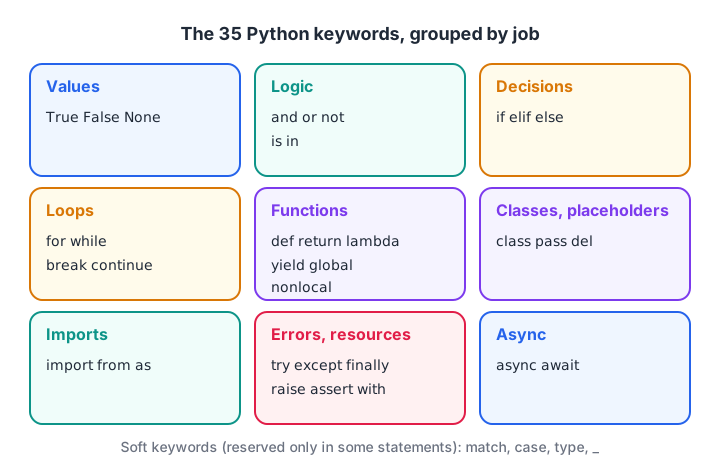
The 35 Python keywords sorted by the job they do in your code.
| Group | Keywords | Where you learn them |
|---|---|---|
| Values | True, False, None |
Variables and literals |
| Logic | and, or, not, is, in |
Operators |
| Decisions | if, elif, else |
if...else |
| Loops | for, while, break, continue |
Loops |
| Functions | def, return, lambda, yield, global, nonlocal |
Functions |
| Classes and placeholders | class, pass, del |
OOP and flow control |
| Imports | import, from, as |
Modules |
| Errors and resources | try, except, finally, raise, assert, with |
Exceptions |
| Async | async, await |
Advanced topics |
You don't need all of them on day one. An analyst writing a cleaning script mostly uses the values, logic, decision, loop, function and import groups.
Soft keywords: match, case, type and _
Since Python 3.10, a few words are soft keywords. They act as keywords only in a specific position and behave like normal names everywhere else. match and case power the match-case statement, and type defines type aliases from Python 3.12.
That is why this code still works, even though match is special inside a match statement:
match = "IND vs AUS"
type = "T20"
print(match, "-", type)

# The soft keyword list
import keyword
print(keyword.softkwlist)
print(keyword.issoftkeyword("match"))
It works, but shadowing type hides the built-in type() function for the rest of your script. Treat soft keywords as "technically allowed, practically avoid".
Quick check
What does "for".isidentifier() return?
isidentifier() only checks the characters. Use keyword.iskeyword() as well to reject reserved words.
What is an identifier in Python?
An identifier is any name you create. Variable names, function names, class names, module names and parameter names are all identifiers. The tutorial on variables and literals shows how a name points to a value. Here we focus on what a legal name looks like.
Rules for naming identifiers
Python applies five rules. Break any one and you get a SyntaxError before your code even starts running.
- Use only letters (a–z, A–Z), digits (0–9) and the underscore
_. - Do not start with a digit.
target_2025is fine,2025_targetis not. - Do not use spaces or symbols such as
-,%,@or.. - Do not use a keyword such as
class,fromorNone. - Remember that names are case-sensitive, so
Sales,salesandSALESare three different names.
Python 3 also accepts Unicode letters, so कीमत = 250 is a legal identifier. It runs, but most teams stick to English letters so that every colleague can type the names.
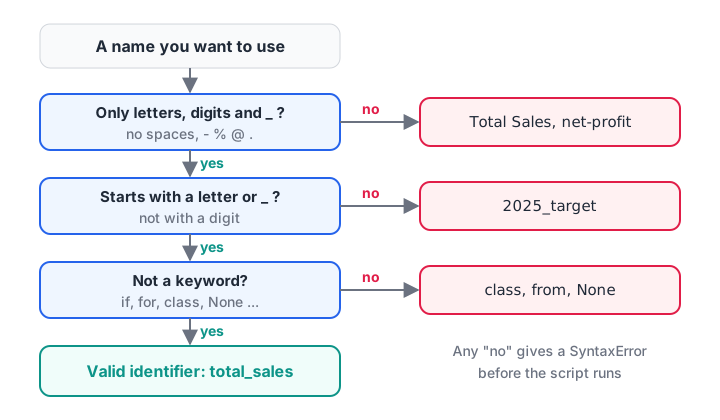
Three questions decide whether a name is a valid Python identifier.
Checking names in code
The string method isidentifier() checks the first three rules for you. It does not know about keywords, so combine it with keyword.iskeyword().
import keyword

def is_valid_name(name):
    return name.isidentifier() and not keyword.iskeyword(name)

headers = ["Total Sales", "2025 Target", "class", "from",
           "region", "profit_%", "_temp", "Discount2"]

for h in headers:
    status = "valid" if is_valid_name(h) else "invalid"
    print(f"{h!r:15} -> {status}")
Four of the eight headers fail. The fix is usually mechanical: lowercase the text, replace spaces and symbols with underscores, and move or prefix leading digits.
Quick check
Which of these is a valid Python identifier?
It uses only letters, digits and underscores and doesn't start with a digit. 2nd_quarter starts with a digit, net-profit has a hyphen and class is a keyword.
Turning messy column names into clean identifiers
This is where the topic stops being theory for an analyst. Spreadsheet headers are written for humans, not for Python. A small function can clean them all at once.
import keyword
import re

def to_identifier(header):
    name = header.strip().lower()
    name = name.replace("%", "pct")
    name = re.sub(r"[^0-9a-z]+", "_", name).strip("_")
    if name and name[0].isdigit():
        name = "col_" + name
    if keyword.iskeyword(name):
        name = name + "_"
    return name

headers = ["Total Sales", "2025 Target", "class", "from", "Profit %", " Region "]
for h in headers:
    print(f"{h!r:15} -> {to_identifier(h)}")
The trailing underscore trick (class_, from_) is the convention the official PEP 8 style guide suggests when a natural name clashes with a keyword.
In pandas, you can still reach a column named class with square brackets, df["class"]. What fails is the dot shortcut df.class, because Python reads class as the keyword. Cleaning the headers once at the start avoids that trap for the rest of the analysis.
Naming conventions that make code readable
Rules tell you what Python accepts. Conventions tell you what other people expect to read. Following them makes your notebook look professional in an interview or code review.
| Kind of name | Convention | Example |
|---|---|---|
| Variable, function | snake_case | monthly_revenue, clean_city() |
| Constant | UPPER_CASE | GST_RATE = 0.18 |
| Class | CapWords | SalesReport |
| "Private" helper | leading underscore | _cache |
| Clash with keyword | trailing underscore | class_, from_ |
| Throwaway value | single underscore | for _ in range(3) |
Pick names that say what the value is. rev_q1_indore tells the next reader far more than x1, and it costs you only a few extra keystrokes.
Built-in names are not keywords, but avoid them
list, sum, max, print, input and type are built-in functions, not keywords. Python lets you reuse them as names, and that is exactly why they cause bugs.
prices = [120, 450, 80]
print("Total:", sum(prices))

sum = 0          # looks harmless
for p in prices:
    sum += p
print("Manual total:", sum)

try:
    print(sum([1, 2, 3]))
except TypeError as err:
    print("Broken:", err)
Once sum points to an integer, the real sum() function is hidden for the rest of the script. In a long Jupyter notebook this can break a cell written an hour earlier. Use names like total or running_sum instead.
Common mistakes with keywords and identifiers
- Starting a name with a digit.
2025_sales = 100raisesSyntaxError: invalid decimal literal. Writesales_2025. - Using a hyphen.
net-profit = 50is read asnet - profit, a subtraction. Usenet_profit. - Writing
trueornonein lowercase. Python only knowsTrue,FalseandNone. Lowercasetrueis treated as an ordinary, undefined name and gives aNameError. - Shadowing built-ins. Naming a variable
list,dict,strorsumhides the real function. - Very short names.
a,banddf2are legal, but in a 200-line analysis nobody, including future you, will remember what they hold.
Key takeaways
- Keywords are reserved words that form Python's grammar; Python 3.13 has 35 of them.
True,FalseandNoneare the only capitalised keywords.- Soft keywords (
match,case,type,_) are reserved only in specific statements. - Identifiers use letters, digits and underscores, never start with a digit and are case-sensitive.
- Clean spreadsheet headers into snake_case identifiers once, at the start of your analysis.
- Avoid reusing built-in names like
sum,listandtype.
Next, before you install pandas, set up a clean workspace with Python virtual environments and pip.
FAQ
How many keywords are there in Python?
Python 3.13 has 35 keywords, listed by keyword.kwlist. It also has four soft keywords, match, case, type and _, which are reserved only in certain statements. The exact count can change between versions, so check keyword.kwlist on the version you use.
What is the difference between a keyword and an identifier in Python?
A keyword is a word Python has already reserved, such as if, for or class, and its meaning cannot change. An identifier is a name you create for your own variables, functions and classes. Every keyword fails as an identifier, but most other words are free to use.
Is print a keyword in Python?
No. In Python 3, print is a built-in function, not a keyword, so keyword.iskeyword("print") returns False. You could technically assign print = 5, but that hides the function and breaks every later print() call in the script, so never do it.
Can a Python identifier start with an underscore?
Yes. Names like _total or __version__ are valid. By convention a single leading underscore marks something as internal, double underscores on both sides are reserved for Python's special names, and a lone _ often stands for a value you don't care about.
Where can I learn Python for data analytics in Indore?
Debugshala runs offline classes at its Old Palasia campus in Indore, taught in English and Hindi, and accepts fresh graduates and non-IT learners. You can join Debugshala's beginner-friendly data analytics course after a free demo class, and practise Python MCQs on Debugshala Test between sessions.
From the team behind this site
Go further with the Data Analytics Course at Debugshala
These tutorials are written by Debugshala, a training and placement institute at Old Palasia, Indore. The classroom course adds live mentoring, real projects and interview preparation.
- Offline classes at Old Palasia, Indore
- Free demo class before you pay
- Non-IT, fresher and year-gap friendly
- Placement assistance
700+ students placed · 200+ hiring partners · 4.9★ Google rating
