

Python Sets: Union, Intersection, Difference and Fast Lookups
Learn Python sets with sales examples: removing duplicates, add and discard, union, intersection and difference, fast membership tests and frozenset.
Imagine you run a sweet shop with two branches, one in Sarafa and one in Vijay Nagar. Each branch keeps a list of loyalty-card numbers for customers who bought something in November. The owner asks three questions: how many different customers did we serve, who shopped at both branches, and who visited Sarafa but never came to Vijay Nagar?
With plain lists you would write nested loops and keep checking "have I seen this one already?". It works for 20 customers and becomes slow and error-prone for 20,000.
Each branch's list of card numbers is a perfect fit for a set. "Different customers" is the size of the combined set, "both branches" is an intersection, and "Sarafa only" is a difference. Python answers each question in one short expression.
A Python set is a mutable, unordered collection of unique hashable objects that supports fast membership tests and mathematical operations such as union, intersection and difference.
Sets come right after lists and tuples in this series. Where those two keep every item in order, a set keeps each value once and forgets the order.
What is a set in Python and how do you create one?
You create a set with curly braces around comma-separated values, or by passing any iterable, such as a list or a string, to set(). Duplicates disappear the moment the set is built.
sarafa = {"C101", "C102", "C103", "C101", "C104"}   # C101 typed twice
print(sorted(sarafa), len(sarafa))

bills = ["Ravi", "Neha", "Ravi", "Asha", "Neha", "Ravi"]
customers = set(bills)
print("Bills:", len(bills), "| Unique customers:", len(customers))

print(set("indore"))        # characters, duplicates removed
empty = set()               # NOT {} - that is an empty dict
print(type(empty), type({}))
Two details catch beginners. First, {} creates an empty dictionary, not an empty set, so you must write set(). Second, sets have no fixed order, so printing one may show items in any sequence. In the examples here we wrap sets in sorted() so the output is easy to read.
What can go inside a set?
Only hashable items: numbers, strings, booleans, None and tuples of hashable values. Lists, dictionaries and other sets cannot be members because their contents can change. Trying {[1, 2]} raises TypeError: unhashable type: 'list'.
That limit is the price of speed. The next section explains why.
Quick check
What does x = {} create?
Empty curly braces have always meant an empty dict. Use set() for an empty set.
Why are set lookups so fast?
When you ask "C103" in my_list, Python checks each item from the start until it finds a match. With 1 lakh items that can mean 1 lakh comparisons. A set works differently.
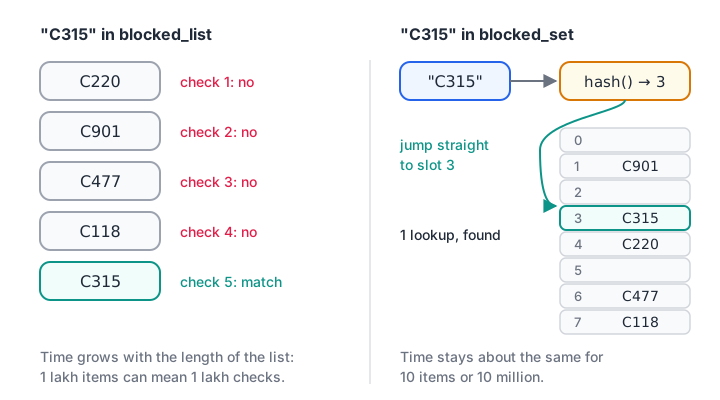
A list is scanned item by item; a set hashes the value and jumps straight to the slot where it would live.
Python runs each value through a hash function, which turns it into a number. That number points to a slot in an internal table. To check membership, Python hashes the value again and looks only in that slot. The time taken stays roughly the same whether the set holds 10 items or 10 million.
blocked_cards = {"C220", "C315", "C901", "C477"}
todays_bills = [("C101", 450), ("C315", 1200), ("C220", 300), ("C150", 780)]

for card, amount in todays_bills:
    if card in blocked_cards:          # one hash lookup per bill
        print(f"{card}: Rs {amount} - card blocked, ask for cash")
    else:
        print(f"{card}: Rs {amount} - ok")
Whenever you have a "lookup list" that you check again and again, such as blocked IDs, valid PIN codes or SKUs already processed, store it as a set. The loop itself is ordinary; see the for loop tutorial if it is new to you.
How do you add and remove items from a set?
Sets are mutable, so you can grow and shrink them after creation. There is no indexing, though: my_set[0] is an error, because there is no "first" position.
| Method | What it does | If the item is missing |
|---|---|---|
add(x) |
Add one item | Not applicable; adding an existing item does nothing |
update(iterable) |
Add every item from a list, tuple or set | Not applicable |
remove(x) |
Delete x |
Raises KeyError |
discard(x) |
Delete x |
Does nothing, silently |
pop() |
Remove and return an arbitrary item | Raises KeyError if the set is empty |
clear() |
Remove everything | Not applicable |
regions = {"Indore", "Bhopal"}
regions.add("Ujjain")
regions.add("Indore")                    # already there: no change
regions.update(["Dewas", "Ratlam"])
print(sorted(regions))

regions.discard("Jabalpur")              # missing, but no error
regions.remove("Ratlam")
print(sorted(regions))

try:
    regions.remove("Gwalior")
except KeyError as err:
    print("remove() failed for", err)
Use remove() when a missing item means something is wrong and you want to know. Use discard() when "already gone" is fine.
Set operations: union, intersection and difference
This is where sets earn their place in analytics work. Back at the sweet shop, here are the four questions you can ask of two branch sets.
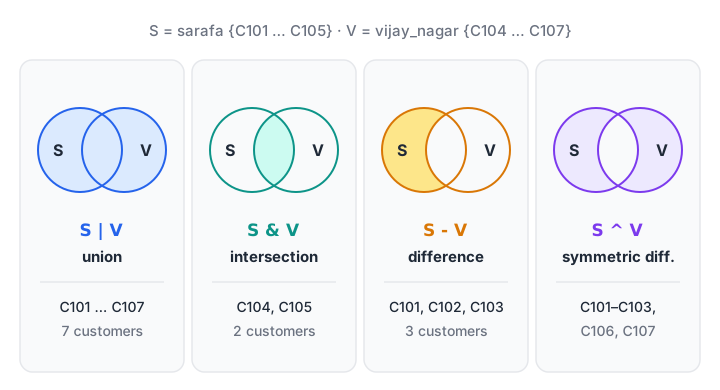
Each operation picks a different region of the two overlapping circles.
| Question | Operator | Method | Result |
|---|---|---|---|
| Customers at either branch | a | b |
a.union(b) |
Union |
| Customers at both branches | a & b |
a.intersection(b) |
Intersection |
| At Sarafa but not Vijay Nagar | a - b |
a.difference(b) |
Difference |
| At exactly one branch | a ^ b |
a.symmetric_difference(b) |
Symmetric difference |
sarafa = {"C101", "C102", "C103", "C104", "C105"}
vijay_nagar = {"C104", "C105", "C106", "C107"}

print("Either branch :", sorted(sarafa | vijay_nagar))
print("Both branches :", sorted(sarafa & vijay_nagar))
print("Sarafa only   :", sorted(sarafa - vijay_nagar))
print("One branch    :", sorted(sarafa ^ vijay_nagar))

total = len(sarafa | vijay_nagar)
repeat = len(sarafa & vijay_nagar)
print(f"{repeat} of {total} customers ({repeat / total:.0%}) used both branches")
The operators need both sides to be sets. The method forms are more forgiving and accept any iterable, so sarafa.union(["C200", "C201"]) works while sarafa | ["C200"] raises a TypeError.
Updating a set in place
Each operation also has an in-place version that changes the left-hand set instead of building a new one: |=, &=, -= and ^=. A common use is to keep a running set of "IDs already processed" as files arrive.
seen = set()
daily_files = [["C1", "C2", "C3"], ["C2", "C4"], ["C4", "C5", "C1"]]

for day, ids in enumerate(daily_files, start=1):
    new_ids = set(ids) - seen
    seen |= new_ids
    print(f"Day {day}: {len(new_ids)} new customers, {len(seen)} so far")
Quick check
a = {1, 2, 3, 4} and b = {3, 4, 5}. What is a - b?
Difference keeps the items in a that are not in b, which are 1 and 2.
Subsets, supersets and disjoint sets
Sometimes you need a yes-or-no answer about two groups. Is every product in this order from the approved catalogue? Do these two campaigns share any customers?
a <= bora.issubset(b): every item ofais also inb.a >= bora.issuperset(b):acontains every item ofb.a.isdisjoint(b): the two sets have no items in common.
catalogue = {"kaju-katli", "rasgulla", "namkeen", "gulab-jamun"}
order1 = {"rasgulla", "namkeen"}
order2 = {"rasgulla", "pizza"}

print("Order 1 valid:", order1 <= catalogue)
print("Order 2 valid:", order2 <= catalogue, "| unknown:", order2 - catalogue)

diwali = {"C1", "C2", "C3"}
holi = {"C7", "C8"}
print("Campaigns overlap?", not diwali.isdisjoint(holi))
Notice how order2 - catalogue immediately tells you which item failed the check. Pairing a yes-or-no test with a difference is a handy pattern for data validation.
What is a frozenset in Python?
A frozenset is an immutable set. It supports every operation that reads a set (in, |, &, -, len) but has no add, remove or update. Because it cannot change, it is hashable, so it can be a dictionary key or live inside another set.
combo_sales = {
    frozenset({"samosa", "chai"}): 182,
    frozenset({"poha", "jalebi"}): 240,
}
basket = frozenset({"chai", "samosa"})     # order typed differently
print("Combo sold:", combo_sales[basket])

bundles = {frozenset({"a", "b"}), frozenset({"b", "a"})}
print("Distinct bundles:", len(bundles))
This is useful for market-basket work, where "samosa and chai" is the same combo as "chai and samosa". A tuple would treat those as two different keys.
Common mistakes with Python sets
- Writing
{}for an empty set. That creates a dictionary. Useset(). - Expecting order. Sets do not keep insertion order, and the printed order can differ between runs. Use
sorted(s)when you need a stable display, orlist(dict.fromkeys(items))to remove duplicates while keeping order. - Indexing a set.
s[0]raisesTypeError. Convert to a list or sorted list first. - Putting lists inside a set. Lists are unhashable. Convert each one to a tuple.
- Calling
set("Indore")to make a one-item set. It splits the string into characters. Write{"Indore"}instead. - Forgetting that
"Rahul"and"rahul "are different values. Clean text withstrip()andlower()before building the set, or your "unique" count will be too high.
Key takeaways
- A set stores each hashable value once and has no order or indexes.
set(items)removes duplicates;len(set(items))counts distinct values.inon a set is a hash lookup, so use sets for any list you search repeatedly.|,&,-and^answer "either", "both", "only this one" and "exactly one" questions.discard()is silent when the item is missing;remove()raisesKeyError.- A
frozensetis an immutable set that can be used as a dictionary key.
Next in the series is Python dictionaries, which pair each unique key with a value. They use the same hashing idea you just learned.
FAQ
What is the difference between a list and a set in Python?
A list keeps items in order, allows duplicates and supports indexing, while a set has no order, keeps each value once and cannot be indexed. Checking membership with in is much faster on a set. Use a list for sequences and a set for unique values and lookups.
How do I remove duplicates from a list using a set?
Call set(my_list), and wrap it in list() if you need a list back. This is fast but loses the original order. When order matters, use list(dict.fromkeys(my_list)), which keeps the first occurrence of each value in its original position.
Is a Python set ordered?
No. A set does not remember insertion order, and the order you see when printing can change between runs and Python versions. Dictionaries do keep insertion order since Python 3.7, but sets never promised it. Use sorted(my_set) whenever you need predictable output.
Can a set contain a list in Python?
No. Set members must be hashable, and lists are mutable and therefore unhashable, so {[1, 2]} raises a TypeError. Convert the list to a tuple, as in {(1, 2)}, or to a frozenset if the order inside it does not matter.
Where can I learn Python sets and data handling in Indore?
Debugshala runs classroom batches at its Old Palasia campus in Indore, taught in English and Hindi, and accepts IT and non-IT graduates. Debugshala's Python-first data analytics course begins with a free demo class, and you can solve set-based practice questions on Debugshala Test.
From the team behind this site
Go further with the Data Analytics Course at Debugshala
These tutorials are written by Debugshala, a training and placement institute at Old Palasia, Indore. The classroom course adds live mentoring, real projects and interview preparation.
- Offline classes at Old Palasia, Indore
- Free demo class before you pay
- Non-IT, fresher and year-gap friendly
- Placement assistance
700+ students placed · 200+ hiring partners · 4.9★ Google rating
