

Python Projects for Beginners: 10 Ideas with Starter Code
10 Python projects for beginners, from a guessing game to a pandas sales report, each with a step-by-step outline and runnable starter code to build on.
Think about learning to cook at home in Indore. You can watch a hundred videos on making poha, but the first real plate teaches you more: the onions burn, the poha turns soggy, and you learn why the recipe said "rinse, don't soak".
Programming works the same way. Tutorials are the videos. A project is the first plate: you choose the steps, things break, and fixing them is where the learning sticks.
Here each project is a recipe card: the outline is the method, the starter code is the half-prepared ingredients, and the "stretch" line makes it your own dish.
A beginner Python project is a small, self-contained program with a clear input, a few processing steps and a visible output, chosen to practise specific language skills and finished end to end so it can be shown to others.
This is the second-last lesson of the series, after the Python random module. Starters target Python 3.12+ and avoid input() and real files so they run in the browser; each tells you what to swap in on your own computer.
How to choose your first Python project
Pick a problem you already understand, such as budgets, marks or quizzes, so all your effort goes into the code.
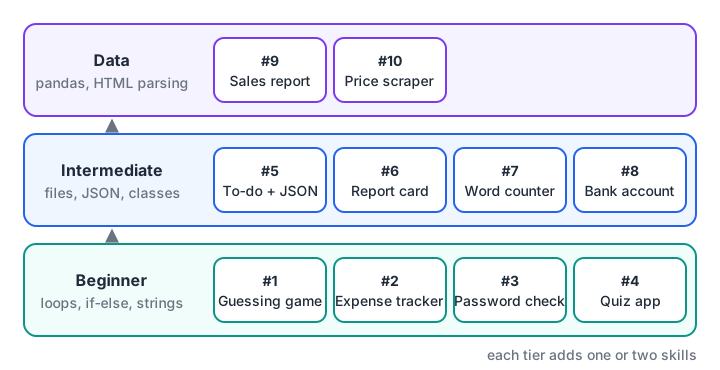
Climb one rung at a time. Each tier adds one or two skills to what the previous tier used.
| # | Project | Level | Main skills |
|---|---|---|---|
| 1 | Number guessing game | Beginner | while loop, if-else, random |
| 2 | Expense tracker | Beginner | CSV, dictionaries |
| 3 | Password strength checker | Beginner | strings, regex, secrets |
| 4 | MCQ quiz app | Beginner | lists of dicts, scoring |
| 5 | To-do list with saving | Intermediate | functions, JSON files |
| 6 | Student report card | Intermediate | functions, formatting |
| 7 | Word frequency analyser | Intermediate | Counter, regex |
| 8 | Bank account simulator | Intermediate | classes, custom exceptions |
| 9 | Sales data report | Data | pandas groupby, pivot |
| 10 | Price scraper | Data | HTML parsing |
Quick check
Which project is the best first step for someone who knows only loops, conditions and functions?
The guessing game needs only a loop, comparisons and a random number, so you can finish it in an evening.
Beginner Python projects
1. Number guessing game
The computer picks a number from 1 to 100 and says "too high" or "too low" until the player gets it.
- Pick the secret with
random.randint. - Loop: read a guess, compare, print a hint.
- Count tries and stop on a correct guess.
The starter plays itself by halving the range each time, so it never needs more than 7 tries.
import random

rng = random.Random(5)
secret = rng.randint(1, 100)
low, high, tries = 1, 100, 0

while True:
    guess = (low + high) // 2      # on your PC: guess = int(input("Guess: "))
    tries += 1
    if guess < secret:
        print(f"{guess}: too low")
        low = guess + 1
    elif guess > secret:
        print(f"{guess}: too high")
        high = guess - 1
    else:
        print(f"{guess}: correct in {tries} tries")
        break
Stretch: limit the player to 7 tries, and handle non-numbers with try and except ValueError.
2. Expense tracker
Record daily spending and see where the money went each month.
- Store each expense as date, category and amount in a CSV.
- Read the rows and total them per category.
- Flag categories above a budget.
- Print a sorted summary.
import csv
import io
from collections import defaultdict

data = io.StringIO("""date,category,amount
2026-11-01,food,240
2026-11-02,travel,120
2026-11-03,food,310
2026-11-05,bills,1450
2026-11-06,food,180
2026-11-08,travel,560
""")
budget = {"food": 600, "travel": 500, "bills": 2000}
totals = defaultdict(int)
for row in csv.DictReader(data):
    totals[row["category"]] += int(row["amount"])

for cat, spent in sorted(totals.items(), key=lambda kv: kv[1], reverse=True):
    flag = "OVER" if spent > budget[cat] else "ok"
    print(f"{cat:8} {spent:6}  budget {budget[cat]:5}  {flag}")
print("Total:", sum(totals.values()))
On your computer, replace io.StringIO with open("expenses.csv"); the CSV lesson shows how to append rows.
Stretch: add monthly totals and the biggest single expense.
3. Password strength checker
Score a password against simple rules and explain what is missing.
- Write one check per rule: length, digit, upper case, lower case, symbol.
- Count how many pass and map the score to a label.
- Generate a strong suggestion with
secrets.
import re
import secrets
import string

RULES = {
    "at least 10 characters": lambda p: len(p) >= 10,
    "a digit": lambda p: re.search(r"\d", p),
    "an upper-case letter": lambda p: re.search(r"[A-Z]", p),
    "a lower-case letter": lambda p: re.search(r"[a-z]", p),
    "a symbol": lambda p: re.search(r"[^\w\s]", p),
}
LABELS = ["very weak", "weak", "weak", "fair", "good", "strong"]

def check(password):
    missing = [name for name, rule in RULES.items() if not rule(password)]
    score = len(RULES) - len(missing)
    return LABELS[score], missing

for pw in ["indore123", "Indore@2026", "Poha&Jalebi_99"]:
    label, missing = check(pw)
    print(f"{pw:16} {label:9} missing: {', '.join(missing) or 'nothing'}")

suggestion = "".join(secrets.choice(string.ascii_letters + string.digits + "@#$%") for _ in range(14))
print("Suggested password length:", len(suggestion))
Stretch: reject passwords found in a list of common ones such as "password123".
4. MCQ quiz app
Ask multiple-choice questions, score the answers and show a review of the mistakes.
- Store each question as a dictionary with options and the correct answer.
- Loop through the questions and collect answers.
- Score, convert to a percentage and list the wrong ones.
questions = [
    {"q": "Which type is immutable?", "options": ["list", "dict", "tuple"], "answer": "tuple"},
    {"q": "len('Indore') returns?", "options": ["5", "6", "7"], "answer": "6"},
    {"q": "Which keyword defines a function?", "options": ["func", "def", "lambda"], "answer": "def"},
    {"q": "3 // 2 equals?", "options": ["1", "1.5", "2"], "answer": "1"},
]
player_answers = ["tuple", "6", "lambda", "1"]   # on your PC, read these with input()

score, review = 0, []
for item, given in zip(questions, player_answers):
    if given == item["answer"]:
        score += 1
    else:
        review.append(f"{item['q']} You said {given}, answer is {item['answer']}")

print(f"Score: {score}/{len(questions)} ({score / len(questions):.0%})")
for line in review:
    print("Review:", line)
Stretch: load questions from a JSON file and shuffle them with random.shuffle.
Intermediate Python projects
5. To-do list that saves to a file
A command-line to-do list that remembers tasks between runs.
- Keep tasks as a list of dictionaries with a title and a done flag.
- Write
add,completeandshowfunctions. - Save to JSON after every change and load at start.
import json
import os
import tempfile

PATH = os.path.join(tempfile.mkdtemp(), "todo.json")

def load():
    if not os.path.exists(PATH):
        return []
    with open(PATH, encoding="utf-8") as f:
        return json.load(f)

def save(tasks):
    with open(PATH, "w", encoding="utf-8") as f:
        json.dump(tasks, f, indent=2)

tasks = load()
for title in ["Revise SQL joins", "Finish pandas notebook", "Mock interview"]:
    tasks.append({"title": title, "done": False})
tasks[0]["done"] = True
save(tasks)

for i, t in enumerate(load(), 1):
    print(f"{i}. [{'x' if t['done'] else ' '}] {t['title']}")
On your computer, use a fixed file name instead of the temporary folder. See working with JSON in Python.
Stretch: add due dates and list overdue tasks first.
6. Student report card
Turn raw marks into grades, a class average and a topper list.
- Store marks per student in a dictionary.
- Write a
grade(percent)function. - Print a neatly aligned table with f-strings.
- Find the topper and the subject average.
marks = {
    "Ananya": {"maths": 88, "english": 74, "computer": 95},
    "Rohit": {"maths": 62, "english": 81, "computer": 70},
    "Sana": {"maths": 91, "english": 89, "computer": 84},
    "Vikram": {"maths": 45, "english": 58, "computer": 66},
}

def grade(pct):
    for cutoff, letter in [(85, "A"), (70, "B"), (55, "C"), (40, "D")]:
        if pct >= cutoff:
            return letter
    return "F"

print(f"{'Name':8}{'Total':>6}{'%':>7}  Grade")
results = {}
for name, subj in marks.items():
    total = sum(subj.values())
    pct = total / len(subj)
    results[name] = pct
    print(f"{name:8}{total:>6}{pct:>7.1f}  {grade(pct)}")

print("Topper:", max(results, key=results.get))
for s in ["maths", "english", "computer"]:
    print(f"Average {s}: {sum(m[s] for m in marks.values()) / len(marks):.1f}")
Stretch: rebuild it in pandas and export the table to Excel.
7. Word frequency analyser
Find the most common words in customer reviews, ignoring filler words.
- Lower-case the text and pull words out with a regex.
- Drop stop words such as "the" and "was".
- Count with
Counterand print the top words.
import re
from collections import Counter

reviews = """Delivery was fast and the poha was fresh. Fresh jalebi too!
The delivery boy was polite. Packaging was poor, but the food was fresh and hot.
Late delivery once, but food quality is always good."""

STOP = {"the", "was", "and", "too", "but", "is", "once", "always"}
words = re.findall(r"[a-z]+", reviews.lower())
counts = Counter(w for w in words if w not in STOP)

print("Total words:", len(words), "| unique kept:", len(counts))
for word, n in counts.most_common(5):
    print(f"{word:10} {'#' * n} {n}")
The collections module explains Counter and its relatives.
Stretch: compare word counts in positive and negative reviews.
8. Bank account simulator
Model accounts as objects with deposits, withdrawals and a statement.
- Write an
Accountclass with a balance and a transaction list. - Add
depositandwithdrawmethods. - Raise a custom exception when funds are short.
- Print a statement.
class InsufficientFunds(Exception):
    pass

class Account:
    def __init__(self, owner, balance=0):
        self.owner, self.balance, self.history = owner, balance, []

    def deposit(self, amount):
        self.balance += amount
        self.history.append(("deposit", amount))

    def withdraw(self, amount):
        if amount > self.balance:
            raise InsufficientFunds(f"{self.owner}: balance {self.balance}, asked {amount}")
        self.balance -= amount
        self.history.append(("withdraw", amount))

acc = Account("Meera", 5000)
acc.deposit(2500)
acc.withdraw(1200)
try:
    acc.withdraw(10000)
except InsufficientFunds as err:
    print("Declined:", err)
for kind, amt in acc.history:
    print(f"{kind:9}{amt:>7}")
print("Closing balance:", acc.balance)
This project rehearses Python classes and objects and custom exceptions in one go.
Stretch: add a SavingsAccount subclass that pays monthly interest.
Quick check
Why does the to-do list starter use tempfile instead of a fixed file name?
In the browser and in shared demos a temporary folder avoids clutter; on your PC a fixed path such as todo.json is fine.
Python data analysis projects
9. Sales data report with pandas
Answer real business questions from an order list: best city, best month, best product.
- Load the data into a DataFrame and parse the dates.
- Add a month column.
- Group by city and month; build a pivot table.
- Write three plain-English findings.
import io
import pandas as pd

csv_text = """date,city,product,qty,price
2026-09-03,Indore,Notebook,40,45
2026-09-11,Bhopal,Pen,120,10
2026-10-02,Indore,Pen,200,10
2026-10-15,Ujjain,Notebook,25,45
2026-10-21,Indore,Bag,8,650
2026-11-04,Bhopal,Bag,5,650
2026-11-09,Indore,Notebook,60,45
"""
df = pd.read_csv(io.StringIO(csv_text), parse_dates=["date"])
df["revenue"] = df["qty"] * df["price"]
df["month"] = df["date"].dt.strftime("%Y-%m")

print(df.groupby("city")["revenue"].sum().sort_values(ascending=False).to_string())
print(df.pivot_table(index="month", columns="city", values="revenue", aggfunc="sum", fill_value=0).to_string())
top = df.groupby("product")["revenue"].sum().idxmax()
print("Top product by revenue:", top)
The pandas groupby and pivot tables guide goes deeper. A real billing export makes it portfolio-ready.
Stretch: add a bar chart with matplotlib and a short written summary.
10. Price scraper
Collect product names and prices from a web page into a table.
- Fetch the page with
requests. - Parse the HTML and find the product elements.
- Clean the prices into numbers.
- Save to CSV and compare over days.
On your computer, use requests and Beautiful Soup, and scrape only pages whose terms allow it.
import requests
from bs4 import BeautifulSoup   # pip install requests beautifulsoup4

html = requests.get("https://example.com/products", timeout=10).text
soup = BeautifulSoup(html, "html.parser")
for card in soup.select("div.product"):
    print(card.select_one("h2").get_text(strip=True), card.select_one(".price").get_text(strip=True))
The browser cannot fetch pages, so this starter parses an HTML string with the standard library's html.parser instead.
from html.parser import HTMLParser

PAGE = """<div class="product"><h2>Steel Bottle</h2><span class="price">Rs 349</span></div>
<div class="product"><h2>Lunch Box</h2><span class="price">Rs 1,199</span></div>
<div class="product"><h2>Tiffin Bag</h2><span class="price">Rs 499</span></div>"""

class ProductParser(HTMLParser):
    def __init__(self):
        super().__init__()
        self.field, self.rows = None, []
    def handle_starttag(self, tag, attrs):
        if tag == "h2":
            self.field = "name"
        elif tag == "span" and ("class", "price") in attrs:
            self.field = "price"
    def handle_data(self, data):
        if self.field == "name":
            self.rows.append({"name": data})
        elif self.field == "price":
            self.rows[-1]["price"] = int(data.replace("Rs", "").replace(",", ""))
        self.field = None

p = ProductParser()
p.feed(PAGE)
for row in sorted(p.rows, key=lambda r: r["price"]):
    print(f"{row['name']:13} {row['price']:>6}")
Stretch: save each day's prices with a date column and report changes.
How to present your Python projects
A finished project has the same shape every time: data comes in, gets checked and processed, and a result comes out. Recruiters look for that structure and for proof you can explain it.
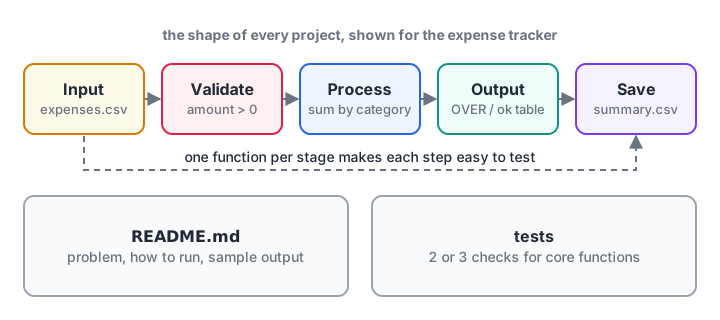
Every project above follows this pipeline. A README and a few tests turn it from homework into a portfolio piece.
- Put each project in its own GitHub repository with a clear name.
- Write a README: the problem, how to run it, a sample output.
- Split the code into functions with names that describe the job.
- Add two or three tests for the core function, such as
check()orgrade(). - Note one thing you would improve next. Interviewers often ask.
If you want project ideas that move into machine learning, continue with data science projects for beginners. To build these with a mentor reviewing your code each week, look at Debugshala's project-led data analytics course in Indore.
Common mistakes with beginner projects
- Starting too big. "An Amazon clone" stalls in a week. Finish a small version first.
- Copying a whole tutorial project. Change the data, the rules or the output so the work is yours.
- Never finishing. One complete project beats five abandoned ones.
- No README. Without it, nobody, including you in six months, knows how to run the code.
Key takeaways
- Choose projects whose problem you already understand.
- Climb from loop-based games to file, class and pandas projects.
- Every starter above runs as is; extend it with the stretch goal.
- Swap the simulated input and in-memory files for
input()and real files on your PC. - Present three or four finished projects with READMEs on GitHub.
The final lesson, Python interview questions, turns the concepts behind these projects into answers you can give under pressure.
FAQ
What are good Python projects for beginners?
Good first projects are small and familiar: a number guessing game, an expense tracker, a password checker, a quiz app, a to-do list that saves to JSON, a report card, a word counter, a bank account class and a pandas sales report. Each uses a few core skills and can be finished in a day or two.
How many Python projects should I have on my resume?
Three or four finished, well-documented projects are enough for a fresher role. Choose a mix: one that shows clean Python logic, one with files or classes, and one or two data analysis projects with pandas. Depth and clear explanations matter more than a long list.
Can I build Python projects without installing anything?
Yes, for a start. Every runnable starter on this page works in the browser, because it uses in-memory data instead of real files and simulated input instead of input(). For the full versions you should install Python, set up a virtual environment and use a code editor.
Where can I get help with Python projects in Indore?
Debugshala's data analytics course at its Old Palasia campus in Indore is project-based, with mentors reviewing your Python and pandas work, and placement assistance for fresh and non-IT graduates. You can join a free demo class first. For short practice between projects, try project-style logic questions on Debugshala Test.
From the team behind this site
Go further with the Data Analytics Course at Debugshala
These tutorials are written by Debugshala, a training and placement institute at Old Palasia, Indore. The classroom course adds live mentoring, real projects and interview preparation.
- Offline classes at Old Palasia, Indore
- Free demo class before you pay
- Non-IT, fresher and year-gap friendly
- Placement assistance
700+ students placed · 200+ hiring partners · 4.9★ Google rating
