

Python Type Conversion: Implicit vs Explicit Casting Guide
Python type conversion explained: when Python converts types for you, how int(), float(), str() and bool() cast values, and how to clean numbers in text.
You are at the exchange counter at Indore airport with a 20-dollar note. The tea stall next door only takes rupees, so you hand the note over, the clerk converts it, and you get back the same value in a currency the stall accepts.
Small coins are different. If you pay with a mix of one-rupee and two-rupee coins, the shopkeeper simply adds them up. Nobody asks you to exchange anything, because both are already rupees.
Python behaves the same way with data types. Some values mix freely, and Python converts them for you, like the coins. Others, like the dollar note, must be converted on purpose before Python will use them together.
Type conversion in Python is the process of changing a value from one data type to another, either implicitly by Python itself or explicitly by you with functions such as int(), float(), str() and bool().
This lesson builds on Python variables and literals, where you met the basic types.
What are data types in Python?
Every value in Python has a type that decides what you can do with it. You can add two integers, join two strings, or check whether a boolean is true. The four types you will convert most often are:
| Type | What it holds | Example |
|---|---|---|
int |
whole numbers | 42, -7 |
float |
numbers with a decimal point | 3.5, 0.18 |
str |
text | "42", "Indore" |
bool |
True or False |
True |
values = [42, 3.5, "42", True]
for v in values:
    print(repr(v), "has type", type(v).__name__)
The for line simply repeats the print() for each value in the list; loops get their own lesson soon. Notice that 42 and "42" look alike when printed, but one is a number and the other is text. Most conversion bugs come from mixing those two up.
What is implicit type conversion?
Implicit conversion is Python changing a type for you, automatically and safely. It only happens between number types, and always towards the type that can hold more information.
units = 12            # int
price = 249.5         # float
total = units * price
print(total, type(total).__name__)

print(7 / 2, type(7 / 2).__name__)      # / always gives a float
print(True + 10)                         # True counts as 1
print(sum([True, False, True, True]))    # count the True values
An int times a float becomes a float, because turning 249.5 into an integer would lose the 0.5. Division with / always returns a float, even when the answer is whole.
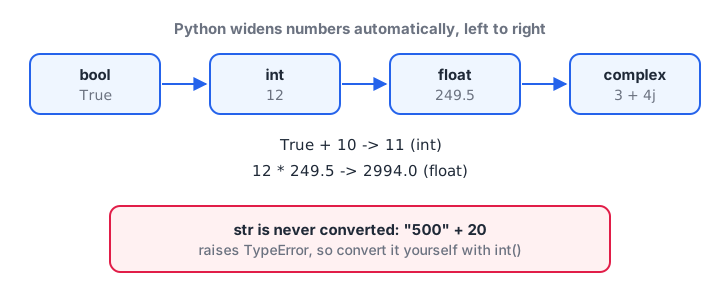
Python widens numbers automatically, from bool to int to float to complex. It never guesses with strings.
The last line is a useful analyst trick. True behaves as 1 and False as 0, so sum() over a list of booleans counts how many are true, such as how many stores hit their target.
Why Python refuses "500" + 20
Strings are never converted implicitly. Should "500" + 20 give 520 or "50020"? Python won't guess, so it raises an error instead.
quantity_text = "500"
try:
    print(quantity_text + 20)
except TypeError as err:
    print("TypeError:", err)

print(int(quantity_text) + 20)     # number maths
print(quantity_text + str(20))     # text joining
You decide what you meant and convert one side. The try and except lines only stop the error from ending the program; Python exceptions covers them properly.
Quick check
What type is the result of 10 / 2?
The / operator always returns a float, so 10 / 2 is 5.0.
What is explicit type conversion (type casting)?
Explicit conversion is when you call a type's function to build a new value of that type. The original value is not changed; you get a converted copy back.
| Function | Converts to | Example | Result |
|---|---|---|---|
int(x) |
whole number | int("42"), int(9.99) |
42, 9 |
float(x) |
decimal number | float("3.5"), float(7) |
3.5, 7.0 |
str(x) |
text | str(2026) |
"2026" |
bool(x) |
True or False |
bool(0), bool("hi") |
False, True |
list(x), tuple(x), set(x) |
collections | list("abc") |
['a', 'b', 'c'] |
Converting to int and float
int() accepts whole-number text and numbers. With a float it does not round. It cuts off the decimal part, moving towards zero.
print(int("42") + 8)
print(int(" 75 "))           # spaces around the digits are fine
print(int(9.99), int(-9.99)) # truncates towards zero
print(round(9.99))           # round() rounds instead
print(float("3.5") * 2)
print(float(7), int(True))
Use round() when you want the nearest whole number and int() when you want to drop the decimals. Mixing them up can quietly shift a sales total.
int() refuses text that contains a decimal point. Convert to float first, then to int:
text = "3.5"
try:
    print(int(text))
except ValueError as err:
    print("ValueError:", err)
print(int(float(text)))
Converting to str
str() turns any value into text. You need it when you join numbers into a message with +.
branch = "Bhawarkua"
orders = 128
growth = 12.5
message = branch + " got " + str(orders) + " orders, up " + str(growth) + "%"
print(message)
print(len(str(1_25_00_000)), "digits in 1.25 crore")
In real code you will usually use an f-string instead, which converts for you. The f-strings lesson shows how.
Converting to bool: truthy and falsy values
bool() returns False for "empty" or zero values and True for everything else. Python calls them falsy and truthy values.
for v in [0, 0.0, "", [], None, 5, -1, "0", "False", [0]]:
    print(repr(v).ljust(8), "->", bool(v))
The surprise is the last few. "0" and "False" are non-empty strings, so they are truthy. A yes/no column read from a CSV file as text will be True for every row unless you compare the text itself, such as value == "Yes".
Quick check
What is the result of int(7.8)?
int() drops the decimal part instead of rounding. Use round(7.8) to get 8.
Quick check
What does bool("0") return?
"0" is a non-empty string, and every non-empty string is truthy. Only the number 0 is falsy.
Cleaning numbers stored as text: a real example
Data exported from billing software, Excel or a website often stores amounts as text with symbols, like "Rs 1,250.50". You cannot do maths on that until you clean and convert it.
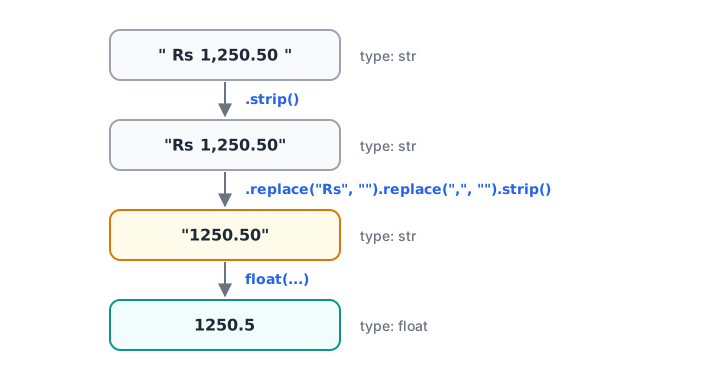
Clean the text first, then convert it. float() cannot read currency symbols or commas.
raw_amounts = [" Rs 1,250.50", "Rs 980", "Rs 12,400.75 ", "Rs 3,05,000"]

total = 0.0
for raw in raw_amounts:
    cleaned = raw.strip().replace("Rs", "").replace(",", "").strip()
    amount = float(cleaned)
    total += amount
    print(repr(raw).ljust(16), "->", amount)

print("Total:", round(total, 2))
print("Total in whole rupees:", int(total))
Each step removes one thing float() cannot understand. The same logic, applied to a whole column at once, is what pandas does for you in data cleaning with pandas.
Common type conversion mistakes
- Expecting
int()to round.int(4.9)is 4. Useround(4.9)to get 5. - Converting text with a decimal point straight to
int.int("4.9")raisesValueError. Useint(float("4.9")). - Forgetting that
bool("False")isTrue. Compare the text instead of callingbool()on it. - Leaving commas and symbols in.
float("1,250")fails. Remove the comma first. - Assuming conversion changes the variable.
int(x)returns a new value. Writex = int(x)to keep it.
Key takeaways
- Implicit conversion happens only between number types, widening from bool to int to float.
- Python never converts strings implicitly, which is why
"500" + 20fails. int(),float(),str()andbool()return a converted copy; assign it to keep it.int()truncates andround()rounds.- Empty and zero values are falsy; any non-empty string, even
"False", is truthy. - Clean symbols and commas out of text before converting it to a number.
Next, use these conversions straight away with Python input and output, where every typed answer arrives as text.
FAQ
What is the difference between implicit and explicit type conversion in Python?
Implicit conversion is done automatically by Python, such as turning an int into a float when you add 5 + 2.5. Explicit conversion, also called type casting, is when you call a function like int(), float() or str() yourself. Python only converts implicitly when no information can be lost.
How do I convert a string to an integer in Python?
Call int() on the string, for example int("42") returns 42. The string must contain only a whole number, optionally with spaces or a sign around it. For text like "42.5", use float() first. For text with commas or currency symbols, remove those characters before converting.
Why does int() not round in Python?
int() is designed to keep only the whole-number part, so it cuts off the decimals and moves towards zero: int(2.9) is 2 and int(-2.9) is -2. When you need the nearest whole number, use round(), which returns 3 for round(2.9).
What values are falsy in Python?
The falsy values are False, None, zero in any number type (0, 0.0), and empty collections or strings such as "", [], (), {} and set(). Everything else is truthy. bool() shows which group a value belongs to.
Is type conversion asked in data analyst interviews?
Yes, often as a small trap such as the output of "5" + "5" or int("3.5"). Interviewers also ask how you would clean a currency column before analysis. Debugshala's data analytics training for Indore freshers practises these cleaning tasks, and you can revise data-type basics with free quizzes on Debugshala Test.
From the team behind this site
Go further with the Data Analytics Course at Debugshala
These tutorials are written by Debugshala, a training and placement institute at Old Palasia, Indore. The classroom course adds live mentoring, real projects and interview preparation.
- Offline classes at Old Palasia, Indore
- Free demo class before you pay
- Non-IT, fresher and year-gap friendly
- Placement assistance
700+ students placed · 200+ hiring partners · 4.9★ Google rating
