

Python JSON: loads, dumps, Files and Nested Data Explained
Work with JSON in Python: json.loads and json.dumps, reading and writing JSON files, type mapping, Hindi text, dates, nested API data and pandas json_normalize.
Imagine you run analytics for a cloud kitchen in Vijay Nagar that takes orders through a delivery app.
Every order reaches your system as a message like this: order number, customer name, a list of dishes with quantities and prices, the payment mode, and whether a coupon was used. Some fields contain lists, some contain smaller records, and some are empty.
A CSV row cannot hold that shape comfortably. A list of dishes inside one cell is awkward, and an empty coupon is ambiguous. The app needs a format that can carry nested records and lists, that every programming language can read, and that is still plain text you can open and inspect.
That format is JSON. The order message is a JSON object. Its list of dishes is a JSON array. And Python's json module turns the whole message into ordinary dictionaries and lists in one call.
JSON (JavaScript Object Notation) is a lightweight text format for structured data made of objects, arrays, strings, numbers, booleans and null; in Python, the standard-library json module converts between JSON text and dictionaries, lists and other built-in types.
This lesson follows reading and writing CSV in Python and uses Python dictionaries throughout. The examples target Python 3.12+ and run in the browser.
What does JSON look like?
JSON looks a lot like Python dictionaries and lists, with a few strict rules: strings and keys use double quotes, the literals are true, false and null, and trailing commas are not allowed.
{
  "order_id": 50231,
  "customer": "Asha Verma",
  "items": [
    {"dish": "Paneer Tikka", "qty": 2, "price": 260},
    {"dish": "Butter Naan", "qty": 4, "price": 45}
  ],
  "paid_online": true,
  "coupon": null
}
The official grammar is short and worth a glance at json.org. Python's module follows the standard closely.
How do you convert JSON to a Python dictionary?
json.loads() (load string) parses JSON text into Python objects. After that, it is ordinary Python: index with keys, loop over lists.
import json

text = '''{"order_id": 50231, "customer": "Asha Verma",
 "items": [{"dish": "Paneer Tikka", "qty": 2, "price": 260},
           {"dish": "Butter Naan", "qty": 4, "price": 45}],
 "paid_online": true, "coupon": null}'''

order = json.loads(text)
print(type(order).__name__, order["customer"])
print(order["paid_online"], order["coupon"])
bill = sum(i["qty"] * i["price"] for i in order["items"])
print("Bill: Rs", bill)
print("Coupon used:", order.get("coupon") is not None)
true became True and null became None. The order total is a normal generator expression over the list of dicts.
Python to JSON type mapping
Every conversion follows a fixed table. Knowing it explains most JSON surprises.
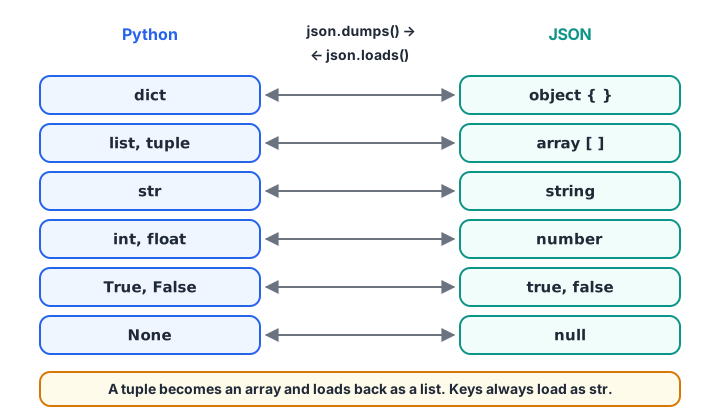
json.dumps() follows the arrows to the right and json.loads() follows them back, but a tuple comes back as a list.
| Python | JSON | Back to Python |
|---|---|---|
dict |
object {} |
dict |
list, tuple |
array [] |
list |
str |
string | str |
int, float |
number | int or float |
True, False |
true, false |
True, False |
None |
null |
None |
set, datetime, Decimal |
not supported | needs a conversion |
How do you convert a Python dict to JSON?
json.dumps() (dump string) turns Python objects into JSON text. Without options it produces one compact line; indent makes it readable and sort_keys gives a stable order, which is useful when comparing files.
import json

summary = {"date": "2026-11-12", "kitchen": "Vijay Nagar",
           "orders": 184, "revenue": 61250.5, "top": ("Paneer Tikka", 72),
           "closed_early": False, "manager_note": None}

print(json.dumps(summary))
print(json.dumps(summary, indent=2, sort_keys=True))
The tuple was written as a JSON array, and False and None became false and null. If you load this text back, top will be a list, not a tuple.
Keeping Hindi text readable with ensure_ascii
By default dumps escapes every non-English character into \u codes. The output is valid, but unreadable to a person checking the file. Pass ensure_ascii=False to keep the characters as they are, and write the file as UTF-8.
import json

menu = {"dish": "पोहा जलेबी", "city": "इंदौर", "price": 60}
print(json.dumps(menu))
print(json.dumps(menu, ensure_ascii=False))
print(json.loads(json.dumps(menu)) == menu)   # same data either way
Reading and writing JSON files in Python
json.dump(obj, f) writes to a file object and json.load(f) reads from one. Open the file with encoding="utf-8", as you learned in Python file handling.
import json, tempfile
from pathlib import Path

path = Path(tempfile.mkdtemp()) / "daily_summary.json"
data = {"kitchen": "Vijay Nagar", "orders": [
    {"id": 50231, "amount": 700}, {"id": 50232, "amount": 435}]}

with open(path, "w", encoding="utf-8") as f:
    json.dump(data, f, indent=2, ensure_ascii=False)

with open(path, encoding="utf-8") as f:
    loaded = json.load(f)

print(loaded == data)
print(sum(o["amount"] for o in loaded["orders"]))
print(path.read_text(encoding="utf-8")[:60], "...")| Function | Input | Output |
|---|---|---|
json.loads(text) |
JSON string | Python object |
json.dumps(obj) |
Python object | JSON string |
json.load(f) |
Open file | Python object |
json.dump(obj, f) |
Python object and open file | Writes to the file |
The s stands for string. A useful habit is to say "load-s" in your head so you never pass a file to loads or a string to load.
Quick check
Which call writes a Python dict to an open file as JSON?
dump writes to a file object; dumps returns a string; loads parses a string.
JSON gotchas: string keys, dates and sets
Three conversions catch almost everyone. Integer dictionary keys become strings. Dates and sets raise TypeError, because JSON has no such types. The default argument lets you supply a converter for anything the module cannot handle.
import json
from datetime import date

daily = {1: 14250, 2: 15100}
back = json.loads(json.dumps(daily))
print(back, "keys now:", type(next(iter(back))).__name__)

record = {"day": date(2026, 11, 12), "areas": {"Palasia", "Rajwada"}}
try:
    json.dumps(record)
except TypeError as err:
    print("TypeError:", err)

def to_json(obj):
    if isinstance(obj, date):
        return obj.isoformat()
    if isinstance(obj, set):
        return sorted(obj)
    raise TypeError(f"Cannot serialise {type(obj).__name__}")

print(json.dumps(record, default=to_json))
After loading, convert date strings back with date.fromisoformat() and key strings back with int(). For money, consider storing paise as integers, since JSON numbers are read as float, which can introduce tiny rounding errors.
Quick check
What does json.loads('{"1": null, "ok": true}') return?
JSON keys are always strings, null maps to None and true maps to True.
How do you handle nested JSON from an API?
API responses are often nested several levels deep, and optional fields may be missing. Use .get() with a default for anything optional, and chain lookups carefully. When you need a table, pandas.json_normalize flattens nested records into columns.
import pandas as pd

orders = [
    {"id": 50231, "customer": {"name": "Asha", "area": "Vijay Nagar"},
     "payment": {"mode": "UPI", "amount": 700}},
    {"id": 50232, "customer": {"name": "Rohit", "area": "Palasia"},
     "payment": {"mode": "Cash", "amount": 435}, "coupon": "DIWALI50"},
]

for o in orders:
    print(o["id"], o["customer"]["area"], o.get("coupon", "no coupon"))

df = pd.json_normalize(orders)
print(df[["id", "customer.area", "payment.mode", "coupon"]])
Nested keys become dotted column names such as payment.mode, and the missing coupon becomes NaN. For very irregular structures, a small recursive function like the ones in Python recursion can walk the data instead.
JSON Lines for logs and large exports
Many systems write one JSON object per line, a format called JSON Lines (.jsonl). You read it line by line, so huge files never need to fit in memory.
import io, json

log = io.StringIO('{"id": 1, "amount": 700}\n{"id": 2, "amount": 435}\n'
                  '{"id": 3, "amount": 1210}\n')
total = sum(json.loads(line)["amount"] for line in log if line.strip())
print("Total from JSON Lines:", total)
Common mistakes with JSON in Python
- Single quotes.
{'a': 1}is a Python dict literal, not JSON.json.loadsraisesJSONDecodeError. - Trailing commas.
[1, 2,]is invalid JSON even though Python allows it. - Using
str(dict)to "make JSON". It produces single quotes andNone. Usejson.dumps. - Expecting integer keys back. All JSON object keys load as strings.
- Mixing up
loadandloads.loadtakes a file,loadstakes a string. - Not catching bad input. Wrap parsing of external data in
tryand handlejson.JSONDecodeError, covered next in Python exception handling.
Key takeaways
json.loadsandjson.dumpswork with strings;json.loadandjson.dumpwork with files.- Objects map to dicts, arrays to lists,
nulltoNone. - Keys always come back as strings; tuples come back as lists.
- Use
default=to serialise dates, sets and other custom types. indent=2for people,ensure_ascii=Falsefor Hindi text.pandas.json_normalizeflattens nested API records into a DataFrame.
If you are aiming for analyst roles that work with API data, Debugshala's data analytics classes for freshers in Indore cover JSON, pandas and SQL together.
FAQ
How do I convert a JSON string to a dictionary in Python?
Use json.loads(). For example, json.loads('{"city": "Indore"}') returns {'city': 'Indore'}. If the JSON is in a file, open the file with UTF-8 encoding and use json.load(f) instead. The result is a normal dict, so you can index it, loop over it and pass it to pandas.
What is the difference between json.dump and json.dumps?
json.dumps() returns the JSON as a string, which you can print, send over a network or store in a database column. json.dump() writes the JSON directly into an open file object. Both accept the same options, such as indent, sort_keys, ensure_ascii and default.
Why do I get "Object of type datetime is not JSON serializable"?
JSON has no date type, so the json module cannot convert a datetime on its own. Convert it to a string first, typically with .isoformat(), or pass a function through default= that does this for every date. When reading, turn the string back with datetime.fromisoformat().
How do I convert JSON to a pandas DataFrame?
For a list of flat records, pd.DataFrame(records) works directly. For nested records, use pd.json_normalize(records), which turns nested keys into dotted column names such as payment.mode. For a JSON file, pd.read_json() also works when the file holds a list of records or JSON Lines with lines=True.
Where can I test my Python JSON skills?
JSON parsing comes up in analyst and backend interviews alike. You can practise JSON and dictionary questions on Debugshala Test at no cost. Debugshala's Old Palasia campus in Indore also offers a free demo class for its classroom data analytics course.
From the team behind this site
Go further with the Data Analytics Course at Debugshala
These tutorials are written by Debugshala, a training and placement institute at Old Palasia, Indore. The classroom course adds live mentoring, real projects and interview preparation.
- Offline classes at Old Palasia, Indore
- Free demo class before you pay
- Non-IT, fresher and year-gap friendly
- Placement assistance
700+ students placed · 200+ hiring partners · 4.9★ Google rating
