

Python datetime Tutorial: strftime, timedelta and Time Zones
Learn the Python datetime module: date, time, datetime and timedelta, strftime and strptime format codes, date maths, IST time zones and pandas dates.
Think about the billing desk of a hardware wholesaler in Siyaganj, Indore. Every invoice carries a date. Some retailers get 30 days of credit, some 45. At the end of the month, the accountant wants to know which bills are overdue and by how many days.
The trouble is that the dates arrive in every style: "03-11-2026" from one software, "2026/11/03" from another, and "3 Nov 2026" written on paper. Before you can count days, you have to turn all of them into one form a computer can do maths with.
In Python, that one form is a datetime object. Converting text into it is parsing. The credit period is a timedelta. And printing the due date nicely on a reminder SMS is formatting.
The Python datetime module is a standard-library module that represents calendar dates, clock times and durations as objects, so you can create, compare, add, subtract, parse and format dates and times reliably instead of handling them as plain strings.
This lesson follows Python regular expressions, which help pull dates out of text; here you learn what to do with them once found. Examples target Python 3.12+ and pandas 2.x.
What does the datetime module contain?
The module is called datetime, and confusingly it also contains a class called datetime. That is why you will usually see from datetime import datetime, date, timedelta.
| Type | Holds | Example |
|---|---|---|
date |
year, month, day | date(2026, 11, 3) |
time |
hour, minute, second, microsecond | time(18, 30) |
datetime |
a date plus a time | datetime(2026, 11, 3, 18, 30) |
timedelta |
a duration in days, seconds, microseconds | timedelta(days=30) |
timezone |
a fixed offset from UTC | timezone(timedelta(hours=5, minutes=30)) |
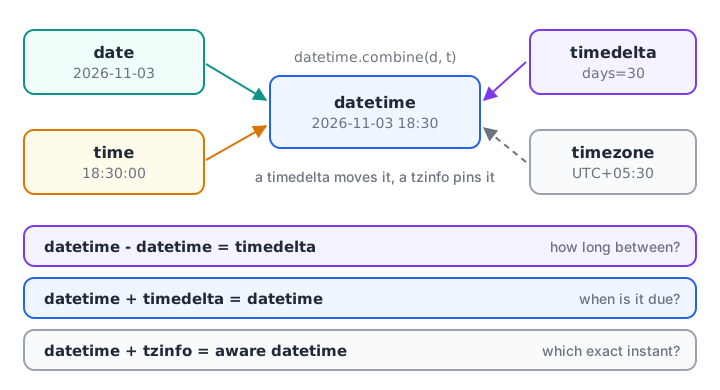
Four types and three operations cover most date work: combine, subtract and add.
Creating dates and times in Python
You build each object by passing numbers to its class. The objects then expose their parts as attributes, and methods such as weekday() tell you more about them.
from datetime import date, time, datetime

d = date(2026, 11, 3)
t = time(18, 30)
dt = datetime(2026, 11, 3, 18, 30)

print(d, "|", t, "|", dt)
print(d.year, d.month, d.day)
print("weekday (Mon=0):", d.weekday(), " isoweekday (Mon=1):", d.isoweekday())
print(datetime.combine(d, t) == dt)
print(dt.date(), dt.time())
print(repr(dt))
print(type(date.today()).__name__, type(datetime.now()).__name__)
date.today() and datetime.now() return the current date and time on your computer, so their values change every run. In analysis, avoid sprinkling now() through your code: capture it once at the top, so every calculation uses the same moment.
Python checks the values for you. date(2026, 2, 30) raises ValueError, because February 2026 has only 28 days.
How do strftime and strptime work?
strftime means "string format time": it turns a datetime into text. strptime means "string parse time": it reads text into a datetime. Both use the same format codes.
| Code | Meaning | Example for 3 Nov 2026, 18:30 |
|---|---|---|
%d |
day, two digits | 03 |
%m |
month, two digits | 11 |
%Y / %y |
year, four / two digits | 2026 / 26 |
%b / %B |
month name, short / full | Nov / November |
%a / %A |
weekday, short / full | Tue / Tuesday |
%H / %I |
hour, 24-hour / 12-hour | 18 / 06 |
%M / %S |
minute / second | 30 / 00 |
%p |
AM or PM | PM |
from datetime import datetime

dt = datetime(2026, 11, 3, 18, 30)
print(dt.strftime("%d-%m-%Y"))
print(dt.strftime("%d %b %Y, %I:%M %p"))
print(dt.strftime("%A, %d %B %Y"))
print(dt.strftime("%Y-%m-%d %H:%M"))
print(f"Invoice date: {dt:%d/%m/%y}")
print(dt.isoformat())
The f-string form {dt:%d/%m/%y} passes the format straight to strftime, which keeps report lines short. The Python string formatting lesson covers more format specs.
Parsing needs the format to match the text exactly, character for character. A mismatch raises ValueError, which you can catch to try the next format.
from datetime import datetime

FORMATS = ["%d-%m-%Y", "%Y/%m/%d", "%d %b %Y"]

def parse_date(text):
    for fmt in FORMATS:
        try:
            return datetime.strptime(text.strip(), fmt).date()
        except ValueError:
            continue
    return None

for raw in ["03-11-2026", "2026/11/05", "7 Nov 2026", "31-02-2026", "next Monday"]:
    print(f"{raw!r:14} -> {parse_date(raw)}")
print(datetime.fromisoformat("2026-11-03T18:30:00"))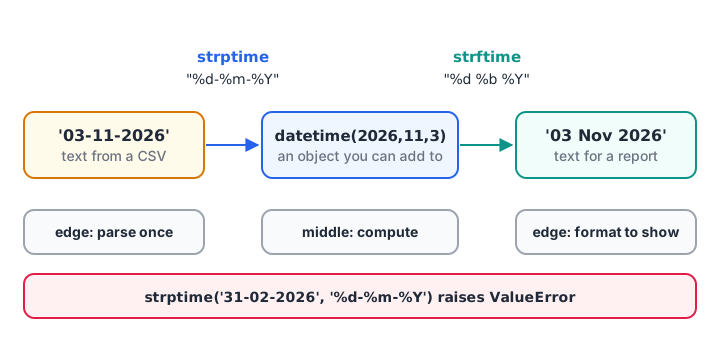
Parse once at the edge of your program, work with datetime objects in the middle, and format only when you show the result.
The impossible date "31-02-2026" returns None instead of a wrong date, which is exactly what you want from a cleaning function. For ISO strings such as 2026-11-03T18:30:00, datetime.fromisoformat is faster and needs no format.
Quick check
Which call converts the text "05-12-2026" into a datetime object?
strptime parses text into a datetime; strftime goes the other way, from datetime to text.
Date arithmetic with timedelta
A timedelta is a duration. Add it to a date to move forward, subtract it to go back, and subtract two dates to get the gap between them.
from datetime import date, datetime, timedelta

invoice = date(2026, 11, 3)
due = invoice + timedelta(days=30)
print("Due date:", due, due.strftime("(%A)"))

today = date(2026, 12, 10)
late = today - due
print("Days overdue:", late.days)

shift = datetime(2026, 11, 3, 22, 15) - datetime(2026, 11, 3, 9, 40)
print("Shift length:", shift, "=", round(shift.total_seconds() / 3600, 2), "hours")
print(timedelta(weeks=2, hours=5))
print("Week ago:", invoice - timedelta(weeks=1))
print(date(2026, 11, 5) > date(2026, 11, 3))
Comparisons work as you would hope: a later date is "greater". Note that late.days gives whole days, while total_seconds() gives the precise length, useful for hours worked.
Adding months safely
timedelta has no months argument, because months have different lengths. Adding one month to 31 January has no single right answer. A small helper that clamps the day to the end of the month handles EMI schedules and subscription renewals.
import calendar
from datetime import date

def add_months(d, n):
    month_index = d.month - 1 + n
    year, month = d.year + month_index // 12, month_index % 12 + 1
    last_day = calendar.monthrange(year, month)[1]
    return d.replace(year=year, month=month, day=min(d.day, last_day))

start = date(2026, 1, 31)
for i in range(1, 5):
    print(f"EMI {i}:", add_months(start, i))
print(add_months(date(2026, 11, 15), 3))
calendar.monthrange(year, month) returns the weekday of the 1st and the number of days in that month, so February correctly ends on the 28th.
Quick check
What is the type of date(2026, 12, 10) - date(2026, 11, 3)?
Subtracting two dates gives a duration, a timedelta; use .days to get the number 37.
Time zones: naive vs aware datetimes
A datetime without time-zone information is naive: Python does not know if 18:30 means Indore or London. An aware datetime carries a tzinfo that fixes it to a point in real time. Servers and APIs usually store times in UTC, while your reports in India need IST.
from datetime import datetime, timezone, timedelta

IST = timezone(timedelta(hours=5, minutes=30), "IST")

server_time = datetime(2026, 11, 3, 13, 0, tzinfo=timezone.utc)
print("UTC:", server_time)
print("IST:", server_time.astimezone(IST))

naive = datetime(2026, 11, 3, 18, 30)
print("naive tzinfo:", naive.tzinfo)
local = naive.replace(tzinfo=IST)
print("aware:", local.isoformat())
print("same instant?", local == server_time.astimezone(IST))

ts = local.timestamp()
print("Unix timestamp:", ts, "->", datetime.fromtimestamp(ts, tz=timezone.utc))
A fixed offset is enough for India, which has one time zone and no daylight saving. For countries with daylight saving, use the standard library's zoneinfo module, which knows each region's rules.
from datetime import datetime
from zoneinfo import ZoneInfo  # Python 3.9+; on Windows also: pip install tzdata

meeting = datetime(2026, 11, 3, 18, 30, tzinfo=ZoneInfo("Asia/Kolkata"))
print(meeting.astimezone(ZoneInfo("America/New_York")))
# 2026-11-03 08:00:00-05:00
Never compare a naive datetime with an aware one. Python raises TypeError, because it cannot know which instant the naive value refers to.
Working with dates in pandas
pandas has its own Timestamp type built on numpy, but it accepts the same format codes. pd.to_datetime converts a whole column, and the .dt accessor exposes the parts.
import pandas as pd

df = pd.DataFrame({
    "order_date": ["01-11-2026", "02-11-2026", "09-11-2026", "15-11-2026", "16-11-2026", "31-11-2026"],
    "amount": [1450, 980, 2300, 640, 1720, 500],
})
df["order_date"] = pd.to_datetime(df["order_date"], format="%d-%m-%Y", errors="coerce")
df["weekday"] = df["order_date"].dt.day_name()
df["days_since"] = (pd.Timestamp("2026-11-30") - df["order_date"]).dt.days
print(df.to_string(index=False))

weekly = df.dropna().set_index("order_date")["amount"].resample("W-SUN").sum()
print(weekly.to_string())
errors="coerce" turns the impossible 31 November into NaT ("not a time"), the date version of NaN, and days_since becomes a float column because of that gap. Always pass format= for Indian day-first dates; otherwise "02-11-2026" may be read as 11 February.
The resample("W-SUN") call groups orders into weeks ending on Sunday, the first step of time series analysis. If your data lives in a database, the same ideas appear in SQL date functions.
Common mistakes with Python datetime
import datetimethen callingdatetime.now(). That fails, becausedatetimeis the module; usedatetime.datetime.now()or import the class.- Mixing up
%mand%M.%mis month,%Mis minute. - Letting pandas guess day-first dates. Pass
format="%d-%m-%Y"ordayfirst=True. - Comparing naive and aware datetimes. Make both aware, or both naive in the same zone.
- Storing dates as strings. "10-11-2026" sorts before "9-11-2026" as text. Parse first, then sort.
- Using
timedelta(days=30)for "one month". Use a month helper orpd.DateOffset(months=1).
Key takeaways
date,time,datetimeandtimedeltaare the core types;timezoneadds a UTC offset.strptimeparses text,strftimeformats it, and both use codes like%d %m %Y %H %M.- Dates minus dates give a
timedelta; dates plus atimedeltagive a new date. - Months need special handling, such as a clamped helper or
pd.DateOffset. - Aware datetimes carry a time zone; IST is UTC+05:30.
- In pandas, use
pd.to_datetimewith an explicit format, the.dtaccessor andresample.
Next, the Python random module shows how to generate test data, including random dates. Turning messy invoice dates into overdue reports is routine practice in Debugshala's placement-focused analytics training at Old Palasia.
FAQ
How do I get the current date and time in Python?
Use datetime.now() for the current local date and time, or date.today() for just the date, after from datetime import datetime, date. For a time-zone-aware value, call datetime.now(timezone.utc) and convert it with .astimezone(). Capture the value once and reuse it so all calculations share one moment.
What is the difference between strftime and strptime?
strftime formats a datetime object into a string, for example dt.strftime("%d-%m-%Y") gives "03-11-2026". strptime parses a string into a datetime and needs the matching format, for example datetime.strptime("03-11-2026", "%d-%m-%Y"). An easy memory aid: f for format, p for parse.
How do I find the number of days between two dates in Python?
Subtract them. date(2026, 12, 10) - date(2026, 11, 3) returns a timedelta, and its .days attribute gives 37. For datetimes with times, use .total_seconds() and divide by 86,400 for fractional days. In pandas, subtract two date columns and use .dt.days.
How do I convert UTC to IST in Python?
Create an aware UTC datetime, then call .astimezone() with an IST time zone. With the standard library, timezone(timedelta(hours=5, minutes=30)) works for India because IST has no daylight saving. ZoneInfo("Asia/Kolkata") from the zoneinfo module gives the same result and handles other regions too.
Is date handling part of the data analytics course at Debugshala in Indore?
Yes. Parsing, cleaning and grouping dates in Python, pandas and SQL is part of everyday reporting work, so it comes up throughout Debugshala's data analytics course at Old Palasia, Indore. A free demo class is available before you enrol. Meanwhile, test your date and time logic on Debugshala Test.
From the team behind this site
Go further with the Data Analytics Course at Debugshala
These tutorials are written by Debugshala, a training and placement institute at Old Palasia, Indore. The classroom course adds live mentoring, real projects and interview preparation.
- Offline classes at Old Palasia, Indore
- Free demo class before you pay
- Non-IT, fresher and year-gap friendly
- Placement assistance
700+ students placed · 200+ hiring partners · 4.9★ Google rating
