

Python Iterators: iter(), next() and the Iterator Protocol
Learn Python iterators: iterable vs iterator, iter() and next(), StopIteration, how for loops work, custom __iter__ and __next__, exhaustion and itertools.
Picture the token machine at a passport office in Indore. You press the button and get the next number: 041, then 042, then 043. The machine remembers where it is. You cannot ask it for token 017 again, and you cannot peek ahead without taking a token.
At the end of the day the roll of tokens runs out and the machine shows "No more tokens". Tomorrow, a fresh roll goes in and counting starts again from 001. The day's appointment list, meanwhile, sits on the officer's desk, and any number of clerks can read it from the top.
The appointment list is an iterable: a collection you can go through. The token machine is an iterator: the thing that tracks the current position and gives out one item per request. "No more tokens" is StopIteration.
A Python iterator is an object that produces the items of a sequence one at a time through __next__(), remembers its position between calls, and raises StopIteration when it is exhausted; an iterable is any object whose __iter__() returns such an iterator.
This lesson starts the Advanced Python section, after Python dataclasses. It explains what was really happening in every for loop you have written. Examples target Python 3.12+.
What is the difference between an iterable and an iterator?
An iterable is something that can be iterated. An iterator is something that is being iterated. A list is iterable but not an iterator: it has no idea which item you are on. Call iter() on it to get an iterator, then call next() to pull items.
daily_orders = [412, 298, 357]          # iterable
it = iter(daily_orders)                 # iterator over it

print(next(it))
print(next(it))
print(next(it))
try:
    next(it)
except StopIteration:
    print("StopIteration: no more items")

print(next(iter(daily_orders)))         # a new iterator starts again
print(next(it, "done")) # a default instead of the exception| Iterable | Iterator | |
|---|---|---|
| Examples | list, tuple, str, dict, set, range | iter(list), file objects, map, zip, enumerate |
| Required method | __iter__() |
__next__(), plus __iter__() returning itself |
| Remembers position? | No | Yes |
| Loop over it twice? | Yes | No, it is used up |
Every iterator is also iterable, because its __iter__ simply returns itself. That is why you can use an iterator directly in a for loop.
How does a for loop work in Python?
A for loop is a polite wrapper around iter() and next(). It asks the iterable for an iterator once, calls next() repeatedly, and stops quietly when StopIteration appears.
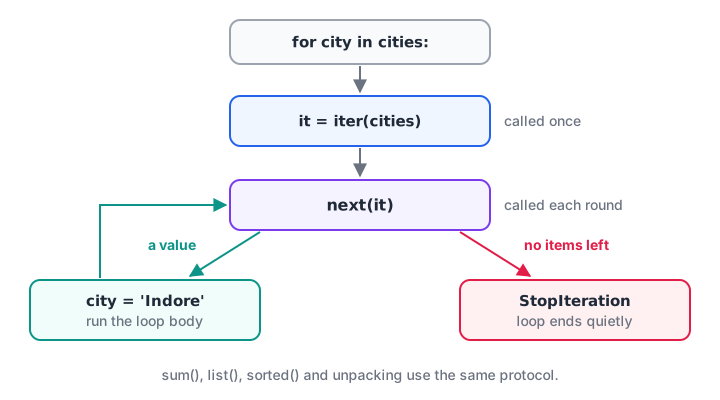
The loop calls iter() once, then next() until StopIteration, which it catches for you.
cities = ["Indore", "Bhopal", "Ujjain"]

for city in cities:                     # what you write
    print("for:", city)

it = iter(cities)                       # what Python does
while True:
    try:
        city = next(it)
    except StopIteration:
        break
    print("manual:", city)
The same protocol powers sum(), list(), sorted(), max(), unpacking like a, b = pair, and the in test on many objects. Anything that speaks the protocol works with all of them.
Iterators get used up
Because an iterator remembers its position, a second pass over it finds nothing left. This catches out analysts constantly, since map(), filter() and zip() return iterators, not lists.
amounts = [1450, 980, 12300, 2300, 15400]
large = filter(lambda a: a > 2000, amounts)     # an iterator

print("First pass:", sum(large))
print("Second pass:", sum(large))               # already exhausted

large = list(filter(lambda a: a > 2000, amounts))
print("From a list, twice:", sum(large), sum(large))

it_a, it_b = iter(amounts), iter(amounts)       # independent positions
print(next(it_a), next(it_a), next(it_b))
The fix is simple. If you need the values more than once, convert to a list with list(). If you only need them once, keep the iterator and save the memory.
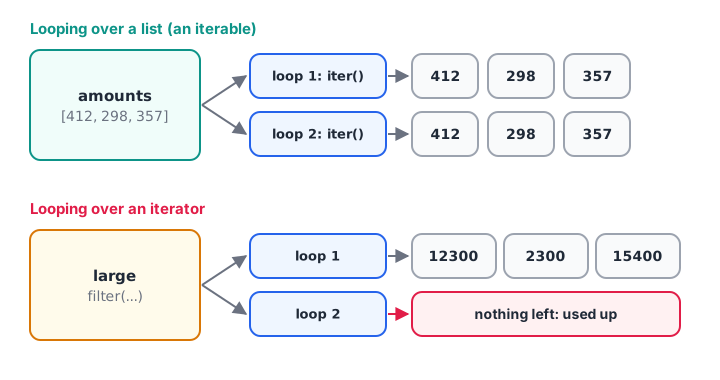
Loop over the list and you get a fresh iterator each time; loop over the iterator and the second pass is empty.
Quick check
What does the second sum() print here? it = map(int, ["1", "2", "3"]); sum(it); print(sum(it))
map() returns an iterator. The first sum() exhausts it, so the second one sees no items and returns 0.
How do you create a custom iterator in Python?
Write a class with two methods: __iter__ returning self, and __next__ returning the next value or raising StopIteration. Here is an iterator that produces month labels for a reporting period, crossing the year boundary correctly.
class MonthIterator:
    def __init__(self, year, month, count):
        self.year, self.month, self.left = year, month, count

    def __iter__(self):
        return self

    def __next__(self):
        if self.left == 0:
            raise StopIteration
        label = f"{self.year}-{self.month:02d}"
        self.month += 1
        if self.month == 13:
            self.year, self.month = self.year + 1, 1
        self.left -= 1
        return label

months = MonthIterator(2026, 10, 5)
print(list(months))
print(list(months))          # used up: an empty list
Iterable classes that can be reused
To loop over your object many times, make the class an iterable instead: its __iter__ returns a brand-new iterator each time. The class itself stores the period; the iterator stores the position.
class ReportPeriod:
    def __init__(self, year, month, count):
        self.year, self.month, self.count = year, month, count

    def __iter__(self):
        y, m = self.year, self.month
        for _ in range(self.count):
            yield f"{y}-{m:02d}"
            y, m = (y + 1, 1) if m == 12 else (y, m + 1)

q = ReportPeriod(2026, 11, 3)
print(list(q))
print(list(q))               # works again: a fresh iterator each time
print("2027-01" in q)
That __iter__ uses yield, which turns it into a generator, a far shorter way to write iterators. Generators get a full lesson in Python generators.
Quick check
Which pair of methods makes a class an iterator?
The iterator protocol is __iter__ plus __next__, with StopIteration signalling the end.
Reading files lazily with iterators
A file object is an iterator over its lines. A loop reads one line at a time, so even a 2 GB log never has to fit in memory. next() is a neat way to read the header row before the loop.
import io

log = io.StringIO("date,city,orders\n2026-11-01,Indore,412\n"
                  "2026-11-01,Bhopal,298\n2026-11-02,Indore,431\n")

header = next(log).strip().split(",")
print("Columns:", header)

indore = 0
for line in log:                       # continues after the header
    date, city, orders = line.strip().split(",")
    if city == "Indore":
        indore += int(orders)
print("Indore orders:", indore)
Real files on disk work identically; see Python file handling.
Useful iterator tools in itertools
The standard library's itertools module combines and slices iterators without building lists. A few cover most analyst needs.
from itertools import islice, chain, accumulate, groupby, batched

orders = [("Indore", 412), ("Indore", 431), ("Bhopal", 298), ("Ujjain", 77)]

print(list(islice(orders, 2)))                      # first 2, lazily
print(list(chain(["Oct"], ["Nov", "Dec"])))         # join iterables
print(list(accumulate([412, 431, 298])))            # running total

for city, rows in groupby(orders, key=lambda r: r[0]):   # data must be sorted by key
    print(city, sum(n for _, n in rows))

print(list(batched(range(1, 8), 3)))                # Python 3.12+
groupby only groups consecutive items with the same key, so sort first if your data is not already in order. The itertools documentation has recipes for many more patterns.
Common mistakes with Python iterators
- Looping over an iterator twice. The second loop is empty with no error. Convert to a list if you need it again.
- Calling
next()on a list. Lists are iterables, not iterators. Usenext(iter(my_list)). - Forgetting
StopIterationin__next__. The iterator then never ends andlist()hangs. - Using
groupbyon unsorted data. The same key appears in several groups. - Calling
len()on an iterator. Iterators usually have no length. Count while looping, or use a list. - Changing a list while iterating over it. Items get skipped. Loop over a copy or build a new list.
Key takeaways
- An iterable can produce an iterator; an iterator hands out items one by one.
iter()gets an iterator,next()pulls the next item,StopIterationends it.forloops,sum(),list()and unpacking all use this protocol.- Iterators are single-use; lists can be looped over again and again.
- Make a reusable iterable by returning a fresh iterator from
__iter__. itertoolsprovides lazy slicing, chaining, running totals and grouping.
Next, Python generators show how yield writes iterators in a few lines. Working through large exports row by row is part of the hands-on Python practice in the data analytics course for graduates at Debugshala in Indore.
FAQ
What is an iterator in Python?
An iterator is an object that returns the items of a collection one at a time when you call next() on it, remembering its position between calls. When nothing is left, it raises StopIteration. File objects, map(), zip() and the result of iter(my_list) are all iterators.
Is a list an iterator in Python?
No. A list is an iterable, not an iterator. It can produce iterators through iter(), and each one keeps its own position, which is why you can loop over a list many times. Calling next() directly on a list raises TypeError because lists have no __next__ method.
Why can I loop over a map object only once?
map() returns an iterator, and iterators are consumed as you read them. After one full pass, the position is at the end, so a second loop finds no items and ends immediately without an error. Wrap it in list() if you need the results more than once.
What is the difference between an iterator and a generator in Python?
A generator is a convenient kind of iterator. Instead of writing a class with __iter__ and __next__, you write a function containing yield, and Python builds the iterator for you. Every generator is an iterator, but iterators can also be hand-written classes or built-in objects like file handles.
How do I practise iterator questions for Python interviews?
Iterator questions usually ask you to predict output after an iterator is exhausted, or to write __iter__ and __next__ for a small class. Rewrite the MonthIterator example from memory, then attempt iterator and loop MCQs on Debugshala Test. Debugshala's Old Palasia campus also runs a free demo class.
From the team behind this site
Go further with the Data Analytics Course at Debugshala
These tutorials are written by Debugshala, a training and placement institute at Old Palasia, Indore. The classroom course adds live mentoring, real projects and interview preparation.
- Offline classes at Old Palasia, Indore
- Free demo class before you pay
- Non-IT, fresher and year-gap friendly
- Placement assistance
700+ students placed · 200+ hiring partners · 4.9★ Google rating
