

Python Dictionaries: Keys, Values, get(), Loops and Grouping
Learn Python dictionaries with sales data: create and update dicts, get() vs [], loop with items(), count and group rows, merge with |, and nest records.
Think of the rate card pinned up behind the counter of a kirana store in Bhawarkua. It lists each product once with its price next to it: "Toor dal 1 kg: 160", "Sugar 1 kg: 46", "Parle-G: 10".
When a customer asks for sugar, the shopkeeper does not read the card from the top. He jumps to "Sugar" and reads the number beside it.
That rate card is a dictionary. Each product name is a key, each price is a value, and "jump to the name" is a lookup. Two products cannot share one line, so keys are unique, but two products can easily cost the same, so values can repeat.
A Python dictionary (dict) is a mutable, insertion-ordered mapping that stores unique, hashable keys, each linked to a value, and retrieves any value by its key in roughly constant time.
If you read the previous article on Python sets, the mechanism will feel familiar. A dictionary's keys are hashed exactly like set members. The difference is that each key carries a value with it.
What is a dictionary in Python?
You write a dictionary with curly braces and key: value pairs separated by commas. You can also build one with dict(), or zip two lists together when keys and values arrive separately.
rate_card = {"toor dal": 160, "sugar": 46, "parle-g": 10, "atta 5kg": 245}
print(rate_card)
print("Items on card:", len(rate_card))

branch = dict(city="Indore", area="Bhawarkua", pin=452014)
print(branch)

products = ["P1", "P2", "P3"]
stock = [40, 0, 12]
stock_by_product = dict(zip(products, stock))
print(stock_by_product)

print(dict.fromkeys(["Mon", "Tue", "Wed"], 0))   # same starting value for each key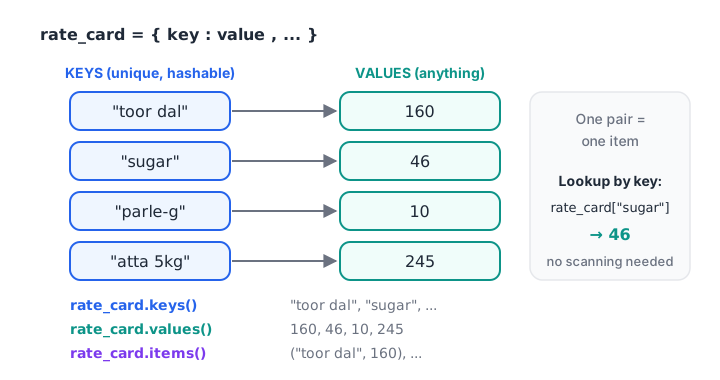
A dictionary is a set of unique keys, each pointing to one value; keys(), values() and items() give you each part.
What can be a dictionary key?
Keys must be hashable: strings, numbers, booleans, None, and tuples made of hashable things. Lists and other dictionaries cannot be keys. Values have no restriction at all, so a value can be a list, another dictionary or a function.
A tuple key such as ("Indore", "Oct") lets you group by two fields at once. The tuples article shows that pattern in detail, so here we stick to single keys.
How do you access values in a Python dictionary?
There are two ways to read a value, and choosing the right one prevents a lot of crashes in data scripts.
| Expression | Key present | Key missing |
|---|---|---|
d[key] |
Returns the value | Raises KeyError |
d.get(key) |
Returns the value | Returns None |
d.get(key, default) |
Returns the value | Returns default |
key in d |
True |
False |
rate_card = {"toor dal": 160, "sugar": 46, "parle-g": 10}

print(rate_card["sugar"])
print(rate_card.get("ghee"))               # None, no crash
print(rate_card.get("ghee", "not stocked"))
print("sugar" in rate_card, 46 in rate_card)   # 'in' checks keys only

try:
    rate_card["ghee"]
except KeyError as err:
    print("KeyError for", err)
Use square brackets when a missing key means your data is broken and you want the script to stop loudly. Use get() when missing keys are normal, such as optional fields in a customer form.
Note the last print: 46 in rate_card is False even though 46 is a price. The in operator only looks at keys. To search values, use 46 in rate_card.values(), which scans every value and is therefore slower.
Quick check
stock = {"P1": 40, "P2": 0}. What does stock.get("P9", -1) return?
get() returns the default you pass when the key is missing, so it returns -1 and does not raise an error.
How do you add, update and delete dictionary items?
Assigning to a key adds it if it is new and replaces the value if it already exists. There is no separate "insert" method.
cart = {"sugar": 2}
cart["toor dal"] = 1            # new key: added
cart["sugar"] = 3               # existing key: replaced
cart.update({"parle-g": 6, "sugar": 4})
print(cart)

removed = cart.pop("parle-g")             # remove and return the value
print("Removed", removed, "->", cart)
print(cart.pop("ghee", 0))                # default avoids KeyError

del cart["toor dal"]
print(cart)

offers = {"sugar": "5% off"}
print({"sugar": 46, "salt": 22} | offers)   # merge: right side wins on clashes
The | merge operator, added in Python 3.9, builds a new dictionary and leaves both originals untouched. |= merges into the left one in place, like update().
setdefault for "create if missing"
d.setdefault(key, default) returns the value for key, first inserting default if the key is absent. It is handy for building a dictionary of lists.
orders = [("Ravi", "INV-1"), ("Neha", "INV-2"), ("Ravi", "INV-3"), ("Asha", "INV-4")]

by_customer = {}
for name, invoice in orders:
    by_customer.setdefault(name, []).append(invoice)

for name, invoices in by_customer.items():
    print(f"{name}: {invoices}")
How do you loop through a dictionary?
Looping over a dictionary directly gives you its keys. Most of the time you want both key and value, which is what items() is for. The keys(), values() and items() methods return views: live windows onto the dictionary that update if the dictionary changes.
monthly_sales = {"Aug": 182000, "Sep": 205500, "Oct": 241300, "Nov": 198750}

for month in monthly_sales:                    # keys
    print(month, end=" ")
print()

print("Total:", sum(monthly_sales.values()))

for month, amount in monthly_sales.items():    # key and value together
    flag = "above 2 lakh" if amount > 200000 else ""
    print(f"{month}: Rs {amount:>8,} {flag}")

best = max(monthly_sales, key=monthly_sales.get)
print("Best month:", best)
The last line is a small idiom worth learning: max() walks over the keys, and key=monthly_sales.get tells it to compare them by their values. Sorting a dictionary by value works the same way and is covered in sorting in Python.
Quick check
Which loop gives you both the key and the value of each entry?
items() yields (key, value) pairs that unpack into two variables. Looping over d directly gives only keys.
Counting and grouping with a dictionary
This is the single most useful dictionary pattern for an analyst. You walk through rows once, and for each row you add its amount to a running total stored under its key. It is a plain-Python version of SQL's GROUP BY or pandas groupby().
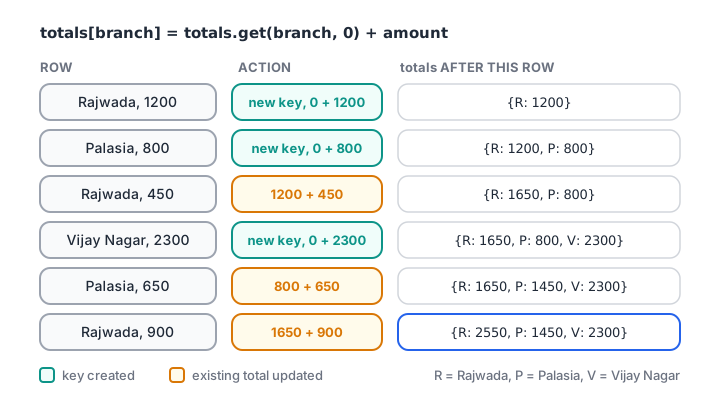
Each row either creates a new key with get(..., 0) as the starting point or adds to the existing total.
sales = [
    ("Rajwada", 1200), ("Palasia", 800), ("Rajwada", 450),
    ("Vijay Nagar", 2300), ("Palasia", 650), ("Rajwada", 900),
]

totals = {}
counts = {}
for branch, amount in sales:
    totals[branch] = totals.get(branch, 0) + amount
    counts[branch] = counts.get(branch, 0) + 1

for branch in totals:
    avg = totals[branch] / counts[branch]
    print(f"{branch:<12} bills={counts[branch]}  total={totals[branch]:>5}  avg={avg:,.0f}")
The get(branch, 0) call is what makes this work: the first time a branch appears, there is no total yet, so it starts from 0. Once you are comfortable with this, the collections module offers Counter and defaultdict, which do the same job with less typing.
Nested dictionaries and JSON-shaped records
A value can itself be a dictionary, which is how you represent one record with several fields. A dictionary whose values are dictionaries looks exactly like the JSON that most APIs return, which the JSON tutorial explores.
customers = {
    "C101": {"name": "Ravi Jain", "city": "Indore", "orders": [1200, 450]},
    "C102": {"name": "Neha Rao", "city": "Ujjain", "orders": [800]},
    "C103": {"name": "Asha Verma", "city": "Indore", "orders": []},
}

print(customers["C101"]["name"])
print(customers["C102"]["orders"][0])

for cid, info in customers.items():
    spend = sum(info["orders"])
    print(f"{cid} {info['name']:<11} {info['city']:<7} spend={spend}")

print(customers["C103"].get("phone", "no phone on file"))
Chain the keys from the outside in: customers["C101"]["name"] first finds the customer, then the field. When some records may lack a field, use get() at the inner level.
Common mistakes with Python dictionaries
- Using
d[key]on optional data. One missing field stops the whole script. Useget()with a sensible default. - Expecting
into search values. It only checks keys. Usein d.values()for values. - Using a list as a key. Lists are unhashable. Convert to a tuple.
- Duplicate keys in a literal.
{"a": 1, "a": 2}silently keeps only the last value,{"a": 2}. - Copying by assignment.
b = amakes two names for one dictionary. Usea.copy()ordict(a), and remember that a shallow copy still shares nested lists and dictionaries. - Changing size inside a loop. Iterate over
list(d)if you must delete keys as you go.
Key takeaways
- A dictionary maps unique hashable keys to values and looks up any key quickly.
d[key]raisesKeyErrorfor missing keys;d.get(key, default)does not.- Assignment adds or replaces;
pop()anddelremove;|merges into a new dict. for k, v in d.items():is the standard loop.totals[k] = totals.get(k, 0) + amountis the plain-Python group-by.- Nested dictionaries model records and match the shape of JSON.
The next lesson, list and dict comprehension, shows how to build and filter dictionaries in a single readable line.
FAQ
What is a dictionary in Python with an example?
A dictionary is a collection of key-value pairs where each key is unique. For example, prices = {"sugar": 46, "salt": 22} maps product names to prices, and prices["sugar"] returns 46. Dictionaries are mutable, ordered by insertion, and very fast at finding a value by its key.
What is the difference between get() and square brackets in a Python dictionary?
Square brackets, d["key"], raise a KeyError when the key is missing. d.get("key") returns None instead, and d.get("key", default) returns your chosen default. Use brackets when the key must exist and get() when missing keys are expected.
Are Python dictionaries ordered?
Yes. Since Python 3.7, dictionaries officially keep the order in which keys were inserted, so looping returns keys in that order. Updating an existing key's value keeps its original position. Deleting a key and adding it again moves it to the end.
How do I sort a dictionary by value in Python?
Use sorted(d.items(), key=lambda kv: kv[1]) to get a list of pairs ordered by value, adding reverse=True for largest first. Wrap the result in dict() if you need a dictionary back. The sorting and lambda articles in this series cover the key argument in depth.
Where can I learn Python dictionaries and data analysis in Indore?
Debugshala's Old Palasia campus in Indore runs classroom batches in English and Hindi for fresh graduates, career switchers and non-IT learners. Its analytics classes that start with core Python include a free demo first, and you can attempt dictionary quizzes on Debugshala Test at any time.
From the team behind this site
Go further with the Data Analytics Course at Debugshala
These tutorials are written by Debugshala, a training and placement institute at Old Palasia, Indore. The classroom course adds live mentoring, real projects and interview preparation.
- Offline classes at Old Palasia, Indore
- Free demo class before you pay
- Non-IT, fresher and year-gap friendly
- Placement assistance
700+ students placed · 200+ hiring partners · 4.9★ Google rating
