

Python Lambda Functions: Syntax, map, filter and pandas apply
Learn Python lambda functions: one-line syntax, lambda vs def, using lambdas as sort keys, with map and filter, in pandas apply, and the late-binding loop trap.
Think of a busy restaurant kitchen in Vijay Nagar. The head chef has a recipe book full of named, tested recipes: "Dal Bafla", "Paneer Tikka". Those are written down because the kitchen makes them every day.
But now and then a customer says, "Same paneer, but less oil and no onion." The chef does not write a new page in the book. He shouts a one-line instruction across the counter, the cook follows it once, and it is forgotten.
Python has both kinds of instructions. The named recipe in the book is a function defined with def. The one-line shouted instruction, used once and never named, is a lambda.
A Python lambda function is an anonymous function created with the lambda keyword, consisting of parameters and a single expression whose value is returned automatically, typically used inline where a short function is needed only once.
This lesson follows Python *args and **kwargs and draws on everything from Python functions onwards.
What is a lambda function in Python?
The syntax is the keyword lambda, the parameters, a colon, and one expression. There are no brackets around the parameters, no return keyword and no name.
def add_gst(amount):
    return round(amount * 1.18)

add_gst_l = lambda amount: round(amount * 1.18)   # same behaviour, for comparison only

print(add_gst(1000), add_gst_l(1000))
print((lambda a, b: a + b)(120, 80))              # define and call at once
print((lambda: "no parameters")())
print((lambda price, gst=0.05: round(price * (1 + gst)))(400))
print(type(add_gst_l).__name__, add_gst_l.__name__)
Both versions create a normal function object. The only differences are that a lambda is limited to one expression and that its name shows up as <lambda> in error messages, which makes debugging slightly harder.
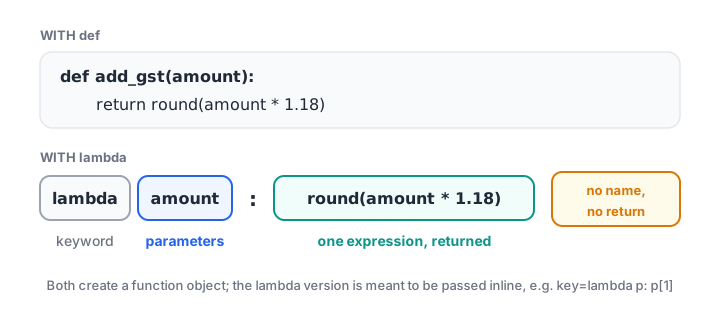
A lambda is a def squeezed into one expression: parameters before the colon, the returned expression after it.
Lambdas accept the same kinds of parameters as any function: defaults, *args and **kwargs all work. What they cannot contain is a statement, such as an assignment, a loop, try or return.
Quick check
What does (lambda x, y=2: x ** y)(3) return?
y defaults to 2, so the lambda returns 3 ** 2, which is 9.
Quick check
Which of these is a valid lambda?
A lambda body must be one expression. A conditional expression is allowed; return and assignment are statements.
Lambda vs def: when should you use each?
lambda |
def |
|
|---|---|---|
| Name | Anonymous (shows as <lambda>) |
Has a name |
| Body | One expression | Any number of statements |
| Return | Implicit, the expression's value | Explicit return |
| Docstring, type hints | Not possible | Supported |
| Best for | A short function passed once to another function | Anything reused, tested or longer than one line |
The PEP 8 style guide advises against assigning a lambda to a name, as in add_gst_l = lambda ... above. If a function deserves a name, write it with def. Keep lambdas for places where the function is passed straight into another call.
Using lambda as a key for sorted(), max() and min()
This is where you will write most of your lambdas. Functions such as sorted(), max() and min() take a key argument: a function that tells them what to compare. A lambda lets you write that rule right where it is needed.
products = [("Earphones", 499, 120), ("Charger", 349, 310),
            ("Cover", 199, 540), ("Power bank", 1299, 85)]

by_revenue = sorted(products, key=lambda p: p[1] * p[2], reverse=True)
for name, price, units in by_revenue:
    print(f"{name:<11} revenue Rs {price * units:>7,}")

cheapest = min(products, key=lambda p: p[1])
print("Cheapest:", cheapest[0])

stock = {"Earphones": 12, "Charger": 0, "Cover": 45}
print("Lowest stock:", min(stock, key=lambda k: stock[k]))
The sorting tutorial explains how key works in detail, including multi-column keys. A lambda returning a tuple, such as key=lambda p: (-p[1], p[0]), sorts by price descending and then by name.
map() and filter() with lambda
map(func, iterable) applies a function to every item. filter(func, iterable) keeps the items for which the function returns something truthy. Both return lazy iterators, so wrap them in list() to see the results.
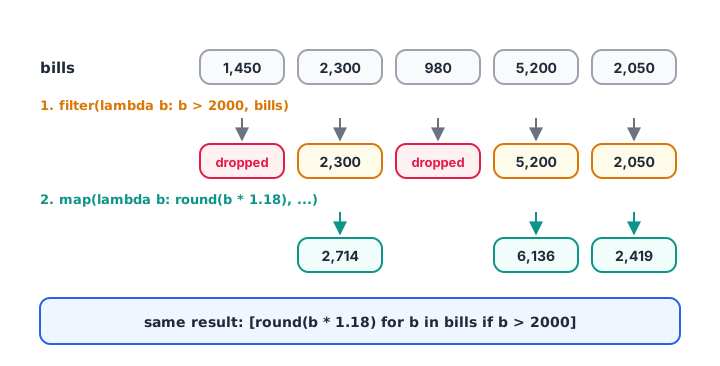
filter() drops items, map() transforms the survivors, and one comprehension can do both steps.
bills = [1450, 2300, 980, 5200, 2050]

big = list(filter(lambda b: b > 2000, bills))
taxed = list(map(lambda b: round(b * 1.18), big))
print(big)
print(taxed)

# The same result with one comprehension
print([round(b * 1.18) for b in bills if b > 2000])

# map shines when a named function already exists
raw = ["  1200", "950 ", " 3100 "]
print(list(map(int, raw)))
print(sum(map(int, raw)))
When you need a lambda just to use map or filter, the comprehension is usually clearer. When the function already exists, such as int, str.strip or one of your own, map(int, raw) is short and readable. Comprehensions are covered in list comprehension.
reduce() for running combinations
functools.reduce combines items pairwise into one value. sum(), max() and min() already cover the common cases, so reach for reduce only when nothing simpler fits.
from functools import reduce

monthly_growth = [1.05, 0.98, 1.12, 1.03]          # month-on-month multipliers
overall = reduce(lambda acc, g: acc * g, monthly_growth, 1.0)
print(f"Overall growth: {(overall - 1) * 100:.1f}%")

regions = [{"Indore", "Ujjain"}, {"Ujjain", "Dewas"}, {"Bhopal"}]
print(sorted(reduce(lambda a, b: a | b, regions)))
Lambdas in pandas
pandas methods take functions constantly, so lambdas appear in almost every analysis notebook. The common places are apply(), map() on a column, assign() and sort_values(key=...).
import pandas as pd

df = pd.DataFrame({
    "customer": ["ravi jain", "NEHA RAO", "Asha verma"],
    "amount": [1450, 5200, 2300],
    "city": ["Indore", "Ujjain", "Indore"],
})

df["customer"] = df["customer"].map(lambda s: s.title())
df["band"] = df["amount"].apply(lambda a: "high" if a >= 2500 else "normal")
df = df.assign(with_gst=lambda d: (d["amount"] * 1.18).round())
print(df)
print(df.sort_values("customer", key=lambda col: col.str.len()))
In assign(), the lambda receives the whole DataFrame, which lets new columns refer to columns created earlier in the same chain. Remember, though, that a vectorised expression such as df["amount"] * 1.18 is much faster than apply with a lambda on large tables. Use apply for logic that genuinely cannot be written as a column operation.
The late-binding trap in loops
Lambdas created inside a loop look up loop variables when they are called, not when they are created. This surprises almost everyone once.
rates = [0.05, 0.12, 0.18]

broken = [lambda x: round(x * (1 + r)) for r in rates]
print([f(1000) for f in broken])       # all use the last r

fixed = [lambda x, r=r: round(x * (1 + r)) for r in rates]
print([f(1000) for f in fixed])        # each keeps its own r
All three broken lambdas refer to the same variable r, which ends the loop at 0.18. Binding it as a default argument, r=r, freezes the current value for each lambda, because defaults are evaluated when the function is created. The underlying idea is a closure, explained in Python closures.
Common mistakes with Python lambda
- Trying to use statements.
lambda x: y = xorlambda x: return xis aSyntaxError. Only one expression is allowed. - Naming lambdas.
f = lambda x: x * 2works, but PEP 8 recommendsdef f(x): return x * 2. - Forgetting
list()aroundmaporfilter. You will print<map object ...>instead of values. - Late binding in loops. Capture the loop variable with a default,
lambda x, r=r: .... applywith a lambda for simple maths in pandas. Use vectorised column operations instead.- Overly clever one-liners. If the lambda needs a comment, it should be a named function.
Key takeaways
lambda params: expressioncreates an anonymous one-expression function.- The expression's value is returned automatically; no
returnkeyword. - Use lambdas inline as
key=functions and in pandasapply,mapandassign. - Prefer comprehensions to
map/filterwith lambdas for simple transforms. - Lambdas in loops capture variables late; bind them with a default argument.
- If it needs a name, a docstring or more than one line, use
def.
Next in the series, learn how a function can call itself with Python recursion.
FAQ
What is a lambda function in Python?
A lambda function is a small anonymous function written as lambda parameters: expression. It returns the expression's value automatically. For example, lambda x: x * 2 doubles its input. Lambdas are typically passed directly to functions such as sorted(), map() or pandas apply() instead of being given a name.
What is the difference between lambda and def in Python?
def creates a named function that can contain many statements, a docstring and type hints. lambda creates an unnamed function limited to a single expression. Both produce ordinary function objects, so they behave the same when called. Use def for anything reused or complex, and lambda for short inline functions.
Can a lambda function have multiple lines or statements?
No. A lambda's body must be exactly one expression, so it cannot contain assignments, loops, try blocks or return. You can still use a conditional expression, such as lambda x: "high" if x > 100 else "low". When you need more logic, define a regular function with def.
Why use lambda with map and filter in Python?
map() and filter() need a function argument, and a lambda supplies one without defining a named function. For example, filter(lambda b: b > 2000, bills) keeps large bills. In modern Python, a list comprehension often expresses the same idea more readably, so use whichever is clearer.
Where can I learn Python lambdas and pandas for analytics in Indore?
Debugshala's Old Palasia campus in Indore runs classroom analytics batches covering Python, pandas and SQL, taught in English and Hindi with placement assistance. Ask for a free demo of the analytics training with placement assistance at Debugshala, and practise lambda questions on Debugshala Test.
From the team behind this site
Go further with the Data Analytics Course at Debugshala
These tutorials are written by Debugshala, a training and placement institute at Old Palasia, Indore. The classroom course adds live mentoring, real projects and interview preparation.
- Offline classes at Old Palasia, Indore
- Free demo class before you pay
- Non-IT, fresher and year-gap friendly
- Placement assistance
700+ students placed · 200+ hiring partners · 4.9★ Google rating
