

Python Regex Tutorial: The re Module with Practical Examples
Learn Python regular expressions with the re module: search, findall, sub, groups, named groups, greedy vs lazy, flags and regex in pandas, with real data.
Imagine you are handed 3,000 delivery addresses typed by customers of an Indore sweet shop. Some write "Indore 452001", some write "Indore-452010", some put the PIN code first, and a few forget it. Your manager wants a column with just the PIN codes.
You could scan each line by eye. Or you could describe what a PIN code looks like, "exactly six digits, standing on their own", and let the computer find every one in a second.
That description is a regular expression. The rule "six digits standing alone" becomes the pattern \b\d{6}\b. The addresses are the text you search. Each PIN code found is a match.
A regular expression in Python is a pattern, written in a compact syntax and processed by the standard library's re module, that describes a set of strings so you can search, extract, validate, split or replace text that fits the pattern.
This lesson follows Python decorators and builds on the string methods from Python strings. Examples target Python 3.12+ and pandas 2.x.
What is a regular expression in Python?
The re module ships with Python, so there is nothing to install. You give it a pattern and a piece of text, and it tells you where the pattern matches.
import re

addresses = [
    "12 Sapna Sangeeta Road, Indore 452001",
    "MG Road, Bhopal - 462001",
    "452010 Vijay Nagar, Indore",
    "Rajwada, Indore (PIN not given)",
]
for a in addresses:
    m = re.search(r"\b\d{6}\b", a)
    print(m.group() if m else "------", "<-", a)
re.search returns a match object when it finds the pattern and None when it does not, so always check before calling .group(). The r before the string makes it a raw string, which stops Python from treating backslashes as escape characters. Use raw strings for every pattern.
Regex syntax: the building blocks
A pattern is built from ordinary characters, which match themselves, and special symbols. The table lists the ones you will use in nearly every data task.
| Symbol | Meaning | Example match |
|---|---|---|
\d |
one digit 0–9 | 7 |
\w |
letter, digit or underscore | a, 9, _ |
\s |
whitespace (space, tab, newline) | a space |
. |
any character except newline | x |
[aeiou] |
one character from the set | e |
[^0-9] |
one character not in the set | R |
+ / * / ? |
one or more / zero or more / optional | \d+ matches 1450 |
{6}, {2,4} |
exactly 6 / between 2 and 4 | \d{6} matches 452001 |
^ / $ |
start / end of the string | ^Rs |
\b |
word boundary | \bupi\b |
cat|dog |
either alternative | dog |
( ) |
group (capture a part) | (\d+) |
Capital letters reverse the shorthand classes: \D is any non-digit, \W any non-word character and \S any non-space.
import re

text = "Order 1041 paid Rs 1,450 on 2026-11-03; order 1042 paid Rs 980."
print(re.findall(r"\d+", text))
print(re.findall(r"\b\d{4}\b", text))
print(re.findall(r"Rs [\d,]+", text))
print(re.findall(r"[Oo]rder \d+", text))
print(re.findall(r"\d{4}-\d{2}-\d{2}", text))
Notice how \d+ splits "1,450" into two numbers, because the comma is not a digit. The pattern Rs [\d,]+ fixes that by allowing digits and commas together.
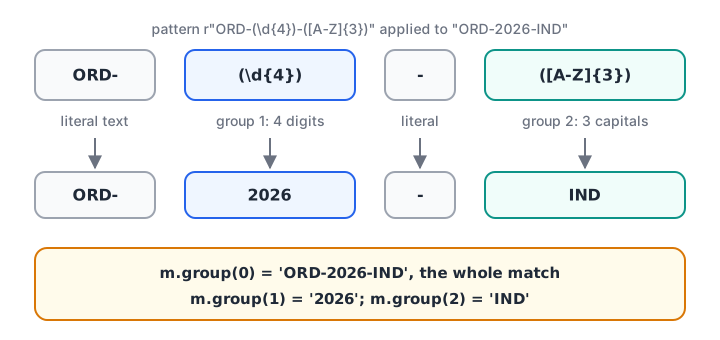
Read a pattern left to right, one piece at a time. Each group in brackets captures its own part of the match.
search, match, fullmatch, findall and finditer
The re module has several finding functions. They differ in where they look and how many matches they return.
| Function | Looks at | Returns |
|---|---|---|
re.match |
only the start of the string | first match object or None |
re.search |
anywhere | first match object or None |
re.fullmatch |
the whole string must fit | match object or None |
re.findall |
anywhere | list of all matched strings |
re.finditer |
anywhere | iterator of match objects |
import re

text = "PIN 452001, alt 452010"
pat = r"\d{6}"
print("match:    ", re.match(pat, text))
print("search:   ", re.search(pat, text).group())
print("findall:  ", re.findall(pat, text))
for m in re.finditer(pat, text):
    print("finditer: ", m.group(), "at", m.span())
print("fullmatch:", re.fullmatch(pat, "452001") is not None, re.fullmatch(pat, text))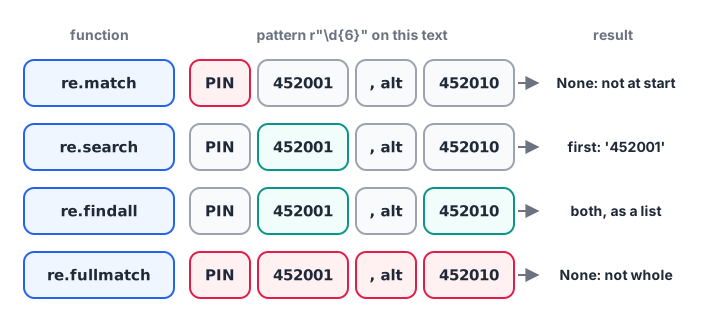
Use fullmatch for validation (is this whole value a PIN?) and search or findall for extraction.
re.match trips up many beginners. It only checks the beginning, so it returns None here even though two PIN codes exist later in the text.
How do regex groups work?
Round brackets create a group. The whole match is group 0, and each bracket pair is numbered from 1 by its opening bracket. Better still, name the groups with (?P<name>...) so your code reads like the data.
import re

logs = [
    "2026-11-03 09:15 INFO order=1041 amount=1450",
    "2026-11-03 09:42 ERROR order=1042 amount=0",
    "2026-11-04 10:05 INFO order=1043 amount=2300",
]
pat = re.compile(r"(?P<date>\S+) \S+ (?P<level>[A-Z]+) order=(?P<order>\d+) amount=(?P<amount>\d+)")

for line in logs:
    m = pat.search(line)
    print(m.group("level"), m.group("order"), int(m.group("amount")), "|", m.group(1))

print(pat.search(logs[1]).groupdict())
re.compile turns the pattern into a reusable object. Python caches recent patterns anyway, but compiling gives the pattern a name and keeps long expressions in one place.
When a pattern has groups, re.findall returns the groups instead of the whole match: a list of strings for one group, a list of tuples for several. That surprise is worth remembering.
Quick check
Which call returns a list of every six-digit number in text?
findall scans the whole string and returns all matches as a list; match and search return only the first.
Replacing and splitting text with re.sub and re.split
Cleaning is where regex earns its keep in analytics. re.sub(pattern, replacement, text) replaces every match, and re.split cuts text wherever the pattern appears.
import re

amounts = ["Rs 1,450", "₹ 980.50", "INR2,300", "1450/-"]
print([float(re.sub(r"[^\d.]", "", a)) for a in amounts])

phones = ["+91 98260-12345", "098260 12346", "9826012347"]
print([re.sub(r"\D", "", p)[-10:] for p in phones])

print(re.split(r"\s*[,;|]\s*", "Indore, Bhopal;Ujjain | Dewas"))

masked = re.sub(r"\d(?=\d{4})", "X", "9826012345")
print(masked)

print(re.sub(r"(\d{2})-(\d{2})-(\d{4})", r"\3-\2-\1", "Due 05-12-2026"))
The first line deletes everything that is not a digit or a dot, turning four messy formats into numbers. The masking line uses a lookahead, (?=\d{4}), which means "a digit that still has four digits after it", so only the last four survive. The last line reorders a date using \1, \2 and \3, the captured groups.
Greedy vs lazy matching and regex flags
Quantifiers such as * and + are greedy: they grab as much text as they can. Adding ? after them makes them lazy, so they take as little as possible.
import re

html = "<b>Indore</b> and <b>Bhopal</b>"
print(re.findall(r"<b>.*</b>", html))
print(re.findall(r"<b>.*?</b>", html))
print(re.findall(r"<b>(.*?)</b>", html))

print(re.findall(r"indore", "Indore INDORE indore", flags=re.IGNORECASE))
notes = "total: 1450\nTOTAL: 980\nsubtotal: 300"
print(re.findall(r"^total: (\d+)", notes, flags=re.IGNORECASE | re.MULTILINE))
The greedy version swallows everything from the first <b> to the last </b>. The lazy version stops at the first closing tag. For real HTML, use a parser; regex is fine for quick, known snippets.
| Flag | Short form | Effect |
|---|---|---|
re.IGNORECASE |
re.I |
Upper and lower case match each other |
re.MULTILINE |
re.M |
^ and $ work on every line, not only the whole string |
re.DOTALL |
re.S |
. also matches newline |
re.VERBOSE |
re.X |
Allows spaces and # comments inside the pattern |
re.VERBOSE makes long patterns readable. Here it validates email addresses in a simple, practical way.
import re

email = re.compile(r"""
    ^(?P<user>[\w.+-]+)              # name before the @
    @
    (?P<domain>[\w-]+(?:\.[\w-]+)+)$  # domain with at least one dot
""", re.VERBOSE)

for e in ["riya.sharma@gmail.com", "info@debugshala.com", "bad@site", "two@@x.com"]:
    m = email.match(e)
    print(f"{e:24}", m.group("domain") if m else "invalid")
(?:...) is a non-capturing group: it groups for repetition without creating a numbered group. No regex can fully validate email; for sign-ups, send a confirmation link.
Quick check
What does re.findall(r"<b>(.*?)</b>", "<b>A</b><b>B</b>") return?
The lazy .*? stops at the first closing tag, and because the pattern has a group, findall returns the group contents.
Using regex with pandas string methods
pandas applies the same patterns to an entire column at once through the .str accessor. This is how you will use regex most often as an analyst.
import pandas as pd

df = pd.DataFrame({"remark": [
    "Paid via UPI ref 4521889",
    "COD, call 9826012345",
    "upi ref 7781002, late",
    "Card declined",
]})
df["is_upi"] = df["remark"].str.contains(r"\bupi\b", case=False, regex=True)
df["upi_ref"] = df["remark"].str.extract(r"(?i)ref (\d+)", expand=False)
df["phone"] = df["remark"].str.extract(r"\b(\d{10})\b", expand=False)
df["clean"] = df["remark"].str.replace(r"\d", "#", regex=True)
print(df.to_string(index=False))
str.extract returns the first group of each row and NaN where nothing matched. The inline flag (?i) makes the pattern case-insensitive without a separate argument. The data cleaning with pandas guide uses these methods on a full messy dataset.
Common mistakes with Python regex
- Forgetting the raw string. In
"\b"Python sees a backspace character;r"\b"is a word boundary. - Using
re.matchto search. It only checks the start of the string. Usere.search. - Calling
.group()onNone. Check the result first, or you getAttributeError. - Forgetting to escape special characters. A literal dot is
\.and a literal+is\+.re.escape(text)escapes a whole string for you. - Greedy
.*grabbing too much. Use.*?or a tighter class such as[^<]*. - Validating with
searchinstead offullmatch.re.search(r"\d{6}", "abc4520019")succeeds even though the value is not a PIN.
Key takeaways
- The built-in
remodule handles regex; write patterns as raw strings. \d,\w,\s, classes[...]and quantifiers+ * ? {n}cover most needs.searchfinds the first match anywhere,findallfinds all,fullmatchvalidates.- Groups and named groups extract parts;
groupdict()gives them as a dict. re.subandre.splitclean and cut text, and can reuse groups as\1.- Add
?for lazy matching; use flags such asre.I,re.Mandre.X. - pandas
str.contains,str.extractandstr.replaceapply regex to whole columns.
Dates are the next messy field you will meet, so continue with Python datetime. If you want a mentor to review your cleaning patterns on real exports, the data analytics classroom course at Debugshala, Indore works through exactly this kind of data.
FAQ
What is the re module in Python?
The re module is Python's built-in library for regular expressions. It provides functions such as search, match, fullmatch, findall, finditer, sub and split, plus compile for reusable patterns. It ships with every Python installation, so you only need import re.
What is the difference between re.search and re.match?
re.match checks for the pattern only at the very start of the string, while re.search scans the whole string and returns the first match anywhere. For "PIN 452001", re.match(r"\d{6}", ...) returns None but re.search finds 452001. Use re.fullmatch when the entire string must fit.
Why use raw strings for regex in Python?
Regex uses many backslashes, and normal Python strings also treat backslashes as escape codes. In a raw string, written r"...", backslashes are kept as they are, so r"\b\d+" reaches the regex engine unchanged. Without the r, patterns like "\b" silently become different characters.
How do I extract numbers from a string in Python?
Use re.findall(r"\d+", text) to get every run of digits as strings, then convert with int. For amounts with commas or decimals, use a wider pattern such as r"[\d,]+(?:\.\d+)?" and remove commas before converting. In pandas, df["col"].str.extract(r"(\d+)") does the same per row.
Where can I practise regex for data analyst interviews in Indore?
Rewrite each example above with your own messy data, such as phone numbers or invoice IDs, and predict the output before running it. Then solve pattern-matching quizzes on Debugshala Test. Debugshala's Old Palasia campus in Indore also offers a free demo class for its data analytics course.
From the team behind this site
Go further with the Data Analytics Course at Debugshala
These tutorials are written by Debugshala, a training and placement institute at Old Palasia, Indore. The classroom course adds live mentoring, real projects and interview preparation.
- Offline classes at Old Palasia, Indore
- Free demo class before you pay
- Non-IT, fresher and year-gap friendly
- Placement assistance
700+ students placed · 200+ hiring partners · 4.9★ Google rating
