

Python String Formatting with f-strings: Decimals, Commas, %
Format numbers, percentages, rupees, dates and aligned report tables with Python f-strings, plus the format spec mini-language and lakh-style commas.
Imagine it is the first Monday of the month at a garment wholesaler near Sitlamata Bazaar. The owner wants a quick message on WhatsApp: total sales, the growth over last month and the top three products, each line neat and readable.
Your Python script has the numbers: 1234567.891, 0.0847 and a list of product names. Printed raw, they look like 1234567.891 and 0.0847. What the owner wants to read is "₹12,34,567.89" and "8.5%", with products lined up in tidy columns.
The raw value is the data. The way it looks on screen is its format. An f-string is the tool that joins the two, and the small codes after the colon, such as .2f or ,, are the format specification.
An f-string (formatted string literal) is a Python string prefixed with f in which expressions inside curly braces are evaluated at runtime and converted to text, optionally using a format specifier after a colon.
How do f-strings work in Python?
Put an f before the opening quote, then write any Python expression inside {}. Python evaluates the expression and inserts the result. You can use variables, arithmetic, function calls and method calls.
shop = "Sitlamata Garments"
orders = 342
avg_value = 1850.5

print(f"{shop} received {orders} orders this month.")
print(f"Revenue: {orders * avg_value}")
print(f"Shop name in capitals: {shop.upper()}")
print(f"Orders above 300? {orders > 300}")
This is much cleaner than gluing pieces together with +, which also forces you to call str() on every number. If you are coming from the strings tutorial, think of an f-string as a template that fills itself in.
The = specifier for quick debugging
Adding = after an expression prints both the expression and its value. It is a fast way to inspect numbers while you build an analysis, and it works from Python 3.8.
target = 500000
achieved = 438250
print(f"{target=}")
print(f"{achieved=:,}")
print(f"{achieved / target=:.1%}")
What is the format specification mini-language?
Everything after the colon inside the braces is the format spec. Python reads it in a fixed order: fill character, alignment, sign, width, grouping, precision and type. You rarely need all of them at once, but knowing the order lets you read any spec you meet.
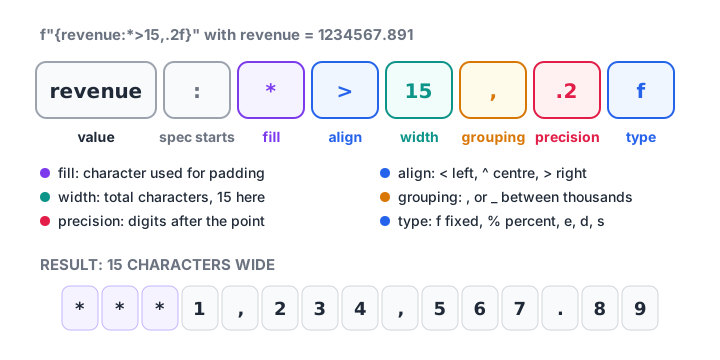
Each part of the format spec is optional, but when present they must appear in this order.
The full rules live in the official format specification documentation. The table below covers what an analyst uses daily.
| Spec | Meaning | {1234567.891:SPEC} gives |
|---|---|---|
.2f |
Fixed point, 2 decimals | 1234567.89 |
, |
Comma thousands separator | 1,234,567.891 |
,.2f |
Commas and 2 decimals | 1,234,567.89 |
_ |
Underscore separator | 1_234_567.891 |
.3e |
Scientific notation | 1.235e+06 |
>15,.2f |
Right-align in 15 characters | 1,234,567.89 |
+.1f |
Always show the sign | +1234567.9 |
Formatting decimals, commas and percentages
These three cover most business reports. Note that % multiplies by 100 for you, so pass the raw ratio, not a number already multiplied.
revenue = 1234567.891
growth = 0.0847
returns = -0.0125

print(f"Revenue : {revenue:,.2f}")
print(f"Rounded : {revenue:,.0f}")
print(f"Growth  : {growth:.1%}")
print(f"Returns : {returns:+.2%}")
print(f"Compact : {revenue / 1e6:.2f} million")
print(f"Padded ID: {42:05d}")
{42:05d} pads an integer with zeros to five characters, which is useful for invoice numbers like 00042. The d type means "decimal integer" and refuses floats, which is a helpful guard.
Quick check
What does f"{0.4567:.1%}" print?
The % type multiplies by 100 and adds a percent sign; .1 keeps one decimal place.
Quick check
Which f-string prints 1234.5 as " 1,234.50" (right-aligned in 10 characters)?
> right-aligns, 10 is the width, the comma adds grouping and .2f gives two decimals.
How do you align text in a report with f-strings?
Alignment turns a list of numbers into a readable table. Use < for left, > for right and ^ for centre, followed by the width in characters. Text is usually left-aligned and numbers right-aligned, so the digits line up.
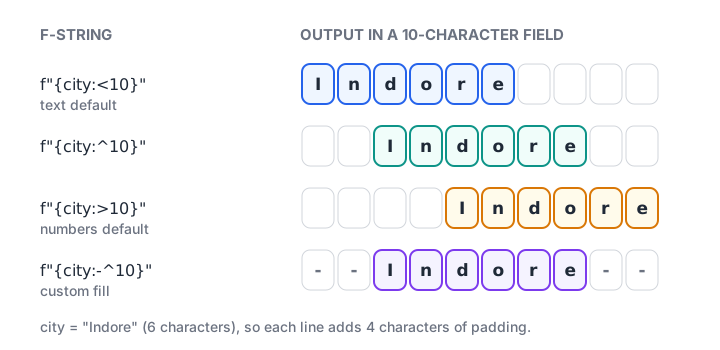
The same value placed in a 10-character field with <, ^ and >, plus a custom fill character.
products = [("Cotton kurta", 1240, 0.112),
            ("Denim jeans", 985, -0.034),
            ("Silk saree", 412, 0.257)]

print(f"{'Product':<14}{'Units':>8}{'Change':>10}")
print("-" * 32)
for name, units, change in products:
    print(f"{name:<14}{units:>8,}{change:>+10.1%}")
print("-" * 32)
total = sum(u for _, u, _ in products)
print(f"{'Total':<14}{total:>8,}")
print(f"{' END ':*^32}")
The last line uses a fill character: *^32 centres the text in 32 characters and fills the gap with asterisks. The for loop tutorial explains the tuple unpacking in for name, units, change in products.
Formatting rupees in lakh and crore
Python's , option always groups in thousands, the Western way: 12,345,678. Indian reports group the last three digits, then pairs: 1,23,45,678. There is no built-in spec for this, but a short function handles it.
def inr(amount):
    sign = "-" if amount < 0 else ""
    whole, paise = f"{abs(amount):.2f}".split(".")
    head, tail = whole[:-3], whole[-3:]
    groups = []
    while head:
        groups.insert(0, head[-2:])
        head = head[:-2]
    return sign + "₹" + ",".join(groups + [tail]) + "." + paise

for value in [950, 45210.5, 1234567.891, 120000000, -78500]:
    print(f"{value:>15,.2f}  ->  {inr(value)}")
The function first formats with two decimals, splits off the paise, and then peels off two digits at a time from the left part. It shows how string slicing from the previous tutorial and f-strings work together. In a pandas report you can apply the same function to a column with df["sales"].map(inr).
Formatting dates and times in f-strings
datetime objects accept their own format codes after the colon, the same codes used by strftime(). You will learn the module properly in Python datetime; here is the formatting side.
from datetime import date, datetime

report_day = date(2026, 11, 2)
run_at = datetime(2026, 11, 2, 9, 5)

print(f"Report for {report_day:%d %b %Y}")
print(f"ISO date: {report_day:%Y-%m-%d}")
print(f"Generated at {run_at:%I:%M %p} on {run_at:%A}")
print(f"Month label: {report_day:%b-%y}")
f-strings vs str.format() vs % formatting
Python has three formatting styles. You will see all of them in older code, tutorials and libraries, so it helps to recognise each one.
| Style | Example | When to use |
|---|---|---|
| f-string | f"{total:,.2f}" |
Default choice for new code (Python 3.6+) |
str.format() |
"{:,.2f}".format(total) |
Templates stored before the values exist |
% operator |
"%.2f" % total |
Reading old code and logging calls |
str.format() is still useful when the template is defined first and filled later, for example a message pattern loaded from a settings file. The format specs after the colon are identical in f-strings and format(), so learning one teaches you both.
template = "Dear {name}, your order of {amount:,.2f} is confirmed."
for name, amount in [("Neha", 18450), ("Imran", 7299.5)]:
    print(template.format(name=name, amount=amount))

print("Old style: %s sold %d units at %.1f%% margin" % ("Kurta", 1240, 18.5))
Common mistakes with Python string formatting
- Forgetting the
f."Total: {total}"prints the braces literally. Thefmust come before the quote. - Multiplying before
%.{0.25 * 100:.0%}prints2500%. Pass the ratio and let%do the scaling. - Formatting too early. Once you format a number into text, you cannot add it up. Keep raw numbers for calculations and format only when printing.
- Using
don a float.{12.0:d}raisesValueError. Use{12.0:.0f}or convert withint()first. - Printing braces. To show a literal
{inside an f-string, double it:f"{{id}} = {7}"prints{id} = 7. - Assuming
,gives Indian grouping. It never will. Use a helper likeinr()above.
Key takeaways
- Prefix a string with
fand put expressions in{}to build readable output. - After the colon, the format spec follows a fixed order: fill, align, sign, width, grouping, precision, type.
.2fsets decimals,,adds separators,%turns ratios into percentages,<,^and>align text.{x=}prints a quick debug label with the value.- Indian lakh and crore grouping needs a small custom function.
- Keep numbers as numbers until the final print.
Formatting is the last of the fundamentals. The flow control section continues with break, continue and pass, which help you stop or skip loop steps while building reports like the one above.
FAQ
How do I format a number to 2 decimal places in Python?
Use an f-string with the .2f spec: f"{value:.2f}". For thousands separators as well, write f"{value:,.2f}". This changes only how the number is displayed. To change the stored value itself, use round(value, 2) or Decimal.quantize() for money calculations.
What is the difference between format() and f-strings in Python?
They use the same format specification language, so {x:,.2f} means the same in both. f-strings evaluate expressions directly where they are written and are shorter to read. str.format() separates the template from the values, which suits templates stored in files or reused with different data.
Which Python version supports f-strings?
f-strings arrived in Python 3.6. The = debugging specifier was added in Python 3.8. Python 3.12 relaxed the parsing rules, allowing the same quote type inside the braces, backslashes and comments in multi-line f-strings. Any currently supported Python version handles everything in this tutorial.
How do I add commas to numbers in Python?
Use the comma option in a format spec: f"{1234567:,}" gives 1,234,567. Combine it with precision, as in f"{1234567.8:,.2f}". For Indian-style grouping such as 12,34,567, write a small helper that splits the last three digits and groups the rest in pairs.
Can I learn Python and reporting skills in a classroom in Indore?
Yes. Debugshala runs classroom batches at Old Palasia in English and Hindi, and fresh graduates, non-IT learners and people with a year gap are welcome. You can attend a free demo of Debugshala's offline data analytics batches first, and test your Python with quizzes on Debugshala Test.
From the team behind this site
Go further with the Data Analytics Course at Debugshala
These tutorials are written by Debugshala, a training and placement institute at Old Palasia, Indore. The classroom course adds live mentoring, real projects and interview preparation.
- Offline classes at Old Palasia, Indore
- Free demo class before you pay
- Non-IT, fresher and year-gap friendly
- Placement assistance
700+ students placed · 200+ hiring partners · 4.9★ Google rating
