

Python Variables and Literals: Assignment, Types and Examples
Learn how Python variables work as names for values, how assignment and reassignment behave, and every kind of literal: numbers, strings, booleans and None.
Walk into the sales office of a distribution company on Ring Road. On the whiteboard someone has written: Target: 50 orders, Top seller: Asha, Orders so far: 31. Each label on the left names a fact, and each fact on the right can change during the day.
At 4 pm Ravi overtakes Asha. Nobody buys a new whiteboard. They wipe "Asha" and write "Ravi" next to the same label. The label Top seller stays; what it refers to changes.
Python variables work like those whiteboard labels. The label is the variable's name, and the thing written beside it is the value. The values you type straight into the code, like 50 or "Asha", are called literals.
A variable in Python is a name that refers to a value stored in memory, and a literal is a fixed value written directly in the code, such as 50, 3.14, "Asha" or True.
You met a few variables in your first Python program. This lesson explains what is really going on, which saves you from several confusing bugs later.
How to create a variable in Python
Write a name, an equals sign and a value. That single line creates the variable. There is no separate step to declare it, and you don't write its type.
target = 50
top_seller = "Asha"
orders_so_far = 31
conversion_rate = 0.62

print("Target:", target)
print("Top seller:", top_seller)
print("Orders left:", target - orders_so_far)
print("Rate:", conversion_rate)
The = sign does not mean "equals" as in maths. It means "make this name refer to this value". Programmers call it the assignment operator. To compare two values you use ==, which you will meet in Python operators.
Assignment runs right to left
Python always works out the right-hand side first, then attaches the name on the left to the result. That is why this line, which looks impossible in maths, is perfectly normal in Python:
orders = 31
print("Before lunch:", orders)

orders = orders + 4      # right side: 31 + 4 = 35
print("After lunch:", orders)

orders += 6              # short form of orders = orders + 6
print("End of day:", orders)
Python reads orders + 4 using the current value, 31, gets 35, and then points orders at 35. The old value is simply forgotten.
What happens in memory when you assign a variable?
A helpful picture: values live in memory as objects, and a variable is a name tag tied to one of them. Assigning a new value moves the tag. It does not change the old object.
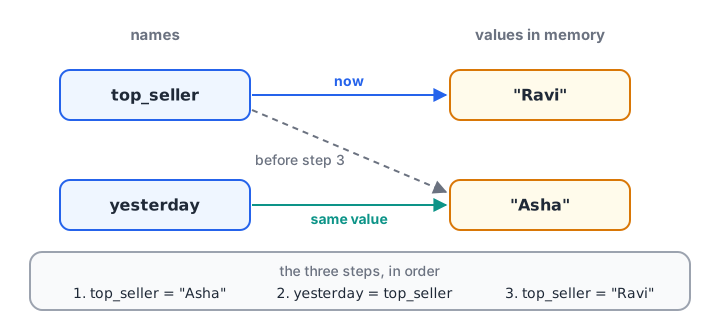
Reassignment moves the name tag to a new value. Two names can point at the same value.
Two names can point at the same object, too. With numbers and strings this never surprises you, because those values cannot be changed in place:
leader = "Asha"
yesterday_leader = leader    # both names point to "Asha"
leader = "Ravi"              # only leader moves

print("leader:", leader)
print("yesterday_leader:", yesterday_leader)
The idea becomes important with lists, which can change in place. The lesson on Python lists shows that case.
Python is dynamically typed
Every value has a type, but the name does not. The same name can point to a number now and a string later. This is called dynamic typing. Use the built-in type() function to see what a name currently refers to.
value = 2026
print(value, type(value))

value = 2026.5
print(value, type(value))

value = "FY 2026-27"
print(value, type(value))
Being allowed to do this does not make it a good idea. A name that holds a year, then a float, then text is hard to follow. Give each idea its own clear name.
Assigning several variables at once
Python lets you assign several names in one line. Values are matched to names from left to right.
city, branch_count, avg_rating = "Indore", 4, 4.3
print(city, branch_count, avg_rating)

opening = closing = 0          # both start at zero
print(opening, closing)

a, b = 10, 20
a, b = b, a                    # swap without a temporary variable
print("a =", a, "b =", b)
The swap works because Python builds the right side, (20, 10), completely before it assigns anything. The number of names and values must match, or you get a ValueError.
Rules for naming variables
A variable name can use letters, digits and underscores, cannot start with a digit, is case-sensitive, and cannot be a reserved word like if or class. The full rules, with a checker you can run, are in Python keywords and identifiers.
For readable analysis code, use lowercase words joined by underscores (monthly_revenue, avg_basket_size). Short names like x are fine for a quick experiment, but not in a script someone else will read.
What are literals in Python?
A literal is a value you type straight into the code. When Python reads 50, it creates the integer fifty. When it reads "Asha", it creates a string. Literals are how fixed values enter a program in the first place.
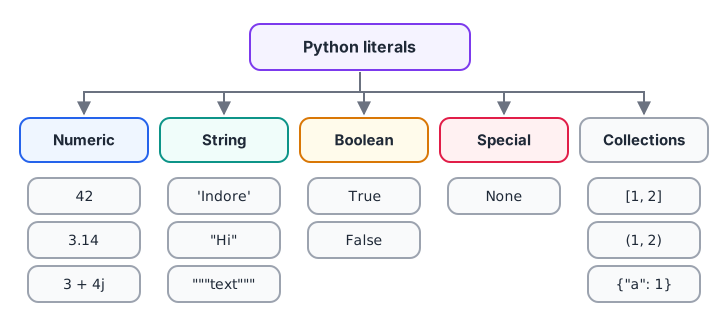
The families of Python literals and an example of each.
| Kind | Examples | Type |
|---|---|---|
| Integer | 42, -7, 1_50_000, 0b1010, 0o17, 0xFF |
int |
| Float | 3.14, 0.5, 2.5e3 |
float |
| Complex | 3 + 4j |
complex |
| String | 'Indore', "Today's total", """many lines""" |
str |
| Boolean | True, False |
bool |
| Special | None |
NoneType |
| Collections | [1, 2], (1, 2), {1, 2}, {"city": "Indore"} |
list, tuple, set, dict |
Numeric literals
Underscores inside a number are ignored, so you can group digits the Indian way to make large amounts readable. Prefixes write integers in binary, octal or hexadecimal, and e means "times ten to the power".
annual_revenue = 1_25_00_000      # 1.25 crore, underscores for readability
print(annual_revenue)
print(0b1010, 0o17, 0xFF)         # binary, octal, hexadecimal
print(2.5e3, 1e-2)                # scientific notation
print(type(3 + 4j))
String, boolean and None literals
Strings can use single, double or triple quotes. True and False are the two boolean literals and must start with a capital letter. None means "no value yet", which is handy for a field you have not filled in.
store = 'Palasia'
note = "Today's footfall was high"
address = """204 C.S. Naidu Arcade,
Old Palasia, Indore"""
is_open = True
manager_feedback = None

print(store, "|", note)
print(address)
print(is_open, type(is_open))
print(manager_feedback, type(manager_feedback))
None is not zero and not an empty string. It is its own value, used to mark something that is missing. You will see it a lot when cleaning data.
Constants: values that should not change
Many programs have values that stay fixed, like a tax rate or the number of months in a year. Python has no keyword that locks a variable. Instead, the convention is to write such names in UPPER_CASE near the top of the file.
GST_RATE = 0.18          # assumed rate for this example
MONTHS_IN_YEAR = 12

monthly_fee = 2500
yearly_fee = monthly_fee * MONTHS_IN_YEAR
print("Yearly fee:", yearly_fee)
print("With GST:", yearly_fee * (1 + GST_RATE))
Python would still let you write GST_RATE = 0.28 later. The capital letters are a promise between programmers, not a rule the interpreter enforces.
Common mistakes with variables and literals
- Using a name before assigning it.
print(total)beforetotal = ...givesNameError: name 'total' is not defined. - Writing commas in numbers.
price = 1,500does not create 1500. It creates the tuple(1, 500). Use1500or1_500. - Quoting numbers by accident.
qty = "12"is text.qty * 2then gives"1212", not 24. The lesson on type conversion shows how to fix this. - Lowercase
trueornone. OnlyTrue,FalseandNoneexist. Lowercase versions are treated as undefined names. - Mixing up
=and==. One assigns, the other compares.
price = 1,500
print(price, type(price))

qty = "12"
print(qty * 2)
print(int(qty) * 2)
Quick check
What does price = 1,500 create?
A comma between values builds a tuple. Write 1500 or 1_500 for the number.
Quick check
Quick check
After running x = 5, then x = x * 2, then x += 1, what is x?
x * 2 gives 10, then x += 1 adds one more, so x refers to 11.
Key takeaways
- A variable is a name that refers to a value;
=creates or moves that link. - Python evaluates the right side first, so
orders = orders + 4is normal. - Names have no fixed type;
type()shows the type of the current value. - Literals are fixed values typed in code: numbers, strings, booleans,
Noneand collections. - Underscores make big numbers readable; commas do not.
- UPPER_CASE names signal constants, by convention only.
FAQ
How do you declare a variable in Python?
You don't declare it separately. Writing name = value creates the variable at that moment, and Python infers the type from the value. For example, sales = 4500 creates an integer variable. If you need a placeholder with no value yet, assign None.
What is the difference between a variable and a literal?
A literal is the value itself, written directly in code, like 4500 or "Indore". A variable is a name that refers to a value. In sales = 4500, sales is the variable and 4500 is the literal. The variable can later point to another value; the literal never changes.
What are the types of literals in Python?
Python has numeric literals (integers, floats and complex numbers), string literals in single, double or triple quotes, the boolean literals True and False, the special literal None, and collection literals for lists, tuples, sets and dictionaries. Each creates a value of the matching built-in type.
Does Python have constants?
Not in the strict sense. No keyword stops a name from being reassigned. By convention, names written in UPPER_CASE, such as GST_RATE, are treated as constants that nobody should change. Tools like linters and type checkers can warn you if you reassign one.
Can I learn Python variables and data types with practice in Indore?
Yes. Debugshala covers variables, data types and the rest of core Python in its hands-on analytics classes in Indore, taught at Old Palasia in English and Hindi. Between classes, you can warm up with beginner Python MCQs on Debugshala Test.
From the team behind this site
Go further with the Data Analytics Course at Debugshala
These tutorials are written by Debugshala, a training and placement institute at Old Palasia, Indore. The classroom course adds live mentoring, real projects and interview preparation.
- Offline classes at Old Palasia, Indore
- Free demo class before you pay
- Non-IT, fresher and year-gap friendly
- Placement assistance
700+ students placed · 200+ hiring partners · 4.9★ Google rating
