

Python Packages: __init__.py, Subpackages and Relative Imports
Learn Python packages: how a folder of modules becomes a package, what __init__.py does, dotted and relative imports, __all__, and a clean project layout.
Think about how a large supermarket in Indore organises its stock. It would be chaos if every item sat on one long shelf. Instead there are aisles: Dairy, Snacks, Household. Inside Household there are sections for Cleaning and Kitchen, and each section has labelled shelves.
When you want a dishwashing liquid, you follow a path: Household, then Cleaning, then the right shelf. The signboard at the entrance of each aisle also tells you what the aisle's most popular items are, so you can grab those without walking in.
Python code grows the same way. One file of helpers is a module. When you have several related modules, you put them in a folder, and that folder is a package. A package inside a package is a subpackage, like the Cleaning section inside Household. The aisle signboard is the package's __init__.py file.
A Python package is a directory of Python modules, usually marked by an __init__.py file, that groups related code under a shared dotted name such as package.module.
This lesson builds on Python modules and imports, so make sure import, sys.path and sys.modules feel familiar. Examples target Python 3.12+.
What is the difference between a module and a package?
| Term | What it is | Example |
|---|---|---|
| Module | One .py file |
cleaning.py, statistics |
| Package | A folder of modules, imported with dots | json, analytics_kit |
| Subpackage | A package inside another package | analytics_kit.reports |
| Library or distribution | Code you install with pip, usually one top-level package | pandas, numpy, scikit-learn |
You have already used packages without noticing. The standard library's json is a package containing modules such as json.decoder. Python marks packages by giving them a __path__ attribute, which plain modules do not have.
import json, math, email.utils

print("json is a package:", hasattr(json, "__path__"))
print("math is a package:", hasattr(math, "__path__"))
print("json.decoder module:", json.decoder.__name__)
print(email.utils.parseaddr("Sales Team <sales@example.com>"))
How do you create a package in Python?
Picture an analyst team that has collected helpers for cleaning data and building monthly reports. Organised as a package, the project looks like this.
analytics_kit/
    __init__.py          # makes the folder a package, exposes key names
    cleaning.py          # clean_amount(), clean_city()
    reports/
        __init__.py
        monthly.py       # monthly_summary(), uses cleaning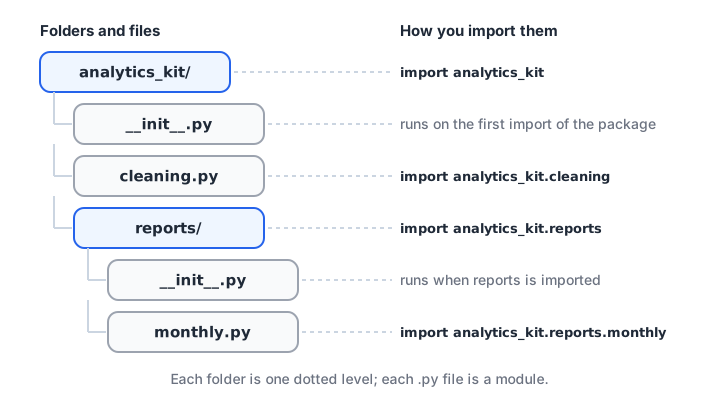
Each folder becomes a dotted level in the import path, and each .py file becomes a module.
The block below writes exactly that structure into a temporary folder so it runs anywhere, then imports it. In your own project, you would simply create these folders and files in your editor.
import sys, tempfile, importlib
from pathlib import Path

root = Path(tempfile.mkdtemp())
files = {
    "analytics_kit/__init__.py": "",
    "analytics_kit/cleaning.py":
        "def clean_amount(text):\n"
        "    return float(text.replace('Rs', '').replace(',', '').strip())\n",
    "analytics_kit/reports/__init__.py": "",
}
for name, code in files.items():
    (root / name).parent.mkdir(parents=True, exist_ok=True)
    (root / name).write_text(code)
sys.path.insert(0, str(root))
importlib.invalidate_caches()
for m in [m for m in sys.modules if m.startswith("analytics_kit")]:
    del sys.modules[m]                  # forget an earlier run of the demo

import analytics_kit.cleaning
from analytics_kit.cleaning import clean_amount
print(analytics_kit.cleaning.clean_amount("Rs 1,450"))
print(clean_amount(" 12,300 "))
print("reports is a package:", hasattr(importlib.import_module("analytics_kit.reports"), "__path__"))
Importing analytics_kit.cleaning first imports analytics_kit itself (running its __init__.py), then the cleaning module. Python always imports parent packages before their children.
What does __init__.py do?
__init__.py is the code that runs when the package is imported. It can be empty, which simply marks the folder as a regular package. Most of the time, though, it is used for one job: lifting the package's most useful names to the top level.
Without that, a user has to know your internal file layout and write from analytics_kit.cleaning import clean_amount. With it, they write from analytics_kit import clean_amount, and you are free to move the function to another file later without breaking their code.
import sys, tempfile, importlib
from pathlib import Path

root = Path(tempfile.mkdtemp())
pkg = root / "salestools"
pkg.mkdir()
(pkg / "money.py").write_text("def with_gst(x):\n    return round(x * 1.18)\n")
(pkg / "dates.py").write_text("def fy_label(year):\n    return f'FY{year}-{(year + 1) % 100:02d}'\n")
(pkg / "__init__.py").write_text(
    "from .money import with_gst\n"
    "from .dates import fy_label\n"
    "__all__ = ['with_gst', 'fy_label']\n"
    "__version__ = '0.1.0'\n")
sys.path.insert(0, str(root))
importlib.invalidate_caches()

import salestools
print(salestools.with_gst(2500), salestools.fy_label(2026))
print("version", salestools.__version__, "exports", salestools.__all__)
The __all__ list declares the package's public names. It controls what from salestools import * brings in, and it tells readers and editors which names are meant to be used. A __version__ string is a common convention for libraries.
How do relative imports work in a Python package?
Inside a package, modules often need each other. The monthly report needs the cleaning helpers. You can write an absolute import, from analytics_kit.cleaning import clean_amount, or a relative one that starts with dots.
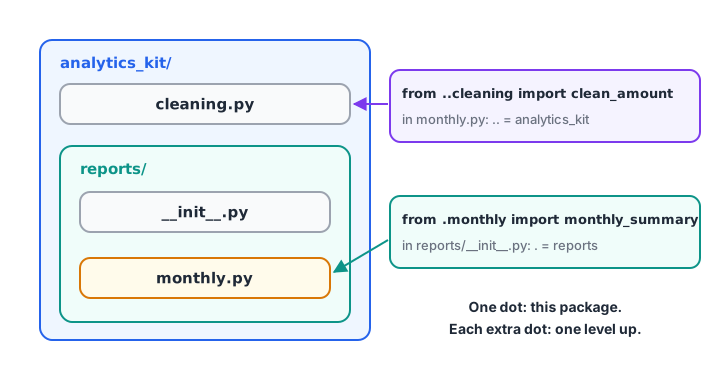
Dots in a relative import count package levels: one dot is the current package, two dots go up one level.
import sys, tempfile, importlib, textwrap
from pathlib import Path

root = Path(tempfile.mkdtemp())
files = {
    "analytics_kit/__init__.py": "",
    "analytics_kit/cleaning.py": "def clean_amount(t):\n    return float(t.replace(',', ''))\n",
    "analytics_kit/reports/__init__.py": "from .monthly import monthly_summary\n",
    "analytics_kit/reports/monthly.py": textwrap.dedent("""
        from ..cleaning import clean_amount     # two dots: up to analytics_kit
        def monthly_summary(raw):
            values = [clean_amount(r) for r in raw]
            return {"orders": len(values), "total": sum(values)}
    """),
}
for name, code in files.items():
    (root / name).parent.mkdir(parents=True, exist_ok=True)
    (root / name).write_text(code)
sys.path.insert(0, str(root))
importlib.invalidate_caches()
for m in [m for m in sys.modules if m.startswith("analytics_kit")]:
    del sys.modules[m]                  # forget an earlier run of the demo

from analytics_kit.reports import monthly_summary
print(monthly_summary(["1,450", "980", "12,300"]))
Relative imports keep working if you rename the top-level package, and they make it obvious that the import is internal. Absolute imports are clearer for readers new to the code. Both are fine; the PEP 8 guide recommends absolute imports in general, with explicit relative imports as an acceptable alternative inside complex packages.
Why does a relative import fail with "no known parent package"?
Relative imports only work in a module that was imported as part of a package. If you run python analytics_kit/reports/monthly.py directly, that file becomes __main__ with no parent package, so from ..cleaning import ... fails. Run it as a module from the project root instead.
# from the folder that contains analytics_kit/
python -m analytics_kit.reports.monthly
Quick check
Inside analytics_kit/reports/monthly.py, what does from ..cleaning import clean_amount refer to?
One dot is the current package (reports); two dots go up to its parent (analytics_kit).
Turning a package into an installable project
Once a package is shared between several notebooks or teammates, give it a standard project layout with a pyproject.toml file. Then it can be installed into any virtual environment like pandas is.
analytics-kit/
    pyproject.toml
    src/
        analytics_kit/
            __init__.py
            cleaning.py
            reports/
                __init__.py
                monthly.py
    tests/
        test_cleaning.py
A minimal pyproject.toml names the project and its build backend:
[project]
name = "analytics-kit"
version = "0.1.0"
requires-python = ">=3.12"
dependencies = ["pandas>=2.2"]

[build-system]
requires = ["setuptools>=69"]
build-backend = "setuptools.build_meta"pip install -e . # editable install: code changes apply without reinstallingThe src/ layout stops Python from accidentally importing the folder in your working directory instead of the installed package, which catches packaging mistakes early. The Python Packaging User Guide covers building and publishing in full.
Namespace packages
A folder without __init__.py can still be imported in Python 3. It becomes a namespace package, which lets several separate folders contribute to one package name. This is meant for large organisations splitting a package across distributions. For your own projects, include __init__.py; it is explicit and avoids surprises.
Common mistakes with Python packages
- Running a package module directly. Use
python -m package.moduleso relative imports work. - Hyphens in package names.
analytics-kitcannot be imported; the import name must beanalytics_kit. - Heavy work in
__init__.py. It runs on every import of the package. Keep it to imports and small constants. - Circular imports between modules in a package. Move the shared helper into a module both can import.
- Confusing the pip name with the import name. You
pip install scikit-learnbutimport sklearn.
Key takeaways
- A package is a folder of modules imported with dotted names.
__init__.pyruns on import and is the place to re-export the main functions.__all__lists a package's public names.- Relative imports use dots:
.for the current package,..for the parent. - Run package modules with
python -m, not by file path. - Use a
pyproject.tomlandsrc/layout when the package is shared.
Next, make your functions and packages easier to read and check with Python type hints. Packaging reusable analysis code is one of the project habits taught in the classroom Python and analytics batches at Debugshala.
FAQ
What is a package in Python?
A package is a folder that groups related Python modules under one name, usually with an __init__.py file inside. You import its modules with dotted names, such as import analytics_kit.cleaning. Libraries like pandas and NumPy are large packages with many subpackages and modules.
Is __init__.py required in Python 3?
__init__.py required in Python 3?Not strictly. Since Python 3.3, a folder without __init__.py can be imported as a namespace package. For normal projects you should still include it: it marks the folder clearly as a regular package and gives you a place to expose the package's public functions.
What is the difference between a module, a package and a library in Python?
A module is a single .py file. A package is a folder of modules and possibly subpackages. "Library" is an informal word for reusable code you install, which is usually distributed as one or more packages. For example, the scikit-learn library installs the sklearn package.
Should I use relative or absolute imports in Python?
Absolute imports, such as from analytics_kit.cleaning import clean_amount, are the general recommendation because they are explicit. Relative imports like from .cleaning import clean_amount are acceptable inside a package and survive renaming the top-level folder. Pick one style per project and use it consistently.
Can I learn to structure Python projects at Debugshala in Indore?
Yes. Debugshala's data analytics course in Indore teaches Python from basics to projects at the Old Palasia campus, in English and Hindi, and accepts non-IT graduates. You can attend a free demo class first, and check your Python packaging basics on Debugshala Test.
From the team behind this site
Go further with the Data Analytics Course at Debugshala
These tutorials are written by Debugshala, a training and placement institute at Old Palasia, Indore. The classroom course adds live mentoring, real projects and interview preparation.
- Offline classes at Old Palasia, Indore
- Free demo class before you pay
- Non-IT, fresher and year-gap friendly
- Placement assistance
700+ students placed · 200+ hiring partners · 4.9★ Google rating
