

SQL Date Functions: strftime, DATEDIFF and Date Arithmetic
SQL date and time functions explained: extract weekdays, add days, find date gaps, group by week or month, and avoid BETWEEN and UTC-vs-IST bugs.
Every evening, the owner of a sweet shop near Sarafa flips through the day's bill book. On Monday she wants to know how Sunday went. At the end of the month she wants a total for each week. Before Diwali she wants to compare this October with last October.
The bill book never changes; only the slicing does. Sometimes she also asks how many days it has been since a regular customer last came in.
Each slice is a date function at work. Pulling "Sunday" out of 8 March is extracting a part. "Seven days after the order" is date arithmetic. "Which week does this bill belong to?" is truncating a date to the start of its period.
SQL date and time functions are built-in functions that extract parts of a date, shift dates by an interval, measure the time between two dates and format dates for display.
This article uses Malwa Mart's March orders. Dates are the one area where SQLite, MySQL and PostgreSQL differ the most, so each section shows all three. The data types article explains why dates should be stored as ISO text in SQLite in the first place.
How are dates stored in SQL databases?
MySQL and PostgreSQL have real DATE, TIME, DATETIME or TIMESTAMP types. The database knows that '2026-03-08' is a date and rejects '2026-02-30'.
SQLite has no date type. It stores dates as text in ISO 8601 format, YYYY-MM-DD or YYYY-MM-DD HH:MM:SS, and its date functions understand that text. Because ISO text sorts in date order, ORDER BY order_date and order_date < '2026-03-10' both work correctly.
| Task | SQLite | MySQL 8 | PostgreSQL |
|---|---|---|---|
| Today | date('now') |
CURDATE() |
CURRENT_DATE |
| Current date and time | datetime('now') |
NOW() |
NOW() |
| Year of a date | strftime('%Y', d) |
YEAR(d) |
EXTRACT(YEAR FROM d) |
| Add 7 days | date(d, '+7 days') |
DATE_ADD(d, INTERVAL 7 DAY) |
d + INTERVAL '7 days' |
| Days between two dates | julianday(b) - julianday(a) |
DATEDIFF(b, a) |
b - a |
| First day of the month | date(d, 'start of month') |
DATE_FORMAT(d, '%Y-%m-01') |
date_trunc('month', d) |
| Show as 08-03-2026 | strftime('%d-%m-%Y', d) |
DATE_FORMAT(d, '%d-%m-%Y') |
to_char(d, 'DD-MM-YYYY') |
Extracting parts of a date with strftime
strftime(format, date) returns text built from format codes: %Y year, %m month, %d day, %H hour, %w weekday (0 is Sunday), %W week of the year and %j day of the year. In MySQL and PostgreSQL you would use EXTRACT(part FROM d) or helpers such as DAYOFWEEK(d).
The question "which weekday sells most?" is a single GROUP BY on the weekday. A CASE expression turns the number into a name.
import sqlite3

con = sqlite3.connect(":memory:")
con.executescript("""
CREATE TABLE orders (order_id INT, customer_id INT, store_id INT, order_date TEXT, amount INT, payment_mode TEXT);
INSERT INTO orders VALUES
 (101,1,1,'2026-03-01',1040,'UPI'), (102,2,2,'2026-03-01',330,'Cash'), (103,1,1,'2026-03-03',275,'UPI'),
 (104,3,3,'2026-03-04',180,'Card'), (105,4,2,'2026-03-05',680,'UPI'), (106,2,4,'2026-03-07',120,'Cash'),
 (107,5,3,'2026-03-08',1560,'Card'), (108,6,1,'2026-03-08',220,'UPI'), (109,4,4,'2026-03-10',340,NULL),
 (110,1,2,'2026-03-12',465,'Cash'), (111,6,3,'2026-03-14',NULL,'UPI');
""")

query = """
SELECT strftime('%w', order_date) AS day_no,
       CASE strftime('%w', order_date)
           WHEN '0' THEN 'Sun' WHEN '1' THEN 'Mon' WHEN '2' THEN 'Tue' WHEN '3' THEN 'Wed'
           WHEN '4' THEN 'Thu' WHEN '5' THEN 'Fri' ELSE 'Sat'
       END AS weekday,
       COUNT(*) AS orders, SUM(amount) AS revenue
FROM orders
GROUP BY day_no
ORDER BY revenue DESC
"""
for row in con.execute(query):
    print(row)
Sundays bring in 3,150 of the month's 5,210 rupees from just four orders. No orders came on a Monday or Friday. A store manager can act on that, for example by changing staff rosters.
Note that strftime returns text, so the comparison is with '0', not 0. In MySQL, DAYOFWEEK() numbers Sunday as 1, while PostgreSQL's EXTRACT(DOW FROM d) uses 0. Check the numbering before you port a weekday report.
Date arithmetic: adding days and finding the gap
SQLite shifts dates with modifiers, short instructions passed after the date. They are applied left to right, so you can chain several in one call.
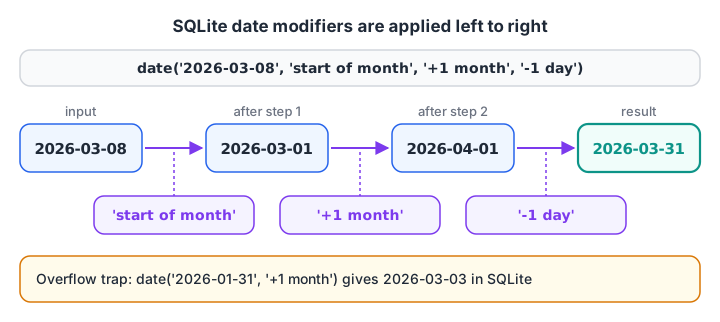
Modifiers run left to right. Going to the start of the month, adding a month and stepping back a day always lands on the month's last day.
Common modifiers are '+7 days', '-1 month', 'start of month', 'start of year', 'weekday N' (move forward to the next weekday N) and 'localtime'. To measure a gap, convert both dates with julianday(), which returns a day number, and subtract.
A classic analyst metric is recency: how many days since each customer last ordered. With a fixed report date of 31 March, it is one subtraction per customer.
import sqlite3

con = sqlite3.connect(":memory:")
con.executescript("""
CREATE TABLE orders (order_id INT, customer_id INT, store_id INT, order_date TEXT, amount INT, payment_mode TEXT);
INSERT INTO orders VALUES
 (101,1,1,'2026-03-01',1040,'UPI'), (102,2,2,'2026-03-01',330,'Cash'), (103,1,1,'2026-03-03',275,'UPI'),
 (104,3,3,'2026-03-04',180,'Card'), (105,4,2,'2026-03-05',680,'UPI'), (106,2,4,'2026-03-07',120,'Cash'),
 (107,5,3,'2026-03-08',1560,'Card'), (108,6,1,'2026-03-08',220,'UPI'), (109,4,4,'2026-03-10',340,NULL),
 (110,1,2,'2026-03-12',465,'Cash'), (111,6,3,'2026-03-14',NULL,'UPI');
""")

query = """
SELECT customer_id,
       MIN(order_date)                                              AS first_order,
       MAX(order_date)                                              AS last_order,
       CAST(julianday(MAX(order_date)) - julianday(MIN(order_date)) AS INT) AS active_days,
       CAST(julianday('2026-03-31') - julianday(MAX(order_date)) AS INT)    AS recency_days,
       date(MAX(order_date), '+30 days')                            AS win_back_after
FROM orders
GROUP BY customer_id
ORDER BY recency_days
"""
for row in con.execute(query):
    print(row)
print("Month end:", con.execute("SELECT date('2026-03-08', 'start of month', '+1 month', '-1 day')").fetchone()[0])
Vikram (customer 6) is the most recent at 17 days, and Meera (customer 3) has been away longest at 27 days. The win_back_after column is the date a reminder SMS would go out. In MySQL the same gap is DATEDIFF('2026-03-31', MAX(order_date)), and in PostgreSQL it is DATE '2026-03-31' - MAX(order_date).
Quick check
Which SQLite expression returns the last day of the month for '2026-03-08'?
The first option gives 7 April. Going to the start of the month first makes the result always land on the last day. SQLite has no 'end of month' modifier.
Grouping by week and month
A weekly report needs every date mapped to the start of its week. PostgreSQL does this with date_trunc('week', d), which uses Monday as the first day. SQLite has no truncate function, but a two-step modifier does the same job: move forward to Sunday with 'weekday 0', then step back six days to that week's Monday.
import sqlite3

con = sqlite3.connect(":memory:")
con.executescript("""
CREATE TABLE orders (order_id INT, customer_id INT, store_id INT, order_date TEXT, amount INT, payment_mode TEXT);
INSERT INTO orders VALUES
 (101,1,1,'2026-03-01',1040,'UPI'), (102,2,2,'2026-03-01',330,'Cash'), (103,1,1,'2026-03-03',275,'UPI'),
 (104,3,3,'2026-03-04',180,'Card'), (105,4,2,'2026-03-05',680,'UPI'), (106,2,4,'2026-03-07',120,'Cash'),
 (107,5,3,'2026-03-08',1560,'Card'), (108,6,1,'2026-03-08',220,'UPI'), (109,4,4,'2026-03-10',340,NULL),
 (110,1,2,'2026-03-12',465,'Cash'), (111,6,3,'2026-03-14',NULL,'UPI');
""")

query = """
SELECT date(order_date, 'weekday 0', '-6 days') AS week_starting,
       MIN(order_date)                          AS first_order,
       COUNT(*)                                 AS orders,
       SUM(amount)                              AS revenue
FROM orders
GROUP BY week_starting
ORDER BY week_starting
"""
for row in con.execute(query):
    print(row)
Sunday 1 March belongs to the week that started on Monday 23 February, so its week_starting value is in February even though both orders are in March. For a monthly report, group by strftime('%Y-%m', order_date) instead. Always keep the year in the key; grouping by %m alone would merge March 2025 with March 2026.
Filtering date ranges and time zones
Real systems store timestamps, not just dates. Malwa Mart's billing system logs the exact second each bill was opened, in UTC. Two traps hide in that sentence.
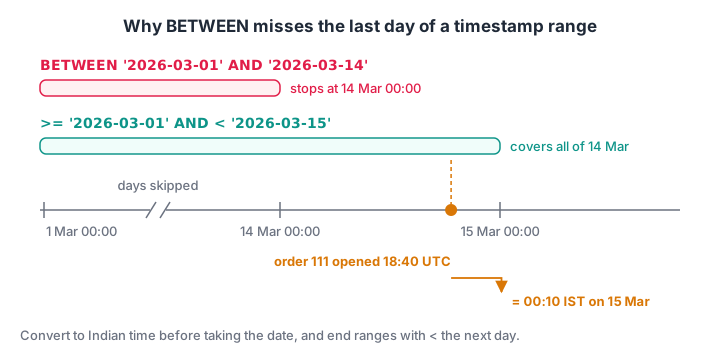
'2026-03-14' means midnight at the start of 14 March. A half-open range, >= start AND < next day, covers every second of the last day.
The first trap is BETWEEN. With timestamps, BETWEEN '2026-03-01' AND '2026-03-14' ends at midnight at the start of 14 March, so a bill opened at 18:40 that day is left out.
The second trap is the time zone. India is UTC+5:30, so a bill logged at 18:40 UTC was really opened at 00:10 IST on 15 March and belongs to the next day's sales.
import sqlite3

con = sqlite3.connect(":memory:")
con.executescript("""
CREATE TABLE bill_log (order_id INT, opened_utc TEXT);
INSERT INTO bill_log VALUES (101,'2026-03-01 05:12:00'), (110,'2026-03-12 13:05:00'), (111,'2026-03-14 18:40:00');
""")
q_between = "SELECT COUNT(*) FROM bill_log WHERE opened_utc BETWEEN '2026-03-01' AND '2026-03-14'"
q_halfopen = "SELECT COUNT(*) FROM bill_log WHERE opened_utc >= '2026-03-01' AND opened_utc < '2026-03-15'"
print("BETWEEN   :", con.execute(q_between).fetchone()[0], "bills")
print("half-open :", con.execute(q_halfopen).fetchone()[0], "bills")

for row in con.execute("""SELECT order_id, date(opened_utc) AS utc_day,
                          datetime(opened_utc, '+5 hours', '+30 minutes') AS ist_time
                          FROM bill_log"""):
    print(row)
try:
    print("unixepoch:", con.execute("SELECT unixepoch('2026-03-14 18:40:00')").fetchone()[0])
except sqlite3.OperationalError:
    print("unixepoch() needs SQLite 3.38+; use strftime('%s', ...) instead")
Order 111 sits on 14 March in UTC but on 15 March in Indian time. The fix is to convert to IST before you take the date.
SQLite's 'localtime' modifier uses the server's time zone, which on a cloud server is often UTC, so a fixed '+5 hours', '+30 minutes' is more predictable for Indian reports. PostgreSQL handles this properly with AT TIME ZONE 'Asia/Kolkata', and MySQL with CONVERT_TZ() once its time zone tables are loaded.
Quick check
A timestamp column holds '2026-03-14 18:40:00'. Does WHERE opened_at BETWEEN '2026-03-01' AND '2026-03-14' include it?
The range ends at 2026-03-14 00:00:00. Use opened_at >= '2026-03-01' AND opened_at < '2026-03-15' to cover the whole last day.
Common mistakes with SQL date functions
- Storing dates as '08-03-2026'. Text in day-month-year order sorts wrongly and SQLite's functions return NULL for it. Store ISO dates and format only for display.
- Grouping by month without the year.
strftime('%m', d)merges every March in your data. - BETWEEN on timestamps. Use
>= start AND < day_after_end. - Ignoring the time zone. UTC timestamps near midnight land on the wrong Indian business day.
- Month overflow. In SQLite,
date('2026-01-31', '+1 month')gives '2026-03-03', because 31 February rolls over. MySQL and PostgreSQL return 28 February instead. Use'start of month'first when you need month ends. - Calling a function on an indexed column in WHERE.
WHERE strftime('%Y', order_date) = '2026'cannot use an index on order_date.WHERE order_date >= '2026-01-01' AND order_date < '2027-01-01'can, which the indexes article explains.
Date logic sits behind nearly every dashboard metric, from weekly sales to customer retention. If you want to practise it on business-style datasets with a trainer, Debugshala's reporting-focused analytics course covers it in Indore, and date-query MCQs on Debugshala Test help you revise.
The Python datetime tutorial covers the same ideas in pandas-friendly Python, and the next article in this series, SQL constraints and keys, moves on to database design.
Key takeaways
- SQLite stores dates as ISO text and works on them with date(), datetime(), strftime() and julianday().
- Modifiers such as '+7 days' and 'start of month' are applied left to right.
- julianday(b) - julianday(a) gives the gap in days; MySQL uses DATEDIFF and PostgreSQL subtracts dates directly.
- Group by week with a week-start date, and by month with year and month together.
- Filter with half-open ranges, and convert UTC to IST before taking the date.
FAQ
How do I get the current date in SQL?
In SQLite, use date('now') for the date and datetime('now') for date and time, both in UTC. MySQL uses CURDATE() and NOW(), and PostgreSQL uses CURRENT_DATE and NOW(). For Indian time in SQLite, add '+5 hours', '+30 minutes' or use the 'localtime' modifier if the server is set to IST.
How do I find the difference between two dates in SQL?
In SQLite, subtract the julianday values: julianday('2026-03-31') - julianday('2026-03-12') returns 19.0. MySQL has DATEDIFF(end, start), which returns whole days. In PostgreSQL, subtracting two DATE values gives an integer number of days, and AGE() returns years, months and days.
Does SQLite have a DATE data type?
No. SQLite stores dates as TEXT in ISO 8601 format, as REAL Julian day numbers or as INTEGER Unix timestamps. Its built-in date functions accept all three. ISO text is the most readable choice and sorts correctly. MySQL and PostgreSQL have true DATE and TIMESTAMP types that reject invalid dates.
How do I group sales by month in SQL?
Group on a value that contains both year and month. In SQLite that is strftime('%Y-%m', order_date), in MySQL DATE_FORMAT(order_date, '%Y-%m'), and in PostgreSQL date_trunc('month', order_date). Then aggregate with SUM or COUNT. Grouping on the month number alone would mix the same month from different years.
Where can I learn SQL for business reporting in Indore?
Debugshala, a training and placement institute at Old Palasia, Indore, teaches date functions, weekly and monthly reports and other analyst SQL in its Data Analytics course. Classes run offline in English and Hindi, freshers and non-IT graduates are welcome, placement assistance is offered, and the first demo class is free.
From the team behind this site
Go further with the Data Analytics Course at Debugshala
These tutorials are written by Debugshala, a training and placement institute at Old Palasia, Indore. The classroom course adds live mentoring, real projects and interview preparation.
- Offline classes at Old Palasia, Indore
- Free demo class before you pay
- Non-IT, fresher and year-gap friendly
- Placement assistance
700+ students placed · 200+ hiring partners · 4.9★ Google rating
