

SQL for Data Analysis: SELECT, GROUP BY and JOIN with Examples
Learn SQL for data analysis with runnable examples: SELECT, WHERE, ORDER BY, GROUP BY, HAVING and JOIN, plus the query order that explains common errors.
Imagine a wholesale grocery business in Siyaganj with a huge order register on a shelf. You walk up to the clerk and say: "Show me only March orders from Indore, total them by category, and tell me which category crossed 1,000 rupees."
A good clerk does not hand you the whole register. He flips to March, skips other cities, writes a small total for each category, crosses out the small ones and hands you a neat slip.
SQL is how you give that instruction to a database. The register is a table. Each line in it is a row, and each heading is a column. "Only Indore" is a filter (WHERE). "Total by category" is a grouping (GROUP BY with SUM). "Crossed 1,000" is a filter on groups (HAVING). The neat slip is your result set.
SQL (Structured Query Language) is a language for asking a database to filter, combine and summarise its tables, returning only the result you asked for.
Why SQL is the first technical skill analysts need
Company data rarely fits in Excel. An app with lakhs of orders a month stores them in a database such as PostgreSQL or MySQL. SQL lets you summarise those rows on the database server and download only a small answer.
It is also the most tested skill in analyst interviews. If you learn just one language from this site, make it SQL, then move on to the pandas techniques in pandas groupby and pivot tables.
SELECT and WHERE: choosing columns and rows
SELECT picks the columns you want. WHERE keeps only the rows that pass a condition.
SELECT id, city, amount
FROM orders
WHERE amount > 300;
Here is the same query running against an 8-row orders table.
import sqlite3
import pandas as pd

con = sqlite3.connect(":memory:")
con.execute("CREATE TABLE orders (id INT, city TEXT, category TEXT, amount INT, order_date TEXT)")
con.executemany("INSERT INTO orders VALUES (?, ?, ?, ?, ?)", [
    (1, "Indore", "Grocery", 500, "2026-03-02"), (2, "Indore", "Snacks", 300, "2026-03-05"),
    (3, "Bhopal", "Grocery", 450, "2026-03-05"), (4, "Bhopal", "Dairy", 120, "2026-03-09"),
    (5, "Ujjain", "Grocery", 800, "2026-03-11"), (6, "Indore", "Dairy", 90, "2026-03-12"),
    (7, "Ujjain", "Snacks", 150, "2026-03-15"), (8, "Indore", "Grocery", 650, "2026-03-18"),
])

query = """
SELECT id, city, amount
FROM orders
WHERE amount > 300;
"""
print(pd.read_sql_query(query, con))
Four orders pass. read_sql_query runs the SQL and returns a pandas DataFrame, which prints as a neat table.
Combining conditions
You can join conditions with AND and OR, check a list with IN, and check a range with BETWEEN. Text values go in single quotes.
SELECT id, city, category, amount
FROM orders
WHERE city IN ('Indore', 'Ujjain')
  AND order_date BETWEEN '2026-03-01' AND '2026-03-15';
ORDER BY and LIMIT: sorting and top-N lists
ORDER BY sorts the result. Add DESC for largest first. LIMIT keeps only the first few rows, which is how "top 3" reports are built.
SELECT id, city, category, amount
FROM orders
WHERE city IN ('Indore', 'Ujjain')
ORDER BY amount DESC
LIMIT 3;import sqlite3
import pandas as pd
con = sqlite3.connect(":memory:")
con.execute("CREATE TABLE orders (id INT, city TEXT, category TEXT, amount INT, order_date TEXT)")
con.executemany("INSERT INTO orders VALUES (?, ?, ?, ?, ?)", [
(1, "Indore", "Grocery", 500, "2026-03-02"), (2, "Indore", "Snacks", 300, "2026-03-05"),
(3, "Bhopal", "Grocery", 450, "2026-03-05"), (4, "Bhopal", "Dairy", 120, "2026-03-09"),
(5, "Ujjain", "Grocery", 800, "2026-03-11"), (6, "Indore", "Dairy", 90, "2026-03-12"),
(7, "Ujjain", "Snacks", 150, "2026-03-15"), (8, "Indore", "Grocery", 650, "2026-03-18"),
])
query = """
SELECT id, city, category, amount
FROM orders
WHERE city IN ('Indore', 'Ujjain')
ORDER BY amount DESC
LIMIT 3;
"""
print(pd.read_sql_query(query, con))GROUP BY and HAVING: totals per group
This is where SQL becomes an analysis tool. GROUP BY collects rows that share a value into one group, and aggregate functions such as COUNT, SUM and AVG compute one number per group.
SELECT city,
       COUNT(*)              AS orders,
       SUM(amount)           AS revenue,
       ROUND(AVG(amount), 1) AS avg_order
FROM orders
GROUP BY city
ORDER BY revenue DESC;
HAVING filters groups after they are formed. Use it whenever the condition contains an aggregate like SUM().
SELECT category, SUM(amount) AS revenue
FROM orders
GROUP BY category
HAVING SUM(amount) > 500;
Both queries together:
import sqlite3
import pandas as pd

con = sqlite3.connect(":memory:")
con.execute("CREATE TABLE orders (id INT, city TEXT, category TEXT, amount INT, order_date TEXT)")
con.executemany("INSERT INTO orders VALUES (?, ?, ?, ?, ?)", [
    (1, "Indore", "Grocery", 500, "2026-03-02"), (2, "Indore", "Snacks", 300, "2026-03-05"),
    (3, "Bhopal", "Grocery", 450, "2026-03-05"), (4, "Bhopal", "Dairy", 120, "2026-03-09"),
    (5, "Ujjain", "Grocery", 800, "2026-03-11"), (6, "Indore", "Dairy", 90, "2026-03-12"),
    (7, "Ujjain", "Snacks", 150, "2026-03-15"), (8, "Indore", "Grocery", 650, "2026-03-18"),
])

by_city = """
SELECT city, COUNT(*) AS orders, SUM(amount) AS revenue,
       ROUND(AVG(amount), 1) AS avg_order
FROM orders
GROUP BY city
ORDER BY revenue DESC;
"""
big_categories = """
SELECT category, SUM(amount) AS revenue
FROM orders
GROUP BY category
HAVING SUM(amount) > 500;
"""
print(pd.read_sql_query(by_city, con))
print()
print(pd.read_sql_query(big_categories, con))
Indore leads with 1,540 rupees from 4 orders. In the second result, only Grocery (2,400 rupees) survives; Snacks (450) and Dairy (210) are removed by HAVING because their totals are not above 500.
Quick check
You want only cities whose total revenue is above 1,000. Which clause holds that condition?
The condition uses SUM(amount), which only exists after GROUP BY. Conditions on groups go in HAVING.
The order SQL actually runs your query
You write SELECT first, but the database processes the clauses in a different, logical order.
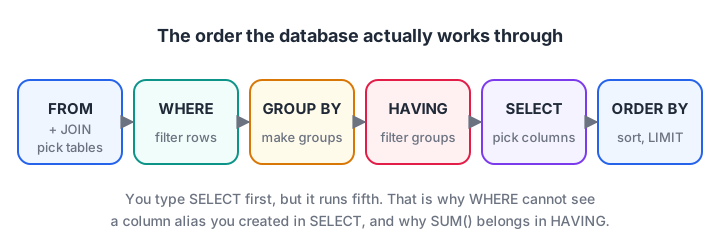
The logical order of a SQL query. Rows are filtered before grouping, and groups are filtered before columns are chosen.
This order explains two rules that confuse beginners:
- You cannot use SUM() inside WHERE. WHERE runs before groups exist, so there is nothing to sum yet. Put group conditions in HAVING.
- WHERE usually cannot see a column alias from SELECT. In PostgreSQL and MySQL,
WHERE revenue > 500fails because SELECT has not run yet. SQLite is lenient here, so do not rely on that habit when you move to other databases.
JOIN: combining two tables
Real databases split information across tables. Customer names live in a customers table, and orders live in an orders table that stores only a customer id. A JOIN matches rows using that id.
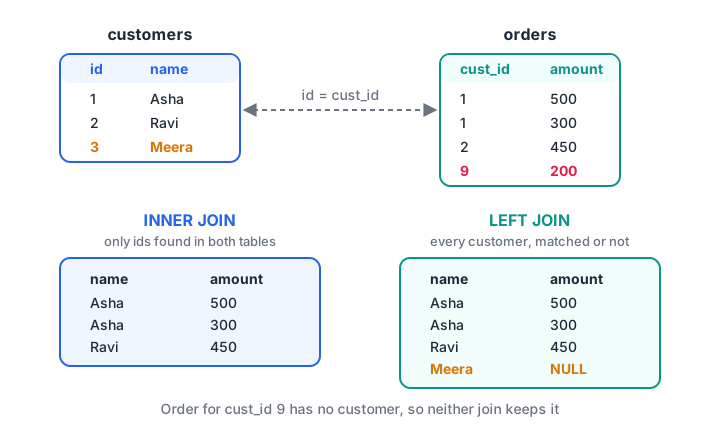
INNER JOIN keeps only matching rows. LEFT JOIN keeps every customer and fills NULL where no order exists.
-- Only customers who have orders
SELECT c.name, o.amount
FROM customers AS c
INNER JOIN orders AS o ON c.id = o.cust_id;

-- Every customer, with or without orders
SELECT c.name, o.amount
FROM customers AS c
LEFT JOIN orders AS o ON c.id = o.cust_id;import sqlite3
import pandas as pd
con = sqlite3.connect(":memory:")
con.execute("CREATE TABLE customers (id INT, name TEXT)")
con.execute("CREATE TABLE orders (cust_id INT, amount INT)")
con.executemany("INSERT INTO customers VALUES (?, ?)",
[(1, "Asha"), (2, "Ravi"), (3, "Meera")])
con.executemany("INSERT INTO orders VALUES (?, ?)",
[(1, 500), (1, 300), (2, 450), (9, 200)])
for kind in ["INNER", "LEFT"]:
query = f"""
SELECT c.name, o.amount
FROM customers AS c
{kind} JOIN orders AS o ON c.id = o.cust_id;
"""
print(f"{kind} JOIN:")
print(pd.read_sql_query(query, con), "\n")Asha appears twice because she has two orders. Meera appears only in the LEFT JOIN, with a missing amount (NULL in SQL, shown as NaN or None by pandas). The order from customer 9 disappears from both, because no customer has id 9.
Joins only match when the key values are identical, so ids stored as text with stray spaces will silently fail to match. If your tables come from spreadsheets, clean the key columns with pandas before loading them.
Putting it together: revenue per customer city
A typical analyst question combines everything: join the tables, filter, group, filter groups and sort.
SELECT c.city, COUNT(*) AS orders, SUM(o.amount) AS revenue
FROM orders AS o
JOIN customers AS c ON c.id = o.cust_id
WHERE o.amount >= 100
GROUP BY c.city
HAVING COUNT(*) >= 2
ORDER BY revenue DESC;import sqlite3
import pandas as pd
con = sqlite3.connect(":memory:")
con.execute("CREATE TABLE customers (id INT, name TEXT, city TEXT)")
con.execute("CREATE TABLE orders (id INT, cust_id INT, amount INT)")
con.executemany("INSERT INTO customers VALUES (?, ?, ?)", [
(1, "Asha", "Indore"), (2, "Ravi", "Bhopal"), (3, "Meera", "Indore"), (4, "Imran", "Ujjain")])
con.executemany("INSERT INTO orders VALUES (?, ?, ?)", [
(101, 1, 500), (102, 1, 300), (103, 2, 450), (104, 3, 120),
(105, 4, 800), (106, 3, 90), (107, 4, 150), (108, 1, 650)])
query = """
SELECT c.city, COUNT(*) AS orders, SUM(o.amount) AS revenue
FROM orders AS o
JOIN customers AS c ON c.id = o.cust_id
WHERE o.amount >= 100
GROUP BY c.city
HAVING COUNT(*) >= 2
ORDER BY revenue DESC;
"""
print(pd.read_sql_query(query, con))Read the result against the execution order: the 90-rupee order is removed by WHERE, Bhopal is removed by HAVING because it has only one order, and the rest are sorted by revenue.
Quick check
customers has 3 rows. One customer has no orders. How many customers appear in a LEFT JOIN from customers to orders?
A LEFT JOIN keeps every row of the left table. The customer without orders appears with NULL in the order columns.
Common SQL mistakes in data analysis
- Forgetting that JOINs multiply rows. If a customer has 3 orders, their details appear 3 times. Summing a customer-level column after a join double counts.
- Comparing with NULL using =.
WHERE amount = NULLnever matches. UseIS NULLorIS NOT NULL. - Selecting a column that is not grouped. In most databases, every column in SELECT must be in GROUP BY or inside an aggregate.
- Using WHERE for aggregate conditions.
WHERE SUM(amount) > 500is an error; that is HAVING's job. - Running SELECT * on huge tables. Pick the columns you need and add LIMIT while exploring.
Key takeaways
- SELECT chooses columns, WHERE filters rows, ORDER BY sorts and LIMIT trims.
- GROUP BY with COUNT, SUM and AVG gives one row per group; HAVING filters those groups.
- The logical order is FROM, WHERE, GROUP BY, HAVING, SELECT, ORDER BY.
- INNER JOIN keeps matches only; LEFT JOIN keeps every row from the left table.
- Python's sqlite3 module lets you practise real SQL with no installation.
FAQ
How long does it take to learn SQL for data analysis?
The six clauses in this article can be learnt in a few weeks of regular practice. Becoming fast at interview-style questions, including subqueries and window functions, takes longer and depends on how many problems you solve. Daily practice on small datasets helps more than reading.
Which database should a beginner learn first, MySQL or PostgreSQL?
Either is fine, because the core SQL is the same. The official PostgreSQL documentation has an excellent beginner tutorial. Start with SQLite in Python, as shown here, then install one server database when you build a portfolio project.
Is SQL enough to get a data analyst job?
SQL is essential but usually not enough alone. Most analyst roles also expect Excel, a dashboard tool such as Power BI, and increasingly some Python. SQL plus one visualisation tool is a common starting combination for freshers.
Can I learn SQL in a classroom in Indore?
Yes. SQL is part of Debugshala's data analytics classes at Old Palasia, taught in English and Hindi with a free demo class before you pay. To sharpen your speed between classes, solve more coding and reasoning questions on Debugshala Test.
From the team behind this site
Go further with the Data Analytics Course at Debugshala
These tutorials are written by Debugshala, a training and placement institute at Old Palasia, Indore. The classroom course adds live mentoring, real projects and interview preparation.
- Offline classes at Old Palasia, Indore
- Free demo class before you pay
- Non-IT, fresher and year-gap friendly
- Placement assistance
700+ students placed · 200+ hiring partners · 4.9★ Google rating
