

Handling NULL in SQL: IS NULL, COALESCE, NULLIF Explained
Handle NULL in SQL with confidence: three-valued logic, IS NULL, COALESCE vs IFNULL, NULLIF for divide by zero, and how aggregates skip NULLs.
On the first day of college, a class teacher in Indore fills the attendance register. One student is absent, so that box gets an "A". Another student's admission is still pending, so their box is left blank.
"A" is a known fact: the student was not there. A blank says "we do not know yet". If the principal later counts attendance, treating that blank as "absent" or as "present" would both be guesses.
That blank box is a SQL NULL. It marks a value the database does not have. Malwa Mart has two of them already: order 111 has no amount because its bill was never finalised, and order 109 has no payment mode because the cashier skipped the field.
NULL is a special marker in SQL that means a value is missing or unknown; it is not a value itself, so it cannot be equal to, greater than or less than anything.
You met NULL briefly in SELECT and WHERE and in CASE WHEN. This article shows how to handle it safely in filters, joins, reports and calculations.
What does NULL mean in SQL?
NULL is the database's way of saying "nothing was recorded here". Three situations produce it:
- The value was never entered, like order 109's payment mode.
- The value does not apply, like the manager of the operations head in the staff table, who has no manager.
- An outer join found no match, like a LEFT JOIN of customers to orders, where Neha D'Souza (customer 7) has never ordered.
| Value | Means | amount + 10 gives |
Counted by COUNT(amount)? |
|---|---|---|---|
0 |
A known amount of zero rupees | 10 | Yes |
'' (empty text) |
Known to be blank text | Depends on the database | Yes |
NULL |
Unknown or missing | NULL | No |
Arithmetic with NULL gives NULL. If you do not know a bill's amount, you also do not know the amount plus GST. The same rule applies to text: 'Asha' || NULL is NULL in SQLite and PostgreSQL, and CONCAT('Asha', NULL) is NULL in MySQL.
Why does WHERE column = NULL return nothing?
SQL uses three-valued logic. A condition can be TRUE, FALSE or UNKNOWN. Any comparison that involves NULL, including NULL = NULL, is UNKNOWN, because you cannot say whether two unknown values match.
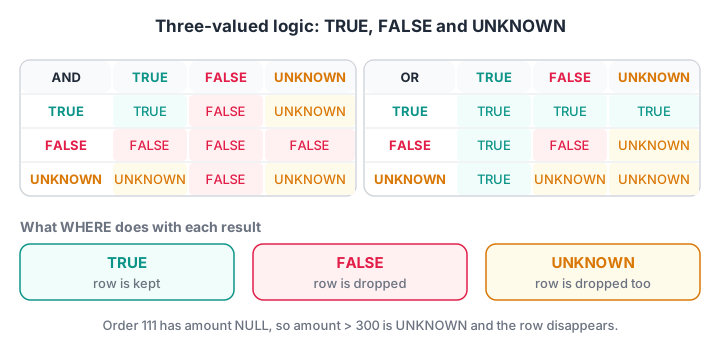
FALSE AND UNKNOWN is FALSE and TRUE OR UNKNOWN is TRUE, because the unknown side cannot change the answer. Every other mix with UNKNOWN stays UNKNOWN.
WHERE keeps a row only when the condition is TRUE. FALSE and UNKNOWN rows are both dropped. That creates a surprise: a row with a NULL amount fails amount > 300 and also fails NOT (amount > 300).
import sqlite3

con = sqlite3.connect(":memory:")
con.executescript("""
CREATE TABLE orders (order_id INT, customer_id INT, store_id INT, order_date TEXT, amount INT, payment_mode TEXT);
INSERT INTO orders VALUES
 (101,1,1,'2026-03-01',1040,'UPI'), (102,2,2,'2026-03-01',330,'Cash'), (103,1,1,'2026-03-03',275,'UPI'),
 (104,3,3,'2026-03-04',180,'Card'), (105,4,2,'2026-03-05',680,'UPI'), (106,2,4,'2026-03-07',120,'Cash'),
 (107,5,3,'2026-03-08',1560,'Card'), (108,6,1,'2026-03-08',220,'UPI'), (109,4,4,'2026-03-10',340,NULL),
 (110,1,2,'2026-03-12',465,'Cash'), (111,6,3,'2026-03-14',NULL,'UPI');
""")

print("NULL = NULL  ->", con.execute("SELECT NULL = NULL").fetchone()[0])
print("NULL IS NULL ->", con.execute("SELECT NULL IS NULL").fetchone()[0])
print("NULL + 10    ->", con.execute("SELECT NULL + 10").fetchone()[0])

checks = {
    "amount > 300":       "SELECT COUNT(*) FROM orders WHERE amount > 300",
    "NOT (amount > 300)": "SELECT COUNT(*) FROM orders WHERE NOT (amount > 300)",
    "amount = NULL":      "SELECT COUNT(*) FROM orders WHERE amount = NULL",
    "amount IS NULL":     "SELECT COUNT(*) FROM orders WHERE amount IS NULL",
}
for label, sql in checks.items():
    print(f"{label:20} {con.execute(sql).fetchone()[0]} rows")
Python prints NULL as None. The first two filters return 6 and 4 rows, a total of 10, not 11: order 111 is in neither. Only IS NULL finds it.
IS NULL, IS NOT NULL and IS DISTINCT FROM
IS NULL and IS NOT NULL always return TRUE or FALSE, never UNKNOWN.
Columns that may both be NULL need a null-safe comparison. Suppose Malwa Mart keeps yesterday's copy of the orders and wants to find payment modes that changed. Order 109 went from NULL to 'Cash', but old <> new is UNKNOWN for it, so a plain comparison misses the change.
import sqlite3

con = sqlite3.connect(":memory:")
con.executescript("""
CREATE TABLE yesterday (order_id INT, payment_mode TEXT);
CREATE TABLE today     (order_id INT, payment_mode TEXT);
INSERT INTO yesterday VALUES (105,'UPI'), (106,'Cash'), (109,NULL), (110,'Card');
INSERT INTO today     VALUES (105,'UPI'), (106,'Cash'), (109,'Cash'), (110,'Cash');
""")
base = "SELECT t.order_id FROM yesterday y JOIN today t ON t.order_id = y.order_id WHERE "

print("plain <>       :", con.execute(base + "y.payment_mode <> t.payment_mode").fetchall())
print("SQLite IS NOT  :", con.execute(base + "y.payment_mode IS NOT t.payment_mode").fetchall())
try:
    rows = con.execute(base + "y.payment_mode IS DISTINCT FROM t.payment_mode").fetchall()
    print("IS DISTINCT FROM:", rows)
except sqlite3.OperationalError:
    print("IS DISTINCT FROM needs SQLite 3.39+; this build is", sqlite3.sqlite_version)
The plain comparison finds only order 110. The null-safe versions also catch order 109. Each database spells this differently:
| Null-safe test | SQLite | MySQL | PostgreSQL |
|---|---|---|---|
| Equal, treating two NULLs as equal | a IS b |
a <=> b |
a IS NOT DISTINCT FROM b |
| Different, counting NULL vs value as different | a IS NOT b |
NOT (a <=> b) |
a IS DISTINCT FROM b |
SQLite 3.39 and later also accept the standard IS DISTINCT FROM spelling.
Quick check
An orders table has 11 rows and one NULL amount. How many rows does WHERE amount > 300 OR NOT (amount > 300) return?
For the NULL row both sides are UNKNOWN, and UNKNOWN OR UNKNOWN is UNKNOWN. WHERE keeps only TRUE rows, so that row is dropped.
Replacing NULL with COALESCE and IFNULL
COALESCE(a, b, c, ...) returns the first argument that is not NULL. It is standard SQL and works everywhere. IFNULL(a, b) is a two-argument shortcut in SQLite and MySQL; PostgreSQL has only COALESCE, and SQL Server calls it ISNULL.
In reports, COALESCE stops a manager wondering whether a blank means zero or a broken query.
Avoiding divide-by-zero with NULLIF
NULLIF(a, b) does the opposite of COALESCE: it returns NULL when a equals b, and a otherwise. Its classic use is x / NULLIF(y, 0). If y is zero, the division becomes x / NULL, which is NULL instead of an error.
On division by zero, SQLite returns NULL, MySQL returns NULL with a warning, and PostgreSQL stops with an error. NULLIF makes all three behave the same.
The next block uses both functions. Dividing by COUNT(o.amount), not COUNT(o.order_id), stops Vikram's unbilled order 111 from dragging his average down.
import sqlite3

con = sqlite3.connect(":memory:")
con.executescript("""
CREATE TABLE customers (customer_id INT, name TEXT, city TEXT);
INSERT INTO customers VALUES (1,'Asha Verma','Indore'), (2,'Ravi Patel','Indore'), (3,'Meera Joshi','Dewas'),
 (4,'Pooja Rathore','Ujjain'), (5,'Sana Qureshi','Indore'), (6,'Vikram Chouhan','Indore'), (7,'Neha D''Souza','Indore');
CREATE TABLE orders (order_id INT, customer_id INT, store_id INT, order_date TEXT, amount INT, payment_mode TEXT);
INSERT INTO orders VALUES
 (101,1,1,'2026-03-01',1040,'UPI'), (102,2,2,'2026-03-01',330,'Cash'), (103,1,1,'2026-03-03',275,'UPI'),
 (104,3,3,'2026-03-04',180,'Card'), (105,4,2,'2026-03-05',680,'UPI'), (106,2,4,'2026-03-07',120,'Cash'),
 (107,5,3,'2026-03-08',1560,'Card'), (108,6,1,'2026-03-08',220,'UPI'), (109,4,4,'2026-03-10',340,NULL),
 (110,1,2,'2026-03-12',465,'Cash'), (111,6,3,'2026-03-14',NULL,'UPI');
""")

query = """
SELECT c.name,
       COUNT(o.order_id)                                         AS orders,
       COALESCE(SUM(o.amount), 0)                                AS total_spent,
       ROUND(SUM(o.amount) * 1.0 / NULLIF(COUNT(o.amount), 0), 1) AS avg_bill
FROM customers AS c
LEFT JOIN orders AS o ON o.customer_id = c.customer_id
GROUP BY c.customer_id, c.name
ORDER BY total_spent DESC
"""
for row in con.execute(query):
    print(row)
print(con.execute("SELECT order_id, COALESCE(payment_mode, 'Not recorded') FROM orders WHERE order_id = 109").fetchone())
Neha shows 0 orders and 0 spent instead of a blank, and her average is None rather than an error. Vikram's average is 220, based on his one billed order. Order 109 now reads "Not recorded".
Quick check
Which expression returns 0 instead of NULL when a customer has no orders?
COALESCE returns its first non-NULL argument. NULLIF does the opposite and turns a value into NULL.
How do aggregates, GROUP BY and ORDER BY treat NULL?
Every aggregate except COUNT(*) ignores NULL inputs. That is usually what you want, but it changes averages in a way people often miss.
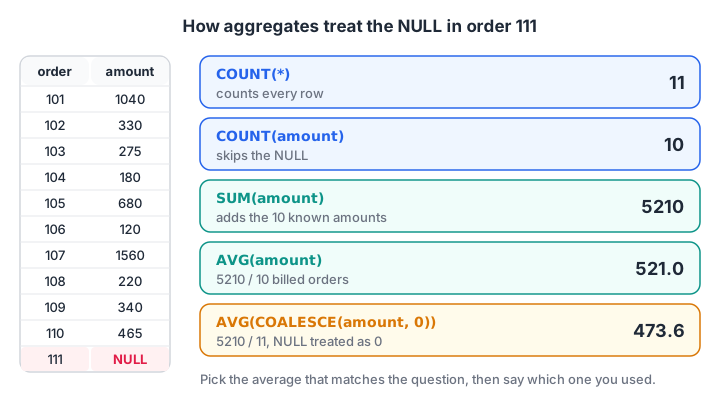
AVG(amount) divides 5,210 by 10 billed orders. AVG(COALESCE(amount, 0)) divides by all 11, treating the missing bill as zero rupees.
import sqlite3

con = sqlite3.connect(":memory:")
con.executescript("""
CREATE TABLE orders (order_id INT, customer_id INT, store_id INT, order_date TEXT, amount INT, payment_mode TEXT);
INSERT INTO orders VALUES
 (101,1,1,'2026-03-01',1040,'UPI'), (102,2,2,'2026-03-01',330,'Cash'), (103,1,1,'2026-03-03',275,'UPI'),
 (104,3,3,'2026-03-04',180,'Card'), (105,4,2,'2026-03-05',680,'UPI'), (106,2,4,'2026-03-07',120,'Cash'),
 (107,5,3,'2026-03-08',1560,'Card'), (108,6,1,'2026-03-08',220,'UPI'), (109,4,4,'2026-03-10',340,NULL),
 (110,1,2,'2026-03-12',465,'Cash'), (111,6,3,'2026-03-14',NULL,'UPI');
""")

row = con.execute("""
SELECT COUNT(*), COUNT(amount), SUM(amount), AVG(amount), ROUND(AVG(COALESCE(amount, 0)), 1)
FROM orders""").fetchone()
print("COUNT(*), COUNT(amount), SUM, AVG, AVG-with-zero:", row)

print("Grouped by payment_mode (NULL forms its own group):")
for r in con.execute("SELECT payment_mode, COUNT(*), SUM(amount) FROM orders GROUP BY payment_mode ORDER BY payment_mode"):
    print("  ", r)
Which average is right depends on the question. If order 111 is a cancelled bill, 521 is the honest average. If it is a real sale that simply was not typed in, neither figure is right, and the fix belongs in the data, not the query.
The other clauses treat NULLs as one bucket:
- GROUP BY puts all NULLs into a single group, as order 109 shows above.
- DISTINCT keeps one NULL, just as it keeps one copy of any value.
- ORDER BY puts NULLs first in ascending order in SQLite and MySQL, and last in PostgreSQL. Add
NULLS FIRSTorNULLS LAST(SQLite 3.30+ and PostgreSQL) to be explicit. The ORDER BY article shows this in action. - UNIQUE constraints allow many NULLs in SQLite, MySQL and PostgreSQL, because two unknowns are not considered duplicates. SQL Server allows only one.
Common mistakes with NULL in SQL
- Writing
= NULLor<> NULL. Both are always UNKNOWN. UseIS NULLandIS NOT NULL. NOT INwith a NULL in the list.x NOT IN (1, 2, NULL)is never TRUE, so the query returns no rows. The subqueries article walks through this trap; preferNOT EXISTS.- Replacing every NULL with 0. Zero is a claim about the data. Use COALESCE for display, but think before using it inside AVG or in a stored table.
- Filtering an outer join in WHERE.
WHERE o.amount > 0after a LEFT JOIN removes customers with no orders, because their NULL amount fails the test. - Assuming
''and NULL are the same. They are different in SQLite, MySQL and PostgreSQL. Oracle is the exception, treating empty strings as NULL.
NULL bugs rarely crash a query; they quietly change totals. Practising on messy data helps, and a data analytics course in Indore that takes data quality seriously gives you that at Debugshala. You can also check your NULL logic with Debugshala Test MCQs. If you work in pandas too, compare these rules with handling missing data in Python.
Key takeaways
- NULL means unknown or missing; it is different from 0 and from an empty string.
- Comparisons with NULL give UNKNOWN, and WHERE drops UNKNOWN rows, so use IS NULL and IS NOT NULL.
- COALESCE and IFNULL supply a fallback; NULLIF(x, 0) protects divisions.
- Aggregates skip NULLs except COUNT(*), which can change averages.
- Null-safe comparison is
ISin SQLite,<=>in MySQL andIS DISTINCT FROMin PostgreSQL.
FAQ
What is the difference between NULL and 0 in SQL?
Zero is a known value, so it is counted, summed and compared like any number. NULL means the value is unknown. Aggregates such as SUM and AVG skip NULLs, arithmetic with NULL returns NULL, and comparisons with NULL return UNKNOWN. Treating one as the other changes totals, averages and filters.
How do I check for NULL values in SQL?
Use WHERE column IS NULL to find missing values and WHERE column IS NOT NULL to exclude them. Never write = NULL, because any comparison with NULL is UNKNOWN and returns no rows. To count missing values, use COUNT(*) - COUNT(column) or SUM(CASE WHEN column IS NULL THEN 1 ELSE 0 END).
What is the difference between COALESCE and IFNULL?
Both replace NULL with another value. COALESCE is standard SQL, accepts any number of arguments and works in every major database. IFNULL takes exactly two arguments and exists in SQLite and MySQL but not PostgreSQL. SQL Server's equivalent is ISNULL. Prefer COALESCE for portable queries.
Does COUNT include NULL values in SQL?
COUNT(*) counts every row, including rows full of NULLs. COUNT(column) counts only rows where that column is not NULL. On Malwa Mart's orders, COUNT(*) returns 11 while COUNT(amount) returns 10, because order 111 has no amount. COUNT(DISTINCT column) also skips NULLs.
Can I learn SQL data cleaning and NULL handling in Indore?
Yes. Debugshala, a training and placement institute at Old Palasia, Indore, teaches NULL handling, data cleaning and reporting queries as part of its Data Analytics course. Classes are offline in English and Hindi, students from non-IT backgrounds and with a year gap are welcome, and a free demo class is offered first.
From the team behind this site
Go further with the Data Analytics Course at Debugshala
These tutorials are written by Debugshala, a training and placement institute at Old Palasia, Indore. The classroom course adds live mentoring, real projects and interview preparation.
- Offline classes at Old Palasia, Indore
- Free demo class before you pay
- Non-IT, fresher and year-gap friendly
- Placement assistance
700+ students placed · 200+ hiring partners · 4.9★ Google rating
