

SQL Self Join and Cross Join: Examples, Uses and Pitfalls
Learn SQL self join and cross join with runnable examples: employee-manager lists, comparing rows, and complete report grids with zeros filled in.
Malwa Mart now has a small staff list pinned in the Vijay Nagar back office. Each line has a name, a role and one more column: the staff number of that person's boss. Priya, a cashier, has boss number 2. To find out who number 2 is, you look further up the same list and find Kavita, the store manager.
You never needed a second document. You read the list twice, once as "the employee" and once as "the manager", and matched the boss number on one reading to the staff number on the other.
That double reading is a self join. The single list is one table, and the two readings are two aliases of it.
A self join is a regular join in which a table is joined to itself, using a different alias for each copy, so that one row can be compared with or linked to another row of the same table.
The second idea in this article, the cross join, goes the other way. Instead of matching rows carefully, it pairs every row with every other row. Both rely on the join mechanics from SQL joins, so read that first if INNER and LEFT JOIN are new.
How does a self join work?
SQL has no special SELF JOIN keyword. You write an ordinary INNER or LEFT JOIN and list the same table twice with two different aliases. The aliases are what make it possible: without them, the database cannot tell which copy name refers to.
Malwa Mart's new staff table has six people. Rajesh, the operations head, has no manager, so his manager_id is NULL.
CREATE TABLE staff (
    staff_id   INTEGER PRIMARY KEY,
    name       TEXT,
    role       TEXT,
    store_id   INTEGER REFERENCES stores(store_id),
    manager_id INTEGER REFERENCES staff(staff_id)   -- points back into the same table
);
The manager_id column is a foreign key that points to the same table's primary key. Whenever you see that pattern, a self join is how you read it.
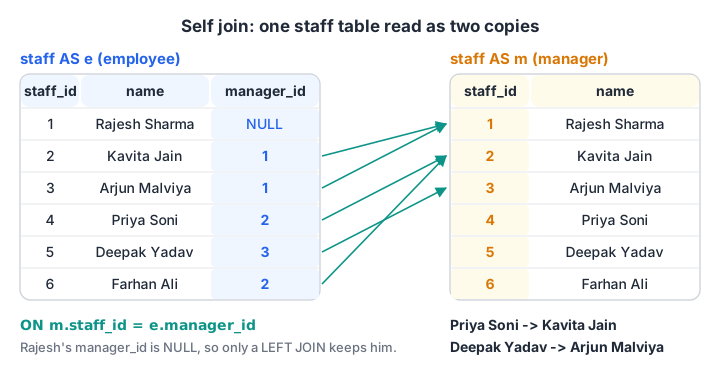
One table, two aliases. Each employee row in copy e is matched to the row in copy m whose staff_id equals its manager_id.
import sqlite3

con = sqlite3.connect(":memory:")
con.executescript("""
CREATE TABLE staff (staff_id INT, name TEXT, role TEXT, store_id INT, manager_id INT);
INSERT INTO staff VALUES (1,'Rajesh Sharma','Operations Head',NULL,NULL), (2,'Kavita Jain','Store Manager',1,1),
 (3,'Arjun Malviya','Store Manager',3,1), (4,'Priya Soni','Cashier',1,2),
 (5,'Deepak Yadav','Cashier',3,3), (6,'Farhan Ali','Stock Clerk',1,2);
""")

query = """
SELECT e.name AS employee, e.role, COALESCE(m.name, '(no manager)') AS reports_to
FROM staff AS e
LEFT JOIN staff AS m ON m.staff_id = e.manager_id
ORDER BY e.staff_id
"""
for row in con.execute(query):
    print(row)

print("Direct reports:", con.execute("""
    SELECT m.name, COUNT(*) FROM staff AS e JOIN staff AS m ON m.staff_id = e.manager_id
    GROUP BY m.staff_id, m.name ORDER BY COUNT(*) DESC""").fetchall())
The LEFT JOIN keeps Rajesh even though no manager row matches him. With an INNER JOIN he would disappear, because his manager_id is NULL. Kavita and Rajesh each have two direct reports, and Arjun has one.
A self join reaches exactly one level up. To walk a whole chain, such as "everyone under Rajesh at any depth", you need a recursive query, which the SQL CTE article builds.
Quick check
In a self join of staff to itself, why are two aliases (such as e and m) required?
Both copies have the same columns. Aliases like e.name and m.name tell the database which copy you mean.
Self join examples with orders: comparing rows
Self joins are not only for hierarchies. Any question that compares one row with another row of the same table is a self join in disguise.
"Which customers came back, and how many days passed between their visits?" compares one order with another order by the same customer. Join orders to itself on customer_id, and keep only pairs where the first order is earlier.
import sqlite3

con = sqlite3.connect(":memory:")
con.executescript("""
CREATE TABLE orders (order_id INT, customer_id INT, store_id INT, order_date TEXT, amount INT, payment_mode TEXT);
INSERT INTO orders VALUES
 (101,1,1,'2026-03-01',1040,'UPI'), (102,2,2,'2026-03-01',330,'Cash'), (103,1,1,'2026-03-03',275,'UPI'),
 (104,3,3,'2026-03-04',180,'Card'), (105,4,2,'2026-03-05',680,'UPI'), (106,2,4,'2026-03-07',120,'Cash'),
 (107,5,3,'2026-03-08',1560,'Card'), (108,6,1,'2026-03-08',220,'UPI'), (109,4,4,'2026-03-10',340,NULL),
 (110,1,2,'2026-03-12',465,'Cash'), (111,6,3,'2026-03-14',NULL,'UPI');
""")

query = """
SELECT a.customer_id, a.order_id AS first, b.order_id AS later,
       CAST(julianday(b.order_date) - julianday(a.order_date) AS INT) AS days_apart,
       a.store_id = b.store_id AS same_store
FROM orders AS a
JOIN orders AS b ON b.customer_id = a.customer_id AND a.order_id < b.order_id
ORDER BY a.customer_id, a.order_id
"""
for row in con.execute(query):
    print(row)
Six pairs come back. Customer 1, Asha, appears three times because three orders make three pairs. Customer 2 returned after 6 days, but to a different store (same_store is 0), which is useful for a branch manager to know.
Why the condition a.order_id < b.order_id matters
Without it, every order would also pair with itself, and every real pair would appear twice, once as (101, 103) and once as (103, 101). Using < keeps each pair once and drops self-pairs. Use <> instead if you want both directions.
julianday() is SQLite's way of turning a date into a day number. In MySQL you would write DATEDIFF(b.order_date, a.order_date), and in PostgreSQL you subtract two DATE values directly. For "days since the previous order only", window functions with LAG are simpler, as shown in SQL window functions.
What is a cross join in SQL?
A cross join returns the Cartesian product of two tables: every row of the first paired with every row of the second. It has no ON condition, because nothing needs to match.
SELECT s.store_name, p.payment_mode
FROM stores AS s
CROSS JOIN (SELECT 'UPI' AS payment_mode UNION ALL SELECT 'Cash' UNION ALL SELECT 'Card') AS p;
With 4 stores and 3 payment modes, the result always has 4 × 3 = 12 rows. Writing FROM stores, payment_modes with no WHERE does the same thing in older comma-join style.
Using a cross join to fill gaps with zeros
In the GROUP BY article, grouping by store and payment mode returned only the combinations that actually happened. A dashboard grid, though, needs all twelve cells, with 0 where nothing was sold. The pattern is:
- CROSS JOIN the dimensions to build every combination.
- LEFT JOIN the real totals onto that grid.
- Replace missing totals with 0 using
COALESCE.
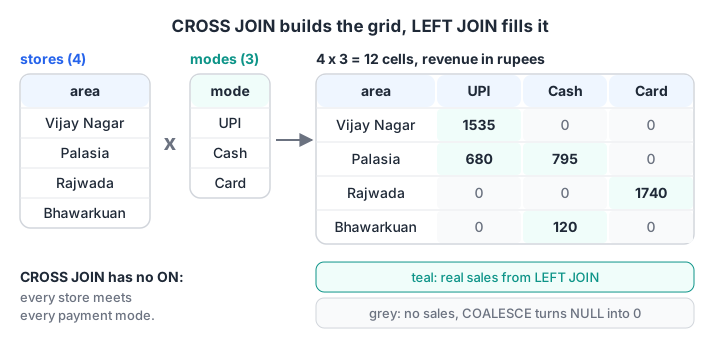
The cross join creates every store-and-mode cell. The LEFT JOIN drops real sales into the cells, and empty cells become 0.
import sqlite3

con = sqlite3.connect(":memory:")
con.executescript("""
CREATE TABLE stores (store_id INT, store_name TEXT, area TEXT);
CREATE TABLE orders (order_id INT, customer_id INT, store_id INT, order_date TEXT, amount INT, payment_mode TEXT);
INSERT INTO stores VALUES (1,'Malwa Mart Vijay Nagar','Vijay Nagar'), (2,'Malwa Mart Palasia','Palasia'),
 (3,'Malwa Mart Rajwada','Rajwada'), (4,'Malwa Mart Bhawarkuan','Bhawarkuan');
INSERT INTO orders VALUES
 (101,1,1,'2026-03-01',1040,'UPI'), (102,2,2,'2026-03-01',330,'Cash'), (103,1,1,'2026-03-03',275,'UPI'),
 (104,3,3,'2026-03-04',180,'Card'), (105,4,2,'2026-03-05',680,'UPI'), (106,2,4,'2026-03-07',120,'Cash'),
 (107,5,3,'2026-03-08',1560,'Card'), (108,6,1,'2026-03-08',220,'UPI'), (109,4,4,'2026-03-10',340,NULL),
 (110,1,2,'2026-03-12',465,'Cash'), (111,6,3,'2026-03-14',NULL,'UPI');
CREATE TABLE modes (payment_mode TEXT);
INSERT INTO modes VALUES ('UPI'), ('Cash'), ('Card');
""")

query = """
SELECT s.area, m.payment_mode, COALESCE(SUM(o.amount), 0) AS revenue
FROM stores AS s
CROSS JOIN modes AS m
LEFT JOIN orders AS o ON o.store_id = s.store_id AND o.payment_mode = m.payment_mode
GROUP BY s.store_id, m.payment_mode
ORDER BY s.store_id, m.payment_mode
"""
rows = con.execute(query).fetchall()
print(len(rows), "cells")
for area, mode, revenue in rows:
    print(f"{area:12} {mode:5} {revenue:>5}")
All 12 cells appear. Vijay Nagar shows 0 for both Card and Cash, and Rajwada shows 0 for UPI, because its only UPI order (111) has no amount yet. Order 109 has no payment mode, so it fits no cell. That is correct for this grid, but worth a footnote in the real report.
Quick check
stores has 4 rows and products has 8 rows. How many rows does stores CROSS JOIN products return?
A cross join pairs every row with every row, so the result has 4 × 8 = 32 rows.
Self join vs cross join vs inner join
| Self join | Cross join | Inner join | |
|---|---|---|---|
| Tables involved | One table, two aliases | Two (or more) tables | Two (or more) tables |
| Match condition | Yes, in ON | None | Yes, in ON |
| Result size | Depends on matches | Rows of A × rows of B | Depends on matches |
| Typical use | Hierarchies, comparing rows | Building complete grids, all combinations | Linking related records |
| Keyword | Normal JOIN syntax | CROSS JOIN |
JOIN or INNER JOIN |
One more distinction. An accidental cross join, a JOIN with a missing or wrong ON condition, is one of the most common causes of wildly inflated totals. A deliberate cross join is written explicitly with CROSS JOIN, so readers know it was intended.
Every join here adds columns from one table to another. To combine the rows of two queries instead, you need SQL UNION, INTERSECT and EXCEPT, the next topic in this series.
Common mistakes with self and cross joins
- Forgetting aliases.
FROM staff JOIN stafffails or becomes ambiguous. Always name the two copies. - Using INNER JOIN for a hierarchy. The top person has a NULL manager and vanishes. Use LEFT JOIN.
- Duplicate pairs. Compare
a.id < b.idto list each pair once. - Self joins on huge tables without a key condition. Joining
ordersto itself only onstore_idpairs every order with every other order in that store, which grows quickly. - Cross joining large tables. Check both row counts first; multiply them to see the result size.
If you would like a mentor to review queries like these with you, an SQL-heavy data analytics course in Old Palasia is run by Debugshala, with a free demo class first. For practice between sessions, attempt reasoning and coding sets on Debugshala Test.
Key takeaways
- A self join uses one table twice with two aliases; it is written with normal JOIN syntax.
- Use it for hierarchies (employee and manager) and for comparing rows of the same table.
- Prefer LEFT JOIN for hierarchies so the top-level row stays.
a.id < b.idlists each pair once and skips self-pairs.- A cross join returns every combination: rows of A times rows of B.
- CROSS JOIN plus LEFT JOIN plus COALESCE builds complete report grids with zeros.
FAQ
What is a self join in SQL with an example?
A self join joins a table to itself. For example, in a staff table where manager_id stores another staff_id, joining staff AS e to staff AS m ON m.staff_id = e.manager_id lists each employee next to their manager's name. It uses ordinary JOIN syntax with two aliases.
Is there a SELF JOIN keyword in SQL?
No. No major database has a SELF JOIN keyword. You write INNER JOIN or LEFT JOIN and give the same table two different aliases. The query is called a self join only because both sides of the join are the same table, not because of any special syntax.
What is the difference between a cross join and an inner join?
A cross join pairs every row of one table with every row of another and has no match condition, so its size is the product of the row counts. An inner join keeps only pairs that satisfy the ON condition. An inner join with a condition that is always true behaves like a cross join.
When should I use a cross join?
Use a cross join when you deliberately need every combination, such as all stores against all months, all sizes against all colours, or all products against all branches for a stock sheet. Keep both inputs small, and usually follow it with a LEFT JOIN to real data so empty combinations show zero.
Where can I learn SQL joins hands-on in Indore?
Debugshala, an IT training and placement institute at Old Palasia, Indore, includes SQL in its offline Data Analytics course, taught in English and Hindi. Freshers, non-IT graduates and candidates with a year gap are welcome. You can attend a free demo class before paying, and placement assistance is offered.
From the team behind this site
Go further with the Data Analytics Course at Debugshala
These tutorials are written by Debugshala, a training and placement institute at Old Palasia, Indore. The classroom course adds live mentoring, real projects and interview preparation.
- Offline classes at Old Palasia, Indore
- Free demo class before you pay
- Non-IT, fresher and year-gap friendly
- Placement assistance
700+ students placed · 200+ hiring partners · 4.9★ Google rating
