

SQL Data Types: INT, DECIMAL, VARCHAR and DATE Explained
SQL data types explained: integers, DECIMAL for money, VARCHAR, DATE and BOOLEAN, with MySQL, PostgreSQL and SQLite differences you can run.
Think of the stockroom at a Malwa Mart branch in Vijay Nagar. Rice goes in sacks, milk goes in the fridge, and bills go in a file. Nobody stores milk in a rice sack, because the container decides what can safely go inside and how you handle it later.
A database table works the same way. Each column is a container, and its data type is the label on that container. A price column labelled "exact decimal" accepts 520.00 and refuses the word "cheap". A joined_on column labelled "date" lets you ask for everyone who joined after March.
A SQL data type is a rule attached to a column that fixes what kind of value it can store and how the database compares, sorts and calculates with it.
This is the second article in the series that began with what SQL is and how an RDBMS works. We keep using the Malwa Mart tables, and here we decide what type each of their columns should be.
Why do SQL data types matter?
Types change the answers your queries give.
- Correct maths. Money stored as a floating-point number can drift by tiny fractions, and those fractions show up in totals.
- Correct sorting. Dates stored as
12-03-2026sort by day number, so March 12 lands before February 28. - Clean data. A strict type stops someone from typing "N/A" into a quantity column.
- Speed and space. A small integer takes less room than text and is faster to compare, which matters at crores of rows.
The main families of SQL data types
Almost every RDBMS groups its types into the same five families, with small naming differences.
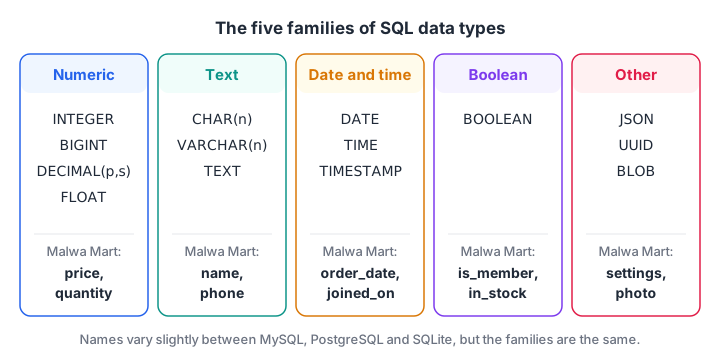
The five families of SQL data types, with the Malwa Mart column that uses each one.
Numeric types: INTEGER, DECIMAL and FLOAT
Integer types hold whole numbers. INT (or INTEGER) covers roughly minus 2.1 billion to plus 2.1 billion, which suits ids and quantities. BIGINT covers far larger values, useful for event logs. SMALLINT saves space for small ranges like a rating out of 5.
DECIMAL(p, s), also called NUMERIC, stores exact decimals. p is the total number of digits and s is how many come after the point. DECIMAL(10, 2) holds up to 99,999,999.99, which is ideal for rupees and paise.
FLOAT, REAL and DOUBLE store approximate numbers in binary. They are fast and fine for measurements such as temperature or GPS coordinates, but they cannot represent most decimals exactly. Never use them for money.
Text types: CHAR, VARCHAR and TEXT
CHAR(n) always stores exactly n characters, padding short values with spaces. It suits fixed codes such as a two-letter state code like MP.
VARCHAR(n) stores up to n characters and uses only the space it needs. It is the everyday choice for names, emails and product titles.
TEXT holds long text such as reviews. In PostgreSQL, TEXT and VARCHAR perform the same, so many teams simply use TEXT.
Date and time types
DATE stores a calendar date such as 2026-03-08. TIME stores a time of day. TIMESTAMP (or DATETIME in MySQL) stores both. PostgreSQL also has TIMESTAMPTZ, which records the time zone, important when one app serves users in India and abroad.
Always write date values in ISO format, YYYY-MM-DD. Every major database understands it, and it sorts correctly even as plain text.
Boolean and other types
BOOLEAN stores true or false, such as is_active. MySQL treats it as an alias for a tiny integer (1 or 0). Other useful types include JSON for flexible documents, UUID for random unique ids in PostgreSQL, and BLOB or BYTEA for raw bytes such as images.
SQL data types compared: MySQL vs PostgreSQL vs SQLite
| Purpose | MySQL 8 | PostgreSQL 16 | SQLite |
|---|---|---|---|
| Whole number | INT, BIGINT |
INTEGER, BIGINT |
INTEGER |
| Exact money | DECIMAL(10,2) |
NUMERIC(10,2) |
No exact decimal; store paise as INTEGER |
| Approximate number | FLOAT, DOUBLE |
REAL, DOUBLE PRECISION |
REAL |
| Short text | VARCHAR(n) |
VARCHAR(n) or TEXT |
TEXT (length not enforced) |
| Date | DATE |
DATE |
TEXT in ISO format |
| Date and time | DATETIME, TIMESTAMP |
TIMESTAMP, TIMESTAMPTZ |
TEXT in ISO format |
| True / false | BOOLEAN (tinyint) |
BOOLEAN |
INTEGER 0 or 1 |
How SQLite handles types: type affinity
SQLite is the odd one out. It stores every value in one of five storage classes: NULL, INTEGER, REAL, TEXT and BLOB. The type you declare on a column only sets a preference, called its type affinity.
If you insert the text '520' into an INTEGER column, SQLite converts it to the number 520. If you insert 'abc', it cannot convert, so it quietly stores text. MySQL in strict mode or PostgreSQL would reject that row with an error.
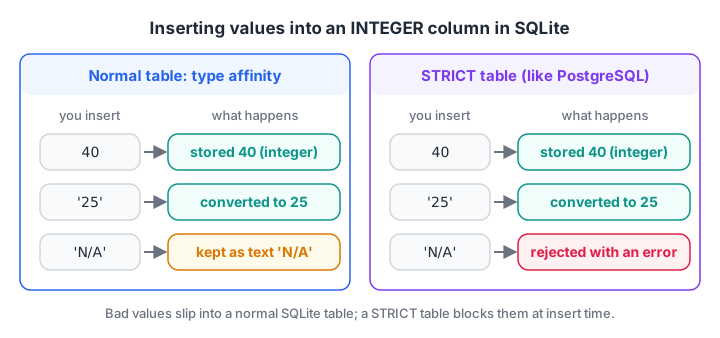
A normal SQLite table bends to fit the value. A STRICT table, like PostgreSQL, refuses values that do not fit.
You can see this with SQLite's typeof() function, which reports how each value was really stored.
CREATE TABLE stock (product TEXT, quantity INTEGER);
INSERT INTO stock VALUES ('Poha 1kg', 40), ('Sev 500g', '25'), ('Paneer 200g', 'N/A');
SELECT product, quantity, typeof(quantity) FROM stock;import sqlite3
con = sqlite3.connect(":memory:")
con.execute("CREATE TABLE stock (product TEXT, quantity INTEGER)")
con.executemany("INSERT INTO stock VALUES (?, ?)",
[("Poha 1kg", 40), ("Sev 500g", "25"), ("Paneer 200g", "N/A")])
for row in con.execute("SELECT product, quantity, typeof(quantity) FROM stock"):
print(row)The text '25' became the integer 25, but 'N/A' slipped in as text. That is exactly the kind of dirty value that breaks a SUM() later.
STRICT tables make SQLite behave like PostgreSQL
Since version 3.37, SQLite supports STRICT tables. They allow only INT, INTEGER, REAL, TEXT, BLOB and ANY, and they reject values that do not fit the column.
import sqlite3

con = sqlite3.connect(":memory:")
con.execute("CREATE TABLE stock (product TEXT, quantity INTEGER) STRICT")
con.execute("INSERT INTO stock VALUES ('Sev 500g', '25')")      # converts cleanly to 25
try:
    con.execute("INSERT INTO stock VALUES ('Paneer 200g', 'N/A')")
except sqlite3.Error as err:
    print("Rejected:", err)

print(con.execute("SELECT product, quantity, typeof(quantity) FROM stock").fetchall())
Quick check
You insert the text 'N/A' into an INTEGER column of a normal (non-STRICT) SQLite table. What happens?
SQLite uses type affinity. It converts values when it can, and otherwise stores them in their original storage class, here TEXT.
Two costly type mistakes: FLOAT money and text dates
Two type choices break more reports than any others.
Why you should never store money as FLOAT
Floating-point numbers are stored in binary, and a value like 0.10 has no exact binary form. Add enough of them and the error becomes visible.
The block below stores two payments, 0.10 and 0.20 rupees, as REAL, and the same payments as whole paise in an INTEGER column.
import sqlite3

con = sqlite3.connect(":memory:")
con.execute("CREATE TABLE payments (amount_rupees REAL, amount_paise INTEGER)")
con.executemany("INSERT INTO payments VALUES (?, ?)", [(0.10, 10), (0.20, 20)])

rupees, paise = con.execute(
    "SELECT SUM(amount_rupees), SUM(amount_paise) FROM payments").fetchone()
print("REAL total:    ", rupees)
print("Equal to 0.30? ", rupees == 0.30)
print("INTEGER total: ", paise, "paise =", paise / 100, "rupees")
print("Paise check:   ", paise == 30)
The REAL total comes out as 0.30000000000000004, so a check like total = 0.30 fails. In MySQL or PostgreSQL you would use DECIMAL(10, 2); in SQLite, store paise as integers and divide by 100 only when displaying. Python's own type conversion rules behave the same way, because Python floats use the same binary format.
Dates as text: why ISO format matters
SQLite has no DATE type, so dates are stored as text. Text sorts character by character, which works only when the biggest unit comes first.
import sqlite3

con = sqlite3.connect(":memory:")
con.execute("CREATE TABLE orders (order_id INTEGER, iso_date TEXT, indian_date TEXT)")
con.executemany("INSERT INTO orders VALUES (?, ?, ?)", [
    (101, "2026-03-01", "01-03-2026"), (102, "2026-02-28", "28-02-2026"),
    (103, "2026-03-12", "12-03-2026"), (104, "2025-12-31", "31-12-2025"),
])

print("Sorted by ISO text:  ", [r[0] for r in con.execute("SELECT order_id FROM orders ORDER BY iso_date")])
print("Sorted by DD-MM-YYYY:", [r[0] for r in con.execute("SELECT order_id FROM orders ORDER BY indian_date")])
print("30 days after 101:   ", con.execute("SELECT date('2026-03-01', '+30 days')").fetchone()[0])
ISO dates come out in true calendar order (104, 102, 101, 103). The DD-MM-YYYY strings sort by day number, putting 2025's New Year's Eve last. SQLite's date() function also understands ISO text, which the SQL date functions guide covers in depth.
Quick check
Which type is best for storing an order amount such as 1,040.50 rupees in PostgreSQL?
NUMERIC (or DECIMAL) stores exact decimal values, so totals never drift. REAL is approximate and VARCHAR cannot be summed.
Choosing types for the Malwa Mart tables
Here is how you would type the four tables in PostgreSQL. You will write these as real CREATE TABLE statements in the next article.
| Column | Type | Reason |
|---|---|---|
customer_id, order_id |
INTEGER |
Whole-number ids |
name, product_name |
VARCHAR(100) |
Short text of varying length |
phone |
VARCHAR(15) |
Digits, but never used in maths, and may start with +91 |
price, amount |
NUMERIC(10, 2) |
Exact rupees and paise |
quantity |
SMALLINT |
Small whole number |
order_date |
DATE |
Calendar date |
is_member |
BOOLEAN |
Yes or no |
Common mistakes with SQL data types
- Money in FLOAT. Totals drift by fractions of a paisa. Use
DECIMALor integer paise. - Dates in local formats.
08/03/2026is March 8 in India and August 3 in the US. Use ISO text or a realDATEcolumn. - VARCHAR too short.
VARCHAR(20)cuts off longer names in some modes or errors in others. Leave room. - Trusting SQLite to reject bad values. A normal SQLite table accepts
'N/A'in an integer column. UseSTRICTor validate first. - Numbers stored as text.
'100' < '20'is true for text, because1sorts before2. Keep numeric columns numeric.
Once these rules feel familiar, revise with free quizzes on Debugshala Test to keep your basics sharp.
Key takeaways
- A data type fixes what a column can hold and how it sorts and calculates.
- Use integers for ids and counts, DECIMAL for money, VARCHAR or TEXT for words, DATE or TIMESTAMP for time.
- MySQL and PostgreSQL enforce types; SQLite uses flexible type affinity unless the table is STRICT.
- Write dates as
YYYY-MM-DDso they sort and compare correctly everywhere. - Next, put these types to work in CREATE TABLE and ALTER TABLE.
FAQ
What is the difference between CHAR and VARCHAR in SQL?
CHAR(n) always stores exactly n characters and pads shorter values with spaces, so it suits fixed-length codes. VARCHAR(n) stores up to n characters and uses only the space each value needs, so it suits names and emails. For most columns, VARCHAR is the better choice.
Should I use DECIMAL or FLOAT for prices?
Use DECIMAL (also called NUMERIC) for prices and any money value. DECIMAL stores exact digits, so 0.10 plus 0.20 is exactly 0.30. FLOAT stores approximate binary values, which causes tiny rounding errors that add up in reports and reconciliation.
Does SQLite have a DATE data type?
No. SQLite stores dates as TEXT in ISO format (YYYY-MM-DD), as REAL Julian day numbers, or as INTEGER Unix timestamps. Its built-in date and time functions understand all three. ISO text is the most readable choice and sorts in correct calendar order.
How many data types should a beginner learn first?
Start with five: INTEGER, DECIMAL, VARCHAR, DATE and BOOLEAN. They cover nearly every column in a typical sales, HR or finance table. Learn TIMESTAMP, TEXT and JSON when a project needs them, using the official PostgreSQL data types documentation as a reference.
Can I learn SQL data types and database design in Indore?
Yes. Debugshala in Old Palasia, Indore, runs a data analytics course taught in English and Hindi, with offline classes and a free demo class first. Freshers and non-IT graduates are welcome, and placement assistance is offered after the course.
From the team behind this site
Go further with the Data Analytics Course at Debugshala
These tutorials are written by Debugshala, a training and placement institute at Old Palasia, Indore. The classroom course adds live mentoring, real projects and interview preparation.
- Offline classes at Old Palasia, Indore
- Free demo class before you pay
- Non-IT, fresher and year-gap friendly
- Placement assistance
700+ students placed · 200+ hiring partners · 4.9★ Google rating
