

SQL Subqueries: Scalar, IN, EXISTS and Correlated Examples
Learn SQL subqueries with runnable examples: scalar values, IN lists, EXISTS, correlated subqueries, derived tables and the NOT IN NULL trap.
The Malwa Mart owner asks his clerk a simple-sounding question: "Which March bills were bigger than our average bill?"
The clerk cannot answer it in one pass. First she has to work out the average, 521 rupees. Only then can she go back through the bills and pick out the ones above 521. There is a small question hiding inside the big one.
The next question is harder. "Which bills were bigger than the average for their own branch?" Now the hidden question changes for every bill: for a Rajwada bill she needs Rajwada's average, and for a Palasia bill, Palasia's.
The hidden question is a subquery. The big question is the outer query. When the hidden question depends on the bill being checked, it is a correlated subquery.
A SQL subquery (also called an inner query or nested query) is a SELECT statement placed inside another statement, whose result the outer statement uses as a single value, a list of values or a table.
You have already combined tables with SQL joins and stacked results with UNION, INTERSECT and EXCEPT. Subqueries are the third way to combine logic, and often the most readable for "compare with a summary" questions.
How does a subquery work in SQL?
The database evaluates a non-correlated subquery once, then plugs its result into the outer query as if you had typed the value yourself.
SELECT order_id, amount
FROM orders
WHERE amount > (SELECT AVG(amount) FROM orders);   -- inner query returns 521.0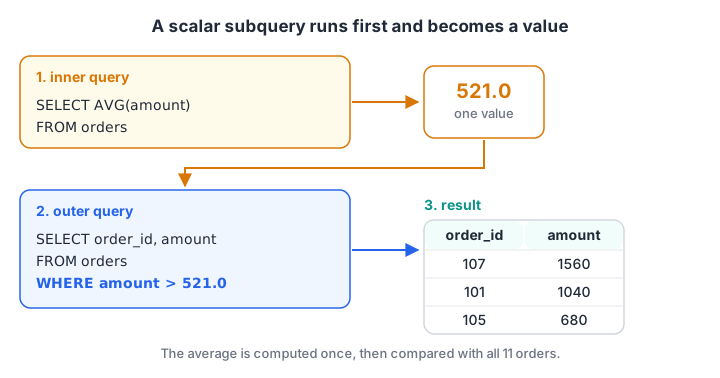
The inner query runs first and becomes a plain number. The outer WHERE then compares every order with that number.
You cannot write WHERE amount > AVG(amount), because WHERE works on single rows and the average does not exist yet. The subquery computes it separately, which is why this is one of the most common patterns in analytics SQL.
Types of SQL subqueries
| Type | Returns | Where it goes | Example question |
|---|---|---|---|
| Scalar | One value (1 row, 1 column) | SELECT, WHERE, HAVING | Orders above the average order |
| List (multi-row) | One column, many rows | IN, NOT IN, ANY, ALL |
Customers who ever paid by card |
| Table (derived table) | Many rows and columns | FROM | Average of per-customer totals |
| Correlated | Depends on each outer row | WHERE, SELECT | Orders above their own store's average |
| EXISTS | True or false | WHERE | Customers with at least one big order |
Scalar subqueries in WHERE and SELECT
A scalar subquery must return exactly one row and one column. In SQLite, if it accidentally returns more rows, only the first is used. PostgreSQL and MySQL raise an error, which is safer.
You can also put a scalar subquery in SELECT, for example to show each order's share of total revenue next to it.
import sqlite3

con = sqlite3.connect(":memory:")
con.executescript("""
CREATE TABLE orders (order_id INT, customer_id INT, store_id INT, order_date TEXT, amount INT, payment_mode TEXT);
INSERT INTO orders VALUES
 (101,1,1,'2026-03-01',1040,'UPI'), (102,2,2,'2026-03-01',330,'Cash'), (103,1,1,'2026-03-03',275,'UPI'),
 (104,3,3,'2026-03-04',180,'Card'), (105,4,2,'2026-03-05',680,'UPI'), (106,2,4,'2026-03-07',120,'Cash'),
 (107,5,3,'2026-03-08',1560,'Card'), (108,6,1,'2026-03-08',220,'UPI'), (109,4,4,'2026-03-10',340,NULL),
 (110,1,2,'2026-03-12',465,'Cash'), (111,6,3,'2026-03-14',NULL,'UPI');
""")

print("Average order:", con.execute("SELECT AVG(amount) FROM orders").fetchone()[0])
query = """
SELECT order_id, amount,
       ROUND(100.0 * amount / (SELECT SUM(amount) FROM orders), 1) AS pct_of_revenue
FROM orders
WHERE amount > (SELECT AVG(amount) FROM orders)
ORDER BY amount DESC
"""
for row in con.execute(query):
    print(row)
Three orders beat the 521-rupee average. Order 107 alone brought in nearly 30% of March revenue, a fact worth knowing before anyone celebrates Rajwada's numbers.
Subqueries with IN and NOT IN
A list subquery returns one column of many values, and the outer query tests membership with IN. "Which customers have ever paid by card?" becomes:
SELECT customer_id, name
FROM customers
WHERE customer_id IN (SELECT customer_id FROM orders WHERE payment_mode = 'Card');
This returns Meera Joshi and Sana Qureshi. The same question could be a join, but a join with a customer who paid by card twice would repeat that customer. IN never duplicates outer rows.
The NOT IN and NULL trap
NOT IN has a dangerous edge case. If the subquery's list contains even one NULL, NOT IN returns no rows at all.
The reason is three-valued logic. 'UPI' NOT IN ('Cash', NULL) means 'UPI' <> 'Cash' AND 'UPI' <> NULL. The second comparison is unknown, not true, so the whole condition is never true. NOT EXISTS does not have this problem.
The next block asks "which payment modes were never used at Bhawarkuan?" Bhawarkuan's orders used Cash and one unrecorded mode (NULL).
import sqlite3

con = sqlite3.connect(":memory:")
con.executescript("""
CREATE TABLE orders (order_id INT, customer_id INT, store_id INT, order_date TEXT, amount INT, payment_mode TEXT);
INSERT INTO orders VALUES
 (101,1,1,'2026-03-01',1040,'UPI'), (102,2,2,'2026-03-01',330,'Cash'), (103,1,1,'2026-03-03',275,'UPI'),
 (104,3,3,'2026-03-04',180,'Card'), (105,4,2,'2026-03-05',680,'UPI'), (106,2,4,'2026-03-07',120,'Cash'),
 (107,5,3,'2026-03-08',1560,'Card'), (108,6,1,'2026-03-08',220,'UPI'), (109,4,4,'2026-03-10',340,NULL),
 (110,1,2,'2026-03-12',465,'Cash'), (111,6,3,'2026-03-14',NULL,'UPI');
""")

not_in = con.execute("""
    SELECT DISTINCT payment_mode FROM orders
    WHERE payment_mode NOT IN (SELECT payment_mode FROM orders WHERE store_id = 4)""").fetchall()
not_exists = con.execute("""
    SELECT DISTINCT o.payment_mode FROM orders AS o
    WHERE o.payment_mode IS NOT NULL
      AND NOT EXISTS (SELECT 1 FROM orders AS b
                      WHERE b.store_id = 4 AND b.payment_mode = o.payment_mode)
    ORDER BY 1""").fetchall()
print("NOT IN:    ", not_in)
print("NOT EXISTS:", not_exists)
NOT IN returns an empty list, which is wrong: UPI and Card were never used at Bhawarkuan. NOT EXISTS gives the right answer. If you must use NOT IN, add WHERE payment_mode IS NOT NULL inside the subquery. Handling NULL in SQL covers more of these traps.
Quick check
The subquery in WHERE x NOT IN (SELECT y FROM t) returns the values 2, 5 and NULL. What does the outer query return?
x <> NULL is unknown, so NOT IN can never be true when the list contains NULL. Use NOT EXISTS instead.
What is a correlated subquery?
A correlated subquery refers to a column of the outer query, so its result changes from row to row. Conceptually, the database re-runs it once per outer row.
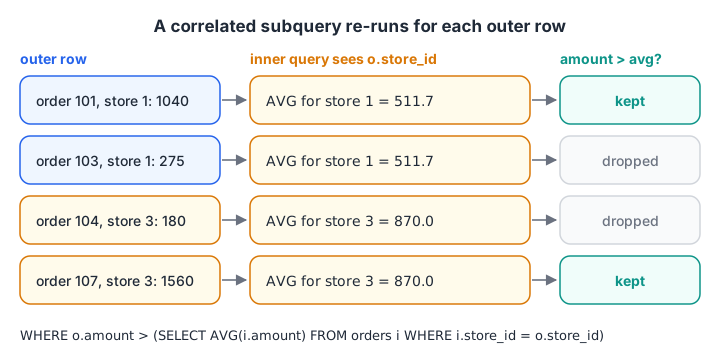
For each order, the inner query sees that order's store_id and computes the average for that store only.
import sqlite3

con = sqlite3.connect(":memory:")
con.executescript("""
CREATE TABLE orders (order_id INT, customer_id INT, store_id INT, order_date TEXT, amount INT, payment_mode TEXT);
INSERT INTO orders VALUES
 (101,1,1,'2026-03-01',1040,'UPI'), (102,2,2,'2026-03-01',330,'Cash'), (103,1,1,'2026-03-03',275,'UPI'),
 (104,3,3,'2026-03-04',180,'Card'), (105,4,2,'2026-03-05',680,'UPI'), (106,2,4,'2026-03-07',120,'Cash'),
 (107,5,3,'2026-03-08',1560,'Card'), (108,6,1,'2026-03-08',220,'UPI'), (109,4,4,'2026-03-10',340,NULL),
 (110,1,2,'2026-03-12',465,'Cash'), (111,6,3,'2026-03-14',NULL,'UPI');
""")

query = """
SELECT o.order_id, o.store_id, o.amount,
       (SELECT ROUND(AVG(i.amount), 1) FROM orders AS i WHERE i.store_id = o.store_id) AS store_avg
FROM orders AS o
WHERE o.amount > (SELECT AVG(i.amount) FROM orders AS i WHERE i.store_id = o.store_id)
ORDER BY o.store_id
"""
for row in con.execute(query):
    print(row)

print("Customers with an order above 500:", con.execute("""
    SELECT c_id FROM (SELECT DISTINCT customer_id AS c_id FROM orders) AS c
    WHERE EXISTS (SELECT 1 FROM orders AS o WHERE o.customer_id = c.c_id AND o.amount > 500)""").fetchall())
Each store has exactly one order above its own average. Bhawarkuan's order 109 qualifies at only 340 rupees, because that store's average is 230. Comparing with the chain-wide average of 521 would have hidden it.
EXISTS and NOT EXISTS
EXISTS (subquery) is true when the subquery returns at least one row. What it selects does not matter, which is why people write SELECT 1. The database can stop at the first match, so EXISTS is usually efficient. Customers 1, 4 and 5 each have an order above 500 rupees.
Quick check
Which subquery is correlated?
The second subquery refers to o.store_id from the outer query, so its result depends on each outer row.
Subqueries in FROM: derived tables
A subquery in FROM produces a temporary result that the outer query treats like a table. MySQL requires an alias for it, and so did PostgreSQL before version 16. SQLite does not, but naming it is always good practice.
"What is the average amount a customer spent in March?" needs two levels of aggregation: total per customer first, then the average of those totals.
SELECT ROUND(AVG(total), 2) AS avg_spend_per_customer
FROM (SELECT customer_id, SUM(amount) AS total
      FROM orders
      GROUP BY customer_id) AS per_customer;   -- 868.33
The six customers spent 5,210 rupees between them, so the average customer spent 868.33, much more than the average order of 521. Deeply nested derived tables quickly become hard to read, which is the problem the next article, SQL common table expressions, solves.
Subquery vs JOIN: which should you use?
| Situation | Better choice | Why |
|---|---|---|
| Need columns from both tables | JOIN | A subquery in WHERE cannot return extra columns |
| "Does a match exist?" | EXISTS / IN | Never duplicates outer rows |
| "Find rows with no match" | NOT EXISTS or LEFT JOIN ... IS NULL | Safe with NULLs |
| Compare with a summary value | Scalar subquery | Clear and short |
| Several steps of logic | CTE | Readable, top to bottom |
Modern optimisers in PostgreSQL, MySQL 8 and SQLite often rewrite IN and EXISTS subqueries into joins internally, so pick the form that reads most clearly and check speed with EXPLAIN only when it matters.
Common mistakes with SQL subqueries
- Scalar subquery returning several rows. PostgreSQL errors with "more than one row returned"; SQLite silently takes the first. Add an aggregate or a stricter WHERE.
- NOT IN with NULLs. Use NOT EXISTS, or filter NULLs out of the subquery.
- Missing alias on a derived table. MySQL rejects
FROM (SELECT ...)withoutAS name. - Forgetting correlation. Leaving out
WHERE i.store_id = o.store_idturns a per-store average into a chain-wide one without any error. - Slow correlated subqueries on big tables. If one runs per row over millions of rows, rewrite it with a join to a grouped table or a window function.
For guided practice turning business questions into nested queries, a placement-focused SQL and analytics course in Indore from Debugshala starts with a free demo. Short daily practice also helps, so try reasoning MCQs on Debugshala Test.
Key takeaways
- A subquery is a SELECT inside another statement, written in parentheses.
- Scalar subqueries return one value; list subqueries feed IN; derived tables sit in FROM.
- Correlated subqueries reference the outer row and are evaluated per row.
- EXISTS checks for at least one matching row and ignores what is selected.
- NOT IN returns nothing if the list contains NULL; NOT EXISTS is the safe form.
- Choose between subquery, join and CTE by readability first, then measure speed.
FAQ
What is a subquery in SQL with an example?
A subquery is a query nested inside another query. For example, SELECT order_id FROM orders WHERE amount > (SELECT AVG(amount) FROM orders) uses an inner query to compute the average and an outer query to list orders above it. Subqueries can appear in SELECT, FROM, WHERE and HAVING.
What is the difference between a subquery and a correlated subquery?
A regular subquery is independent: it runs once and its result is reused for every outer row. A correlated subquery refers to a column of the outer query, so it is evaluated for each outer row, like a per-store average for each order. Correlated subqueries are more flexible but can be slower.
Which is faster, a subquery or a JOIN?
Often neither, because modern databases rewrite many subqueries into joins before running them. Differences appear with correlated subqueries over large tables, which can be slower than a join to a pre-grouped result. Write the clearest version first, then compare both with EXPLAIN if performance matters.
What is the difference between EXISTS and IN?
IN compares a value with a list returned by the subquery. EXISTS only checks whether the subquery returns any row, usually through a correlated condition. Results are the same for positive checks, but NOT EXISTS stays correct when NULLs are present, while NOT IN returns no rows.
Can I learn SQL subqueries in Indore with placement support?
Yes. Debugshala, an IT training and placement institute at Old Palasia, Indore, teaches SQL subqueries in its Data Analytics course, offline and in English or Hindi. Fresh graduates, non-IT learners and candidates with a year gap can join, placement assistance is offered, and a free demo class comes first.
From the team behind this site
Go further with the Data Analytics Course at Debugshala
These tutorials are written by Debugshala, a training and placement institute at Old Palasia, Indore. The classroom course adds live mentoring, real projects and interview preparation.
- Offline classes at Old Palasia, Indore
- Free demo class before you pay
- Non-IT, fresher and year-gap friendly
- Placement assistance
700+ students placed · 200+ hiring partners · 4.9★ Google rating
