

SQL Aggregate Functions: COUNT, SUM, AVG, MIN and MAX
SQL aggregate functions explained: COUNT(*) vs COUNT(column), SUM, AVG, MIN and MAX, how NULLs change results, and conditional totals you can run.
At closing time, the cashier at Malwa Mart's Vijay Nagar branch does not read every bill aloud to the manager. She calls out five numbers: "Eleven bills today, 5,210 rupees in total, about 521 per bill, smallest 120, largest 1,560."
Those five numbers summarise a whole drawer of paper. The manager can decide whether it was a good day without seeing a single bill.
Each number is the output of an aggregate function. "Eleven bills" is COUNT. "5,210 in total" is SUM. "About 521 per bill" is AVG. "Smallest" and "largest" are MIN and MAX. The drawer of bills is the set of rows that passed your WHERE filter.
An SQL aggregate function takes a set of rows and returns a single value that summarises one column, such as a count, total, average, minimum or maximum.
You have already learned to choose and sort rows with ORDER BY, LIMIT and DISTINCT. Aggregates are the next step: instead of returning rows, the query returns facts about them.
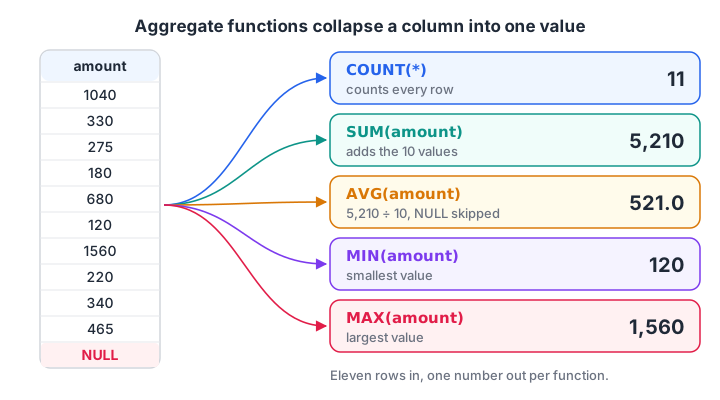
Five aggregate functions read the same amount column and each returns one number. The NULL amount is skipped by all except COUNT().*
The five core SQL aggregate functions
| Function | Returns | Works on | Ignores NULL? |
|---|---|---|---|
COUNT(*) |
Number of rows | Any table | Counts every row |
COUNT(col) |
Number of non-NULL values | Any column | Yes |
SUM(col) |
Total | Numbers | Yes |
AVG(col) |
Mean (sum divided by count of non-NULL values) | Numbers | Yes |
MIN(col) / MAX(col) |
Smallest / largest value | Numbers, text, dates | Yes |
These five exist in every SQL database, with the same names. They follow the SQL standard, so a query that uses them moves between MySQL, PostgreSQL and SQLite unchanged.
Malwa Mart's March orders table has eleven rows. Order 111 is still being billed, so its amount is NULL. Here is the whole day summarised in one query.
SELECT COUNT(*)              AS orders,
       SUM(amount)           AS revenue,
       ROUND(AVG(amount), 1) AS avg_order,
       MIN(amount)           AS smallest,
       MAX(amount)           AS largest
FROM orders;import sqlite3
con = sqlite3.connect(":memory:")
con.execute("CREATE TABLE orders (order_id INT, customer_id INT, store_id INT, order_date TEXT, amount INT, payment_mode TEXT)")
con.executemany("INSERT INTO orders VALUES (?, ?, ?, ?, ?, ?)", [
(101, 1, 1, "2026-03-01", 1040, "UPI"), (102, 2, 2, "2026-03-01", 330, "Cash"),
(103, 1, 1, "2026-03-03", 275, "UPI"), (104, 3, 3, "2026-03-04", 180, "Card"),
(105, 4, 2, "2026-03-05", 680, "UPI"), (106, 2, 4, "2026-03-07", 120, "Cash"),
(107, 5, 3, "2026-03-08", 1560, "Card"), (108, 6, 1, "2026-03-08", 220, "UPI"),
(109, 4, 4, "2026-03-10", 340, None), (110, 1, 2, "2026-03-12", 465, "Cash"),
(111, 6, 3, "2026-03-14", None, "UPI")])
query = """
SELECT COUNT(*) AS orders, SUM(amount) AS revenue, ROUND(AVG(amount), 1) AS avg_order,
MIN(amount) AS smallest, MAX(amount) AS largest
FROM orders
"""
cur = con.execute(query)
names = [d[0] for d in cur.description]
print(dict(zip(names, cur.fetchone())))The query returns exactly one row, however many rows the table holds. Notice that the average is 521.0, which is 5,210 divided by 10, not by 11. AVG skipped the NULL amount.
COUNT(*) vs COUNT(column) vs COUNT(DISTINCT column)
COUNT has three forms, and interviewers love asking about the difference.
COUNT(*)counts rows, whatever they contain. Eleven orders means eleven.COUNT(amount)counts rows whereamountis not NULL. That is ten.COUNT(DISTINCT customer_id)counts unique non-NULL customers. Several customers ordered more than once, so this is smaller.
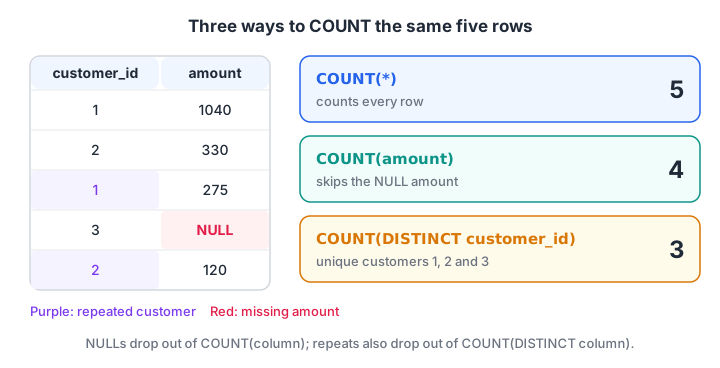
The same five rows give three different counts. COUNT() counts rows, COUNT(col) skips NULLs and COUNT(DISTINCT col) also drops repeats.*
import sqlite3

con = sqlite3.connect(":memory:")
con.execute("CREATE TABLE orders (order_id INT, customer_id INT, amount INT, payment_mode TEXT)")
con.executemany("INSERT INTO orders VALUES (?, ?, ?, ?)", [
    (101, 1, 1040, "UPI"), (102, 2, 330, "Cash"), (103, 1, 275, "UPI"), (104, 3, 180, "Card"),
    (105, 4, 680, "UPI"), (106, 2, 120, "Cash"), (107, 5, 1560, "Card"), (108, 6, 220, "UPI"),
    (109, 4, 340, None), (110, 1, 465, "Cash"), (111, 6, None, "UPI")])

row = con.execute("""
    SELECT COUNT(*), COUNT(amount), COUNT(payment_mode),
           COUNT(DISTINCT customer_id), COUNT(DISTINCT payment_mode)
    FROM orders
""").fetchone()
labels = ["rows", "amounts recorded", "payment modes recorded", "unique customers", "unique payment modes"]
for label, value in zip(labels, row):
    print(f"{label:24} {value}")
Eleven orders came from six unique customers. COUNT(DISTINCT payment_mode) is 3, because NULL is never counted as a value.
Quick check
A column has 8 rows: 6 numbers and 2 NULLs. What does COUNT(column) return?
COUNT(column) skips NULLs and counts only the 6 rows with values. COUNT(*) would return 8.
How do aggregate functions handle NULL?
All aggregates except COUNT(*) skip NULLs. Usually that is what you want, but it can mislead.
Suppose order 111 really earned nothing because it was cancelled. Then the honest average across all eleven orders is 5,210 divided by 11, about 473.6, not 521. You decide which is right by business meaning, and you make it explicit with COALESCE, which swaps NULL for a value you choose.
SELECT AVG(amount)              AS avg_of_billed,   -- skips NULL: 521.0
       AVG(COALESCE(amount, 0)) AS avg_of_all       -- NULL counted as 0: 473.6
FROM orders;
Aggregates on an empty set
When no rows pass the WHERE filter, COUNT returns 0, but SUM, AVG, MIN and MAX return NULL. A dashboard that shows "NULL" instead of "0" looks broken, so wrap the sum: COALESCE(SUM(amount), 0). SQLite also offers TOTAL(), which returns 0.0 for an empty set.
import sqlite3

con = sqlite3.connect(":memory:")
con.execute("CREATE TABLE orders (order_id INT, store_id INT, amount INT)")
con.executemany("INSERT INTO orders VALUES (?, ?, ?)", [
    (101, 1, 1040), (102, 2, 330), (103, 1, 275), (104, 3, 180), (105, 2, 680), (106, 4, 120),
    (107, 3, 1560), (108, 1, 220), (109, 4, 340), (110, 2, 465), (111, 3, None)])

print("Billed avg vs all-orders avg:",
      con.execute("SELECT AVG(amount), ROUND(AVG(COALESCE(amount, 0)), 1) FROM orders").fetchone())

store9 = "FROM orders WHERE store_id = 9"   # no such store, so zero rows match
print("COUNT, SUM, MAX on no rows:", con.execute(f"SELECT COUNT(*), SUM(amount), MAX(amount) {store9}").fetchone())
print("With COALESCE and TOTAL:   ", con.execute(f"SELECT COALESCE(SUM(amount), 0), TOTAL(amount) {store9}").fetchone())
NULL handling has many more traps; the handling NULL in SQL article collects them in one place.
Quick check
The amounts are 100, 200 and NULL. What does AVG(amount) return?
AVG ignores the NULL, so it divides 300 by 2. Use AVG(COALESCE(amount, 0)) if the NULL should count as 0.
Quick check
No rows match the WHERE clause. What does SELECT SUM(amount) return?
SUM over no rows is NULL. COUNT over no rows is 0. Wrap the sum in COALESCE(SUM(amount), 0) to show zero.
Combining aggregates with WHERE
WHERE runs before the aggregate, so it decides which rows get summarised. "How much did UPI orders bring in, from 5 March onwards?" is one query.
SELECT COUNT(*) AS upi_orders, SUM(amount) AS upi_revenue
FROM orders
WHERE payment_mode = 'UPI' AND order_date >= '2026-03-05';
You cannot put an aggregate inside WHERE, as in WHERE SUM(amount) > 1000. When WHERE runs, the sum does not exist yet. Conditions on aggregates belong in HAVING, which the next article explains.
Several summaries in one pass: conditional aggregation
Often you want UPI revenue, cash revenue and card revenue side by side. Instead of three queries, put a CASE expression inside SUM. Rows that do not match add 0.
import sqlite3

con = sqlite3.connect(":memory:")
con.execute("CREATE TABLE orders (order_id INT, order_date TEXT, amount INT, payment_mode TEXT)")
con.executemany("INSERT INTO orders VALUES (?, ?, ?, ?)", [
    (101, "2026-03-01", 1040, "UPI"), (102, "2026-03-01", 330, "Cash"), (103, "2026-03-03", 275, "UPI"),
    (104, "2026-03-04", 180, "Card"), (105, "2026-03-05", 680, "UPI"), (106, "2026-03-07", 120, "Cash"),
    (107, "2026-03-08", 1560, "Card"), (108, "2026-03-08", 220, "UPI"), (110, "2026-03-12", 465, "Cash")])

query = """
SELECT SUM(CASE WHEN payment_mode = 'UPI'  THEN amount ELSE 0 END) AS upi,
       SUM(CASE WHEN payment_mode = 'Cash' THEN amount ELSE 0 END) AS cash,
       SUM(CASE WHEN payment_mode = 'Card' THEN amount ELSE 0 END) AS card,
       MIN(order_date) AS first_day, MAX(order_date) AS last_day
FROM orders
"""
cur = con.execute(query)
print(dict(zip([d[0] for d in cur.description], cur.fetchone())))
UPI brought in 2,215 rupees, cash 915 and card 1,740. MIN and MAX also work on ISO date text, giving the first and last trading day. PostgreSQL and SQLite 3.30+ offer a shorter form, SUM(amount) FILTER (WHERE payment_mode = 'UPI'); MySQL does not. The CASE syntax itself is covered in SQL CASE WHEN.
Mixing aggregates with ordinary columns
This query looks reasonable but is invalid in standard SQL:
SELECT store_id, SUM(amount) FROM orders;SUM collapses every row into one, so which store_id should appear beside it? PostgreSQL and MySQL (with its default ONLY_FULL_GROUP_BY mode) reject it with an error. SQLite runs it and picks a store from some arbitrary row, which gives a misleading answer.
The fix is to say you want one total per store. That is exactly what GROUP BY store_id does, and it is the heart of the next article, SQL GROUP BY and HAVING. Until then, every column in an aggregate query's SELECT should be inside an aggregate function.
Common mistakes with SQL aggregate functions
- Expecting COUNT(col) to equal COUNT(*). They differ whenever the column has NULLs.
- Trusting AVG with missing values. AVG ignores NULLs; decide whether a NULL should count as 0.
- Integer averages in SQL Server.
AVGof an integer column returns an integer there, so 7 and 8 average to 7. WriteAVG(amount * 1.0). SQLite, MySQL and PostgreSQL return decimals. - Showing NULL for empty totals. Wrap SUM in
COALESCE(..., 0). - Summing after a join. A join can repeat rows, so SUM double counts. Check row counts before and after joining.
If you want guided practice that goes from these basics to full reports, Debugshala's data analyst course for freshers runs offline in Indore with a free demo class. For extra drills, try aptitude and coding questions on Debugshala Test.
Key takeaways
- COUNT, SUM, AVG, MIN and MAX collapse many rows into one value each.
COUNT(*)counts rows;COUNT(col)counts non-NULL values;COUNT(DISTINCT col)counts unique values.- All aggregates except COUNT(*) ignore NULLs, which affects averages.
- WHERE filters before aggregating; aggregates cannot appear in WHERE.
- Use CASE inside SUM for side-by-side totals, and GROUP BY for one summary per group.
FAQ
What are aggregate functions in SQL?
Aggregate functions calculate a single result from a set of rows. The five standard ones are COUNT, SUM, AVG, MIN and MAX. They are used for totals, averages and counts in reports, and they are usually combined with GROUP BY to get one result per category, store or month.
What is the difference between COUNT(*) and COUNT(1)?
There is no practical difference. Both count every row, including rows with NULLs, and modern databases run them identically. COUNT(*) is the standard, more readable form. The form that behaves differently is COUNT(column), which skips NULL values in that column.
Does SQL AVG include NULL values?
No. AVG adds the non-NULL values and divides by how many non-NULL values there are, so NULL rows are left out of both the sum and the count. If missing values should count as zero, write AVG(COALESCE(column, 0)) to include them explicitly.
Can I use aggregate functions in a WHERE clause?
No. WHERE filters individual rows before any aggregation happens, so an aggregate has nothing to work on yet. To filter on an aggregate result, such as total sales above 1,000, use HAVING after GROUP BY, or compute the aggregate in a subquery first.
Where can I learn SQL for data analytics in Indore?
Debugshala, an IT training and placement institute at Old Palasia, Indore, offers a Data Analytics course with offline classes in English and Hindi. It accepts freshers, non-IT graduates and candidates with a year gap, offers placement assistance, and lets you attend a free demo class before paying.
From the team behind this site
Go further with the Data Analytics Course at Debugshala
These tutorials are written by Debugshala, a training and placement institute at Old Palasia, Indore. The classroom course adds live mentoring, real projects and interview preparation.
- Offline classes at Old Palasia, Indore
- Free demo class before you pay
- Non-IT, fresher and year-gap friendly
- Placement assistance
700+ students placed · 200+ hiring partners · 4.9★ Google rating
