

SQL Transactions and ACID Properties Explained with Examples
SQL transactions explained with runnable code: BEGIN, COMMIT, ROLLBACK, savepoints, the four ACID properties and isolation levels in MySQL and PostgreSQL.
Asha opens the Malwa Mart app and pays 900 rupees for her groceries from her store wallet. Behind that one tap, two things must happen: an order row is written, and 900 rupees leaves her wallet balance.
Now imagine the server crashes between those two steps. If the order is saved but the wallet is not charged, the store gives away groceries. If the wallet is charged but no order exists, Asha loses money and the support team gets an angry call. Neither half-finished state is acceptable.
The database solves this by treating both steps as one transaction. The two statements are the operations. Saving them together is a commit, and undoing everything after a failure is a rollback.
A SQL transaction is a sequence of one or more SQL statements executed as a single unit of work, so that either all of their changes are permanently saved or none of them are.
This article follows SQL views in the series and builds on the safe-change routine from INSERT, UPDATE and DELETE. The runnable examples use Python's sqlite3 module; the SQL itself works the same way in MySQL 8 and PostgreSQL 16 unless noted.
What happens without a transaction?
By default, most databases run in autocommit mode: each statement is saved the moment it finishes. That is fine for a single UPDATE and dangerous for a sequence.
The wallet table below has a rule, CHECK (balance >= 0), so nobody can spend more than they hold. Neha has 300 rupees and tries to pay 450.
import sqlite3

con = sqlite3.connect(":memory:", isolation_level=None)   # autocommit: every statement saves at once
con.executescript("""
CREATE TABLE wallets (customer_id INTEGER PRIMARY KEY, name TEXT, balance INT CHECK (balance >= 0));
CREATE TABLE orders (order_id INTEGER PRIMARY KEY, customer_id INT, store_id INT, amount INT, payment_mode TEXT);
INSERT INTO wallets VALUES (1, 'Asha Verma', 1500), (7, 'Neha D''Souza', 300);
""")
try:
    con.execute("INSERT INTO orders VALUES (113, 7, 4, 450, 'Wallet')")
    con.execute("UPDATE wallets SET balance = balance - 450 WHERE customer_id = 7")
except sqlite3.IntegrityError as err:
    print("Payment failed:", err)

print("Orders:", con.execute("SELECT * FROM orders").fetchall())
print("Neha's wallet:", con.execute("SELECT balance FROM wallets WHERE customer_id = 7").fetchone())
The wallet update failed, but order 113 is still saved. The store now has an order that was never paid for. This is exactly the half-done state that transactions exist to prevent.
How do BEGIN, COMMIT and ROLLBACK work?
A transaction has three commands. BEGIN opens it, COMMIT saves every change since BEGIN, and ROLLBACK throws them all away.
BEGIN;                                  -- MySQL also accepts START TRANSACTION
INSERT INTO orders VALUES (112, 1, 2, 900, 'Wallet');
UPDATE wallets SET balance = balance - 900 WHERE customer_id = 1;
COMMIT;                                 -- or ROLLBACK; if anything went wrong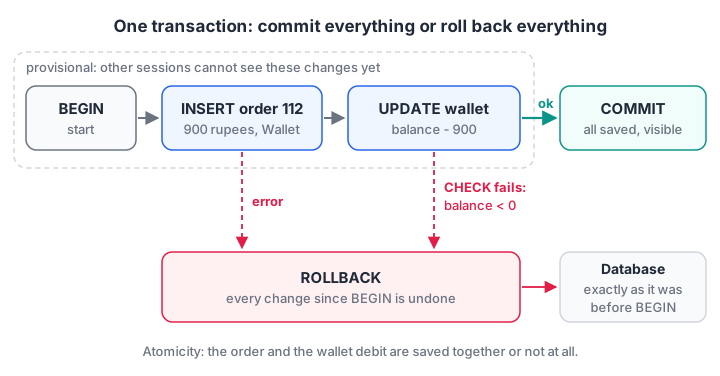
Until COMMIT, the changes are provisional. A failure at any step leads to ROLLBACK, and the database looks as if the transaction never started.
Here is the same payment wrapped in a transaction, for one customer who can afford it and one who cannot.
import sqlite3

con = sqlite3.connect(":memory:", isolation_level=None)   # we send BEGIN and COMMIT ourselves
con.executescript("""
CREATE TABLE wallets (customer_id INTEGER PRIMARY KEY, name TEXT, balance INT CHECK (balance >= 0));
CREATE TABLE orders (order_id INTEGER PRIMARY KEY, customer_id INT, store_id INT, amount INT, payment_mode TEXT);
INSERT INTO wallets VALUES (1, 'Asha Verma', 1500), (7, 'Neha D''Souza', 300);
""")

def pay_from_wallet(order_id, customer_id, store_id, amount):
    try:
        con.execute("BEGIN")
        con.execute("INSERT INTO orders VALUES (?, ?, ?, ?, 'Wallet')", (order_id, customer_id, store_id, amount))
        con.execute("UPDATE wallets SET balance = balance - ? WHERE customer_id = ?", (amount, customer_id))
        con.execute("COMMIT")
        print(f"order {order_id}: committed")
    except sqlite3.IntegrityError as err:
        con.execute("ROLLBACK")
        print(f"order {order_id}: rolled back ({err})")

pay_from_wallet(112, 1, 2, 900)
pay_from_wallet(113, 7, 4, 450)
print("Wallets:", con.execute("SELECT name, balance FROM wallets").fetchall())
print("Orders: ", con.execute("SELECT order_id, amount FROM orders").fetchall())
Asha's order is saved and her balance drops to 600. Neha's attempt is rolled back completely: no order 113, and her balance stays at 300.
Quick check
A transaction inserts an order and then fails while updating the wallet. The code runs ROLLBACK. What is in the orders table?
Atomicity means every statement since BEGIN is undone by ROLLBACK, including those that succeeded.
What are the ACID properties?
ACID is the checklist of guarantees a reliable database gives each transaction.
| Property | Plain meaning | In the wallet example |
|---|---|---|
| Atomicity | All statements succeed, or none take effect | Order and debit are saved together or not at all |
| Consistency | Every rule (constraints, keys) holds before and after | The balance can never go below zero |
| Isolation | Running transactions do not see each other's unfinished work | Another cashier never sees Asha's balance mid-payment |
| Durability | Once committed, data survives crashes and power cuts | After COMMIT, the order is safe even if the server restarts |
Atomicity and consistency you have already seen in action. Durability comes from the database writing to a log on disk before it confirms a commit: the write-ahead log in SQLite's WAL mode and PostgreSQL, and the redo log in MySQL's InnoDB engine.
An in-memory SQLite database, like the ones on this page, has no durability at all, because nothing ever reaches a disk.
Isolation is the subtle one, so it gets its own section.
Savepoints: rolling back part of a transaction
Sometimes you want to undo one step without losing the whole transaction. A savepoint is a named bookmark inside a transaction that you can roll back to.
Suppose the night job loads three bills from the stores. One bill has a bad line, and you want to skip that bill but keep the other two.
import sqlite3

con = sqlite3.connect(":memory:", isolation_level=None)
con.execute("CREATE TABLE order_items (order_id INT, product_id INT, quantity INT CHECK (quantity > 0), PRIMARY KEY (order_id, product_id))")
bills = {112: [(2, 1), (8, 2)], 113: [(3, 2), (5, 0)], 114: [(1, 1)]}   # bill 113 has a zero quantity

con.execute("BEGIN")
for order_id, lines in bills.items():
    con.execute("SAVEPOINT one_bill")
    try:
        for product_id, qty in lines:
            con.execute("INSERT INTO order_items VALUES (?, ?, ?)", (order_id, product_id, qty))
        con.execute("RELEASE one_bill")
    except sqlite3.IntegrityError:
        con.execute("ROLLBACK TO one_bill")       # undo only this bill's lines
        con.execute("RELEASE one_bill")
        print(f"skipped bill {order_id}")
con.execute("COMMIT")
print(con.execute("SELECT * FROM order_items").fetchall())
Bill 113's first line was inserted and then undone along with the bad one, while bills 112 and 114 were committed. SAVEPOINT, ROLLBACK TO and RELEASE work the same way in SQLite, MySQL and PostgreSQL.
What are transaction isolation levels?
When two sessions work at the same time, isolation decides what each can see of the other. Full isolation is safe but slower, so the SQL standard defines four levels by which problems, called anomalies, they allow.
- Dirty read: you read a change another session has not committed yet, and it may be rolled back.
- Non-repeatable read: you read the same row twice in one transaction and get different values, because someone committed an update in between.
- Phantom read: you run the same filter twice and new rows appear, because someone committed an insert.
| Isolation level | Dirty read | Non-repeatable read | Phantom read |
|---|---|---|---|
| READ UNCOMMITTED | Possible | Possible | Possible |
| READ COMMITTED | Prevented | Possible | Possible |
| REPEATABLE READ | Prevented | Prevented | Possible in the standard |
| SERIALIZABLE | Prevented | Prevented | Prevented |
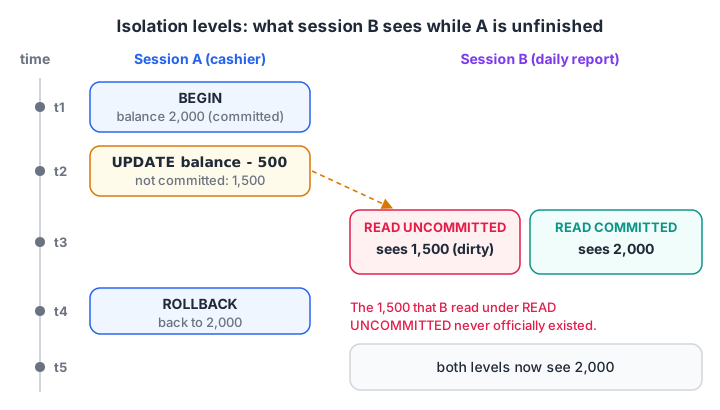
A dirty read shows a value that never officially existed. Under READ COMMITTED, session B sees only the last committed balance.
The defaults differ, and interviewers like to ask about them:
- MySQL 8 (InnoDB): REPEATABLE READ. Its locking also blocks most phantoms.
- PostgreSQL 16: READ COMMITTED. Asking for READ UNCOMMITTED gives you READ COMMITTED, and its REPEATABLE READ also prevents phantoms.
- SQLite: effectively SERIALIZABLE, because only one connection can write at a time.
You change the level per transaction, for example SET TRANSACTION ISOLATION LEVEL SERIALIZABLE; before the transaction starts in MySQL, or as the first statement inside it in PostgreSQL.
Seeing a dirty read in SQLite
SQLite allows a dirty read only in one special case: two connections sharing an in-memory cache, with PRAGMA read_uncommitted switched on. That makes it a neat way to watch isolation work.
import sqlite3

uri = "file:malwa_wallets?mode=memory&cache=shared"
a = sqlite3.connect(uri, uri=True, isolation_level=None)   # cashier A
b = sqlite3.connect(uri, uri=True, isolation_level=None)   # cashier B, same database
a.executescript("CREATE TABLE wallets (name TEXT PRIMARY KEY, balance INT); INSERT INTO wallets VALUES ('Asha Verma', 2000);")

a.execute("BEGIN")
a.execute("UPDATE wallets SET balance = balance - 500 WHERE name = 'Asha Verma'")   # not committed
try:
    b.execute("SELECT balance FROM wallets").fetchone()
except sqlite3.OperationalError as err:
    print("B, normal isolation:", err)

b.execute("PRAGMA read_uncommitted = 1")
print("B, read uncommitted:", b.execute("SELECT balance FROM wallets").fetchone())
a.execute("ROLLBACK")
print("B, after A's rollback:", b.execute("SELECT balance FROM wallets").fetchone())
With normal isolation, B is simply blocked until A finishes. With read-uncommitted on, B sees 1,500, a balance that disappears when A rolls back. Any report built on that read would be wrong.
Quick check
Which isolation level is the default in PostgreSQL?
PostgreSQL defaults to READ COMMITTED. MySQL's InnoDB defaults to REPEATABLE READ.
Transaction syntax across databases
| Behaviour | SQLite | MySQL 8 | PostgreSQL 16 |
|---|---|---|---|
| Start | BEGIN |
START TRANSACTION or BEGIN |
BEGIN or START TRANSACTION |
| Autocommit by default | Yes, outside BEGIN | Yes (SET autocommit = 0 to change) |
Yes, in psql |
| DDL inside a transaction | Can be rolled back | Causes an implicit COMMIT | Can be rolled back |
| Two sessions want the same row | Second writer waits, then gets "database is locked" | Row lock wait, deadlock detection | Row lock wait, deadlock detection |
The DDL row surprises people. In MySQL, a CREATE TABLE or ALTER TABLE in the middle of a transaction silently commits everything before it, so you cannot roll it back.
Common mistakes with SQL transactions
- Forgetting to commit. In Python, changes made outside
with con:or withoutcon.commit()vanish when the connection closes. - Long transactions. Holding a transaction open while a user fills a form, or during a slow API call, blocks other sessions. Keep transactions short.
- Catching the error and carrying on. If a statement fails and you neither roll back nor fix it, the remaining statements may commit a partial change. PostgreSQL forces the issue by refusing every statement until you roll back.
- Assuming the same default everywhere. Code tested on MySQL's REPEATABLE READ can behave differently on PostgreSQL's READ COMMITTED.
- Relying on application checks instead of constraints. Two sessions can both pass a Python check like "balance is enough". A
CHECKconstraint or a locked read is the real guard.
Transactions turn up in every analyst and backend interview, usually as "explain ACID with an example". The hands-on SQL track in Debugshala's data analytics course practises them on real retail tables, and timed transaction and ACID MCQs on Debugshala Test are a quick way to revise.
Next, stored procedures and functions show how to package a transaction like this wallet payment inside the database itself.
Key takeaways
- A transaction groups statements so they succeed or fail together: BEGIN, then COMMIT or ROLLBACK.
- ACID stands for atomicity, consistency, isolation and durability.
- Savepoints let you undo part of a transaction without losing the rest.
- Isolation levels trade safety for concurrency by allowing dirty, non-repeatable or phantom reads.
- MySQL commits implicitly on DDL; PostgreSQL and SQLite can roll DDL back.
FAQ
What is a transaction in SQL with an example?
A transaction is a group of SQL statements that succeed or fail as one unit. For example, paying for an order from a wallet needs an INSERT into orders and an UPDATE to the wallet. Wrapped in BEGIN and COMMIT, both are saved together, and a ROLLBACK after any error undoes both.
What are ACID properties in DBMS?
ACID stands for Atomicity, Consistency, Isolation and Durability. Atomicity means all or nothing. Consistency means constraints hold before and after. Isolation means concurrent transactions do not see each other's unfinished changes. Durability means committed data survives crashes because it is written to a log on disk first.
What is the difference between COMMIT and ROLLBACK?
COMMIT makes every change since the transaction began permanent and visible to other sessions. ROLLBACK discards all of those changes and returns the data to how it was at BEGIN. After either command, the transaction ends, and a new one must start before further grouped changes.
What is the default isolation level in MySQL?
MySQL's InnoDB engine uses REPEATABLE READ by default. Within one transaction, repeated reads of the same rows return the same values, and InnoDB's next-key locking also prevents most phantom rows. PostgreSQL, by contrast, defaults to READ COMMITTED, and SQLite effectively runs every transaction as SERIALIZABLE.
Does Debugshala in Indore teach SQL transactions?
Yes. Debugshala's Data Analytics course in Indore covers transactions, ACID and safe data changes alongside joins and reporting. Classes are held offline at the Old Palasia campus in English and Hindi, students from non-IT backgrounds and with a year gap are welcome, placement assistance is offered, and a free demo class comes first.
From the team behind this site
Go further with the Data Analytics Course at Debugshala
These tutorials are written by Debugshala, a training and placement institute at Old Palasia, Indore. The classroom course adds live mentoring, real projects and interview preparation.
- Offline classes at Old Palasia, Indore
- Free demo class before you pay
- Non-IT, fresher and year-gap friendly
- Placement assistance
700+ students placed · 200+ hiring partners · 4.9★ Google rating
