

SQL CREATE TABLE and ALTER TABLE: Syntax with Examples
Learn SQL CREATE TABLE and ALTER TABLE with runnable examples: columns, constraints, foreign keys, adding and renaming columns, and SQLite limits.
Before Malwa Mart opened its new Bhawarkuan branch, the owner had a carpenter build shelves. He measured each section first: rice sacks on the bottom, a labelled rack for spices, a locked drawer for cash. Once the shelves were up, the staff only had to fill them.
Six months later the branch started selling frozen food. The carpenter did not knock down the whole stockroom. He added one freezer section and relabelled a rack.
Building the shelves is CREATE TABLE. Each section is a column, the size and label is its data type, and rules like "cash drawer must stay locked" are constraints. Adding the freezer later is ALTER TABLE.
CREATE TABLE is the SQL command that defines a new table's columns, data types and constraints; ALTER TABLE changes that definition after the table exists.
In the previous article you chose SQL data types for every Malwa Mart column. Now you will turn those choices into real tables.
What does a CREATE TABLE statement look like?
A CREATE TABLE statement has a table name and, inside brackets, a comma-separated list of column definitions. Each column definition is a name, a type and zero or more constraints.
CREATE TABLE products (
    product_id   INTEGER PRIMARY KEY,
    product_name VARCHAR(100) NOT NULL UNIQUE,
    category     VARCHAR(30)  NOT NULL,
    price        DECIMAL(10, 2) CHECK (price > 0),
    in_stock     BOOLEAN DEFAULT TRUE
);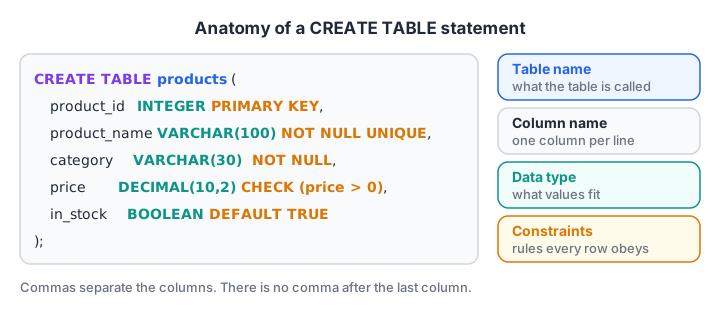
Every column line follows the same pattern: name, then type, then any constraints. Commas separate the columns.
Read the statement line by line. product_id is the primary key, so every product gets a unique id. product_name cannot be empty and cannot repeat. price must be above zero. in_stock is true unless you say otherwise.
The constraints you will use most
| Constraint | What it enforces | Malwa Mart example |
|---|---|---|
PRIMARY KEY |
Unique, never NULL, one per table | customer_id |
NOT NULL |
A value is required | product_name |
UNIQUE |
No two rows share the value | phone |
DEFAULT |
Value used when none is given | in_stock DEFAULT TRUE |
CHECK |
A condition every row must pass | price > 0 |
FOREIGN KEY |
Value must exist in another table | orders.customer_id |
Constraints deserve their own deep dive, which you will find in SQL constraints, primary and foreign keys. For now, treat them as free quality checks that run on every insert.
Creating your first table in SQLite
The block below creates the products table, adds three rows and asks SQLite to describe the table using PRAGMA table_info. A PRAGMA is a SQLite-specific command; in MySQL you would write DESCRIBE products, and in PostgreSQL's psql shell \d products.
import sqlite3

con = sqlite3.connect(":memory:")
con.execute("""
    CREATE TABLE products (
        product_id   INTEGER PRIMARY KEY,
        product_name TEXT NOT NULL UNIQUE,
        category     TEXT NOT NULL,
        price        INTEGER CHECK (price > 0),
        in_stock     INTEGER DEFAULT 1
    )
""")
con.executemany("INSERT INTO products (product_id, product_name, category, price) VALUES (?, ?, ?, ?)",
                [(1, "Basmati Rice 5kg", "Grocery", 520), (2, "Toor Dal 1kg", "Grocery", 165),
                 (3, "Sev 500g", "Snacks", 120)])

print("cid | name | type | notnull | default | pk")
for col in con.execute("PRAGMA table_info(products)"):
    print(col)
print(con.execute("SELECT * FROM products").fetchall())
Notice that in_stock became 1 for all three rows even though the insert never mentioned it. That is the DEFAULT at work. Prices are stored as whole rupees here to keep the example short.
Building the full Malwa Mart schema
A real database has several linked tables. The orders table points to customers, stores and products through foreign keys. Two habits make this script safe to run again and again: IF NOT EXISTS, which skips a table that already exists, and SQLite's PRAGMA foreign_keys = ON, which SQLite needs on every connection before it checks foreign keys.
import sqlite3

con = sqlite3.connect(":memory:")
con.execute("PRAGMA foreign_keys = ON")
con.executescript("""
CREATE TABLE IF NOT EXISTS stores (store_id INTEGER PRIMARY KEY, store_name TEXT, area TEXT);
CREATE TABLE IF NOT EXISTS customers (
    customer_id INTEGER PRIMARY KEY, name TEXT NOT NULL,
    phone TEXT UNIQUE, city TEXT DEFAULT 'Indore', joined_on TEXT);
CREATE TABLE IF NOT EXISTS products (
    product_id INTEGER PRIMARY KEY, product_name TEXT NOT NULL,
    category TEXT NOT NULL, price INTEGER CHECK (price > 0));
CREATE TABLE IF NOT EXISTS orders (
    order_id INTEGER PRIMARY KEY,
    customer_id INTEGER NOT NULL REFERENCES customers(customer_id),
    store_id INTEGER NOT NULL REFERENCES stores(store_id),
    order_date TEXT NOT NULL, amount INTEGER CHECK (amount >= 0), payment_mode TEXT);
""")
print([r[0] for r in con.execute("SELECT name FROM sqlite_master WHERE type = 'table'")])

con.executescript("""INSERT INTO stores VALUES (1, 'Malwa Mart Vijay Nagar', 'Vijay Nagar');
                      INSERT INTO customers (customer_id, name) VALUES (1, 'Asha Verma');""")
tests = {"order 101 for customer 1": "INSERT INTO orders VALUES (101, 1, 1, '2026-03-01', 1040, 'UPI')",
         "order 102 for customer 99": "INSERT INTO orders VALUES (102, 99, 1, '2026-03-01', 330, 'Cash')",
         "free sample at price 0": "INSERT INTO products VALUES (9, 'Free sample', 'Promo', 0)"}
for label, sql in tests.items():
    try:
        con.execute(sql); print("Accepted:", label)
    except sqlite3.IntegrityError as err:
        print("Blocked: ", label, "->", err)
The first order is accepted. The second is blocked because customer 99 does not exist, and the free sample is blocked by the CHECK (price > 0) rule. The database refused bad data before it ever reached a report.
How do you change a table with ALTER TABLE?
Requirements change. Malwa Mart now wants to record each customer's loyalty tier, wants to rename joined_on to something clearer, and no longer needs a column it added by mistake. ALTER TABLE handles all three without losing the existing rows.
ALTER TABLE customers ADD COLUMN loyalty_tier TEXT DEFAULT 'Silver';
ALTER TABLE customers RENAME COLUMN joined_on TO signup_date;
ALTER TABLE customers DROP COLUMN temp_notes;
ALTER TABLE customers RENAME TO members;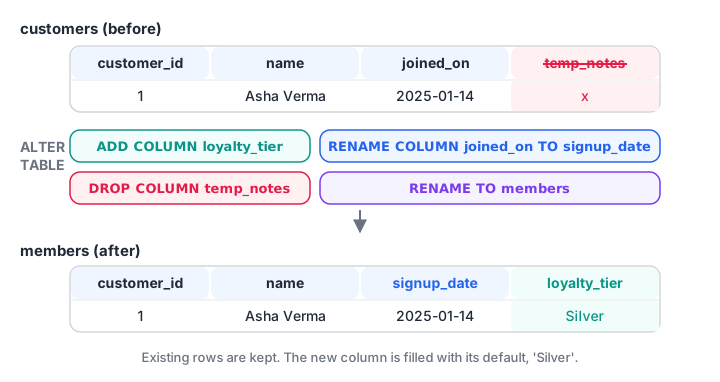
ALTER TABLE edits the table's structure in place. Existing rows stay, and a new column is filled with its default.
import sqlite3

con = sqlite3.connect(":memory:")
con.execute("CREATE TABLE customers (customer_id INTEGER PRIMARY KEY, name TEXT, joined_on TEXT, temp_notes TEXT)")
con.executemany("INSERT INTO customers VALUES (?, ?, ?, ?)",
                [(1, "Asha Verma", "2025-01-14", "x"), (2, "Ravi Patel", "2025-03-02", "y")])

def columns(table):
    return [row[1] for row in con.execute(f"PRAGMA table_info({table})")]

print("Before:", columns("customers"))
con.execute("ALTER TABLE customers ADD COLUMN loyalty_tier TEXT DEFAULT 'Silver'")
con.execute("ALTER TABLE customers RENAME COLUMN joined_on TO signup_date")
con.execute("ALTER TABLE customers DROP COLUMN temp_notes")
con.execute("ALTER TABLE customers RENAME TO members")
print("After: ", columns("members"))
print(con.execute("SELECT * FROM members").fetchall())
Both old customers kept their data and received 'Silver' as their tier. RENAME COLUMN needs SQLite 3.25 or newer, and DROP COLUMN needs 3.35 or newer.
ALTER TABLE differences between databases
| Task | SQLite | MySQL 8 | PostgreSQL 16 |
|---|---|---|---|
| Add a column | ADD COLUMN |
ADD COLUMN (can use AFTER col) |
ADD COLUMN |
| Rename a column | RENAME COLUMN a TO b |
RENAME COLUMN a TO b |
RENAME COLUMN a TO b |
| Drop a column | DROP COLUMN |
DROP COLUMN |
DROP COLUMN |
| Change a type | Not supported, rebuild | MODIFY COLUMN price DECIMAL(10,2) |
ALTER COLUMN price TYPE NUMERIC(10,2) |
| Add a constraint later | Not supported, rebuild | ADD CONSTRAINT ... |
ADD CONSTRAINT ... |
Quick check
In SQLite, how do you change a column from TEXT to INTEGER?
SQLite has no command to change a column's type. MODIFY is MySQL syntax and ALTER COLUMN ... TYPE is PostgreSQL syntax.
Changing a column type in SQLite by rebuilding
Because SQLite cannot change a column's type in place, you rebuild the table. The official SQLite ALTER TABLE page describes the full procedure; the short version is:
- Start a transaction so a failure leaves nothing half done.
- Create a new table with the corrected definition.
- Copy the rows across with
INSERT INTO new SELECT ... FROM old. - Drop the old table.
- Rename the new table to the old name, then commit.
import sqlite3

con = sqlite3.connect(":memory:")
con.execute("CREATE TABLE products (product_id INTEGER PRIMARY KEY, product_name TEXT, price TEXT)")
con.executemany("INSERT INTO products VALUES (?, ?, ?)", [(1, "Poha 1kg", "60"), (2, "Sev 500g", "120")])

with con:   # commits at the end, or rolls back if anything fails
    con.execute("CREATE TABLE products_new (product_id INTEGER PRIMARY KEY, product_name TEXT NOT NULL, price INTEGER CHECK (price > 0))")
    con.execute("INSERT INTO products_new SELECT product_id, product_name, CAST(price AS INTEGER) FROM products")
    con.execute("DROP TABLE products")
    con.execute("ALTER TABLE products_new RENAME TO products")

for row in con.execute("SELECT product_name, price, typeof(price) FROM products"):
    print(row)
The price column is now a real integer with a CHECK rule, and both rows survived the move.
DROP TABLE and CREATE TABLE AS SELECT
DROP TABLE products; deletes the table and every row in it. There is no undo outside a transaction, so production teams restrict this permission. Add IF EXISTS to avoid an error when the table is already gone.
CREATE TABLE march_orders AS SELECT * FROM orders WHERE order_date LIKE '2026-03%'; makes a new table from a query result. Analysts use it for quick snapshots. It copies the data but not the constraints or keys.
Common mistakes with CREATE TABLE and ALTER TABLE
- A trailing comma after the last column.
price INTEGER,followed by)is a syntax error in every database. - Forgetting
PRAGMA foreign_keys = ONin SQLite. Without it, SQLite stores orders for customers who do not exist. - Adding a NOT NULL column with no default. Existing rows would have nothing to put there, so the database refuses. Give it a
DEFAULT. - Using reserved words as names. A column called
orderorgroupneeds quoting everywhere. Preferorder_idorgroup_name. - Changing structure without a backup.
DROP COLUMNis permanent. Copy the table first when it holds real data.
If you would like to design schemas like this under a mentor's review, the data analytics course at Debugshala's Old Palasia campus offers a free demo class before you commit.
Quick check
Which statement adds a column to an existing table?
Structure changes go through ALTER TABLE. UPDATE changes values in rows, not the table's columns.
Key takeaways
CREATE TABLE name (column type constraints, ...)defines a new table.- Constraints like PRIMARY KEY, NOT NULL, UNIQUE, CHECK and FOREIGN KEY reject bad rows automatically.
ALTER TABLEcan add, rename and drop columns and rename tables.- SQLite cannot change a column type in place; rebuild the table inside a transaction.
- Next, fill these tables with SQL INSERT, UPDATE and DELETE.
FAQ
What is the difference between CREATE TABLE and ALTER TABLE?
CREATE TABLE builds a brand-new table with its columns and constraints. ALTER TABLE changes a table that already exists, for example by adding a column or renaming one. Both are DDL commands, meaning they change structure, not the rows themselves.
How do I add a primary key to an existing table?
In MySQL and PostgreSQL, run ALTER TABLE orders ADD PRIMARY KEY (order_id), provided the column has no duplicates or NULLs. SQLite does not allow adding a primary key later, so you rebuild the table with the key in its definition and copy the rows across.
What does IF NOT EXISTS do in CREATE TABLE?
IF NOT EXISTS tells the database to skip the statement quietly when a table with that name already exists. Without it, running the same setup script twice fails with a "table already exists" error. It does not compare columns, so an outdated table stays unchanged.
Can I delete a column in SQL?
Yes. ALTER TABLE customers DROP COLUMN temp_notes removes the column and its data in MySQL, PostgreSQL and SQLite 3.35 or newer. Some databases refuse if the column is part of an index, key or view, so remove those dependencies first.
Where can I practise database design in Indore?
Debugshala, an IT training and placement institute at Old Palasia, Indore, runs offline Data Analytics classes in English and Hindi, with a free demo class before you pay. For quick revision between classes, take a short coding quiz on Debugshala Test.
From the team behind this site
Go further with the Data Analytics Course at Debugshala
These tutorials are written by Debugshala, a training and placement institute at Old Palasia, Indore. The classroom course adds live mentoring, real projects and interview preparation.
- Offline classes at Old Palasia, Indore
- Free demo class before you pay
- Non-IT, fresher and year-gap friendly
- Placement assistance
700+ students placed · 200+ hiring partners · 4.9★ Google rating
