

SQL Joins Explained: INNER, LEFT, RIGHT and FULL OUTER JOIN
SQL joins explained with runnable examples: INNER, LEFT, RIGHT and FULL OUTER JOIN, anti-joins, three-table joins and the ON vs WHERE filter trap.
Malwa Mart keeps two registers at its Palasia head office. The customer register lists each member once: name, city, the date they joined. The bill book lists every purchase, but each bill only carries a customer number, not a name.
When the owner asks "how much did Asha Verma spend in March?", the clerk has to work with both books open. She finds Asha's number in the register, then runs her finger down the bill book and picks out every bill with that number.
Some questions are trickier. "Which members have never bought anything?" means looking for register entries with no bills at all. "Are there bills whose customer number is not in the register?" means the opposite check.
Matching the two books by customer number is a join. The register is the customers table, the bill book is the orders table, and the customer number is the shared key column customer_id.
A SQL JOIN is a clause that combines rows from two or more tables into one result set by matching values in related columns, such as a primary key and the foreign key that points to it.
In SQL GROUP BY and HAVING you summarised the orders table on its own. Joins let those summaries show customer names and store names, which live in other tables. If keys are new to you, what is SQL explains primary and foreign keys.
How does an INNER JOIN work?
An INNER JOIN pairs each row of the first table with every row of the second table that satisfies the ON condition. Rows with no partner on the other side are dropped.
SELECT o.order_id, c.name, o.amount
FROM orders AS o
INNER JOIN customers AS c
        ON c.customer_id = o.customer_id;
o and c are table aliases, short nicknames that keep the query readable. The word INNER is optional: a bare JOIN means INNER JOIN in every database.
Malwa Mart has seven registered customers. Neha D'Souza signed up in March but has not ordered yet. That one customer is enough to see the difference between join types.
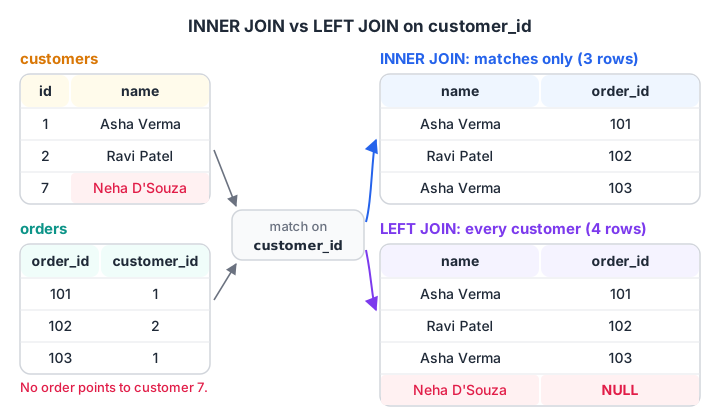
INNER JOIN drops Neha because no order points to her. LEFT JOIN keeps her row and fills the order columns with NULL.
import sqlite3

con = sqlite3.connect(":memory:")
con.executescript("""
CREATE TABLE customers (customer_id INT, name TEXT, city TEXT);
CREATE TABLE orders (order_id INT, customer_id INT, store_id INT, order_date TEXT, amount INT, payment_mode TEXT);
INSERT INTO customers VALUES (1,'Asha Verma','Indore'), (2,'Ravi Patel','Indore'), (3,'Meera Joshi','Dewas'),
 (4,'Pooja Rathore','Ujjain'), (5,'Sana Qureshi','Indore'), (6,'Vikram Chouhan','Indore'), (7,'Neha D''Souza','Indore');
INSERT INTO orders VALUES
 (101,1,1,'2026-03-01',1040,'UPI'), (102,2,2,'2026-03-01',330,'Cash'), (103,1,1,'2026-03-03',275,'UPI'),
 (104,3,3,'2026-03-04',180,'Card'), (105,4,2,'2026-03-05',680,'UPI'), (106,2,4,'2026-03-07',120,'Cash'),
 (107,5,3,'2026-03-08',1560,'Card'), (108,6,1,'2026-03-08',220,'UPI'), (109,4,4,'2026-03-10',340,NULL),
 (110,1,2,'2026-03-12',465,'Cash'), (111,6,3,'2026-03-14',NULL,'UPI');
""")

inner = con.execute("""SELECT c.name, o.order_id, o.amount FROM orders AS o
                       JOIN customers AS c ON c.customer_id = o.customer_id""").fetchall()
print("INNER JOIN rows:", len(inner), "first three:", inner[:3])

query = """
SELECT c.name, COUNT(o.order_id) AS orders, COALESCE(SUM(o.amount), 0) AS spent
FROM customers AS c
LEFT JOIN orders AS o ON o.customer_id = c.customer_id
GROUP BY c.customer_id, c.name
ORDER BY spent DESC
"""
for row in con.execute(query):
    print(row)
The INNER JOIN returns 11 rows, one per order, now carrying the customer's name. The LEFT JOIN report lists all seven customers. Asha tops it at 1,780 rupees, and Neha appears at the bottom with 0 orders, which an INNER JOIN would have hidden.
Note COUNT(o.order_id) rather than COUNT(*). For Neha, the LEFT JOIN produces one row full of NULLs, so COUNT(*) would wrongly report 1 order.
Quick check
Which query finds customers who have never placed an order?
The LEFT JOIN keeps customers without orders, filling the order columns with NULL. Keeping only those NULL rows is the anti-join pattern.
What is a LEFT JOIN used for?
A LEFT JOIN (also written LEFT OUTER JOIN) keeps every row of the table written first, the left table, whether or not it has a match. Where there is no match, the right table's columns come back as NULL.
Analysts use it for two everyday jobs:
- Complete lists. Every customer, every store or every product, with zeros for the ones that had no activity.
- Finding what is missing. Customers who never ordered, products never sold, leads never called.
The second job has its own name, the anti-join. You LEFT JOIN, then keep only the rows where the right side is NULL.
SELECT c.customer_id, c.name
FROM customers AS c
LEFT JOIN orders AS o ON o.customer_id = c.customer_id
WHERE o.order_id IS NULL;      -- only customers with no matching order
On Malwa Mart's data this returns one row: Neha D'Souza. That is a ready-made list for a "first order" discount SMS.
Quick check
customers has 7 rows and one customer has no orders. orders has 11 rows, all with valid customers. How many rows does customers LEFT JOIN orders return?
Each of the 11 orders matches one customer, and the customer with no orders is kept once with NULLs, giving 12 rows.
RIGHT JOIN and FULL OUTER JOIN
A RIGHT JOIN keeps every row of the right table instead. customers RIGHT JOIN orders gives the same rows as orders LEFT JOIN customers. Most teams simply swap the table order and stick to LEFT JOIN.
A FULL OUTER JOIN keeps unmatched rows from both tables. It is the tool for reconciliation: comparing two lists that should agree and seeing every disagreement in one result.
Imagine Malwa Mart imports old bills from a previous billing app, with foreign key checks switched off. One imported bill, order 112, points to customer 9, who does not exist. A FULL OUTER JOIN shows both problems at once: the customer with no orders and the order with no customer.
import sqlite3

print("SQLite version:", sqlite3.sqlite_version, "(RIGHT and FULL JOIN need 3.39+)")
con = sqlite3.connect(":memory:")
con.executescript("""
CREATE TABLE customers (customer_id INT, name TEXT, city TEXT);
CREATE TABLE orders (order_id INT, customer_id INT, store_id INT, order_date TEXT, amount INT, payment_mode TEXT);
INSERT INTO customers VALUES (1,'Asha Verma','Indore'), (2,'Ravi Patel','Indore'), (3,'Meera Joshi','Dewas'),
 (4,'Pooja Rathore','Ujjain'), (5,'Sana Qureshi','Indore'), (6,'Vikram Chouhan','Indore'), (7,'Neha D''Souza','Indore');
INSERT INTO orders VALUES
 (101,1,1,'2026-03-01',1040,'UPI'), (102,2,2,'2026-03-01',330,'Cash'), (103,1,1,'2026-03-03',275,'UPI'),
 (104,3,3,'2026-03-04',180,'Card'), (105,4,2,'2026-03-05',680,'UPI'), (106,2,4,'2026-03-07',120,'Cash'),
 (107,5,3,'2026-03-08',1560,'Card'), (108,6,1,'2026-03-08',220,'UPI'), (109,4,4,'2026-03-10',340,NULL),
 (110,1,2,'2026-03-12',465,'Cash'), (111,6,3,'2026-03-14',NULL,'UPI'),
 (112,9,2,'2026-03-15',260,'UPI');   -- imported bill for a customer who does not exist
""")

for kind in ["INNER JOIN", "LEFT JOIN", "RIGHT JOIN", "FULL OUTER JOIN"]:
    try:
        rows = con.execute(f"""SELECT c.name, o.order_id FROM customers AS c
                               {kind} orders AS o ON o.customer_id = c.customer_id""").fetchall()
    except sqlite3.OperationalError as err:
        print(kind, "not supported here:", err); continue
    gaps = [r for r in rows if r[0] is None or r[1] is None]
    print(f"{kind:16} {len(rows):2} rows, unmatched: {gaps}")
INNER JOIN drops both problem rows and returns 11. LEFT JOIN adds Neha (12). RIGHT JOIN adds order 112 with no name (12). FULL OUTER JOIN shows both, giving 13 rows.
Database support for each join type
| Join type | Keeps unmatched rows from | SQLite | MySQL 8 | PostgreSQL |
|---|---|---|---|---|
INNER JOIN |
Neither table | Yes | Yes | Yes |
LEFT JOIN |
Left table | Yes | Yes | Yes |
RIGHT JOIN |
Right table | 3.39+ | Yes | Yes |
FULL OUTER JOIN |
Both tables | 3.39+ | No | Yes |
In MySQL, or in an older SQLite, you build a full join yourself: take the LEFT JOIN, then add the right-side rows that had no match with UNION ALL. The SQL UNION article explains how stacking results works.
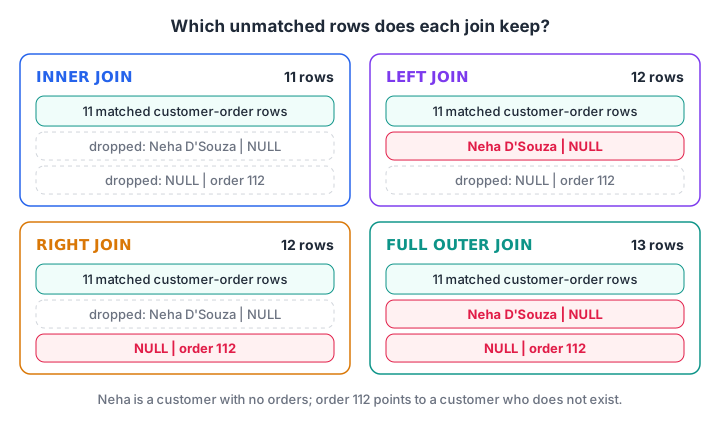
Every join keeps the matched rows. The types differ only in which unmatched rows they also keep.
Quick check
Which database does not support FULL OUTER JOIN?
MySQL has no FULL OUTER JOIN. You emulate it with a LEFT JOIN plus the unmatched right-side rows combined using UNION ALL. SQLite added it in 3.39.
Joining three tables
You add one JOIN ... ON per extra table, and each ON connects the new table to one already in the query.
The owner wants revenue by store name, plus how many different customers each store served. Store names live in stores, customers in customers, and orders links the two.
SELECT s.store_name,
       COUNT(DISTINCT c.customer_id) AS customers,
       SUM(o.amount)                 AS revenue
FROM orders AS o
JOIN stores    AS s ON s.store_id    = o.store_id
JOIN customers AS c ON c.customer_id = o.customer_id
GROUP BY s.store_name
ORDER BY revenue DESC;
Malwa Mart Rajwada comes first with 1,740 rupees from three customers. Joins run before GROUP BY, so you can group by any column from any joined table.
Filtering an outer join: ON vs WHERE
This is the most common LEFT JOIN bug in real reports. A condition on the right table behaves very differently in ON and in WHERE.
- In ON, the condition decides which orders count as a match. Customers without a matching order still stay, with NULLs.
- In WHERE, the condition runs after the join and removes rows. Rows where the right side is NULL fail the test, so the LEFT JOIN silently becomes an INNER JOIN.
import sqlite3

con = sqlite3.connect(":memory:")
con.executescript("""
CREATE TABLE customers (customer_id INT, name TEXT);
CREATE TABLE orders (order_id INT, customer_id INT, payment_mode TEXT);
INSERT INTO customers VALUES (1,'Asha Verma'), (2,'Ravi Patel'), (3,'Meera Joshi'), (4,'Pooja Rathore'),
 (5,'Sana Qureshi'), (6,'Vikram Chouhan'), (7,'Neha D''Souza');
INSERT INTO orders VALUES (101,1,'UPI'), (102,2,'Cash'), (103,1,'UPI'), (104,3,'Card'), (105,4,'UPI'),
 (106,2,'Cash'), (107,5,'Card'), (108,6,'UPI'), (109,4,NULL), (110,1,'Cash'), (111,6,'UPI');
""")

base = """SELECT c.name, COUNT(o.order_id) FROM customers AS c
          LEFT JOIN orders AS o ON o.customer_id = c.customer_id {extra}
          GROUP BY c.customer_id ORDER BY c.customer_id"""
in_where = con.execute(base.format(extra="WHERE o.payment_mode = 'UPI'")).fetchall()
in_on = con.execute(base.format(extra="AND o.payment_mode = 'UPI'")).fetchall()
print("Filter in WHERE:", len(in_where), "customers", in_where)
print("Filter in ON:   ", len(in_on), "customers", in_on)
With the filter in WHERE, only the three UPI users survive. With the filter in ON, all seven customers appear and Ravi, Meera, Sana and Neha show 0 UPI orders, which is what "UPI orders per customer" really means.
Common mistakes with SQL joins
- Forgetting the ON condition. Without it, many databases build every possible pairing of rows. That is a cross join, covered with self joins in the SQL self join and cross join article.
- Row explosion. If the right table has several matches per key, each left row repeats. Join a table of 1,000 orders to a table with 3 rows per customer and your SUM triples. Check
COUNT(*)before and after a join. - Ambiguous column names. Both tables have
customer_id, so writec.customer_id, not justcustomer_id. - Counting with COUNT(*) after a LEFT JOIN. Count a right-table column instead, so unmatched rows count as 0.
Joins are where most interview SQL questions live, and they reward practice on messy, realistic tables. Classroom SQL practice with mentors at Debugshala works through exactly that, and timed reasoning rounds on Debugshala Test keep your logic sharp.
Key takeaways
- A join matches rows from two tables through a shared column, usually a primary key and a foreign key.
- INNER JOIN keeps only matches; LEFT JOIN keeps all left rows; RIGHT JOIN keeps all right rows; FULL OUTER JOIN keeps everything.
- LEFT JOIN plus
WHERE right_key IS NULLfinds rows with no match. - Conditions on the right table belong in ON if you want to keep unmatched left rows.
- Check row counts after every join to catch duplication before you aggregate.
- SQLite needs 3.39+ for RIGHT and FULL JOIN; MySQL has no FULL JOIN.
FAQ
What is the difference between INNER JOIN and LEFT JOIN?
INNER JOIN returns only rows that have a match in both tables. LEFT JOIN returns every row from the left table, plus matching data from the right table, and fills NULLs where no match exists. Use LEFT JOIN when you must not lose rows, such as customers who have not ordered yet.
Is JOIN the same as INNER JOIN?
Yes. In SQLite, MySQL, PostgreSQL and SQL Server, writing JOIN on its own means INNER JOIN. Many teams still write INNER JOIN in full because it makes the intent obvious next to LEFT JOIN lines. Likewise, LEFT JOIN and LEFT OUTER JOIN are identical.
How do I do a FULL OUTER JOIN in MySQL?
MySQL has no FULL OUTER JOIN, so combine two queries. Write the LEFT JOIN from table A to table B, then UNION ALL a second query that selects rows from B with no match in A, using LEFT JOIN from B and WHERE a.key IS NULL. The result matches a full outer join.
Why does my JOIN return more rows than expected?
Usually because a key matches several rows on the other side, so each row repeats once per match. It also happens when the ON condition is missing or wrong, producing a cross join. Check the key's uniqueness with GROUP BY key HAVING COUNT(*) > 1 before you join.
Can I learn SQL joins at an institute in Indore?
Yes. Debugshala in Old Palasia, Indore, covers SQL joins within its Data Analytics course, taught offline in English and Hindi. It welcomes fresh graduates, non-IT learners and people with a career gap, offers placement assistance, and lets you sit a free demo class before you pay.
From the team behind this site
Go further with the Data Analytics Course at Debugshala
These tutorials are written by Debugshala, a training and placement institute at Old Palasia, Indore. The classroom course adds live mentoring, real projects and interview preparation.
- Offline classes at Old Palasia, Indore
- Free demo class before you pay
- Non-IT, fresher and year-gap friendly
- Placement assistance
700+ students placed · 200+ hiring partners · 4.9★ Google rating
