

SQL SELECT and WHERE: Filter Rows with Clear Examples
Master SQL SELECT and WHERE: comparison operators, AND/OR precedence, IN, BETWEEN, LIKE and IS NULL, with runnable examples on a retail database.
Imagine you are the accounts clerk at Malwa Mart's head office in Indore. The owner hands you the March order register and says, "I only need three things for each order: the date, the amount and how they paid. And only show me card or UPI orders above 500 rupees."
You would not photocopy the whole register. You would draw a box around three columns, then run your finger down the pages and tick only the lines that pass both tests.
Drawing the box around columns is SELECT. Running your finger down and ticking lines is WHERE. The register is the table named in FROM, and the ticked lines you hand back are the result set.
SELECT is the SQL statement that reads data from a table, and its WHERE clause filters that data so only rows meeting a condition are returned.
Your Malwa Mart tables now hold rows, thanks to INSERT, UPDATE and DELETE. Time to read them back precisely.
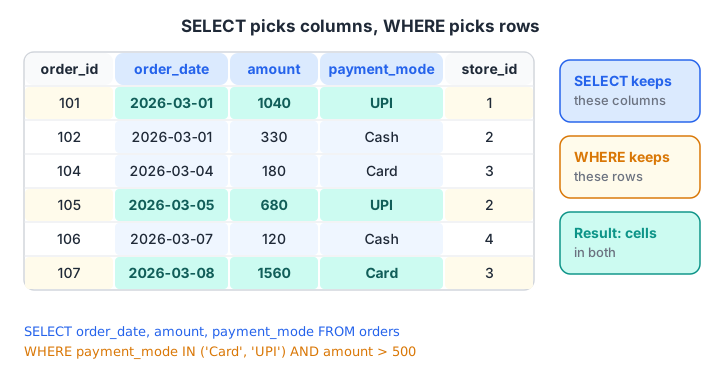
SELECT cuts the table vertically into columns. WHERE cuts it horizontally into rows. You get the cells where both cuts meet.
What does SELECT do in SQL?
The smallest useful query has two parts: the columns you want, and the table they live in.
SELECT order_id, order_date, amount
FROM orders;
SELECT * returns every column. It is handy for a first look, but in real work name the columns. Listing them makes the query faster on wide tables, and the result does not change shape when someone adds a column.
Calculated columns and aliases
SELECT can return expressions as well as stored columns. Give each one a readable name with AS.
SELECT product_name,
       price,
       price * 2                               AS price_for_two,
       product_name || ' (' || category || ')' AS label
FROM products;
The || operator joins text in SQLite, PostgreSQL and Oracle. MySQL treats || as a logical OR by default, so there you write CONCAT(product_name, ' (', category, ')').
import sqlite3

con = sqlite3.connect(":memory:")
con.execute("CREATE TABLE products (product_id INTEGER, product_name TEXT, category TEXT, price INTEGER)")
con.executemany("INSERT INTO products VALUES (?, ?, ?, ?)", [
    (1, "Basmati Rice 5kg", "Grocery", 520), (2, "Toor Dal 1kg", "Grocery", 165),
    (3, "Poha 1kg", "Grocery", 60), (4, "Butter 500g", "Dairy", 275),
    (5, "Paneer 200g", "Dairy", 90), (6, "Namkeen Mix 400g", "Snacks", 110)])

query = """
SELECT product_name, price,
       price * 2 AS price_for_two,
       product_name || ' (' || category || ')' AS label
FROM products
"""
for row in con.execute(query):
    print(row)
The table itself is unchanged. Calculated columns exist only in the result.
How does the WHERE clause filter rows?
WHERE takes a condition and tests it against each row. Rows where it is true stay; rows where it is false or unknown are dropped.
| Operator | Meaning | Example |
|---|---|---|
= |
Equal to | payment_mode = 'UPI' |
<> or != |
Not equal to | store_id <> 3 |
> < >= <= |
Greater or less than | amount >= 500 |
BETWEEN a AND b |
In a range, both ends included | amount BETWEEN 200 AND 400 |
IN (...) |
Matches any value in a list | store_id IN (1, 2) |
LIKE |
Matches a text pattern | product_name LIKE 'P%' |
IS NULL |
Value is missing | payment_mode IS NULL |
Text and dates go in single quotes. Numbers do not. <> is the standard spelling of "not equal"; != works in every major database too.
How do AND, OR and NOT work together?
AND needs both conditions to be true. OR needs at least one. NOT flips a condition.
The trap is precedence. SQL evaluates AND before OR, just as maths does multiplication before addition. The owner asked for "card or UPI orders above 500". Look at what happens without brackets.
-- Wrong: read as  Card  OR  (UPI AND amount > 500)
SELECT order_id, payment_mode, amount FROM orders
WHERE payment_mode = 'Card' OR payment_mode = 'UPI' AND amount > 500;

-- Right: brackets force the OR first
SELECT order_id, payment_mode, amount FROM orders
WHERE (payment_mode = 'Card' OR payment_mode = 'UPI') AND amount > 500;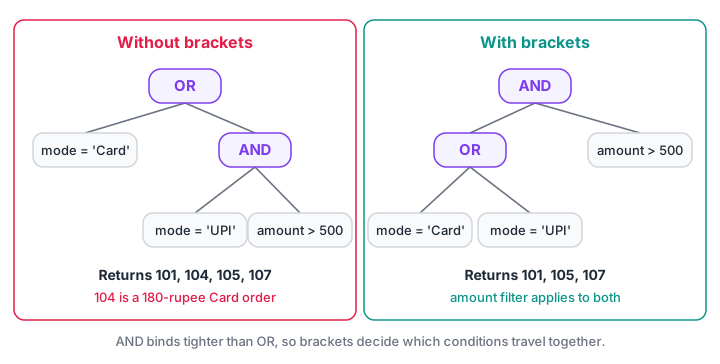
Without brackets, the amount filter attaches only to UPI. With brackets, it applies to both payment modes.
import sqlite3

con = sqlite3.connect(":memory:")
con.execute("CREATE TABLE orders (order_id INT, customer_id INT, store_id INT, order_date TEXT, amount INT, payment_mode TEXT)")
con.executemany("INSERT INTO orders VALUES (?, ?, ?, ?, ?, ?)", [
    (101, 1, 1, "2026-03-01", 1040, "UPI"), (102, 2, 2, "2026-03-01", 330, "Cash"),
    (103, 1, 1, "2026-03-03", 275, "UPI"), (104, 3, 3, "2026-03-04", 180, "Card"),
    (105, 4, 2, "2026-03-05", 680, "UPI"), (106, 2, 4, "2026-03-07", 120, "Cash"),
    (107, 5, 3, "2026-03-08", 1560, "Card"), (108, 6, 1, "2026-03-08", 220, "UPI"),
    (109, 4, 4, "2026-03-10", 340, None), (110, 1, 2, "2026-03-12", 465, "Cash")])

wrong = "SELECT order_id FROM orders WHERE payment_mode = 'Card' OR payment_mode = 'UPI' AND amount > 500"
right = "SELECT order_id FROM orders WHERE (payment_mode = 'Card' OR payment_mode = 'UPI') AND amount > 500"
tidy  = "SELECT order_id FROM orders WHERE payment_mode IN ('Card', 'UPI') AND amount > 500"
for name, q in [("wrong", wrong), ("right", right), ("tidy", tidy)]:
    print(name, [r[0] for r in con.execute(q)])
The wrong version sneaks in order 104, a 180-rupee card order. The IN version gives the same answer as the bracketed one and is easier to read, so prefer IN whenever you compare one column with several values.
Quick check
Which WHERE clause returns orders paid by Card or UPI that are above 500 rupees?
IN checks both payment modes, and AND applies the amount filter to both. The first option attaches the amount filter only to UPI.
Filtering with IN, BETWEEN and LIKE
BETWEEN includes both ends
amount BETWEEN 200 AND 400 keeps 200 and 400 themselves. It is a shorthand for amount >= 200 AND amount <= 400.
Be careful with dates that carry a time. order_time BETWEEN '2026-03-01' AND '2026-03-07' misses anything at 2026-03-07 14:30, because that text is greater than '2026-03-07'. For timestamps, write order_time >= '2026-03-01' AND order_time < '2026-03-08'.
LIKE matches patterns
LIKE uses two wildcards. % matches any run of characters, including none. _ matches exactly one character.
| Pattern | Matches | Does not match |
|---|---|---|
'P%' |
Poha 1kg, Paneer 200g | Sev 500g |
'%500g' |
Butter 500g, Sev 500g | Poha 1kg |
'%Dal%' |
Toor Dal 1kg | Poha 1kg |
'Se_ 500g' |
Sev 500g | Seviyan 500g |
Case sensitivity differs by database. SQLite's LIKE ignores case for English letters. PostgreSQL's LIKE is case-sensitive, and it offers ILIKE for case-insensitive matching. MySQL depends on the column's collation, and the default collations ignore case.
import sqlite3

con = sqlite3.connect(":memory:")
con.execute("CREATE TABLE products (product_id INTEGER, product_name TEXT, category TEXT, price INTEGER)")
con.executemany("INSERT INTO products VALUES (?, ?, ?, ?)", [
    (1, "Basmati Rice 5kg", "Grocery", 520), (2, "Toor Dal 1kg", "Grocery", 165),
    (3, "Poha 1kg", "Grocery", 60), (4, "Butter 500g", "Dairy", 275),
    (5, "Paneer 200g", "Dairy", 90), (6, "Namkeen Mix 400g", "Snacks", 110),
    (7, "Detergent 2kg", "Household", 340), (8, "Sev 500g", "Snacks", 120)])

checks = {
    "starts with P":          "product_name LIKE 'P%'",
    "500g packs":             "product_name LIKE '%500g'",
    "price 100 to 300":       "price BETWEEN 100 AND 300",
    "Dairy or Snacks":        "category IN ('Dairy', 'Snacks')",
    "not Grocery, under 200": "NOT category = 'Grocery' AND price < 200",
}
for label, condition in checks.items():
    names = [r[0] for r in con.execute(f"SELECT product_name FROM products WHERE {condition}")]
    print(f"{label:24} {names}")
The f-string here builds conditions that you typed yourself, which is safe. Never do this with values that come from users; use placeholders as shown in the previous article.
Quick check
Which pattern matches every product name that ends in 500g?
% matches any number of characters before 500g. The underscore matches exactly one character.
Finding missing values with IS NULL
Order 109 has no payment mode recorded. In SQL, a missing value is NULL, and NULL is not equal to anything, not even another NULL. A comparison with NULL gives unknown, and WHERE drops unknown rows.
SELECT order_id FROM orders WHERE payment_mode = NULL;    -- always returns nothing
SELECT order_id FROM orders WHERE payment_mode IS NULL;   -- returns 109
SELECT order_id FROM orders WHERE payment_mode <> 'UPI'; -- skips 109 tooimport sqlite3
con = sqlite3.connect(":memory:")
con.execute("CREATE TABLE orders (order_id INT, amount INT, payment_mode TEXT)")
con.executemany("INSERT INTO orders VALUES (?, ?, ?)", [
(105, 680, "UPI"), (106, 120, "Cash"), (107, 1560, "Card"), (109, 340, None)])
for condition in ["payment_mode = NULL", "payment_mode IS NULL",
"payment_mode <> 'UPI'", "payment_mode <> 'UPI' OR payment_mode IS NULL"]:
ids = [r[0] for r in con.execute(f"SELECT order_id FROM orders WHERE {condition}")]
print(f"{condition:45} -> {ids}")The third query surprises people. Order 109 is clearly "not UPI", but its comparison is unknown, so it disappears. If you want it, add OR payment_mode IS NULL. The full story is in handling NULL in SQL.
Running SELECT queries from pandas
Analysts often pull a filtered result straight into pandas. pd.read_sql_query accepts the SQL and a params list for the placeholders. If DataFrames are new to you, see the pandas DataFrame tutorial.
import sqlite3
import pandas as pd

con = sqlite3.connect(":memory:")
con.execute("CREATE TABLE orders (order_id INT, store_id INT, order_date TEXT, amount INT, payment_mode TEXT)")
con.executemany("INSERT INTO orders VALUES (?, ?, ?, ?, ?)", [
    (101, 1, "2026-03-01", 1040, "UPI"), (103, 1, "2026-03-03", 275, "UPI"),
    (105, 2, "2026-03-05", 680, "UPI"), (108, 1, "2026-03-08", 220, "UPI"),
    (109, 4, "2026-03-10", 340, None), (110, 2, "2026-03-12", 465, "Cash")])

query = """
SELECT order_id, order_date, amount
FROM orders
WHERE store_id = ? AND order_date >= ?
"""
print(pd.read_sql_query(query, con, params=[1, "2026-03-02"]))
Common mistakes with SELECT and WHERE
- Double quotes for text. In standard SQL and PostgreSQL,
"UPI"means a column called UPI. Use single quotes for values. - Mixing AND and OR without brackets. AND binds first. Add parentheses or switch to
IN. = NULLinstead ofIS NULL. It silently returns no rows.- Using a SELECT alias in WHERE. WHERE runs before SELECT, so PostgreSQL and MySQL reject
WHERE price_for_two > 300. SQLite allows it, which hides the habit until you switch. The execution order is explained in SQL for data analysis. - Comparing numbers stored as text.
'90' > '500'is true for text. Fix the column type.
To build speed with filters like these, test yourself with timed quizzes on Debugshala Test, or work through them with a trainer in Debugshala's classroom data analytics programme.
Key takeaways
SELECT columns FROM tablepicks columns; expressions withASadd calculated columns.WHEREkeeps rows whose condition is true, using comparison operators, IN, BETWEEN and LIKE.- AND binds before OR; use brackets or IN.
- Use
IS NULLfor missing values, and remember<>also skips NULLs. - Next, sort and trim results with ORDER BY, LIMIT and DISTINCT.
FAQ
What is the difference between SELECT and WHERE in SQL?
SELECT decides which columns appear in the result, while WHERE decides which rows appear. SELECT works on the table vertically and WHERE works on it horizontally. A query always has SELECT, but WHERE is optional; without it, every row is returned.
Is SQL case-sensitive in WHERE conditions?
Keywords and column names are not case-sensitive, but text values may be. In PostgreSQL, 'upi' does not equal 'UPI'. MySQL's default collations and SQLite's LIKE ignore case, but SQLite's = operator does not. Use LOWER(column) = 'upi' when you need a portable case-insensitive match.
Can I use multiple conditions in a WHERE clause?
Yes. Combine as many conditions as you need with AND, OR and NOT. Use parentheses whenever you mix AND with OR, because AND is evaluated first. For one column compared with many values, IN ('a', 'b', 'c') is shorter and clearer than a chain of ORs.
Why does WHERE column = NULL return no rows?
NULL means "unknown", and comparing anything with an unknown gives an unknown result, which WHERE treats as false. Use IS NULL to find missing values and IS NOT NULL to exclude them. The same rule explains why <> and NOT IN can silently skip rows with NULLs.
How can I learn SQL querying with guidance in Indore?
Debugshala, a training and placement institute at Old Palasia, Indore, offers an offline Data Analytics course taught in English and Hindi. It accepts fresh graduates and non-IT learners, and you can attend a free demo class before deciding. Practise the queries on this page at home between classes.
From the team behind this site
Go further with the Data Analytics Course at Debugshala
These tutorials are written by Debugshala, a training and placement institute at Old Palasia, Indore. The classroom course adds live mentoring, real projects and interview preparation.
- Offline classes at Old Palasia, Indore
- Free demo class before you pay
- Non-IT, fresher and year-gap friendly
- Placement assistance
700+ students placed · 200+ hiring partners · 4.9★ Google rating
