

SQL Views: How to Create, Use and Update Views with Examples
Learn SQL views with runnable examples: CREATE VIEW, views for security and reuse, updatable views, WITH CHECK OPTION and materialized views compared.
Every evening, the owner of Malwa Mart asks the same question: how much did each of the four stores sell? The first week, the analyst writes a join between orders and stores, groups by area and sends the numbers.
The second week she writes it again. By the third week she has three slightly different versions of the "same" query in three files.
Then she does something smarter. She saves the query in the database itself, gives it the name store_sales, and tells the owner's team to run SELECT * FROM store_sales. Nobody types the join again. When she fixes a bug in it, everyone gets the fix at once.
That saved, named query is a view. The orders and stores tables are the base tables. The SELECT you save is the view definition, and every query against the view runs that definition on whatever the base tables hold right now.
A SQL view is a virtual table defined by a stored SELECT query; it has columns and rows when you query it, but the data always comes from the underlying base tables.
This article follows SQL indexes. Every example runs in your browser with Python's sqlite3 module on the series' Malwa Mart data.
What is a view in SQL?
A view looks and behaves like a table in a SELECT. You can filter it, join it, group it and sort it. The difference is that a table stores rows on disk, while a view stores only the text of a query.
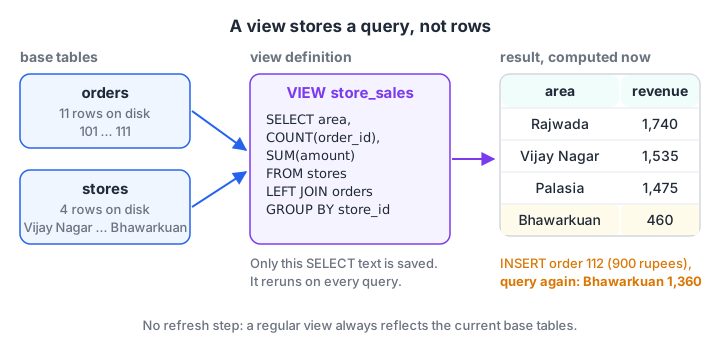
The view holds no data. Each time someone queries store_sales, the database runs the saved SELECT against the current orders and stores tables.
Three things follow from this:
- A view is always current. Add an order to the base table and the view shows it immediately. There is no refresh step.
- A view costs almost no space. Only the definition is saved, in the database's catalogue.
- A view is only as fast as its query. A view over a slow join is a slow view. It is not a cache.
How do you create a view in SQL?
The syntax is the same in SQLite, MySQL and PostgreSQL. Write a normal SELECT and put CREATE VIEW name AS in front of it.
CREATE VIEW store_sales AS
SELECT s.area,
       COUNT(o.order_id)          AS orders,
       COALESCE(SUM(o.amount), 0) AS revenue
FROM stores AS s
LEFT JOIN orders AS o ON o.store_id = s.store_id
GROUP BY s.store_id, s.area;

SELECT * FROM store_sales ORDER BY revenue DESC;
The block below builds both tables, creates the view and queries it. Then it inserts an order and queries the view again, without touching the view.
import sqlite3

con = sqlite3.connect(":memory:")
con.executescript("""
CREATE TABLE stores (store_id INTEGER PRIMARY KEY, store_name TEXT, area TEXT);
CREATE TABLE orders (order_id INTEGER PRIMARY KEY, customer_id INT, store_id INT, order_date TEXT, amount INT, payment_mode TEXT);
INSERT INTO stores VALUES (1,'Malwa Mart Vijay Nagar','Vijay Nagar'), (2,'Malwa Mart Palasia','Palasia'),
 (3,'Malwa Mart Rajwada','Rajwada'), (4,'Malwa Mart Bhawarkuan','Bhawarkuan');
INSERT INTO orders VALUES
 (101,1,1,'2026-03-01',1040,'UPI'), (102,2,2,'2026-03-01',330,'Cash'), (103,1,1,'2026-03-03',275,'UPI'),
 (104,3,3,'2026-03-04',180,'Card'), (105,4,2,'2026-03-05',680,'UPI'), (106,2,4,'2026-03-07',120,'Cash'),
 (107,5,3,'2026-03-08',1560,'Card'), (108,6,1,'2026-03-08',220,'UPI'), (109,4,4,'2026-03-10',340,NULL),
 (110,1,2,'2026-03-12',465,'Cash'), (111,6,3,'2026-03-14',NULL,'UPI');
CREATE VIEW store_sales AS
SELECT s.area, COUNT(o.order_id) AS orders, COALESCE(SUM(o.amount), 0) AS revenue
FROM stores AS s LEFT JOIN orders AS o ON o.store_id = s.store_id
GROUP BY s.store_id, s.area;
""")
for row in con.execute("SELECT * FROM store_sales ORDER BY revenue DESC"):
    print(row)

con.execute("INSERT INTO orders VALUES (112, 7, 4, '2026-03-15', 900, 'UPI')")
print("After order 112:", con.execute("SELECT * FROM store_sales WHERE area = 'Bhawarkuan'").fetchone())
Rajwada leads with 1,740 rupees, and Bhawarkuan is last with 460. After Neha's 900-rupee order at Bhawarkuan, the view reports three orders and 1,360 rupees. Nothing was refreshed; the view simply ran its query again.
Notice that the view counts order 111 at Rajwada but adds nothing for it, because its amount is NULL. COALESCE matters only for a store with no orders at all, a pattern explained in handling NULL in SQL.
Changing and removing a view
| Task | SQLite | MySQL 8 | PostgreSQL 16 |
|---|---|---|---|
| Create only if missing | CREATE VIEW IF NOT EXISTS v AS ... |
Not supported | Not supported |
| Replace the definition | Drop it, then create it again | CREATE OR REPLACE VIEW v AS ... |
CREATE OR REPLACE VIEW v AS ... |
| Remove it | DROP VIEW IF EXISTS v; |
DROP VIEW IF EXISTS v; |
DROP VIEW IF EXISTS v; |
| List views | SELECT name FROM sqlite_master WHERE type = 'view' |
SHOW FULL TABLES WHERE Table_type = 'VIEW' |
SELECT viewname FROM pg_views |
PostgreSQL's CREATE OR REPLACE VIEW lets you add new columns at the end, but not rename or drop existing ones. For bigger changes, drop and recreate the view.
Why use views? Three practical reasons
Views earn their place in real databases for three jobs.
- Simplify. A five-table join behind a bill becomes
SELECT * FROM bill_lines. Analysts and BI tools such as Power BI see a clean, flat table. - Secure. A view can leave out sensitive columns or rows. The marketing team gets a view of customers without phone numbers, and its database user is granted access to the view but not the table.
- Standardise. "Revenue" is defined once. If the business decides that unbilled orders should count as zero, you change one view instead of twenty reports.
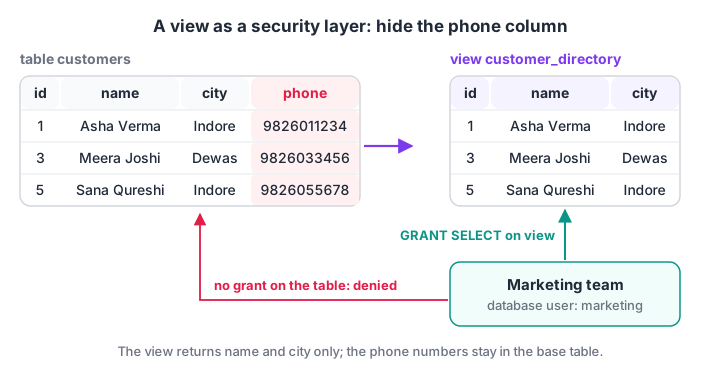
The marketing team queries the view and never sees the phone column. In MySQL and PostgreSQL you enforce this with GRANT on the view and no grant on the table.
The next block creates such a view, lists the views in the database, and then tries to insert through the view.
import sqlite3

con = sqlite3.connect(":memory:")
con.executescript("""
CREATE TABLE customers (customer_id INTEGER PRIMARY KEY, name TEXT, city TEXT, phone TEXT);
INSERT INTO customers VALUES (1,'Asha Verma','Indore','9826011234'), (3,'Meera Joshi','Dewas','9826033456'),
 (4,'Pooja Rathore','Ujjain','9826044567'), (5,'Sana Qureshi','Indore','9826055678');
CREATE VIEW customer_directory AS
SELECT customer_id, name, city FROM customers;
""")
print(con.execute("SELECT * FROM customer_directory WHERE city = 'Indore'").fetchall())
print("Columns:", [d[0] for d in con.execute("SELECT * FROM customer_directory").description])
print("Views:", con.execute("SELECT name FROM sqlite_master WHERE type = 'view'").fetchall())

try:
    con.execute("INSERT INTO customer_directory VALUES (8, 'Rohit Gupta', 'Indore')")
except sqlite3.OperationalError as err:
    print("Insert refused:", err)
The view returns only three columns, so a query through it cannot reach the phone numbers. The insert fails with "cannot modify customer_directory because it is a view", because SQLite views are read-only.
Can you update data through a view?
It depends on the database and on the view.
| Database | Simple views (one table, no GROUP BY) | Complex views (joins, aggregates, DISTINCT) |
|---|---|---|
| SQLite | Read-only, unless you add an INSTEAD OF trigger |
Same: needs an INSTEAD OF trigger |
| MySQL 8 | Updatable automatically | Mostly read-only |
| PostgreSQL 16 | Updatable automatically | Needs an INSTEAD OF trigger or a rule |
A view with GROUP BY can never be updated directly, because one row of store_sales stands for many orders. There is no single row to change.
When a simple view filters rows, add WITH CHECK OPTION in MySQL or PostgreSQL. It stops someone inserting a row through the view that the view itself would not show.
-- MySQL 8 and PostgreSQL 16
CREATE VIEW indore_customers AS
SELECT customer_id, name, city FROM customers
WHERE city = 'Indore'
WITH CHECK OPTION;

INSERT INTO indore_customers VALUES (8, 'Rohit Gupta', 'Dewas');   -- rejected: Dewas fails the WHERE
The INSTEAD OF trigger that makes a SQLite view writable is covered with a runnable example in SQL triggers.
Quick check
Why can you not UPDATE a view defined with GROUP BY store_id?
Aggregated rows have no one-to-one link to base rows. Simple single-table views are updatable in MySQL and PostgreSQL.
What is a materialized view?
A materialized view stores the result of its query as real rows, like a snapshot. Reading it is as fast as reading a table, but it goes stale until you refresh it. PostgreSQL supports it directly.
-- PostgreSQL 16
CREATE MATERIALIZED VIEW daily_revenue AS
SELECT order_date, SUM(amount) AS revenue FROM orders GROUP BY order_date;

REFRESH MATERIALIZED VIEW daily_revenue;   -- rerun the query and replace the stored rows
MySQL and SQLite have no materialized views. The usual substitute is a summary table rebuilt on a schedule, which the next block simulates.
import sqlite3

con = sqlite3.connect(":memory:")
con.executescript("""
CREATE TABLE orders (order_id INTEGER PRIMARY KEY, order_date TEXT, amount INT);
INSERT INTO orders VALUES (101,'2026-03-01',1040), (102,'2026-03-01',330), (103,'2026-03-03',275), (104,'2026-03-04',180);
CREATE VIEW daily_live AS SELECT order_date, SUM(amount) AS revenue FROM orders GROUP BY order_date;
""")

def refresh_snapshot():
    with con:
        con.execute("DROP TABLE IF EXISTS daily_snapshot")
        con.execute("CREATE TABLE daily_snapshot AS SELECT * FROM daily_live")

refresh_snapshot()
con.execute("INSERT INTO orders VALUES (112, '2026-03-04', 900)")
print("Live view:     ", con.execute("SELECT * FROM daily_live WHERE order_date = '2026-03-04'").fetchone())
print("Stale snapshot:", con.execute("SELECT * FROM daily_snapshot WHERE order_date = '2026-03-04'").fetchone())
refresh_snapshot()
print("After refresh: ", con.execute("SELECT * FROM daily_snapshot WHERE order_date = '2026-03-04'").fetchone())
The live view shows 1,080 rupees for 4 March immediately. The snapshot keeps showing 180 until it is refreshed. That trade-off, speed against freshness, is the whole story of materialized views.
View vs table vs CTE vs materialized view
| Stores rows? | Always fresh? | Lives after the query? | Best for | |
|---|---|---|---|---|
| Table | Yes | You keep it fresh | Yes | The data itself |
| View | No | Yes | Yes, until dropped | Reused logic, security |
| Materialized view | Yes | Only after refresh | Yes | Slow, heavy reports |
CTE (WITH) |
No | Yes | No, one query only | Breaking one query into steps |
If you only need a named step inside a single query, a common table expression is lighter than a view.
Quick check
You add a new row to the orders table. What happens to a regular view built on orders?
A regular view stores only its query, so every read runs that query on the current data. Only materialized views need a refresh.
Common mistakes with SQL views
- Treating a view as a cache. A view over a slow query is slow every time. Speed it up with indexes on the base tables, or use a materialized view.
- Stacking views on views. Five layers deep, nobody can tell what a query really does, and the planner may not simplify it. Keep nesting shallow.
SELECT *in a view definition. PostgreSQL and MySQL expand the star when the view is created, so new table columns do not appear later. List columns explicitly.ORDER BYinside the view. Sort in the query that reads the view. Some databases ignore an inner ORDER BY.- Dropping a column a view needs. SQLite and PostgreSQL refuse the change, while MySQL allows it and the view fails on its next use. Check dependent views before altering a table.
Views are where report logic lives in many companies, and you will meet them on your first analytics job.
Debugshala's classroom analytics programme at Old Palasia builds reporting views on retail data, and you can test your view and join basics on Debugshala Test. Next, SQL transactions and ACID explain how a database keeps changes safe when several things must happen together.
Key takeaways
- A view is a named, stored SELECT. It holds no data and always reflects the base tables.
- Use views to simplify joins, hide sensitive columns and define metrics once.
- SQLite views are read-only; MySQL and PostgreSQL can update simple views, and
WITH CHECK OPTIONguards filtered ones. - A materialized view stores results for speed and needs refreshing; PostgreSQL has them, MySQL and SQLite do not.
- List columns explicitly in view definitions and avoid deep chains of views.
FAQ
What is the difference between a view and a table in SQL?
A table stores rows physically, while a view stores only a SELECT query. When you query a view, the database runs that query against the base tables and returns the result. A view therefore takes almost no space and is always current, but it is never faster than the query it contains.
Does a SQL view improve performance?
Usually not. A regular view runs its query every time, so it performs the same as typing the query yourself. It can feel faster to work with because the logic is ready, but real speed comes from indexes on the base tables or from a materialized view that stores precomputed results.
Can we insert data into a view?
Sometimes. MySQL and PostgreSQL allow INSERT, UPDATE and DELETE on simple views built from one table without aggregates or DISTINCT. SQLite views are read-only unless you write an INSTEAD OF trigger. Views with GROUP BY, joins or DISTINCT generally cannot be written to directly in any database.
What is the difference between a view and a materialized view?
A view stores the query and computes results on demand, so it is always fresh. A materialized view stores the result rows themselves, so reading is fast but data is only as new as the last refresh. PostgreSQL supports materialized views with REFRESH MATERIALIZED VIEW; MySQL and SQLite need a summary table instead.
Where can I learn SQL views and reporting in Indore?
Debugshala, a training and placement institute at Old Palasia in Indore, covers views, joins and reporting queries in its Data Analytics course. Classes are offline in English and Hindi, fresh graduates and non-IT learners are accepted, placement assistance is offered, and you can attend a free demo class before paying anything.
From the team behind this site
Go further with the Data Analytics Course at Debugshala
These tutorials are written by Debugshala, a training and placement institute at Old Palasia, Indore. The classroom course adds live mentoring, real projects and interview preparation.
- Offline classes at Old Palasia, Indore
- Free demo class before you pay
- Non-IT, fresher and year-gap friendly
- Placement assistance
700+ students placed · 200+ hiring partners · 4.9★ Google rating
